How to backup Google Chrome.
The easy way to manually backup Google Chrome
Simply copy your profile folder somewhere else.
Where it is located:
Windows XP: C:\Documents and Settings\YOUR_USER_NAME\Local Settings\Application Data\Google\Chrome\User Data\Default
To get there quick you can copy/paste this in the Run menu > %USERPROFILE%\Local Settings\Application Data\Google\Chrome\User Data
Windows 7 and Vista: C:\Users\YOUR_USER_NAME\AppData\Local\Google\Chrome\User Data\Default
To get there quick you can copy/paste this in the Run menu or Search box >%USERPROFILE%\AppData\Local\Google\Chrome\User Data
Particular files:
Bookmarks are obviously in the Bookmarks folder.
Passwords are stored in a file called Login Data.
Google Chrome Official Help Pages- Import or export bookmarks
Backup Chrome Using Google Sync
Open Chrome and go to Wrench Icon (or press the Alt+F keys) > Options > Personal Stuff > Sync > Set up sync… >
sign in to your Google account (if you have more than one be sure to use the same one every time for sync)
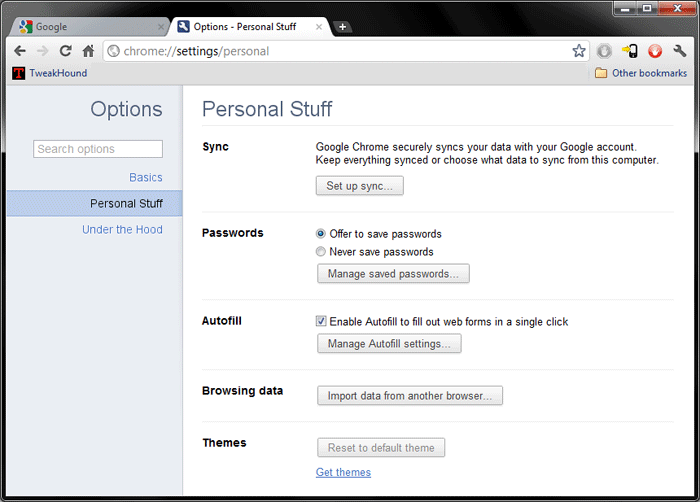
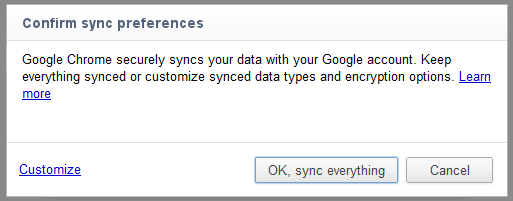
Click OK, sync everything, or Customize
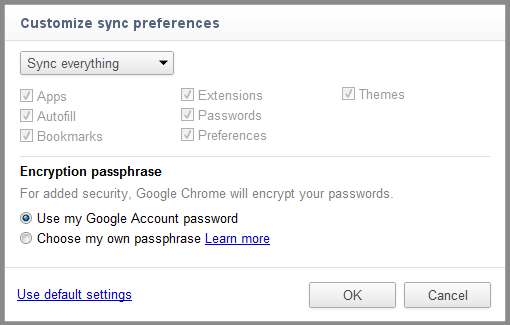
If you only want to backup certain options use the drop down menu to change from everything to customize and the click OK.
Google Chrome Official Help Pages- Sync settings across multiple computers , How to enable or disable sync
See also:
ChromePass
warning – You will most likely need to temporarily disable your anti-virus to download and/or run this program. DO NOT add an exception or “allow” it.
To temporarily disable Microsoft Security Essentials either uncheck Real Time Scanning within the program or stop the Microsoft Antimalware Service (from services.msc).
-END-