• Skip to primary navigation
  • Skip to main content
  • Skip to primary sidebar

TweakHound

Computer stuff...

  • Home
  • Windows XP
  • Windows Vista
  • Windows 7
  • Windows 8
  • Windows 10
  • Windows 11
  • Linux
  • Tweak Guides
  • Site Info
    • About
    • About Me
    • TweakHound’s World
    • Contact
    • My Computers
    • Old Articles
    • Privacy Policy
    • Old Index
    • Advanced Search

This Site

UAC – Quick notes on why I disable it.

December 31, 2020, 13:34(EST) By Eric (a.k.a. TweakHound)

Original article: Windows 7 UAC – Quick notes on why I disable it. circa 2009

***31 December, 2020
As of today my original article is over eleven years old. Links to sources have disappeared. I updated the links today, mostly to the Internet Wayback Machine archive. I’ve also backed up these sources to PDF and have linked to those where appropriate.

Microsoft introduced User Account Control (UAC) with Windows Vista. Windows 7 has an “improved” version of UAC. The purpose of this short note is to explain why I do not like or use UAC on my own machines (because I get asked so much), it is not to start an argument or to try to convince others to disable UAC.
[Read more…] about UAC – Quick notes on why I disable it.


Tagged With: How-To's, Security, This Site, Windows 10, Windows 7, Windows 8, Windows Vista

Changing Your DNS Server

February 19, 2019, 10:45(EST) By Eric (a.k.a. TweakHound)

th

This guide will show you how to change your DNS Server. In addition it covers benchmarking DNS servers and if you should change your DNS server.
[Read more…] about Changing Your DNS Server

Tagged With: How-To's, This Site, Windows 10, Windows 7, Windows 8

Blocking A Programs Internet Access Via The Windows Firewall

November 30, 2018, 08:22(EST) By Eric (a.k.a. TweakHound)

Many programs on your computer access the internet even though they don’t need to. They phone home for a variety of reason including telemetry and checking for updates.
I don’t need or want most programs phoning home for any reason. Still, they try.
With programs getting more invasive I thought it would be appropriate to show you how to block their access to the net.
[Read more…] about Blocking A Programs Internet Access Via The Windows Firewall

Tagged With: How-To's, Privacy, Security, This Site, Windows 10, Windows 7, Windows 8

Upgrade To Win10 And Keep Previous Windows Version

February 6, 2016, 11:39(EST) By Eric (a.k.a. TweakHound)

th

thI’m going to show you how I upgraded to Windows 10 and kept my Windows 7 install. I alluded to this method earlier. Although not tested this should work for Windows 8.1 too.
I searched the Windows 10 EULA and I can find nothing that restricts this but I’m not a lawyer either.
[Read more…] about Upgrade To Win10 And Keep Previous Windows Version

Tagged With: How-To's, This Site, Windows 10, Windows 7, Windows 8

GWX – Get Windows 10

April 8, 2015, 11:04(EDT) By Eric (a.k.a. TweakHound)

gwxEarlier this week several Geek sites parroted an article at MYCE entitled Update for Windows 7 and 8.1 silently installs Windows 10 downloader (nice work there guys!). Although the article did not bash Microsoft, commenters around the web were pissed off. At first I thought these comments might be a little bit of anti-Microsoft hysterics. Still, it made be curious enough to research the issue. Now, I’ve changed my mind…
[Read more…] about GWX – Get Windows 10

Tagged With: How-To's, This Site, Windows 10, Windows 7, Windows 8

Alternative To Moving Libraries

January 28, 2015, 15:54(EST) By Eric (a.k.a. TweakHound)

thpinpostlogo

thpinpostlogoAs many of you know, I consider moving libraries an essential part of my backup strategy.
I decided to post this article because through the years I’ve discovered some folks don’t get it and some folks don’t want to do it.
There is an alternative. [Read more…] about Alternative To Moving Libraries

Tagged With: How-To's, This Site, Windows 10, Windows 7, Windows 8

Advice On Installing Windows 8.1

January 4, 2015, 10:49(EST) By Eric (a.k.a. TweakHound)

thpinpostlogo

thpinpostlogoI am constantly asked installation/partitioning advice on installing Windows.
Below is my advice on installing Windows 8.1.
[Read more…] about Advice On Installing Windows 8.1

Tagged With: How-To's, This Site, Windows 8

Windows 8.1 SSD Defrag

December 15, 2014, 18:39(EST) By Eric (a.k.a. TweakHound)

th

thAn interesting blog post was brought to me attention by a reader. Many Geeks will recognize the blogger, Scott Hanselman:
The real and complete story – Does Windows defragment your SSD? (be cure to check out the comments too)
The gist of this post is to tell us we’ve all been wrong and Windows 8.1 does in fact defrag SSD’s.
However, we need to dig a little deeper. [Read more…] about Windows 8.1 SSD Defrag

Tagged With: This Site, Windows 8

Fix KB3000850 Will Not Install

November 24, 2014, 16:09(EST) By Eric (a.k.a. TweakHound)

thpinpostlogo

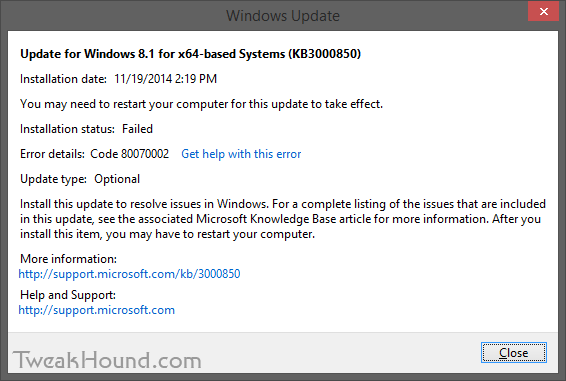
thpinpostlogoI had a couple of Windows 8.1 computers that would not install KB3000850.
KB3000850 is also called “The November 2014 update rollup for Windows RT 8.1, Windows 8.1, and Windows Server 2012 R2.”
The specific error code was 80070002.
fix_kb3000850_1

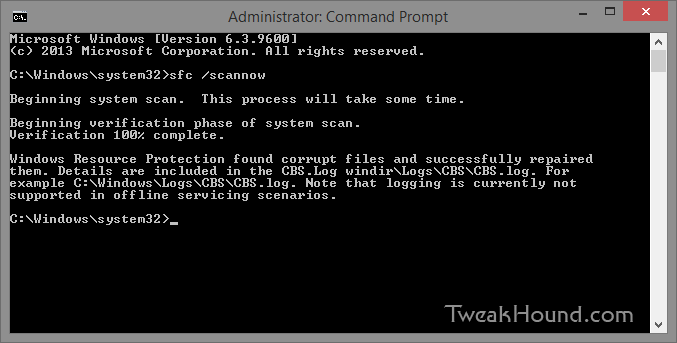
The Windows error logs directed me to C:\Windows\Logs\CBS\CBS.log. There I found complaints about system files.
The cure for that is:
From an ELEVATED command prompt [Command Prompt (Admin) ] > type sfc /scannow and press the Enter key >
Let it do its thing > Reboot and install your update.

fix_kb3000850_2

– END –

Tagged With: How-To's, This Site, Windows 8

Tweaking Windows 8.1 Updated

April 7, 2014, 15:11(EDT) By Eric (a.k.a. TweakHound)

th

thTweaking Windows 8.1 has been updated for Update 1.
Get it while it’s hot!
PLEASE help spread the word!

If you ordered the printable PDF in the past you’re due a free update! Contact me:
– Either reply to the original email, or
– Email me and provide the email address you ordered with or forward your receipt.

Haven’t ordered the printable PDF yet? Grab it here.

Tagged With: How-To's, This Site, Windows 8

Next Page »

Primary Sidebar

Popular Articles

Windows 10

Tweaking Windows 10

My Windows 10 Tweaks

Windows 10 Privacy Settings

Win10 Diagnostics Tracking Service Gone?

Windows 10 Advanced Disk Cleanup

Win10 Customize Installation Options

Windows 10 Dark Theme

Win10 Wallpapers, Graphics, etc.

All Windows 10 Articles

Windows 8

Tweaking Windows 8.1

Advice On Installing Windows 8.1

Clean Install Windows 8.1

Cleanup After Windows 8.1 Upgrade

Create Shutdown, Restart, Logoff Tiles For Windows 8

Tweaking Windows 8

Install Windows 8 – Clean Install With Upgrade Media

Install Windows 8 – Upgrade

Windows 8 – Cleaning Up After You’ve Upgraded

Windows 8 Freeware Machine

Windows 8 SSD Settings, Etc.

How To Resize Your Windows 8 Partition

Create Windows 8 Recovery Media

Windows 8 – Elevated Command Prompt

How To Fix The Windows Bootloader

Windows 7

Installing Windows 7

Tweaking Windows 7

Windows 7 Diagnostics Tracking Service

The Windows 7 Freeware Machine

The Windows 7 Pagefile And Running Without One

Bad Tweaks

SSD Tweak Guide (sort of)

The noguiboot (no GUI Boot) Tweak

NtfsMemoryUsage=2 Tweak

More Windows 7 articles here.

Windows Vista

Installing Windows Vista

Tweaking Windows Vista

More Windows Vista articles here.

Windows XP

eXPired - The Last Windows XP Guide You'll Ever Need

The Right Way To Install Windows XP

Super XP Tweaking Guide

The Freeware XP Machine

Bad Tweaks

More XP Articles here and here.

Backup

Backup Article Greatest Hits – Vol. 1

Other

Cataloging Your Music Collection

Finding Good Album Art

Converting Vinyl Records To Digital Music – A Non-Audiophiles Guide

Windows All-In-One Recovery Flash Drive

SSD Tweak Guide (sort of)

Raidmax Blackstorm Case Review

Disk Partitioning

Ditch Those CD's! A Guide To Using USB Flash Drives

Checking Your Disks For Problems

Bad Tweaks

More articles here

Tags

Android Backup Beer Computer Hardware Computer News Cool Tools Freeware How-To's Linux Off Topic openSUSE Playlists Privacy Security Software This Site vacation Veterans Windows 7 Windows 8 Windows 10 Windows 11 Windows Vista Windows XP

TweakHound - Optimize Your Computing Experience! TweakHound - Optimize Your Computing Experience!

Copyright 2002-2025 by Eric Vaughan All material contain here is the property of the materials owner. Windows, Windows XP, Windows Vista, Windows Seven, Windows 8, Windows 10, Windows 11, Microsoft, and all associated logos are trademarks/property of Microsoft. You may not use or copy any material from tweakhound.com without expressed written permission. Hotlinking to any material within this site is forbidden. Privacy Policy