
Sorry for the lack of updates. I’ve spent all my free time the last 2 days trying to get openSUSE Leap 42.2 installed on my main computer to no avail.
My AMD Radeon RX 480 is unsupported and simply will not work with openSUSE Leap 42.2. AMD only has drivers for Red Hat and Ubuntu. I’ve tried every hack, every tip, every suggestion I could find and some I made up on my own.
I tried Kubuntu 16.10. My graphics card worked out of the box. But, Kubuntu 16.10 is quite probably the worst KDE implementation I have ever seen.
Fedora 25 gets released in a few days so I may give that a shot. Linux Mint 18.1 is out soon too.
I’ll keep my ears open to see if someone gets my card working under openSUSE Leap 42.2 but I’m not all that hopeful. Doesn’t seem anyone really cares.
openSUSE
Not Happy With openSUSE Leap and KDE5
 I am back to using openSUSE 13.2 and KDE4. I’m just not happy with the newest openSUSE and KDE.
[Read more…] about Not Happy With openSUSE Leap and KDE5
openSUSE Leap 42.1 Tips, Tricks, and Tweaks
 This article IS NOT FINISHED. I’m preoccupied with other stuff but folks have been asking for this so I thought I would show what I’ve got.
[Read more…] about openSUSE Leap 42.1 Tips, Tricks, and Tweaks
Dual Boot openSUSE Leap and Windows 10 UEFI
This is how I dual-boot my Windows 10 rig with openSUSE Leap.
This article is virtually unchanged from: Dual Boot openSUSE 13.2 and Windows 8.1 UEFI
Notes:
– BACKUP your computer with a disk image before attempting this!
– Please do not contact me with questions on this topic.
That’s what the openSUSE forums are for.
– For how I dual-boot with a standard BIOS (legacy) see here: Dual-Boot openSUSE 12.3 And Windows (article is NOT compatible with BTRFS)
Interesting Links
openSUSE:UEFI
BCD System Store Settings for UEFI
Dual booting with Windows 8, not as painful as expected.
Preparation
1 – Full disk image backup using Acronis True Image.
2 – Make or leave unpartitioned space on OS drive for openSUSE. (If you can’t do this without a tutorial, well…..)
3 – Make UEFI boot usb flash drive with Rufus.
Installation
Pardon the odd screenshots. I used Vmware player for this article.
I should note that I am not a believer in using multiple partitions for my Linux installs.
Boot up, go through setup until you get to the partitioning section.
I do not use BTRFS and I always use Create Partition Setup…
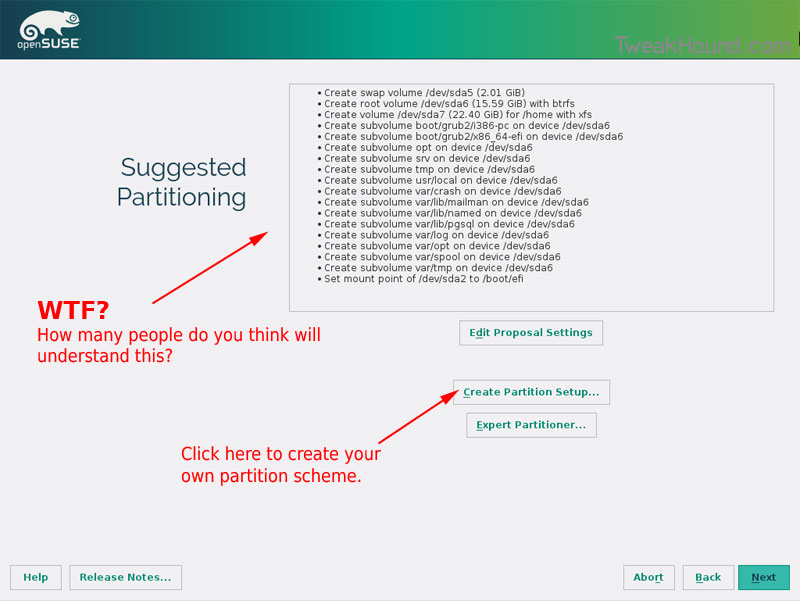
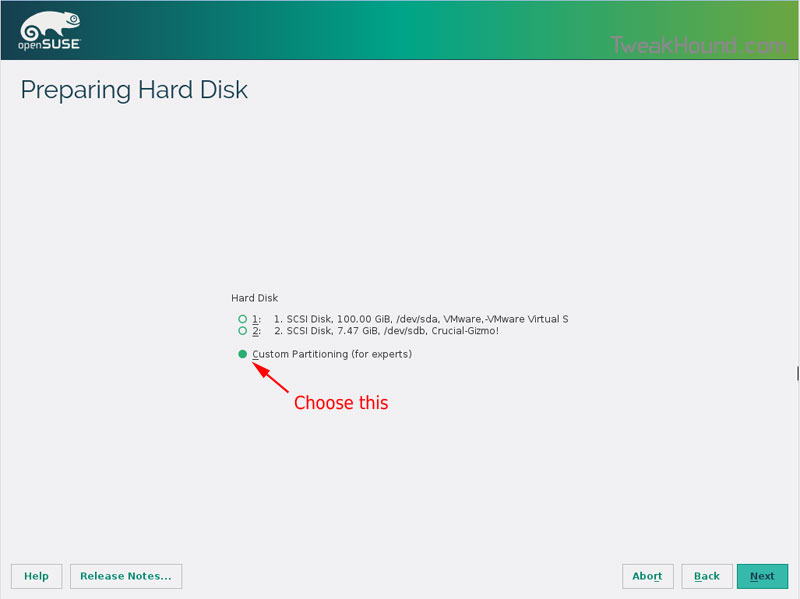
Choose Custom Partitioning (for experts) and click Next
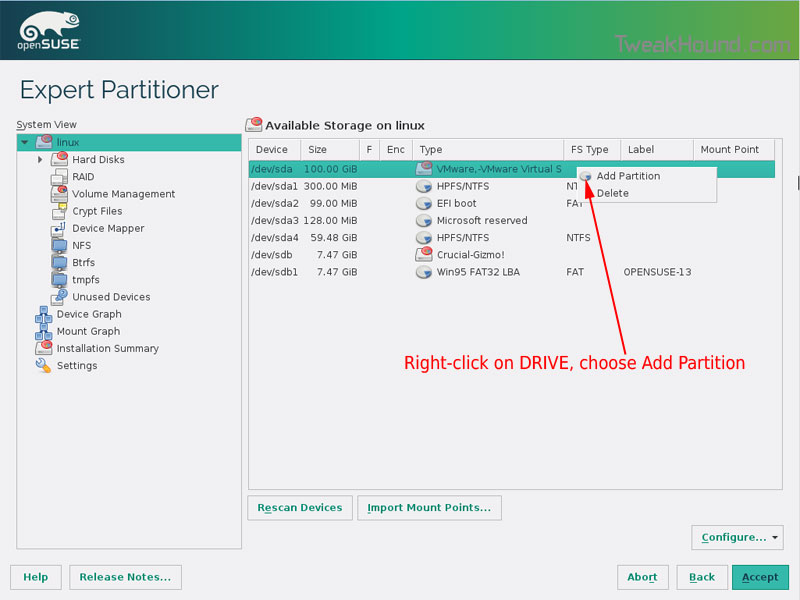
Right-click on the DRIVE where you want to install openSUSE and choose Add Partition
Make a swap partition, 2-4GB is fine.
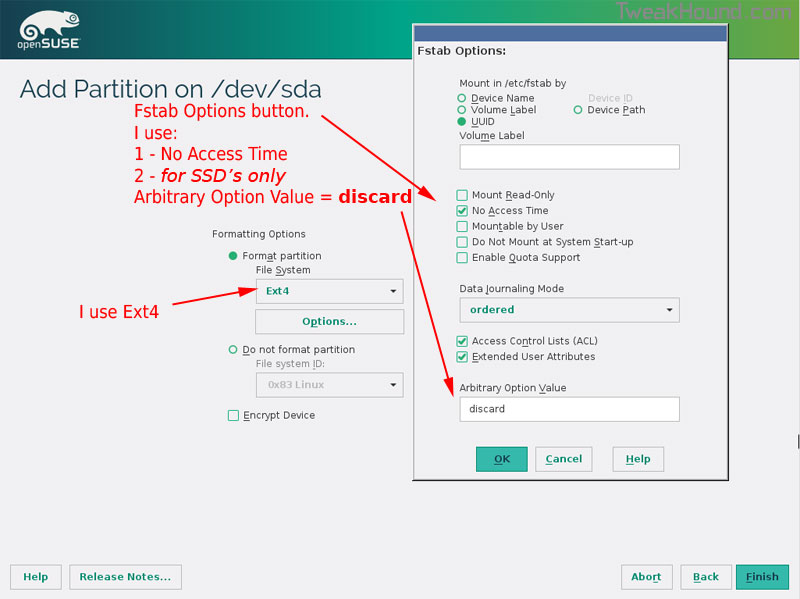
Below are the options I use. Ext4 for file system, noatime, discard* (=trim)
*note – I am not using discard at the moment because it was causing errors on my Samsung 850 Pro SSD.
This next step is critical as your system will not boot without it.
Right-click on the Windows EFI boot partition and choose Edit
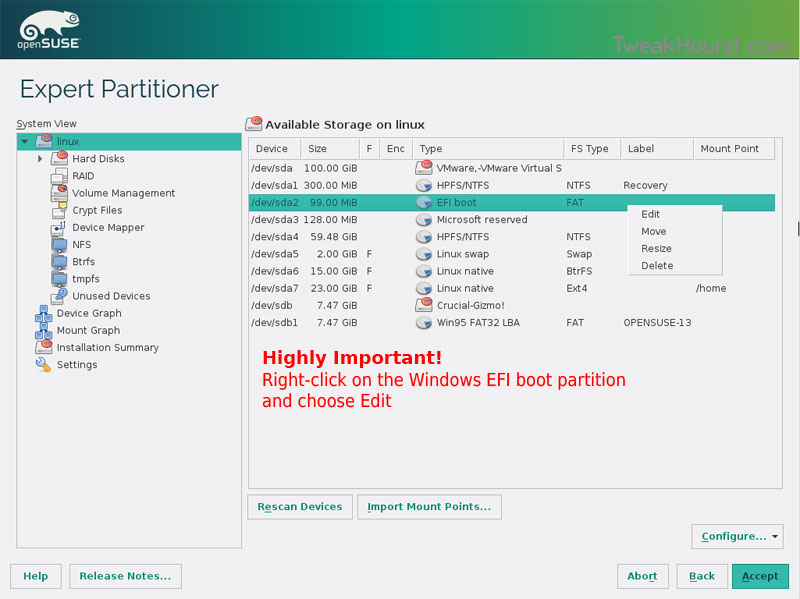
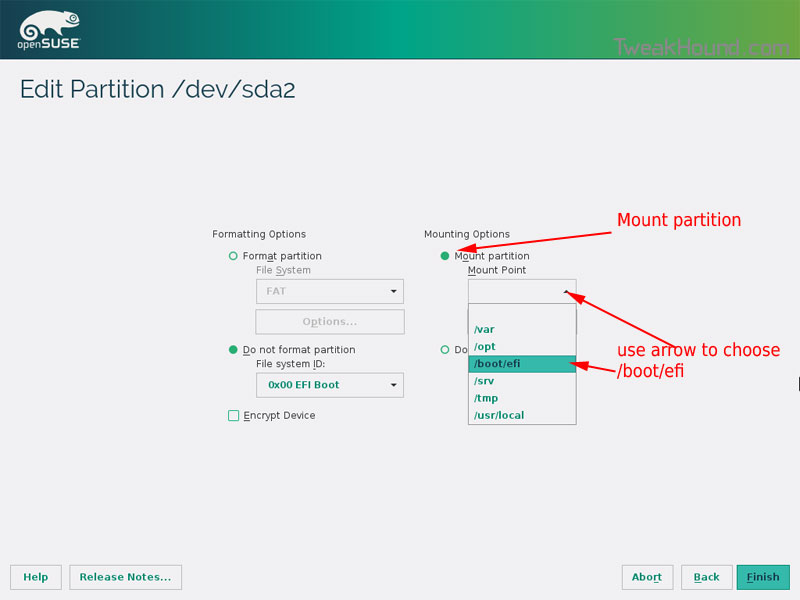
Choose Mount partition
Choose /boot/efi
Click Finish
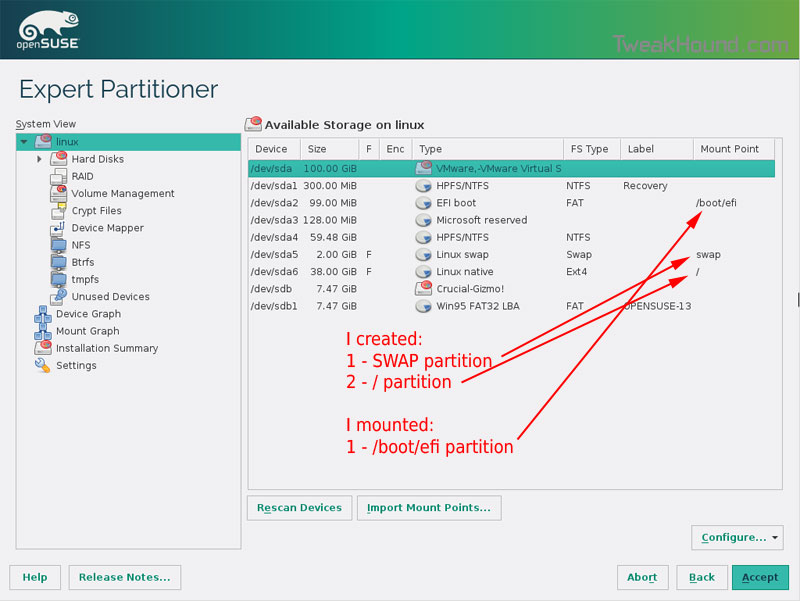
Done? click Accept
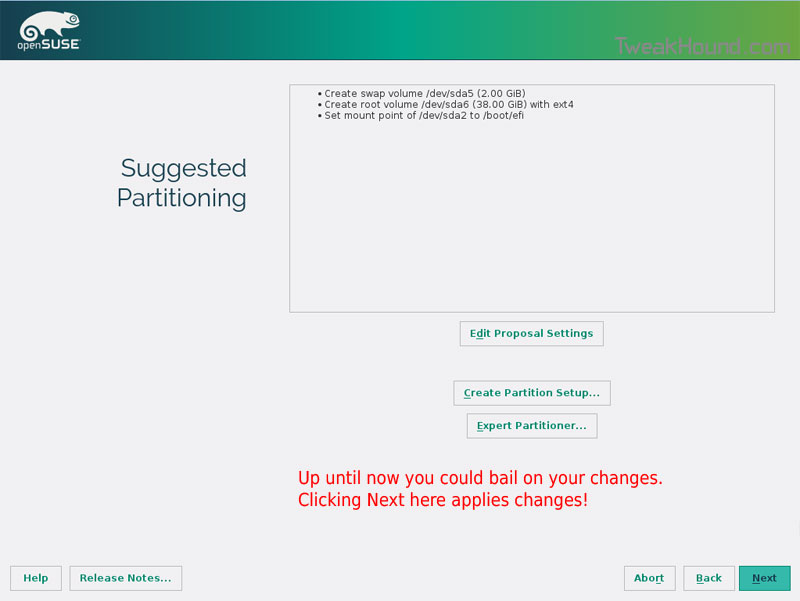
Last chance to bail…
Click Next
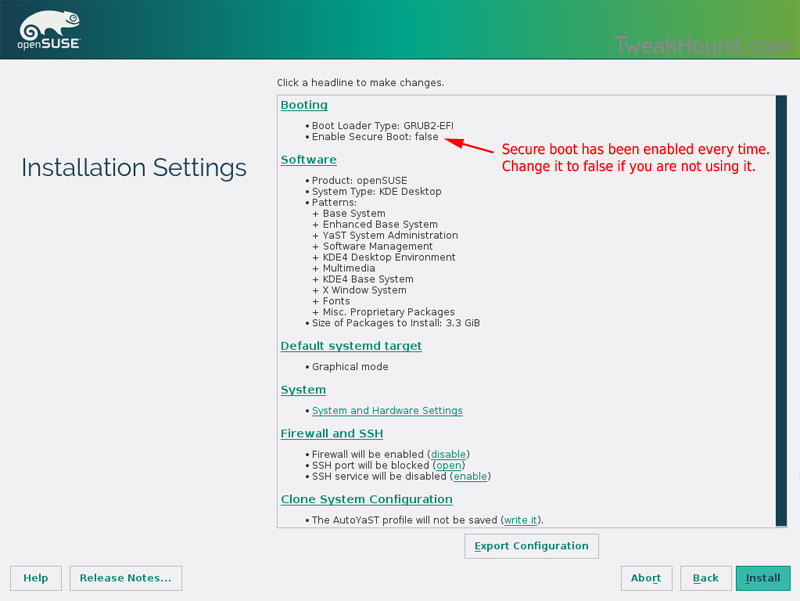
I don’t use Secure Boot. It can be disabled here:
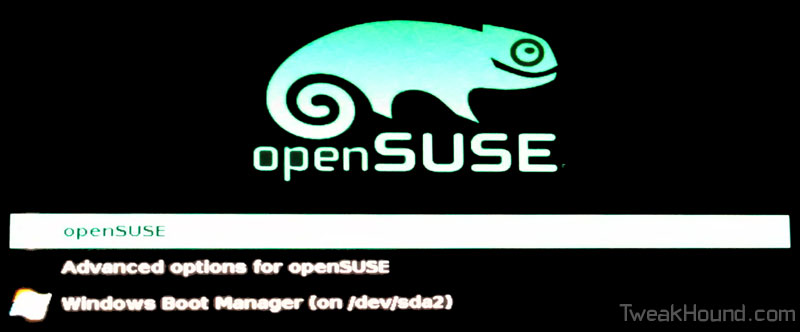
Boot Screen:
Everything should run just peachy until you boot into Windows again.
Windows will usually try and make its bootloader default again which means openSUSE isn’t an option.
While in Windows, open an Elevated Command Prompt and copy/paste this command (source):
bcdedit /set {bootmgr} path \EFI\opensuse\shim.efi
That’s it!
openSUSE Leap 42.1 Released
My Linux distro of choice has received a significant update. openSUSE Leap changes the way openSUSE does things. Once divided between an enterprise and regular version openSUSE has merged these into what they are calling a hybrid system. You see the enterprise version (SLE) was a more stable version that was slow to implement changes. The regular version was considered “bleeding edge”. That meant stuff was either not quite done or could break stuff, a permanent beta version if you will. IMHO, his had the effect of frustrating many non-Linux Geeks. openSUSE Leap aims to speed up inclusion of software that is ready for the average users but leave the “bleeding edge” stuff to a version best left to Linux Geeks called “openSUSE Tumbleweed“.
Also includes: Kernel 4.1.12, KDE Plasma 5, GNOME 3.16.2
Release announcement: openSUSE Leap 42.1 Becomes First Hybrid Distribution
Download (I highly suggest you try this in a virtual machine first)
Release notes (very important to read these)
OpenSUSE Forums
openSUSE – Unlocking KWallet and Google Integration
I wanted to add Google Calendar to KOrganizer but it kept pestering me for a password at every sign-in. A quick Google search and a little configuring got it to work.
[Read more…] about openSUSE – Unlocking KWallet and Google Integration
openSUSE 13.2 Tips, Tricks, and Tweaks
How I use openSUSE 13.2. I hope you find something useful here!
This article will be updated as I find more tips or on the off chance that someone actually sends some in.
[Read more…] about openSUSE 13.2 Tips, Tricks, and Tweaks
Dual Boot openSUSE 13.2 and Windows 8.1 UEFI
This is how I dual-boot my Windows 8.1 rig with openSUSE 13.2.
Though virtually unchanged from this version, I’ve put up a new version here: Dual Boot openSUSE Leap and Windows 10 UEFI
Notes:
– BACKUP your computer with a disk image before attempting this!
– Please do not contact me with questions on this topic.
That’s what the openSUSE forums are for.
– For how I dual-boot with a standard BIOS (legacy) see here: Dual-Boot openSUSE 12.3 And Windows (article is NOT compatible with BTRFS)
Interesting Links
openSUSE:UEFI
BCD System Store Settings for UEFI
Dual booting with Windows 8, not as painful as expected.
Preparation
1 – Full disk image backup using Acronis True Image.
2 – Make or leave unpartitioned space on OS drive for openSUSE. (If you can’t do this without a tutorial, well…..)
3 – Make UEFI boot usb flash drive with Rufus.
Installation
Pardon the odd screenshots. I used Vmware player for this article.
I should note that I am not a believer in using multiple partitions for my Linux installs.
Boot up, go through setup until you get to the partitioning section.
I do not use BTRFS and I always use Create Partition Setup…
Choose Custom Partitioning (for experts) and click Next
Right-click on the DRIVE where you want to install openSUSE and choose Add Partition
Make a swap partition, 2-4GB is fine.
Below are the options I use. Ext4 for file system, noatime, discard (=trim)
This next step is critical as your system will not boot without it.
Right-click on the Windows EFI boot partition and choose Edit
Choose Mount partition
Choose /boot/efi
Click Finish
Done? click Accept
Last chance to bail…
Click Next
I don’t use Secure Boot. It can be disabled here:
Boot Screen:
Everything should run just peachy until you boot into Windows again.
Windows will usually try and make its bootloader default again which means openSUSE isn’t an option.
While in Windows, open an Elevated Command Prompt and copy/paste this command (source):
bcdedit /set {bootmgr} path \EFI\opensuse\shim.efi
That’s it!
TweakHound’s BTRFS Notes
First draft: 15OCT2014
Purpose
This page contains my notes on BTRFS. I hope that others may find it useful.
This page will be updated as I gather more info.
If you have useful info please contact me.
[Read more…] about TweakHound’s BTRFS Notes
openSUSE 13.2 Beta: BTRFS vs. EXT4
openSUSE has decided to use BTRFS as the default file system for openSUSE 13.2.
I’m currently testing 13.2 Beta 1 ( openSUSE 13.2 Is Coming – First Beta Has Arrived! ).
My main reason for testing is to see if I want to use BTRFS. To be clear, I am testing this to see if I want to use this on MY computers. For the purpose of this article I am not interested in any other scenario. [Read more…] about openSUSE 13.2 Beta: BTRFS vs. EXT4