
TweakHound’s Vista Services Recommendations
Giving good, detailed recommendations on Services settings is nearly impossible. I do not know what your computer experience level is, what sort of privileges you run under, how many people use the computer, or what version of Vista you are running. With that in mind…
These recommendations are how I would set up a computer in my house. Most of them (except the first table) assume you are running under an Admin account. Before you security nuts get on my back…Yes I know, but I and most Geeks run under Admin in Windows and in truth most home users do too. Though running as a Standard User in Vista is better than previous Windows versions it is still a PITA, unlike Linux.
*Note – A change in the recommendation for the ReadyBoost service. ReadyBoost, ReadyBoot, and Vista’s new prefetching scheme are all tied together. To take advantage of all these options you should leave the ReadyBoost service enabled even if you do not have a ReadyBoost drive. If not the basic scheme defaults back to an XP-like setting. During testing the biggest effect I noticed was a 10-15 second difference in boot times (faster after re-enabling ReadyBoost).
Step 1
Open your services, Press the Windows + R keys (= Start > Run), type services.msc.
Maximize the window.
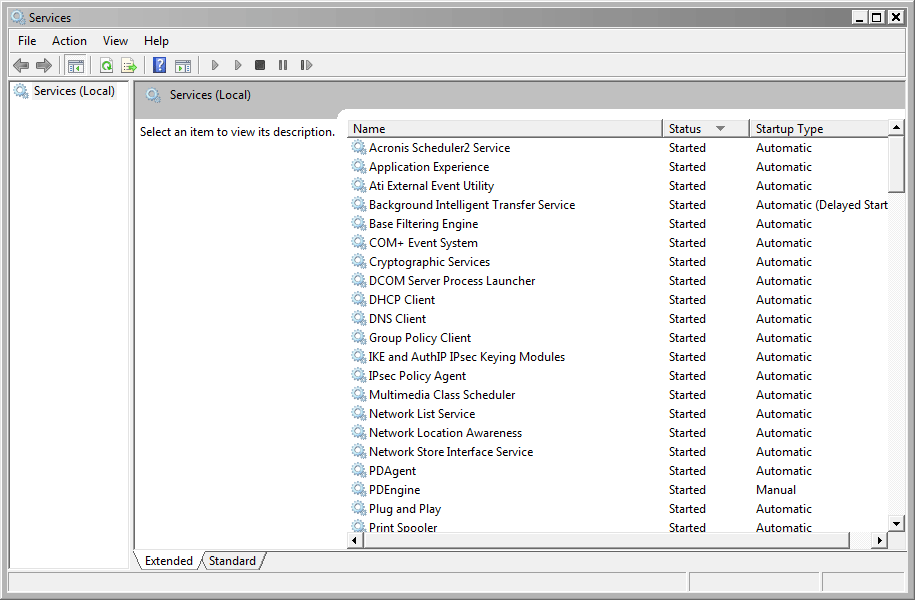
You’ll see a column labeled Status. Double-click it so that all the services that are started are up top.
These are the only ones you need to worry about. If it isn’t started, leave it alone.
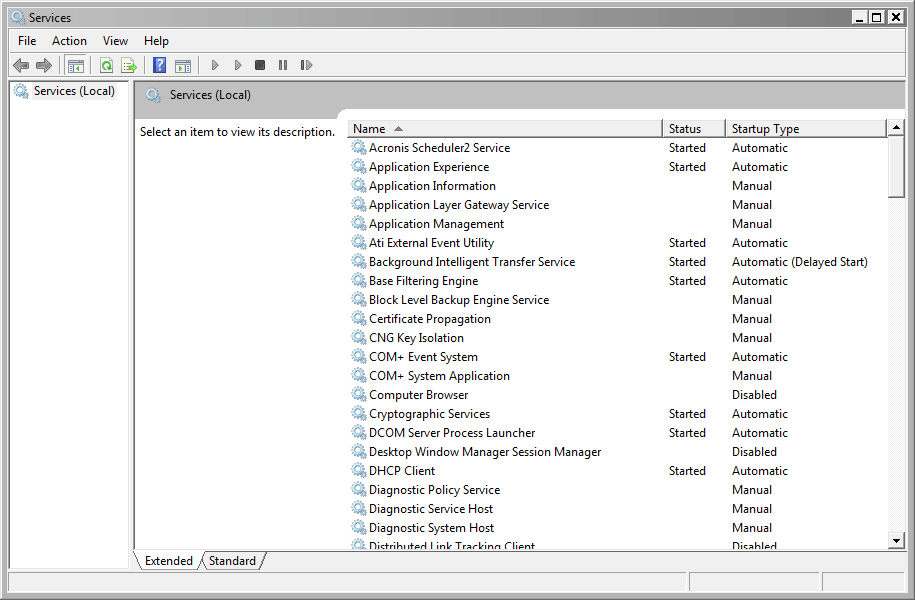
See pics below for an example. (click on thumbnails for a larger image)
|
The services screen in its default state.
|
The services screen ordered with started services at the top.
|
|
TweakHound’s Vista Services Recommendations – Absolute Safe Settings |
|
|
Disable |
If you are not comfortable adjusting Services or do not understand them either leave them alone or use these settings. |
| DFS Replication Diagnostic Policy Service (change to manual) Distributed Link Tracking Client IKE and AuthIP IPsec Keying Modules IPsec Policy Agent KtmRm for Distributed Transaction Coordinator Offline Files Remote Registry (for security reasons) Tablet PC Input Service Windows Error Reporting Service Windows Search (if you do a lot of searching on your computer then leave this alone) |
|
|
TweakHound’s Vista Services Recommendations – Desktop |
|||
| Disable |
Safe |
Networked + Sharing (non-essential stuff off) |
Networked + Not sharing from this computer |
| DFS Replication Diagnostic Policy Service (change to manual) Distributed Link Tracking Client IKE and AuthIP IPsec Keying Modules IPsec Policy Agent KtmRm for Distributed Transaction Coordinator Offline Files Remote Registry (for security reasons) Secondary Logon Security Center SSDP Discovery (for security reasons) Tablet PC Input Service Terminal Services Windows Defender Windows Error Reporting Service Windows Search |
DFS Replication Diagnostic Policy Service (change to manual) Distributed Link Tracking Client IKE and AuthIP IPsec Keying Modules IP Helper IPsec Policy Agent KtmRm for Distributed Transaction Coordinator Offline Files Remote Registry (for security reasons) Secondary Logon Security Center SSDP Discovery (for security reasons) Tablet PC Input Service Terminal Services UPnP Device Host Windows Defender Windows Error Reporting Service Windows Search |
Computer Browser* |
|
DFS Replication
Diagnostic Policy Service (change to manual)
Distributed Link Tracking Client
Function Discovery Provider Host
Function Discovery Resource Publication
IKE and AuthIP IPsec Keying Modules
IP Helper
IPsec Policy Agent
KtmRm for Distributed Transaction Coordinator
Offline Files
Remote Registry (for security reasons)
Secondary Logon
Security Center
Server
SSDP Discovery (for security reasons)
Tablet PC Input Service
Terminal Services
UPnP Device Host
Windows Defender
Windows Error Reporting Service
Windows Search
* – if you want to use the Computer Browser service
you’ll need to keep the Server service enabled
|
TweakHound’s Vista Services Recommendations – Desktop, part 2 |
||
|
Disable |
Not Networked |
Tweaked Out (Geeks Only!!!) |
| Computer Browser DFS Replication Diagnostic Policy Service (change to manual) Distributed Link Tracking Client Function Discovery Provider Host Function Discovery Resource Publication IKE and AuthIP IPsec Keying Modules IP Helper IPsec Policy Agent KtmRm for Distributed Transaction Coordinator Offline Files Remote Registry (for security reasons) Secondary Logon Security Center Server SSDP Discovery (for security reasons) Tablet PC Input Service TCP/IP NetBIOS Helper Terminal Services UPnP Device Host Windows Defender Windows Error Reporting Service Windows Search |
Computer Browser |
|
Desktop Window Manager Session Manager
DFS Replication
Diagnostic Policy Service (change to manual)
Distributed Link Tracking Client
Function Discovery Provider Host
Function Discovery Resource Publication
IKE and AuthIP IPsec Keying Modules
IP Helper
IPsec Policy Agent
KtmRm for Distributed Transaction Coordinator
Offline Files
Print Spooler
Remote Registry (for security reasons)
Secondary Logon
Security Center
Server
SSDP Discovery (for security reasons)
Tablet PC Input Service
TCP/IP NetBIOS Helper
Terminal Services
Themes
UPnP Device Host
Windows Defender
Windows Error Reporting Service
Windows Event Log (I wouldn’t disable this)
Windows Search
Windows Time
|
TweakHound’s Vista Services Recommendations – Laptop Best results will most likely be achieved in between this 2 categories. |
||
|
Disable |
Safe |
Tweaked Out (Geeks Only!!!) |
| DFS Replication Diagnostic Policy Service (change to manual) Distributed Link Tracking Client IKE and AuthIP IPsec Keying Modules IPsec Policy Agent KtmRm for Distributed Transaction Coordinator Offline Files Remote Registry (for security reasons) Secondary Logon Security Center SSDP Discovery (for security reasons) Tablet PC Input Service Terminal Services Windows Defender Windows Error Reporting Service Windows Search |
Computer Browser |
|
Desktop Window Manager Session Manager
DFS Replication
Diagnostic Policy Service (change to manual)
Distributed Link Tracking Client
Function Discovery Provider Host
Function Discovery Resource Publication
IKE and AuthIP IPsec Keying Modules
IP Helper
IPsec Policy Agent
KtmRm for Distributed Transaction Coordinator
Offline Files
Print Spooler
Remote Registry (for security reasons)
Secondary Logon
Security Center
Server
SSDP Discovery (for security reasons)
Tablet PC Input Service
TCP/IP NetBIOS Helper
Terminal Services
Themes
UPnP Device Host
Windows Defender
Windows Error Reporting Service
Windows Event Log (I wouldn’t disable this)
Windows Search
Windows Time