
• Skip to primary navigation
  • Skip to main content
  • Skip to primary sidebar

TweakHound

Computer stuff...

  • Home
  • Windows XP
  • Windows Vista
  • Windows 7
  • Windows 8
  • Windows 10
  • Windows 11
  • Linux
  • Tweak Guides
  • Site Info
    • About
    • About Me
    • TweakHound’s World
    • Contact
    • My Computers
    • Old Articles
    • Privacy Policy
    • Old Index
    • Advanced Search

Win10 KB4056892 Benchmarked

th

January 4, 2018, 15:24(EST) By Eric (a.k.a. TweakHound)

KB4056892 is Microsoft’s first attempt at mitigating the Intel CPU fiasco.
Updated: see the end of this post.

This is one benchmark, by one Geek, on one computer. It isn’t scientific, or definitive. It proves nothing except how KB4056892 affects one Geeks synthetic benchmark results.
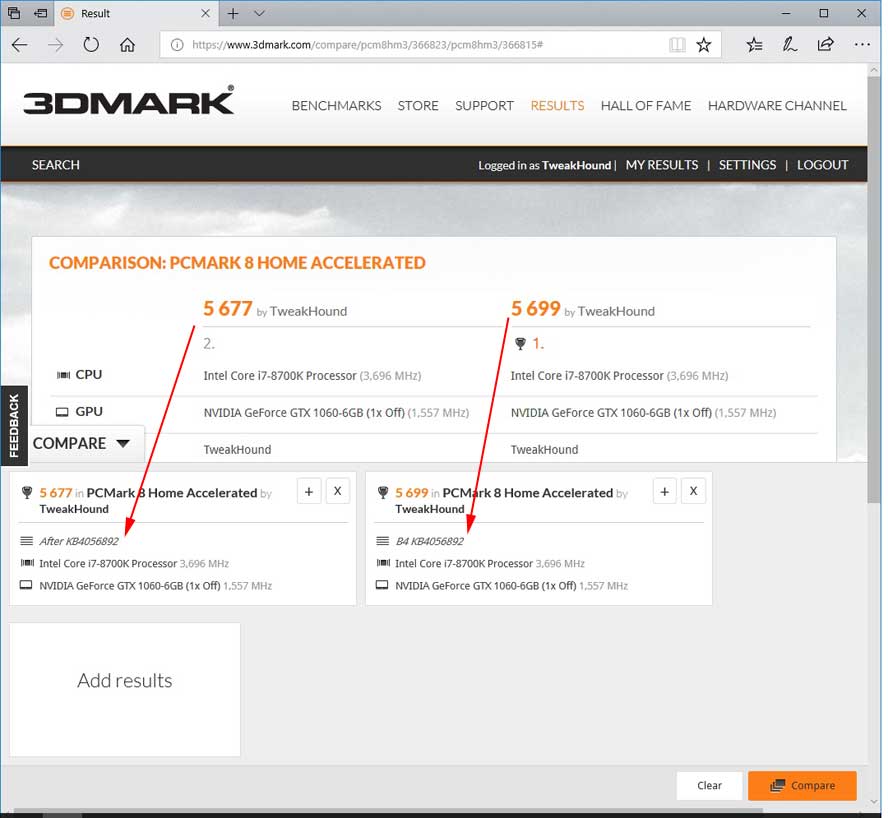
Score: 5699 before update 5677 after.
5677 as a proportion of 5699 is 99.61%
5699 as a proportion of 5677 is 100.39%
.39% difference.
IMHO the results are statistically insignificant. I make no conclusions beyond that.
 

Update: 0850EST, 05JAN2018
Techspot ran a bunch of comprehensive benchmarks:
Video: https://youtu.be/_qZksorJAuY
Article: https://www.techspot.com/article/1554-meltdown-flaw-cpu-performance-windows/
Conclusion: “Desktop users have little to worry about in terms of performance loss, particularly gamers.”

Update: 1315EST, 05JAN2018
Guru3D – Windows 10 CPU Bug Fix Patch Benchmarked
Conclusion:
“Given what I am currently seeing, desktop users and PC gamers should not be too worried about significant performance drops. Most test results do show a negative effect on performance overall, but we’re really talking in a realm of 2% differentials here. Now my remark here needs to include this, there probably will be more firmware updates and perhaps new patches for all protections to kick in, accumulated and activated these all can have an effect on performance. If that turns out to be the case, we’ll have to re-do and revisit all tests. ”

Tagged With: Computer Hardware, This Site

Reader Interactions

Comments

  1. Ken Smet (aka Grand Pa Ken) says

    January 5, 2018, 13:54(EST) at 13:54

    Don’t come here every day, this opportunity to comment seems new to me. Thank you for being here. Thank you for what you’re doing — and how you do it.

    • Eric (a.k.a. TweakHound) says

      January 5, 2018, 16:11(EST) at 16:11

      Don’t get a lot of comments. Thanks Ken!

Primary Sidebar

Popular Articles

Windows 10

Tweaking Windows 10

My Windows 10 Tweaks

Windows 10 Privacy Settings

Win10 Diagnostics Tracking Service Gone?

Windows 10 Advanced Disk Cleanup

Win10 Customize Installation Options

Windows 10 Dark Theme

Win10 Wallpapers, Graphics, etc.

All Windows 10 Articles

Windows 8

Tweaking Windows 8.1

Advice On Installing Windows 8.1

Clean Install Windows 8.1

Cleanup After Windows 8.1 Upgrade

Create Shutdown, Restart, Logoff Tiles For Windows 8

Tweaking Windows 8

Install Windows 8 – Clean Install With Upgrade Media

Install Windows 8 – Upgrade

Windows 8 – Cleaning Up After You’ve Upgraded

Windows 8 Freeware Machine

Windows 8 SSD Settings, Etc.

How To Resize Your Windows 8 Partition

Create Windows 8 Recovery Media

Windows 8 – Elevated Command Prompt

How To Fix The Windows Bootloader

Windows 7

Installing Windows 7

Tweaking Windows 7

Windows 7 Diagnostics Tracking Service

The Windows 7 Freeware Machine

The Windows 7 Pagefile And Running Without One

Bad Tweaks

SSD Tweak Guide (sort of)

The noguiboot (no GUI Boot) Tweak

NtfsMemoryUsage=2 Tweak

More Windows 7 articles here.

Windows Vista

Installing Windows Vista

Tweaking Windows Vista

More Windows Vista articles here.

Windows XP

eXPired - The Last Windows XP Guide You'll Ever Need

The Right Way To Install Windows XP

Super XP Tweaking Guide

The Freeware XP Machine

Bad Tweaks

More XP Articles here and here.

Backup

Backup Article Greatest Hits – Vol. 1

Other

Cataloging Your Music Collection

Finding Good Album Art

Converting Vinyl Records To Digital Music – A Non-Audiophiles Guide

Windows All-In-One Recovery Flash Drive

SSD Tweak Guide (sort of)

Raidmax Blackstorm Case Review

Disk Partitioning

Ditch Those CD's! A Guide To Using USB Flash Drives

Checking Your Disks For Problems

Bad Tweaks

More articles here

Tags

Android Backup Beer Computer Hardware Computer News Cool Tools Freeware How-To's Linux Off Topic openSUSE Playlists Privacy Security Software This Site vacation Veterans Windows 7 Windows 8 Windows 10 Windows 11 Windows Vista Windows XP

TweakHound - Optimize Your Computing Experience! TweakHound - Optimize Your Computing Experience!

Copyright 2002-2025 by Eric Vaughan All material contain here is the property of the materials owner. Windows, Windows XP, Windows Vista, Windows Seven, Windows 8, Windows 10, Windows 11, Microsoft, and all associated logos are trademarks/property of Microsoft. You may not use or copy any material from tweakhound.com without expressed written permission. Hotlinking to any material within this site is forbidden. Privacy Policy