• Skip to primary navigation
  • Skip to main content
  • Skip to primary sidebar

TweakHound

Computer stuff...

  • Home
  • Windows XP
  • Windows Vista
  • Windows 7
  • Windows 8
  • Windows 10
  • Windows 11
  • Linux
  • Tweak Guides
  • Site Info
    • About
    • About Me
    • TweakHound’s World
    • Contact
    • My Computers
    • Old Articles
    • Privacy Policy
    • Old Index
    • Advanced Search

Windows 10 Game Mode And Ultimate Performance Power Plan

May 8, 2018, 08:07(EDT) By Eric (a.k.a. TweakHound)

In prep for the upcoming revision of the Win10 Tweak Guide I have some thoughts about Game Mode and the Ultimate Performance Power Plan.
Lemme give you my conclusion right out of the box. IMHO, for performance Game Mode and the Ultimate Performance Power Plan are pure snake oil.

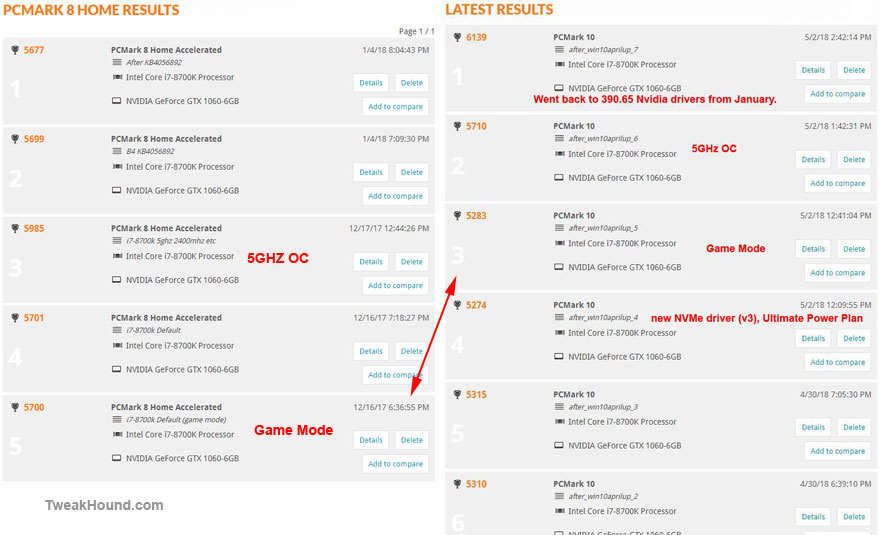
Game Mode was sold as a way to get, “better game quality and performance“.
Here are my benchmarks:
The result? No change.
Win10’s Ultimate Performance Power Plan is, well…

Microsoft when Win10 was released: “There is a High Performance power plan”
Microsoft when April Update was released: “We have an “Ultimate Performance power plan”
Us: Well, “high” was the highest setting before so wasn’t it already “ultimate”? Were you lying? Mistaken? Misleading? Exactly what does this power plan do?
Microsoft: “it goes a step further to eliminate micro-latencies associated with fine grained power management techniques”
Us: *Pauses, rereading that statement…*
Us: *Pauses, reading that statement for the third time…*
Us: WTF does that mean? We already set our machines to stop turning stuff off. What does this do? Please explain.
Microsoft: *silence*

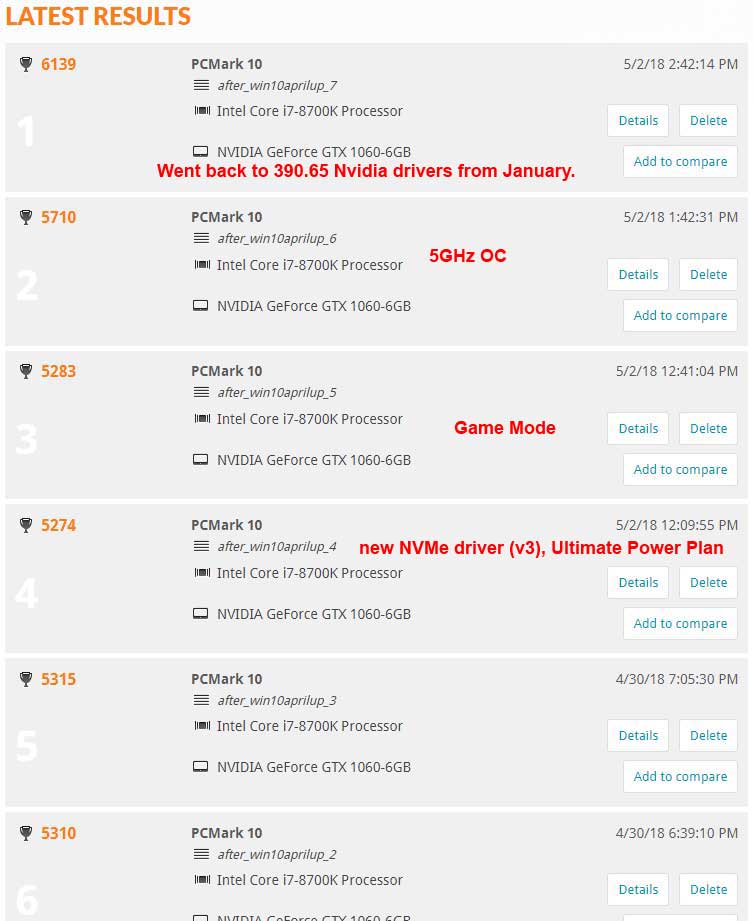
When the Ultimate Performance Power Plan was announced I used JV16 Power Tools to monitor the registry. No changes made (like different from other power plan options). As far as I can tell it just stops shutting a few more things off than the High Performance power plan. You know, just like you’ve already been doing.
I could be wrong but since Microsoft hasn’t explained what this does we don’t know. There certainly isn’t any change in my benchmarks:
Conclusion
Like I said, snake oil. I don’t see Game Mode and the Ultimate Performance Power Plan hurting things but they don’t seem to help either.

Tagged With: This Site, Windows 10

Reader Interactions

Comments

  1. radosuaf says

    May 8, 2018, 09:33(EDT) at 09:33

    Surprise, surprise… 🙂 When I benchmarked W7 vs W8.1 vs W10, it was usually W7 that came on top – so I would not expect any hidden performance that is still possible to squeeze out of current hardware. Windows is already optimised enough. What we can possibly see is only a decrease that could come with all the “features” that are inroducted to the OS.

    • Eric (a.k.a. TweakHound) says

      May 8, 2018, 11:53(EDT) at 11:53

      No argument here.

  2. Ed says

    May 8, 2018, 09:38(EDT) at 09:38

    Yup, All Ultimate power plan does over HP is keep HD at full speed, no sleep timer values.
    You can easy check reg keys here(all though you will have to look up what the key does in power setting section).
    Computer\HKEY_LOCAL_MACHINE\SYSTEM\CurrentControlSet\Control\Power\User\PowerSchemes\e9a42b02-d5df-448d-aa00-03f14749eb61

    • Eric (a.k.a. TweakHound) says

      May 8, 2018, 12:54(EDT) at 12:54

      AFAIK e9a42b02-d5df-448d-aa00-03f14749eb61 is the value thats copied, not the key that is used. Article will follow.

  3. Ed says

    May 8, 2018, 16:56(EDT) at 16:56

    Yes, it gets copied but if you look at keys under that key, there not doing anything “new” you could do that with any of power plans.
    Now maybe its not finished yet.
    I am real surprised as at least with Skylark they did bring new power plan to support new HW, for Speed-Step, but maybe Intel did all the work 🙂

  4. Maxim says

    May 11, 2018, 20:52(EDT) at 20:52

    To think that some people bought Windows 10 Pro for the Ultimate Performance power plan.

Primary Sidebar

Popular Articles

Windows 10

Tweaking Windows 10

My Windows 10 Tweaks

Windows 10 Privacy Settings

Win10 Diagnostics Tracking Service Gone?

Windows 10 Advanced Disk Cleanup

Win10 Customize Installation Options

Windows 10 Dark Theme

Win10 Wallpapers, Graphics, etc.

All Windows 10 Articles

Windows 8

Tweaking Windows 8.1

Advice On Installing Windows 8.1

Clean Install Windows 8.1

Cleanup After Windows 8.1 Upgrade

Create Shutdown, Restart, Logoff Tiles For Windows 8

Tweaking Windows 8

Install Windows 8 – Clean Install With Upgrade Media

Install Windows 8 – Upgrade

Windows 8 – Cleaning Up After You’ve Upgraded

Windows 8 Freeware Machine

Windows 8 SSD Settings, Etc.

How To Resize Your Windows 8 Partition

Create Windows 8 Recovery Media

Windows 8 – Elevated Command Prompt

How To Fix The Windows Bootloader

Windows 7

Installing Windows 7

Tweaking Windows 7

Windows 7 Diagnostics Tracking Service

The Windows 7 Freeware Machine

The Windows 7 Pagefile And Running Without One

Bad Tweaks

SSD Tweak Guide (sort of)

The noguiboot (no GUI Boot) Tweak

NtfsMemoryUsage=2 Tweak

More Windows 7 articles here.

Windows Vista

Installing Windows Vista

Tweaking Windows Vista

More Windows Vista articles here.

Windows XP

eXPired - The Last Windows XP Guide You'll Ever Need

The Right Way To Install Windows XP

Super XP Tweaking Guide

The Freeware XP Machine

Bad Tweaks

More XP Articles here and here.

Backup

Backup Article Greatest Hits – Vol. 1

Other

Cataloging Your Music Collection

Finding Good Album Art

Converting Vinyl Records To Digital Music – A Non-Audiophiles Guide

Windows All-In-One Recovery Flash Drive

SSD Tweak Guide (sort of)

Raidmax Blackstorm Case Review

Disk Partitioning

Ditch Those CD's! A Guide To Using USB Flash Drives

Checking Your Disks For Problems

Bad Tweaks

More articles here

Tags

Android Backup Beer Computer Hardware Computer News Cool Tools Freeware How-To's Linux Off Topic openSUSE Playlists Privacy Security Software This Site vacation Veterans Windows 7 Windows 8 Windows 10 Windows 11 Windows Vista Windows XP

TweakHound - Optimize Your Computing Experience! TweakHound - Optimize Your Computing Experience!

Copyright 2002-2025 by Eric Vaughan All material contain here is the property of the materials owner. Windows, Windows XP, Windows Vista, Windows Seven, Windows 8, Windows 10, Windows 11, Microsoft, and all associated logos are trademarks/property of Microsoft. You may not use or copy any material from tweakhound.com without expressed written permission. Hotlinking to any material within this site is forbidden. Privacy Policy