• Skip to primary navigation
  • Skip to main content
  • Skip to primary sidebar

TweakHound

Computer stuff...

  • Home
  • Windows XP
  • Windows Vista
  • Windows 7
  • Windows 8
  • Windows 10
  • Windows 11
  • Linux
  • Tweak Guides
  • Site Info
    • About
    • About Me
    • TweakHound’s World
    • Contact
    • My Computers
    • Old Articles
    • Privacy Policy
    • Old Index
    • Advanced Search

Samsung 870 EVO 250GB OS Drive?

January 30, 2021, 11:41(EST) By Eric (a.k.a. TweakHound)

Long ago I lamented about someone coming up with a superfast drive just for the operating system. That has been a reality since the late 2000s when SSDs became mainstream and affordable.
A couple of weeks ago, Samsung released the 870 EVO line of SSDs. The smallest and cheapest of these is 250GB version. Because I view the smaller drives as ideal for Operating System only drives, this is the drive I will be focusing on.
The 870 EVO line has been touted by Samsung and hardware review sites as the last shot at maximizing the performance of SATA drives.

SAMSUNG 870 EVO at Amazon: 250GB=$39.99 | 500GB=$69.99 | 1TB=$129.99 | 2TB&4TB $250-$489 unavailable


The Standard Quickie Benchmarks

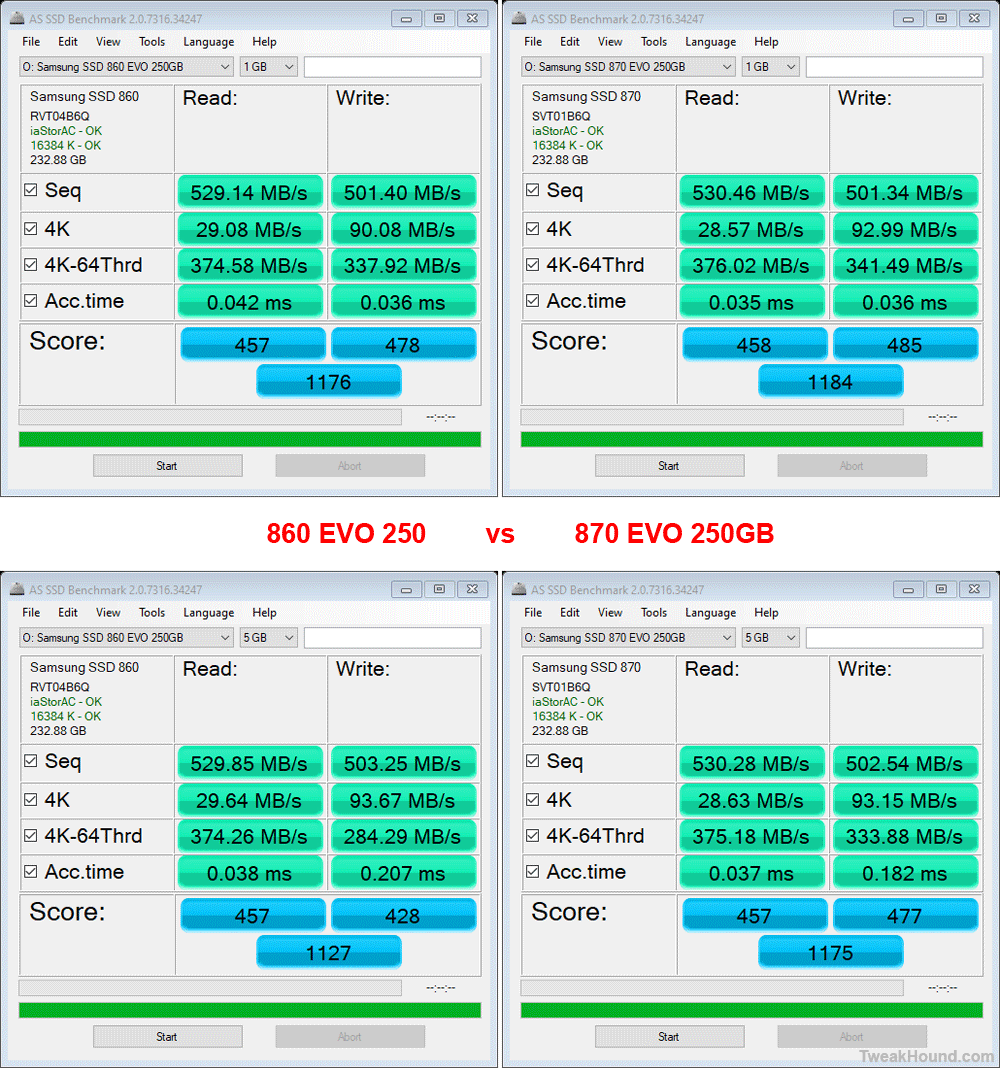
AS SSD benchmark
Taken by themselves, these margins are statistically insignificant.

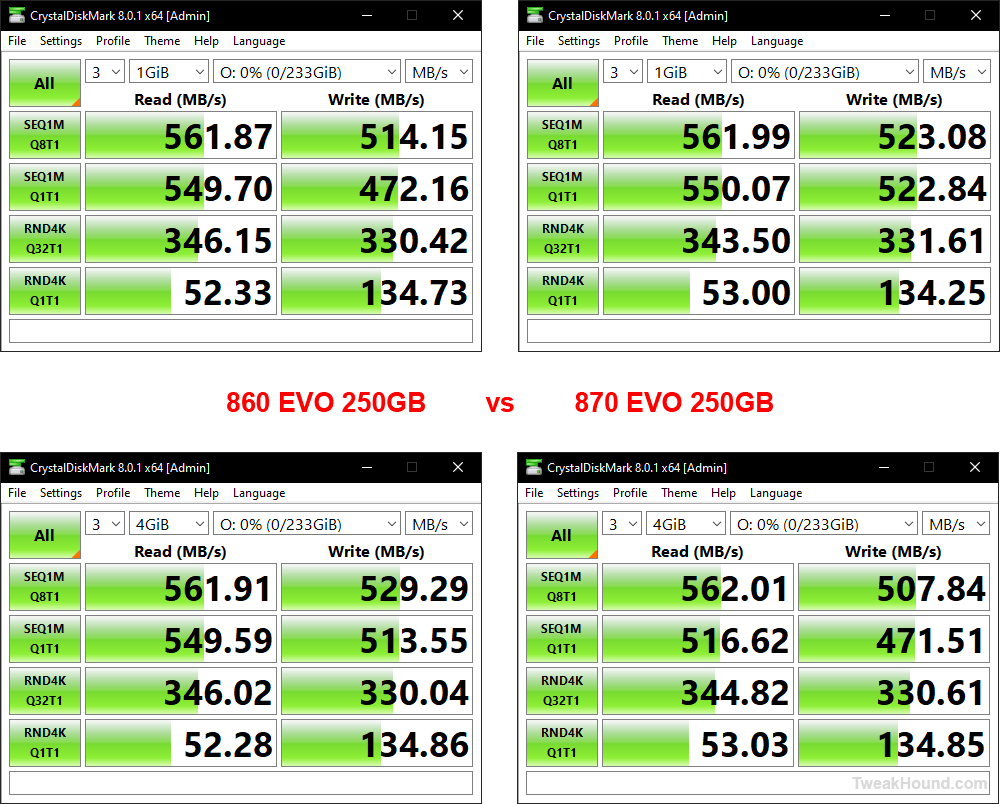
CrystalDiskMark
Again, taken by themselves, these margins are statistically insignificant.

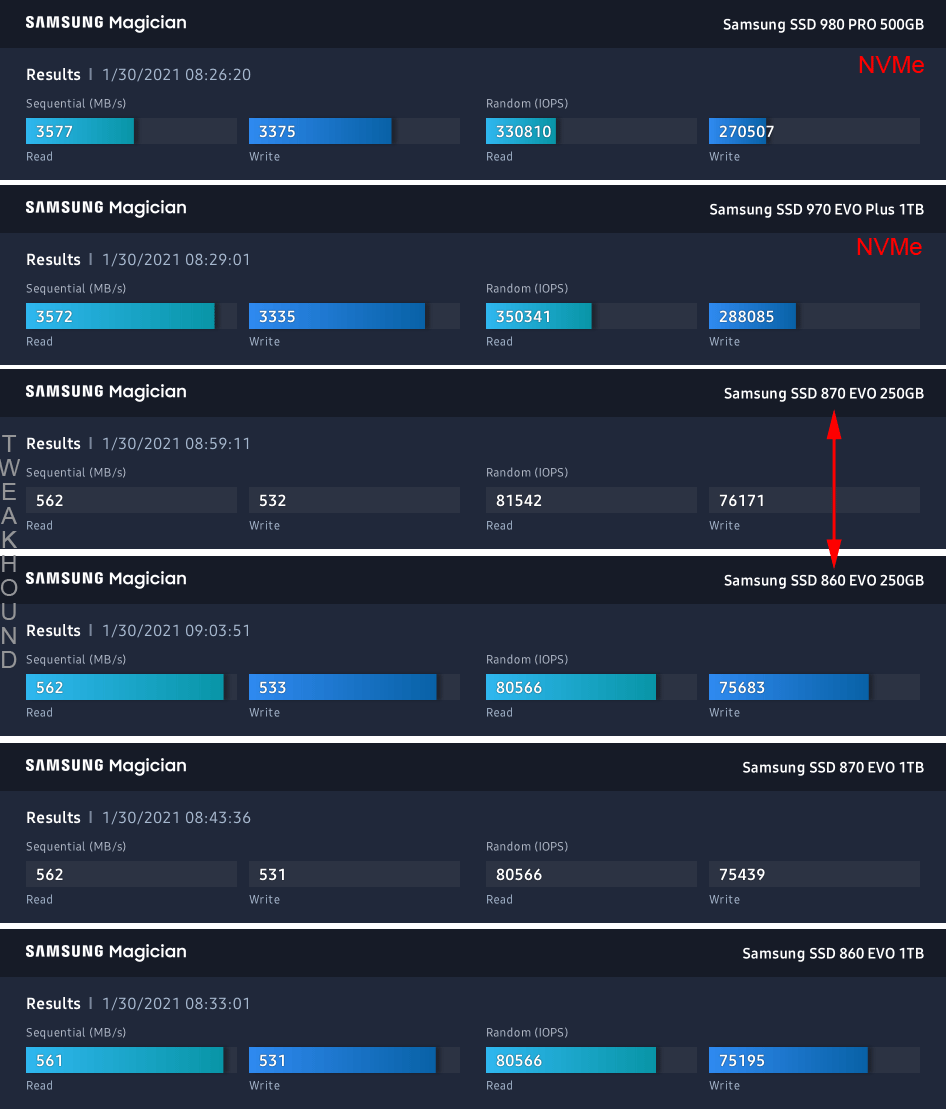
Samsung Magician Benchmark
I went ahead and benchmarked all the SSDs in my system. Yes, they are all Samsung.
Again, taken by themselves, the margins between the 860 EVO 250GB and 870 EVO 250GB are statistically insignificant.

“Real-World” Benchmark

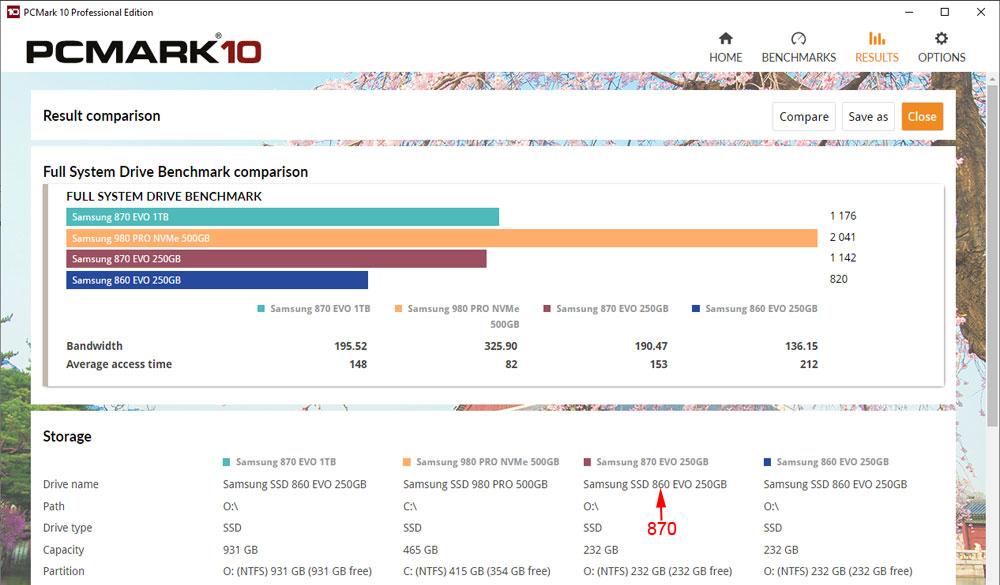
PCMark 10 Full System Drive benchmark
“Each test uses traces recorded while performing real-world tasks such as booting Windows 10, starting applications such as Adobe Photoshop and Illustrator, working with applications such as Microsoft Excel and PowerPoint, and copying several large files and many small files.
Unlike other synthetic storage tests, this focus on real-world activities enables PCMark 10 to show meaningful differences between the latest, high-performance storage technologies.
This benchmark writes 204 GB of data to the drive over the duration of the test.
”
In a “real-world” scenario the 870 dominates the 860. Surprisingly, it holds it’s own against the 970 EVO Plus NVMe drive. Unsurprisingly, it is frackin’ wrecked by the 980 PRO NVMe.

Conclusion
I’ll make this short and sweet. For systems without NVMe slots, the 870 EVO 250GB is the ideal solution to install Windows on. With top SATA performance, the $39.99 price tag makes it a no-brainer.

Tagged With: Computer Hardware, This Site

Reader Interactions

Comments

  1. a says

    February 6, 2021, 15:47(EST) at 15:47

    SAMSUNG 870 QVO SATA III 2.5″ SSD 1TB (MZ-77Q1T0B) , normally $129.00, bought today on Amazon for $99.99

    Good price!

Primary Sidebar

Popular Articles

Windows 10

Tweaking Windows 10

My Windows 10 Tweaks

Windows 10 Privacy Settings

Win10 Diagnostics Tracking Service Gone?

Windows 10 Advanced Disk Cleanup

Win10 Customize Installation Options

Windows 10 Dark Theme

Win10 Wallpapers, Graphics, etc.

All Windows 10 Articles

Windows 8

Tweaking Windows 8.1

Advice On Installing Windows 8.1

Clean Install Windows 8.1

Cleanup After Windows 8.1 Upgrade

Create Shutdown, Restart, Logoff Tiles For Windows 8

Tweaking Windows 8

Install Windows 8 – Clean Install With Upgrade Media

Install Windows 8 – Upgrade

Windows 8 – Cleaning Up After You’ve Upgraded

Windows 8 Freeware Machine

Windows 8 SSD Settings, Etc.

How To Resize Your Windows 8 Partition

Create Windows 8 Recovery Media

Windows 8 – Elevated Command Prompt

How To Fix The Windows Bootloader

Windows 7

Installing Windows 7

Tweaking Windows 7

Windows 7 Diagnostics Tracking Service

The Windows 7 Freeware Machine

The Windows 7 Pagefile And Running Without One

Bad Tweaks

SSD Tweak Guide (sort of)

The noguiboot (no GUI Boot) Tweak

NtfsMemoryUsage=2 Tweak

More Windows 7 articles here.

Windows Vista

Installing Windows Vista

Tweaking Windows Vista

More Windows Vista articles here.

Windows XP

eXPired - The Last Windows XP Guide You'll Ever Need

The Right Way To Install Windows XP

Super XP Tweaking Guide

The Freeware XP Machine

Bad Tweaks

More XP Articles here and here.

Backup

Backup Article Greatest Hits – Vol. 1

Other

Cataloging Your Music Collection

Finding Good Album Art

Converting Vinyl Records To Digital Music – A Non-Audiophiles Guide

Windows All-In-One Recovery Flash Drive

SSD Tweak Guide (sort of)

Raidmax Blackstorm Case Review

Disk Partitioning

Ditch Those CD's! A Guide To Using USB Flash Drives

Checking Your Disks For Problems

Bad Tweaks

More articles here

Tags

Android Backup Beer Computer Hardware Computer News Cool Tools Freeware How-To's Linux Off Topic openSUSE Playlists Privacy Security Software This Site vacation Veterans Windows 7 Windows 8 Windows 10 Windows 11 Windows Vista Windows XP

TweakHound - Optimize Your Computing Experience! TweakHound - Optimize Your Computing Experience!

Copyright 2002-2025 by Eric Vaughan All material contain here is the property of the materials owner. Windows, Windows XP, Windows Vista, Windows Seven, Windows 8, Windows 10, Windows 11, Microsoft, and all associated logos are trademarks/property of Microsoft. You may not use or copy any material from tweakhound.com without expressed written permission. Hotlinking to any material within this site is forbidden. Privacy Policy