
A while back I mentioned I wanted to ditch my XP era equipment for more modern stuff. All in all I want to create 3 (maybe 4) more computers. With that in mind…
Step 1:
First I bought a CyberpowerPC SLC3600C off of Craigslist for $725 (was asking $900). The guy even set it up in his garage for me to look at. It was his son’s PC who’s off at college now.
Researching it I found it was purchased at Costco in 2017 for $2000. I’m looking at the video card, hmmm… More than I need but people are paying insane prices for video cards right now. I bet I can get $600 for it no problem.
– – – – – – – – – – – –
Specs as I bought it:
Processor & Memory:
7th Gen Intel Core i7-7700K Processor 4.2GHz (“K”, that’s the key here.)
32GB DDR4 RAM (4 slots, 64GB Max)
Motherboard:
MSI Z270-A PRO
Drives:
3TB 7200RPM SATA Hard Drive + 500GB WD Blue SSD
Graphics & Video:
MSI GEFORCE GTX1080 TI ARMOR 11G OC (this came with the original box and appears to be an upgrade)
PSU:
800 watt 80+ Gold
Cooling:
Water cooled
Communications:
10/100/1000 Gigabit Ethernet LAN
802.11 Wireless-AC WLAN
Operating System:
Microsoft Windows 10 Professional
Audio:
Integrated High Definition Channel Audio Processing (Realtek)
– – – – – – – – – – – –
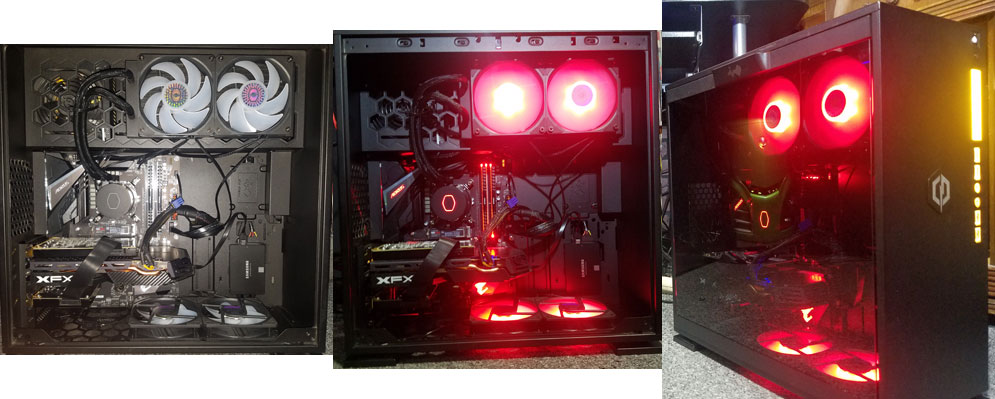
As we are unplugging it he says, “Hey, I have another video card.” He went in the house and came out with a GeForce GTX 960 and said, “You got a use for it? Give me 20 bucks?” So, I get all this for $745. I’m amazed at the case, it’s an IN WIN 303C BLACK Black SECC / Tempered Glass ATX Mid Tower Computer Case and it’s better than anything I’ve got. I decide on the way home my main PC is getting transferred over to this.
I get it home and pop the 1080TI into my rig, play with the MSI Afterburner utility, and run a single 3Dmark benchmark hitting 10002 out of the gate. The score on my XFX Radeon RX 580 GTS Black Edition was 4979. I box the 1080TI and put it on Craigslist for $650. It sold in one day.
This nets my purchase of everything else at $95!
Step 2:
At Amazon I pick up a GIGABYTE Z390 UD motherboard for $120, Sound Blaster Z Sound Card on sale for $80, 16GB (2×8) Corsair Vengeance RAM for $80, Crucial RAM 16GB (2x8GB) for $58, Samsung 970 EVO Plus SSD 500GB M.2 NVMe at $85, Corsair H60 water cooler for $70.
2 back-lit keyboards for approx. $40: Mafiti RK100 3 Color LED and a VictSing RGB keyboard (I have 3 of these).
***edit 05FEB2010 – Got a better motherboard off Craigslist. The MSI is on the shelf for now. New motherboard is the Asus Z170-A.
Via ebay I got an i7-7700 and a MSI B150A GAMING PRO*** motherboard for about $300. I wanted this motherboard because it is semi-modern yet still has PCI slots. I want to put my old Sound Blaster X-FI Fatal1ty which to this day is my all-time favorite sound card (Creative drivers not withstanding).
Back in December I bought a Rosewill Zircon T ATX Mid Tower & Rosewill 450 watt80+ Bronze PSU for $65 on sale because it was too good a deal to pass up.
Also, a few months ago on Craigslist I picked up a Dell Ultra HD 4K 24-inch Monitor for an astounding $100. I rolled up out front and saw his DS vet sticker on his truck. We had a good chat and I got a top end monitor.
Total
New expenses: 95 + 120 + 80 + 80 + 58 + 85 + 70 + 40 + 300 + 65 + 100 = 1,093
3 “new” computers: 1093 ÷ 3 = 364.3333333333333
Plus a new case for my main PC.
Everything else I’ve got from stripping down my old systems or were left over from upgrading.
The new lineup:
| Multimedia 1 | Workout A/V | Wife’s PC | |
| CPU | i7-8700k | i7-7700k | i7-7700 |
| Motherboard | Gigabyte Z390 UD | MSI B150A GAMING PRO | MSI Z270-A PRO |
| Memory | 16GB Crucial | 16GB Corsair | 32GB Adata |
| GPU | XFX Radeon RX 480 8GB | XFX Radeon DD R9-270X 4GB | GeForce GTX 960 4GB |
| Drives | Samsung NVMe 970 EVO Plus 250GB Samsung SSD 850 PRO 256GB Samsung SSD 850 EVO 250GB Blueray |
Samsung 870 EVO 250GB WD Black 5TB |
Samsung NVMe 970 EVO Plus 500GB WD Blue 500GB SSD Toshiba 3TB SATA |
| Network | Gigabit Ethernet | Gigabit Ethernet | Gigabit Ethernet |
| Audio | Sound Blaster Z | Sound Blaster X-FI Fatal1ty | Realtek |
| PSU | Corsair CZ550M | Seasonic SSR-650FX | 800 watt 80+ Gold |
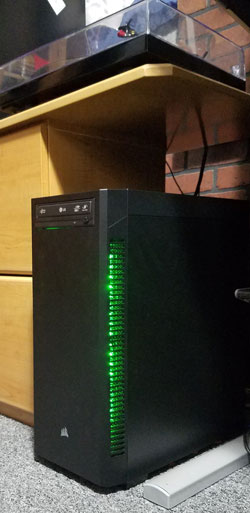
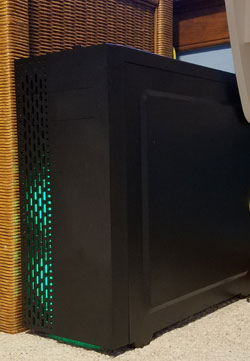
| Case | Corsair 110Q | Corsair Carbide Series SPEC-02 | Rosewill Zircon T |
| Cooling | Corsair H60 | Corsair H80i | Generic Water Cooler |
| OS | Win10 Pro | Win10 Pro | Win10 Pro |
 |
 |
 |
New pc for my main rig:
That’s a gnarly looking setup. Nice going!
OMG! You’re now ‘officially’ a plugger, a bonafide dumpster diving garage sale phenom. LOL
Who knew that COVID could actually have a silver lining by driving prices up to ridiculous valuations with all the WFH troopers? Forget recycling cans and bottles, you could make some serious jack on the side by reclaiming systems with a nifty profit margin. And you’re saving the environment from toxic waste!
We won’t tell your wife about your secret stash…….
No kiddin’ though, used to do that as a kid. At one time when I was a kid I had 4 small black & white TVs that just needed a little fixing.
So I didn’t remember any mention of USB-C? I’ve been thinking about adding a multi-port USB C card to my rig (I’ve got iPad & iPhone)., A fair number of external SSD’s are using USB-C.
I don’t currently have anything that uses it (the mini). Don’t do Apple.
Wow that’s some mighty fine dealin’ right there. On a side note on video cards. I remember at one time they were overpriced because of cryptocurrency mining. Is this the reason today?
That and a lot of other things.
Bad News: Graphics Card Prices Are Skyrocketing And There’s No End In Sight
“Our new MSRP reflects increases in cost for components. operating costs, and logistical activities plus a continuation of import tariffs.”
Memory prices are about to rise: Graphics Card Prices Could Soar Amid Increasing Memory Prices