
• Skip to primary navigation
  • Skip to main content
  • Skip to primary sidebar

TweakHound

Computer stuff...

  • Home
  • Windows XP
  • Windows Vista
  • Windows 7
  • Windows 8
  • Windows 10
  • Windows 11
  • Linux
  • Tweak Guides
  • Site Info
    • About
    • About Me
    • TweakHound’s World
    • Contact
    • My Computers
    • Old Articles
    • Privacy Policy
    • Old Index
    • Advanced Search

Enroll In Windows 10 ESU

September 20, 2025, 12:27(EDT) By Eric (a.k.a. TweakHound) 3 Comments

The Windows 10 ESU enrollment notification finally showed up on my main computer. I’ll show you how the official process went for me and a way to force enrollment using only a local account.

I urge you to make a full system image backup before starting this process.
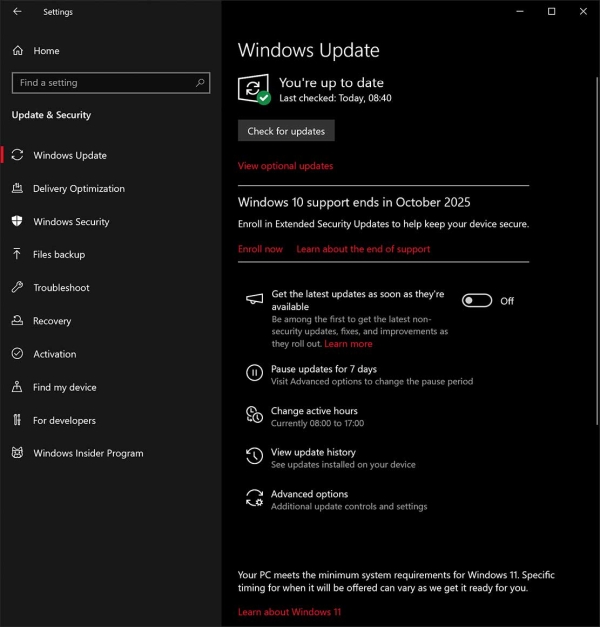
Check Windows Update > click Enroll Now
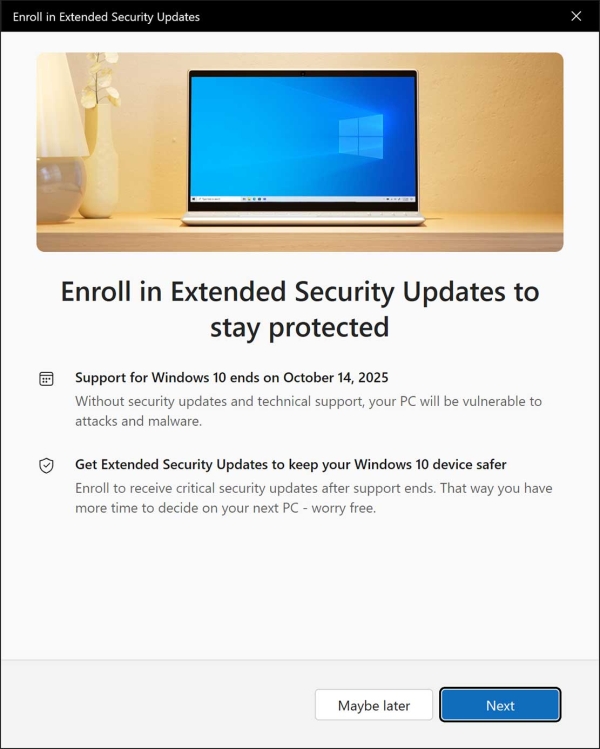
Click Next
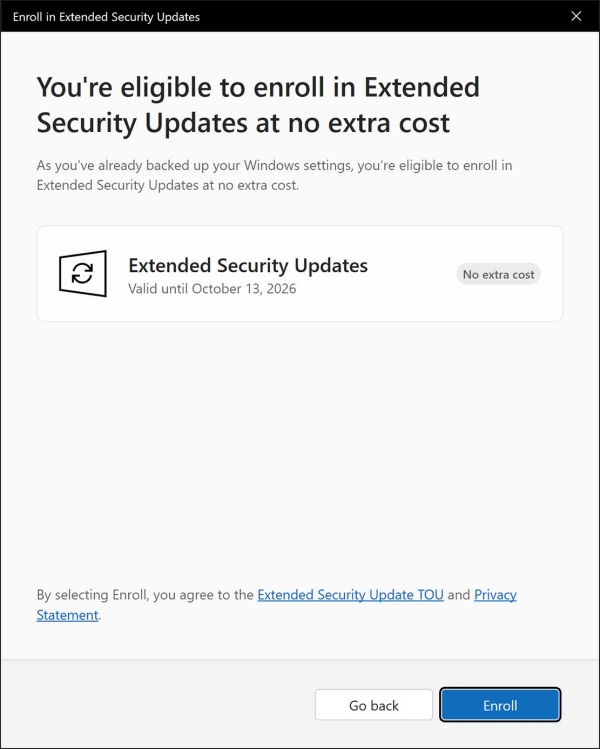
Click Enroll > You’ll  have to log in to your Microsoft Account, you may have to backup some stuff.
That’s it. Windows Update should show you’re enrolled in ESU.
——————————–
***EDIT 13OCT2025
Microsoft seems committed to closing every avenue it can for installing Win11 under a local account. The bypass that the program below no longer works…
“UPDATE 2025-10-12:
– Enrollment without Microsoft account is not possible anymore as of 2025-10-08
– Acquire license without enrollment no longer works as well
– Already enrolled devices with Local account or License should not be affected by this change
”

Wanna bypass all that and get enrolled using a local account?
Understand this is all “unofficial”. Please BACK UP using a system image BEFORE running this.
The Win10 ESU enrollment option had not showed up on my secondary PC.
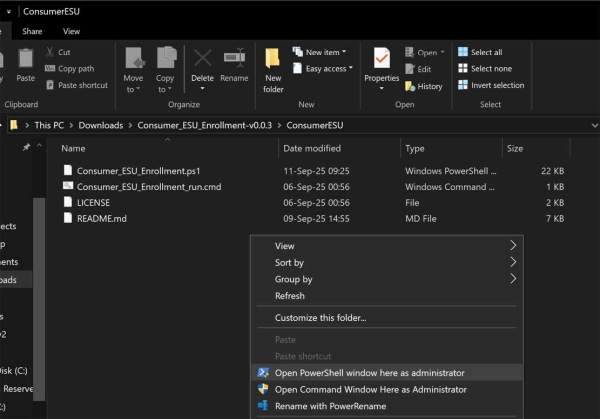
There is a script overt at GitHub that lets you use command line or PowerShell to enroll in Win10 ESU: https://github.com/abbodi1406/ConsumerESU
The instructions are all there. I used PowerShell and the script worked perfectly.
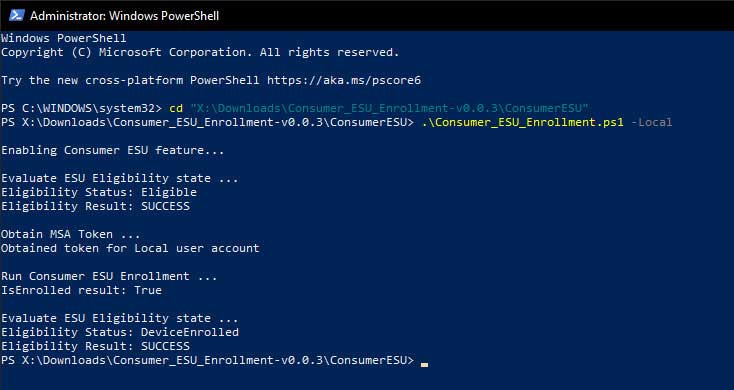
If you like you can add “Open PowerShell window here as administrator” to your right-click menu.
-END-

Tagged With: How-To's, This Site, Windows 10

Reader Interactions

Comments

  1. Tim says

    September 23, 2025, 20:32(EDT) at 20:32

    Thanks for the tip(s) Eric – good to know to give our Win10’s a little more life….

    Reply
  2. johnny says

    October 19, 2025, 01:12(EDT) at 01:12

    it didnt work. after running the program after installing the update…..
    ==== ERROR ====

    ConsumerESUMgr.dll is not detected.
    Make sure to install update 2025-06 KB5061087 (19045.6036) or later.

    Press Enter to exit:

    Reply
    • Eric (a.k.a. TweakHound) says

      October 19, 2025, 09:55(EDT) at 09:55

      See the section of this article “***EDIT 13OCT2025”.
      Also you can post issues here: https://github.com/abbodi1406/ConsumerESU/issues

      Reply

Comment Policy:
-You do not need an account or login to anything to comment.
-Comments are not posted until moderated and are filtered using Akismet among other things.
-NO POLITICS (unless post is political in nature.)
-Comments are closed after a time to cut down on spam.
-In addition the following comments will be deleted: trolling, posted in the wrong topic, bashing other people, profanity, links to adult or other questionable sites.
-Once you click submit your IP address is recorded (it is NOT posted...unless, perhaps, you violate the rules). FYI - All sites do this, I just tell you about it.
-The comment section is not a way to contact me. See here for that.
-In the end it is my site and not a public forum. I will decide what I do and do not want posted here.

Leave a Reply Cancel reply

Your email address will not be published. Required fields are marked *

This site uses Akismet to reduce spam. Learn how your comment data is processed.

Primary Sidebar

Popular Posts

Tweaking Windows 10

Software I Use – 2021 Edition

Timer Tweaks Benchmarked

Win10 – Get Auto-Login Back

Recent Posts

  • WACUP 1.99.41.22982 Released
  • Wednesday News
  • O&O ShutUp10 Updated
  • Wednesday News
  • Thursday News
  • Patch Tuesday
  • Installing or Upgrading to Windows 11
  • Microsoft, “Tips to improve PC performance in Windows”
  • Weekend News
  • Enroll In Windows 10 ESU
buywin10th2

Tags

  • Android
  • Backup
  • Beer
  • Computer Hardware
  • Computer News
  • Cool Tools
  • Freeware
  • How-To's
  • Linux
  • Off Topic
  • openSUSE
  • Playlists
  • Privacy
  • Security
  • Software
  • This Site
  • vacation
  • Veterans
  • Windows 10
  • Windows 11
  • Windows 7
  • Windows 8
  • Windows Vista
  • Windows XP

Catagories

  • Android
  • Backup
  • Beer
  • Computer Hardware
  • Computer News
  • Cool Tools
  • Freeware
  • Freeware Machines
  • How-To's
  • Linux
  • News From The Web
  • Off Topic
  • openSUSE
  • Privacy
  • Security
  • Software
  • Tweak Guides
  • Veterans
  • Windows
  • Windows 10
  • Windows 11
  • Windows 7
  • Windows 8
  • Windows Vista
  • Windows XP

TweakHound - Optimize Your Computing Experience! TweakHound - Optimize Your Computing Experience!

Copyright 2002-2025 by Eric Vaughan All material contain here is the property of the materials owner. Windows, Windows XP, Windows Vista, Windows Seven, Windows 8, Windows 10, Windows 11, Microsoft, and all associated logos are trademarks/property of Microsoft. You may not use or copy any material from tweakhound.com without expressed written permission. Hotlinking to any material within this site is forbidden. Privacy Policy