
• Skip to primary navigation
  • Skip to main content
  • Skip to primary sidebar

TweakHound

Computer stuff...

  • Home
  • Windows XP
  • Windows Vista
  • Windows 7
  • Windows 8
  • Windows 10
  • Windows 11
  • Linux
  • Tweak Guides
  • Site Info
    • About
    • About Me
    • TweakHound’s World
    • Contact
    • My Computers
    • Old Articles
    • Privacy Policy
    • Old Index
    • Advanced Search

Using BleachBit

January 25, 2026, 09:11(EST) By Eric (a.k.a. TweakHound) Leave a Comment

Initially created for Linux computers, this freeware disk cleaner now does Windows and macOS too. You may recall BleachBit was infamously used to wipe Hillary Clinton’s emails back in 2015. I use BleachBit on both Windows and Linux.

As I stated in Windows 11 Disk Cleanup,

On modern systems with SSD’s, cleaning your drives IS NOT A PERFORMANCE TWEAK unless your drive is near full. SSDs do not get fragmented and Windows not only periodically cleans system files but also automatically optimizes drives (TRIM).
You clean a drive to reduce its size resulting in quicker backup and recovery and a smaller image.

I would add that with 3rd party cleaners you use it to help with privacy and clearing cache, history, cookies etc. may help with the performance of your web browsers.
BleachBit Home | Download
If you are on a Linux system most distros have BleachBit in their repos albeit sometimes not the latest version. Although I will try the download from the BB download page it can often be wonky and throw errors.
On Windows I use the portable version. To update I download the latest version and copy paste everything EXCEPT the BleachBit.ini to the old folder.
BleachBit will as for admin rights on Windows. This is OK. You can also “Run as administrator”. Under Linux BleachBit can be run as root but I’ve never found a reason to do that.

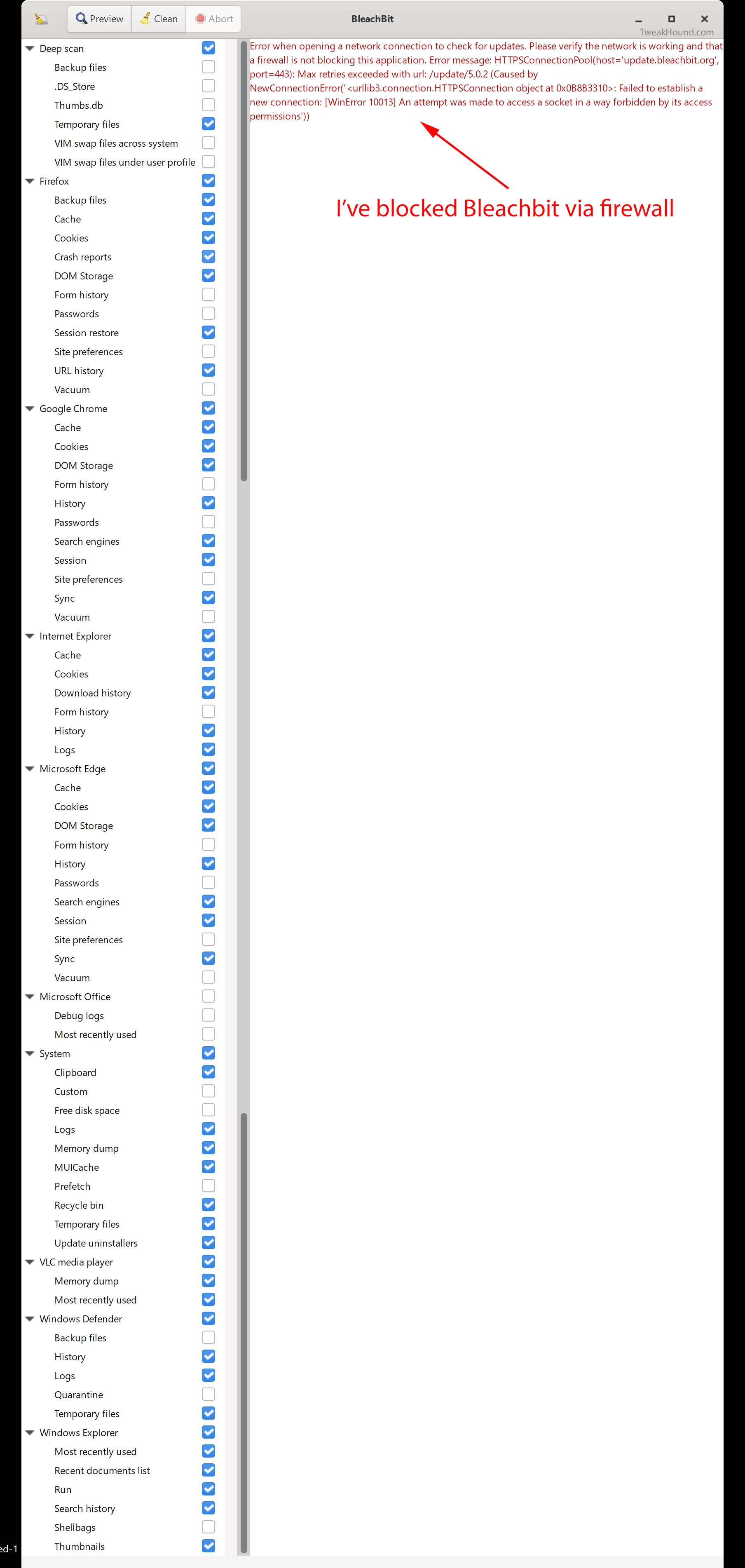
Windows
Here are the settings I use. You can download and then import my configuration file (BleachBit.ini) here:
https://www.tweakhound.com/files/BleachBit.ini . Copy/paste into your BleachBit folder.
Click for full size.
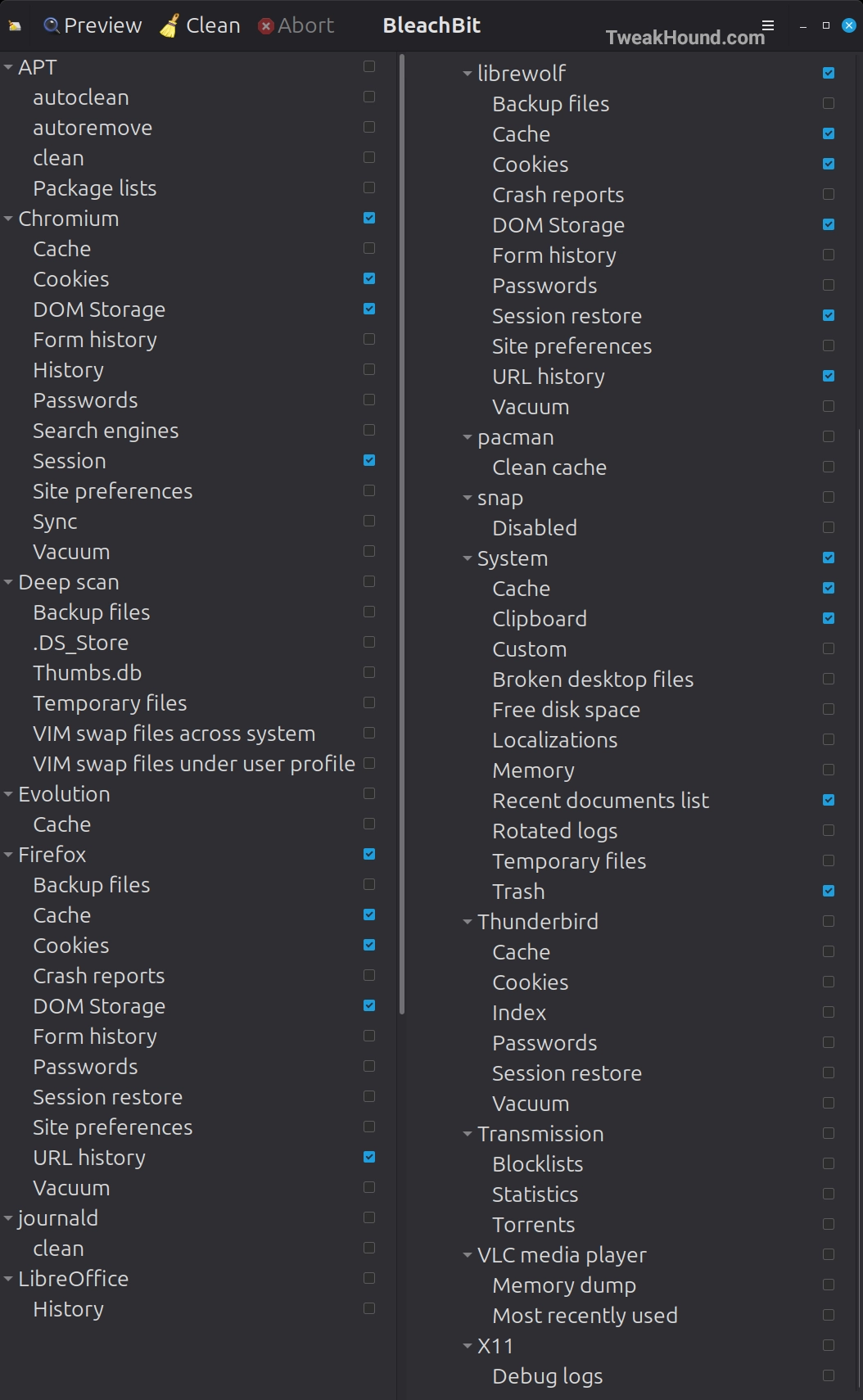
Linux
Click for full size.
-END-

Tagged With: Cool Tools, How-To's, This Site, Windows 10, Windows 11

Reader Interactions

Comment Policy:
-You do not need an account or login to anything to comment.
-Comments are not posted until moderated and are filtered using Akismet among other things.
-NO POLITICS (unless post is political in nature.)
-Comments are closed after a time to cut down on spam.
-In addition the following comments will be deleted: trolling, posted in the wrong topic, bashing other people, profanity, links to adult or other questionable sites.
-Once you click submit your IP address is recorded (it is NOT posted...unless, perhaps, you violate the rules). FYI - All sites do this, I just tell you about it.
-The comment section is not a way to contact me. See here for that.
-In the end it is my site and not a public forum. I will decide what I do and do not want posted here.

Leave a Reply Cancel reply

Your email address will not be published. Required fields are marked *

This site uses Akismet to reduce spam. Learn how your comment data is processed.

Primary Sidebar

Popular Posts

Tweaking Windows 10

Software I Use – 2021 Edition

Timer Tweaks Benchmarked

Win10 – Get Auto-Login Back

Recent Posts

  • Patch Tuesday
  • Using Wise Disk Cleaner
  • Using Cleanmgr+
  • O&O ShutUp10++ 2.2.1024
  • Friday News
  • Windows 11 OOB Update
  • Using BleachBit
  • Weekend News
  • Windows 11 – Cleaning WinSxS
  • Windows 11 Disk Cleanup
buywin10th2

Tags

  • Android
  • Backup
  • Beer
  • Computer Hardware
  • Computer News
  • Cool Tools
  • Freeware
  • How-To's
  • Linux
  • Off Topic
  • openSUSE
  • Playlists
  • Privacy
  • Security
  • Software
  • This Site
  • vacation
  • Veterans
  • Windows 10
  • Windows 11
  • Windows 7
  • Windows 8
  • Windows Vista
  • Windows XP

Catagories

  • Android
  • Backup
  • Beer
  • Computer Hardware
  • Computer News
  • Cool Tools
  • Freeware
  • Freeware Machines
  • How-To's
  • Linux
  • News From The Web
  • Off Topic
  • openSUSE
  • Privacy
  • Security
  • Software
  • Tweak Guides
  • Veterans
  • Windows
  • Windows 10
  • Windows 11
  • Windows 7
  • Windows 8
  • Windows Vista
  • Windows XP

TweakHound - Optimize Your Computing Experience! TweakHound - Optimize Your Computing Experience!

Copyright 2002-2025 by Eric Vaughan All material contain here is the property of the materials owner. Windows, Windows XP, Windows Vista, Windows Seven, Windows 8, Windows 10, Windows 11, Microsoft, and all associated logos are trademarks/property of Microsoft. You may not use or copy any material from tweakhound.com without expressed written permission. Hotlinking to any material within this site is forbidden. Privacy Policy