CCleaner is a freeware system optimization and privacy tool. It removes unused files from your system – allowing Windows to run faster and freeing up valuable hard disk space. It also cleans traces of your online activities such as your Internet history.
[25th March 2008]
CCleaner v2.06
– Added Google Firefox Toolbar history cleaning.
– Winapp.ini is now embedded in the main EXE.
– Added ability to override default embedded INI files with:
winsys1.ini, winreg1.ini and winapp1.ini.
– Updated ability to append to default embedded INI files with:
winsys2.ini, winreg2.ini and winapp2.ini.
– Updated system info code to support Win2k8.
– Improved IE History cleaning with .DAT files.
– Improved accessibility features of treeview control.
– Removal of version history from About screen.
– Options section checkboxes resized to fit caption text.
– GUI tweaks including Piriform logo change.
– Minor performance improvements.
Computer News
Firefox 2.0.0.13 Hits Mirrors
Not ‘official’ yet and no release notes as of this post.
Download English (U.S.)
Other OS’s and languages. (available when official, or change links on page to 2.0.0.13)
Several New Downloads At MajorGeeks
***Must have free downloads updated
jv16 PowerTools 2008 1.8.0.449
Realtek High Definition Audio 1.89 for 2K\XP\03 for Vista
Nero 8 Ultra Edition 8.3.2.1
vLite 1.1.1
Random Musings, 19 March, 2008
I’ve installed the official Vista SP1 via Windows Update on 4 machines in the last 2 days. All installs went fine. My vote for SP1 is Thumbs Up.
I’m working on a revision of the Vista tweak guide. Updated for SP1 of course, and a few additions and clarifications. Got any tips you think should be in there? Please post it in this post’s comments.
Here are some articles on Vista SP1 from around the web:
It’s Here! Windows Vista Service Pack 1 Arrives (Paul Thurrott)
Want Vista SP1? Here’s what to expect (Ed Bott)
Seems like some folks are having issues:
Vista SP1 horror stories start to appear (pcpro)
Windows Vista SP1 Wreaks Havoc On Some PCs, Users Complain (infoweek)
Windows Vista SP1 Meeting Sour Reception In Places (where microsoft can never do anything right)
A lot of you guys that stop by here are Geeks and I’m continually impressed by your knowledge and contributions. If you’ve ever wanted to get involved in a tech site, Neowin is looking for help: Write for Neowin 2008
New Poll Up, Vista Users:Vista Service Pack 1?
Thumbs Up or Thumbs Down?
Comments???
Vista SP1 Cleanup
Just thought I would offer this tip. Once you’ve installed SP1 and everything is running well, AND you are absolutely 100% sure you do not want to uninstall it, AND you have backed up your system…
You can run this command vsp1cln.exe. This will allow you to reclaim significant disk space.
To do this press the Windows + R keys and type vsp1cln.exe in the run box.
or if you prefer using the command line:
press the Windows + R keys and type cmd then type vsp1cln.exe.
More info from Microsoft:
Windows Vista SP1 File Removal tool (Vsp1cln.exe). Vsp1cln.exe is an optional tool that you can run after you install SP1. This tool removes older versions of components that have been updated in SP1, which are stored during the installation in case you need to uninstall SP1 later. Saving these older components increases the amount of disk space that is used. Typically, you should run Vsp1cln.exe if you want to reclaim this disk space after applying SP1 and if you will not need to uninstall SP1. Note, however, that you cannot uninstall SP1 after you run this tool. You can use this tool both online and offline, but you must have SP1 installed and you must use the correct version of the tool. If you are running this file on an offline image, you should use the Vsp1cln.exe included in the Windows OPK or AIK. However, if you are running this file online (on a computer that you are booted into), you should use the Vsp1cln.exe file located at %windir%\system32\vsp1cln.exe.
Please do not whine at me if you run into problems and you haven’t backed up your computer!
Vista SP1 Is Out
This is now available via Windows Update (it was only 66.9 MB on my machine via Windows Update).
Full file downloads:
Windows Vista Service Pack 1 Five Language Standalone (KB936330) 434.5 MB
Windows Vista Service Pack 1 Five Language Standalone for x64-based Systems (KB936330) 726.5 MB
If you don’t see it in Windows Update by days end, see:
Windows Vista Service Pack 1 is not available for installation from Windows Update and is not offered by Automatic Updates
Updated release notes:
Release Notes for Windows Vista Service Pack 1 (v3.2, 3/18/2008)
Also see the Windows Vista Team Blog post:
Windows Vista SP1 Released to Windows Update
eWEEK Survey: Vista? Gimme XP
Interesting survey results by eWeek Microsoft Watch. Some selected quotes:
…The XP ecosystem is developed and holds back Vista adoption, with some businesses actually going back to XP from its successor. Many respondents wrote in the survey that their main reason for adopting Vista would be Microsoft’s ending XP support…
…Thirty-seven percent of all businesses—48 percent for those with 10-999 employees—do not plan to “implement” Windows Vista within two years. Thirty-four percent—40 percent for businesses with 1,000 or more employees—are unsure…
…Mac OS X is doing surprising well as primary operating system among businesses between 10 and 99 employees—15 percent!…
…The main driver for Vista adoption isn’t some newfangled feature but that the operating system comes preinstalled on the hardware (34 percent of respondents)…
Creative Sound Blaster X-Fi Driver XP\Vista 2.15.0006
Fixes:
* Resolves the issue for systems with 4 GB of RAM.
* Resolves the Digital I/O detection issue when restarting your computer.
More info and download at MajorGeeks.
Speedtest.net
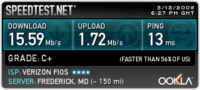
I haven’t been there in quite some time so I’ve no idea when it changed, but…
Speedtest.net has improved quite a bit and has an awesome looking interface.
What is Speedtest.net?
Speedtest.net is a free broadband speed test with servers located all over the world. Compare your results with others and easily share them.
Here is my result. What’s your internet speed?
