A reader was confused by all the steps in Microsoft’s How to enable and disable SMBv1, SMBv2, and SMBv3 in Windows and Windows Server.
Should he use PowerShell, Registry Editor, Group Policy? Should he disable it on Client or Server or both?
Because it is a security risk, it is important to ditch SMB1 on all platforms.
You should get rid of both the client and server.
In Windows 7 I do this via PowerShell. It is fast and easy.
You must run PowerShell as Admin.
Press the Windows + R keys > type powershell (press the Enter key)
> copy and paste the following command:
Set-ItemProperty -Path “HKLM:\SYSTEM\CurrentControlSet\Services\LanmanServer\Parameters” SMB1 -Type DWORD -Value 0 -Force
> now press the Enter key
> copy and paste the following command: sc.exe config lanmanworkstation depend= bowser/mrxsmb20/nsi
> now press the Enter key
> copy and paste the following command: sc.exe config mrxsmb10 start= disabled
> now press the Enter key > Reboot

———-
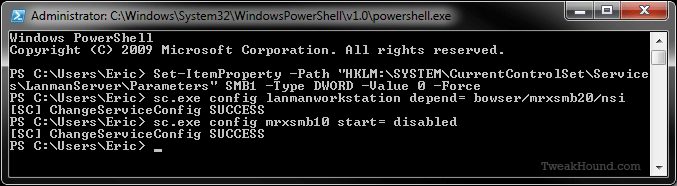
Windows PowerShell
Copyright (C) 2009 Microsoft Corporation. All rights reserved.
PS C:\Users\Eric> Set-ItemProperty -Path “HKLM:\SYSTEM\CurrentControlSet\Service
s\LanmanServer\Parameters” SMB1 -Type DWORD -Value 0 -Force
PS C:\Users\Eric> sc.exe config lanmanworkstation depend= bowser/mrxsmb20/nsi
[SC] ChangeServiceConfig SUCCESS
PS C:\Users\Eric> sc.exe config mrxsmb10 start= disabled
[SC] ChangeServiceConfig SUCCESS
PS C:\Users\Eric>
———-