
• Skip to primary navigation
  • Skip to main content
  • Skip to primary sidebar

TweakHound

Computer stuff...

  • Home
  • Windows XP
  • Windows Vista
  • Windows 7
  • Windows 8
  • Windows 10
  • Windows 11
  • Linux
  • Tweak Guides
  • Site Info
    • About
    • About Me
    • TweakHound’s World
    • Contact
    • My Computers
    • Old Articles
    • Privacy Policy
    • Old Index
    • Advanced Search

Get Rid Of SMB1 In Windows 7

win7orb

May 22, 2017, 07:33(EDT) By Eric (a.k.a. TweakHound)

A reader was confused by all the steps in Microsoft’s How to enable and disable SMBv1, SMBv2, and SMBv3 in Windows and Windows Server.
Should he use PowerShell, Registry Editor, Group Policy? Should he disable it on Client or Server or both?
Because it is a security risk, it is important to ditch SMB1 on all platforms.
You should get rid of both the client and server.
In Windows 7 I do this via PowerShell. It is fast and easy.
You must run PowerShell as Admin.

Press the Windows + R keys > type powershell (press the Enter key)
> copy and paste the following command:
Set-ItemProperty -Path “HKLM:\SYSTEM\CurrentControlSet\Services\LanmanServer\Parameters” SMB1 -Type DWORD -Value 0 -Force
> now press the Enter key
> copy and paste the following command: sc.exe config lanmanworkstation depend= bowser/mrxsmb20/nsi
> now press the Enter key
> copy and paste the following command: sc.exe config mrxsmb10 start= disabled
> now press the Enter key > Reboot
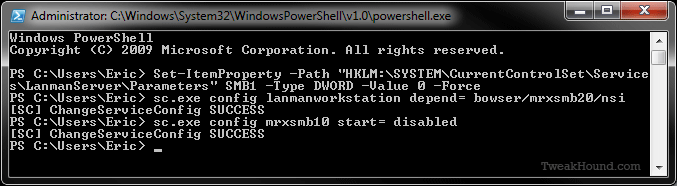
———-
Windows PowerShell
Copyright (C) 2009 Microsoft Corporation. All rights reserved.

PS C:\Users\Eric> Set-ItemProperty -Path “HKLM:\SYSTEM\CurrentControlSet\Service
s\LanmanServer\Parameters” SMB1 -Type DWORD -Value 0 -Force
PS C:\Users\Eric> sc.exe config lanmanworkstation depend= bowser/mrxsmb20/nsi
[SC] ChangeServiceConfig SUCCESS
PS C:\Users\Eric> sc.exe config mrxsmb10 start= disabled
[SC] ChangeServiceConfig SUCCESS
PS C:\Users\Eric>
———-

Tagged With: How-To's, Security, Windows 7

Reader Interactions

Comments

  1. Calvin says

    May 22, 2017, 11:59(EDT) at 11:59

    Thanks, Eric. I must admit that I had the same questions/confusion.

    Calvin

  2. Tim says

    May 22, 2017, 13:36(EDT) at 13:36

    I was unclear on the first part of that(Registry) and am not familiar with PowerShell. Thanks for clarifying the proper sequence and commands with instructions.

  3. BW says

    May 22, 2017, 15:05(EDT) at 15:05

    I thought you could just uninstall SMB1 from Programs and Features?

    • Eric (a.k.a. TweakHound) says

      May 22, 2017, 15:09(EDT) at 15:09

      Not in Windows 7.

      • Joshua says

        May 22, 2017, 22:05(EDT) at 22:05

        Thank you, Seven is now good also.

  4. Calvin says

    May 24, 2017, 08:01(EDT) at 08:01

    Does getting rid of SMB1 in Win 7 have any affect on using the “run” command to access a HHD attached to the router. When I use Run \\192.168.0.1 as before I now get the message “The specified server cannot perform the requested operation”. When I checked the start properties box I noticed that “Run” was no longer checked. I checked the box but still no luck. Currently at a loss for what else could have caused this.

  5. jeremy says

    June 14, 2017, 15:46(EDT) at 15:46

    I, like Calvin was not aware this would disable samba-shares completely. I think I cannot do without it. What’s the command to re-enable it? I use samba shares for easy filesharing on my home network between windows and linux machines. Or is there a a simple (gui + drag and drop based) alternative for linux and windows machines?

    • Eric (a.k.a. TweakHound) says

      June 14, 2017, 16:03(EDT) at 16:03

      https://www.cyberciti.biz/faq/how-to-configure-samba-to-use-smbv2-and-disable-smbv1-on-linux-or-unix/

      • Eric (a.k.a. TweakHound) says

        June 14, 2017, 16:16(EDT) at 16:16

        but if you insist on keeping smb1:
        https://support.microsoft.com/en-us/help/2696547/how-to-enable-and-disable-smbv1-smbv2-and-smbv3-in-windows-and-windows-server

Primary Sidebar

Popular Articles

Windows 10

Tweaking Windows 10

My Windows 10 Tweaks

Windows 10 Privacy Settings

Win10 Diagnostics Tracking Service Gone?

Windows 10 Advanced Disk Cleanup

Win10 Customize Installation Options

Windows 10 Dark Theme

Win10 Wallpapers, Graphics, etc.

All Windows 10 Articles

Windows 8

Tweaking Windows 8.1

Advice On Installing Windows 8.1

Clean Install Windows 8.1

Cleanup After Windows 8.1 Upgrade

Create Shutdown, Restart, Logoff Tiles For Windows 8

Tweaking Windows 8

Install Windows 8 – Clean Install With Upgrade Media

Install Windows 8 – Upgrade

Windows 8 – Cleaning Up After You’ve Upgraded

Windows 8 Freeware Machine

Windows 8 SSD Settings, Etc.

How To Resize Your Windows 8 Partition

Create Windows 8 Recovery Media

Windows 8 – Elevated Command Prompt

How To Fix The Windows Bootloader

Windows 7

Installing Windows 7

Tweaking Windows 7

Windows 7 Diagnostics Tracking Service

The Windows 7 Freeware Machine

The Windows 7 Pagefile And Running Without One

Bad Tweaks

SSD Tweak Guide (sort of)

The noguiboot (no GUI Boot) Tweak

NtfsMemoryUsage=2 Tweak

More Windows 7 articles here.

Windows Vista

Installing Windows Vista

Tweaking Windows Vista

More Windows Vista articles here.

Windows XP

eXPired - The Last Windows XP Guide You'll Ever Need

The Right Way To Install Windows XP

Super XP Tweaking Guide

The Freeware XP Machine

Bad Tweaks

More XP Articles here and here.

Backup

Backup Article Greatest Hits – Vol. 1

Other

Cataloging Your Music Collection

Finding Good Album Art

Converting Vinyl Records To Digital Music – A Non-Audiophiles Guide

Windows All-In-One Recovery Flash Drive

SSD Tweak Guide (sort of)

Raidmax Blackstorm Case Review

Disk Partitioning

Ditch Those CD's! A Guide To Using USB Flash Drives

Checking Your Disks For Problems

Bad Tweaks

More articles here

Tags

Android Backup Beer Computer Hardware Computer News Cool Tools Freeware How-To's Linux Off Topic openSUSE Playlists Privacy Security Software This Site vacation Veterans Windows 7 Windows 8 Windows 10 Windows 11 Windows Vista Windows XP

TweakHound - Optimize Your Computing Experience! TweakHound - Optimize Your Computing Experience!

Copyright 2002-2025 by Eric Vaughan All material contain here is the property of the materials owner. Windows, Windows XP, Windows Vista, Windows Seven, Windows 8, Windows 10, Windows 11, Microsoft, and all associated logos are trademarks/property of Microsoft. You may not use or copy any material from tweakhound.com without expressed written permission. Hotlinking to any material within this site is forbidden. Privacy Policy