
• Skip to primary navigation
  • Skip to main content
  • Skip to primary sidebar

TweakHound

Computer stuff...

  • Home
  • Windows XP
  • Windows Vista
  • Windows 7
  • Windows 8
  • Windows 10
  • Windows 11
  • Linux
  • Tweak Guides
  • Site Info
    • About
    • About Me
    • TweakHound’s World
    • Contact
    • My Computers
    • Old Articles
    • Privacy Policy
    • Old Index
    • Advanced Search

Acronis True Image 2015 Released

acronislogo

September 17, 2014, 17:53(EDT) By Eric (a.k.a. TweakHound)

acronislogoAcronis True Image 2015 is out.
(press release)
It is currently available for existing users only.
Forum post:”Acronis True Image 2015 is not fully available for sale on website yet.
All product versions will be available for sale on website on September 23 for EN, FR, DE, RU, JP.
”
Now according to Acronis you can buy 2014 now and get 2015 free on Sept. 23rd.
If that is what you are going to do please go here so I can get commission 😀
Anyway, no review here (wouldn’t be ethical as I am an affiliate). Normally, I do not install True Image I use it from the boot disk.
However, I did install TI2015 to test it out. It is feature rich for those who want it. I prefer the boot disk.
IMHO, if you currently use TI2013/TI2014 and you do not need the new features then this update is not a “must have”.
FYI, aside from the initial boot screen the boot disk is unchanged graphically/functionally but does use an updated kernel.
I’ve uploaded the user manuals to Dropbox for those who are interested:
ATI2015_userguide_en-US.pdf
AcronisUniversalRestore_userguide_en-US.pdf (this is now included with True Image)

What’s new in this version:
– Brand new UI—Creating a backup is straightforward and navigation is very user friendly.
– Entire PC backup—To back up your computer, just click on “Entire PC” in backup source, and we will select your internal drives for you. We still have a more advanced option for backup source, in case you would like to backup certain partitions.
– A new joint Acronis Bootable Media builder—Just click on it and select what kind of bootable media you need: Acronis Rescue Media or WinPE.
– New simple way of WinPE media creation—Once you select it in the Acronis Bootable Media builder, we create it for you; and in case AIK/ADK is required – we will suggest the correct version.
– New option to send feedback right from the product—With just one click, you can send system report information and your feedback directly to the Acronis Development team
– New offer: Acronis True Image Unlimited with unlimited Cloud storage.

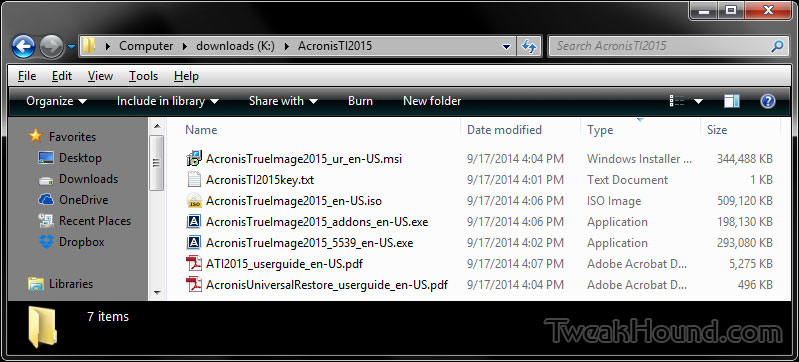
Here is a screen shot with all the available files (the text file is where I saved my key):
ti2015_downloads

Tagged With: Software

Primary Sidebar

Popular Posts

Tweaking Windows 10

Software I Use – 2021 Edition

Timer Tweaks Benchmarked

Win10 – Get Auto-Login Back

Recent Posts

  • Patch Tuesday
  • Using Wise Disk Cleaner
  • Using Cleanmgr+
  • O&O ShutUp10++ 2.2.1024
  • Friday News
  • Windows 11 OOB Update
  • Using BleachBit
  • Weekend News
  • Windows 11 – Cleaning WinSxS
  • Windows 11 Disk Cleanup
buywin10th2

Tags

  • Android
  • Backup
  • Beer
  • Computer Hardware
  • Computer News
  • Cool Tools
  • Freeware
  • How-To's
  • Linux
  • Off Topic
  • openSUSE
  • Playlists
  • Privacy
  • Security
  • Software
  • This Site
  • vacation
  • Veterans
  • Windows 10
  • Windows 11
  • Windows 7
  • Windows 8
  • Windows Vista
  • Windows XP

Catagories

  • Android
  • Backup
  • Beer
  • Computer Hardware
  • Computer News
  • Cool Tools
  • Freeware
  • Freeware Machines
  • How-To's
  • Linux
  • News From The Web
  • Off Topic
  • openSUSE
  • Privacy
  • Security
  • Software
  • Tweak Guides
  • Veterans
  • Windows
  • Windows 10
  • Windows 11
  • Windows 7
  • Windows 8
  • Windows Vista
  • Windows XP

TweakHound - Optimize Your Computing Experience! TweakHound - Optimize Your Computing Experience!

Copyright 2002-2025 by Eric Vaughan All material contain here is the property of the materials owner. Windows, Windows XP, Windows Vista, Windows Seven, Windows 8, Windows 10, Windows 11, Microsoft, and all associated logos are trademarks/property of Microsoft. You may not use or copy any material from tweakhound.com without expressed written permission. Hotlinking to any material within this site is forbidden. Privacy Policy