
• Skip to primary navigation
  • Skip to main content
  • Skip to primary sidebar

TweakHound

Computer stuff...

  • Home
  • Windows XP
  • Windows Vista
  • Windows 7
  • Windows 8
  • Windows 10
  • Windows 11
  • Linux
  • Tweak Guides
  • Site Info
    • About
    • About Me
    • TweakHound’s World
    • Contact
    • My Computers
    • Old Articles
    • Privacy Policy
    • Old Index
    • Advanced Search

Microsoft, Tanks Fer Nuttin

win10_logo

January 10, 2017, 15:02(EST) By Eric (a.k.a. TweakHound)


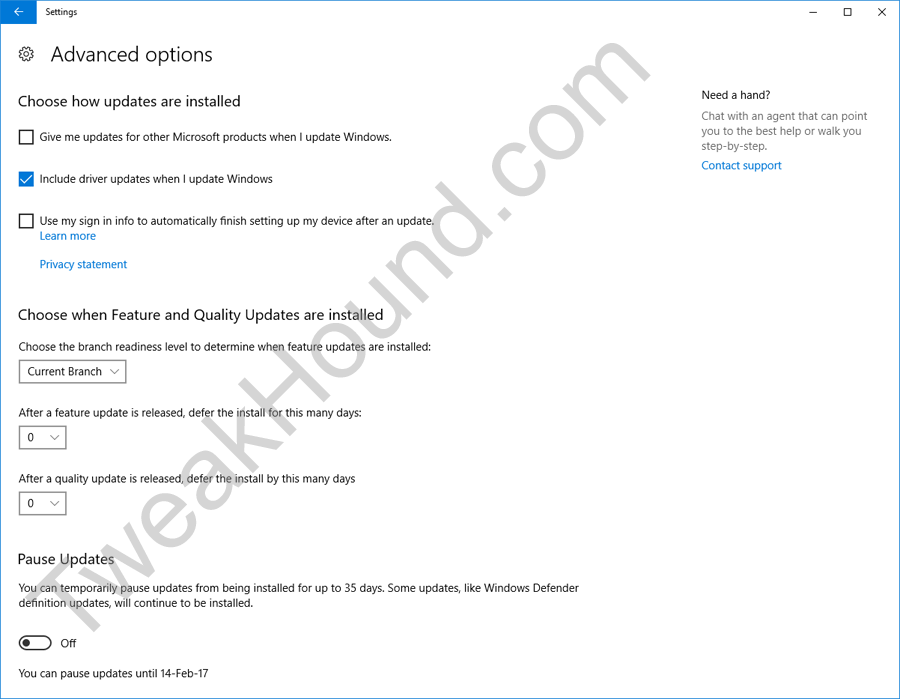
Lots of folks in the tech press are all excited that in the newest build of Win10 “you can pause Windows Updates”.
Except, this behavior/feature isn’t new and it only applies to non-Home versions of Win10. What has changed is that now this option is under Windows Update settings and you do not have to use Group Policy.
Curiously, at this time the Windows Update settings do not effect Group Policy settings even though the behavior is the same. How do I know? I checked. Changes in the Windows Update settings are not reflected in the Group Policy editor.
I had to search the registry to find the new keys. They are:
[HKEY_LOCAL_MACHINE\SOFTWARE\Microsoft\WindowsUpdate\UpdatePolicy\Settings]
“PausedQualityStatus”=dword:00000000
“PausedFeatureStatus”=dword:00000000

When using my computer as an Insider Build / Fast Ring, I’m finding this entire process buggy as hell. Pausing updates and the re-nabling them caused Win10 to endlessly and unsuccessfully check for updates until I rebooted.
Also, in other great news…
Some genius decided it would be a good idea to remove Control Panel from the Win+X menu.
But wait, there’s more!
That same genius removed the the ability to add desktop icons via Personalization settings.
Tagged With: Windows 10

Reader Interactions

Comments

  1. radosuaf says

    January 11, 2017, 04:42(EST) at 04:42

    I did a full image backup of my Windows 7 install yesterday (900 GB, damn, that took some time) in an attempt to install W10 and try to get accustomed to it but… Media Creation Tool didn’t recognise my USB flash drive :). Which was perfectly visible in the File Explorer naturally.
    That is an obvious sign I should stay out of this crap for some time at least…

Primary Sidebar

Popular Posts

Tweaking Windows 10

Software I Use – 2021 Edition

Timer Tweaks Benchmarked

Win10 – Get Auto-Login Back

Recent Posts

  • Patch Tuesday
  • Friday News
  • Patch Tuesday
  • Using Wise Disk Cleaner
  • Using Cleanmgr+
  • O&O ShutUp10++ 2.2.1024
  • Friday News
  • Windows 11 OOB Update
  • Using BleachBit
  • Weekend News
buywin10th2

Tags

  • Android
  • Backup
  • Beer
  • Computer Hardware
  • Computer News
  • Cool Tools
  • Freeware
  • How-To's
  • Linux
  • Off Topic
  • openSUSE
  • Playlists
  • Privacy
  • Security
  • Software
  • This Site
  • vacation
  • Veterans
  • Windows 10
  • Windows 11
  • Windows 7
  • Windows 8
  • Windows Vista
  • Windows XP

Catagories

  • Android
  • Backup
  • Beer
  • Computer Hardware
  • Computer News
  • Cool Tools
  • Freeware
  • Freeware Machines
  • How-To's
  • Linux
  • News From The Web
  • Off Topic
  • openSUSE
  • Privacy
  • Security
  • Software
  • Tweak Guides
  • Veterans
  • Windows
  • Windows 10
  • Windows 11
  • Windows 7
  • Windows 8
  • Windows Vista
  • Windows XP

TweakHound - Optimize Your Computing Experience! TweakHound - Optimize Your Computing Experience!

Copyright 2002-2025 by Eric Vaughan All material contain here is the property of the materials owner. Windows, Windows XP, Windows Vista, Windows Seven, Windows 8, Windows 10, Windows 11, Microsoft, and all associated logos are trademarks/property of Microsoft. You may not use or copy any material from tweakhound.com without expressed written permission. Hotlinking to any material within this site is forbidden. Privacy Policy