
These are my current registry tweaks for Windows 11. This is the first edition and should be considered BETA level.
Some of these tweaks I’ve reused from as far back as XP. Some I hunted down, some I found around the web. I make no claim to any of this.
This is a large-ish file at over 220 lines.
BACKUP with a SYSTEM IMAGE. If you choose to run it without first backing up and run into an issue I will laugh at you.
This zip file contains both a .reg version and .txt version.
Clicking on the .reg version will attempt to run the file. DOWNLOAD – TH_Win11_BETA_Tweaks_v1.zip
I do all my registry work using Notepad++.
To edit a tweak you can “comment out” a tweak by using a semi-colon on that line. Any line with a semi-colon is skipped.
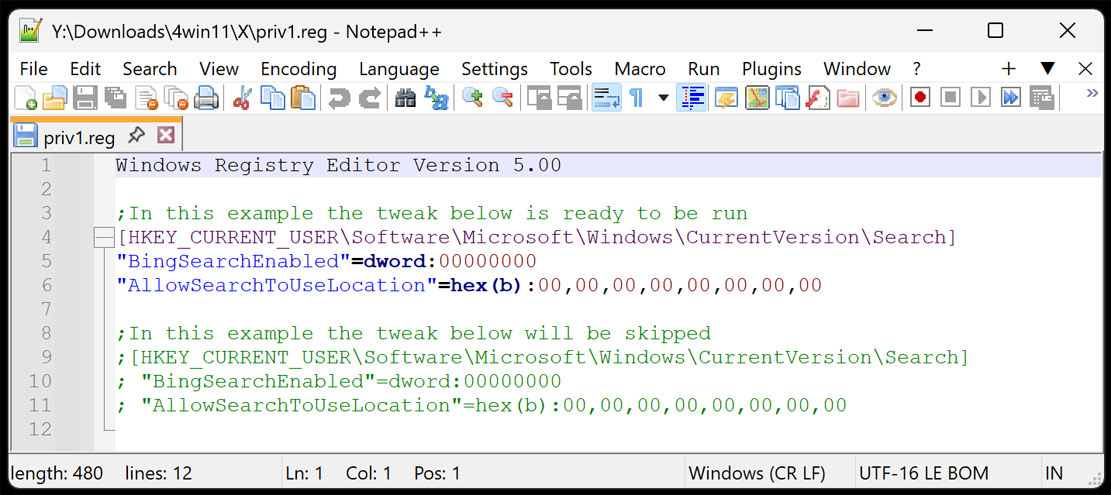
——————————————————————————–
Windows Registry Editor Version 5.00
; by TweakHound, https://tweakhound.com/, version 1.1 , 16NOV2025
; Some of these are mine, some not Use as you see fit
; This Win11 tweaks file is for DESKTOPS ONLY.
; Read through this before using.
; BACKUP BEFORE USING. You’ve been warned!
; – – – – Power & Performance – – – –
; Disable Hibernate
[HKEY_LOCAL_MACHINE\SYSTEM\CurrentControlSet\Control\Power]
“HibernateEnabled”=dword:00000000
; Turn off Fast Startup
[HKEY_LOCAL_MACHINE\SYSTEM\CurrentControlSet\Control\Session Manager\Power]
“HiberbootEnabled”=dword:00000000
; – – – – Misc – – – –
; Windows Update disable P2P
[HKEY_LOCAL_MACHINE\SOFTWARE\Microsoft\Windows\CurrentVersion\DeliveryOptimization\Config]
“DODownloadMode”=dword:00000000
; – – – – Desktop – – – –
; Make desktop menus snappier
[HKEY_CURRENT_USER\Control Panel\Desktop]
“MenuShowDelay”=”200”
; – – – – EXPLORER – – – –
; Explorer show all folders
[HKEY_CURRENT_USER\Software\Microsoft\Windows\CurrentVersion\Explorer\Advanced]
“NavPaneShowAllFolders”=dword:00000001
; Remove Is Shortcut text
[HKEY_CURRENT_USER\SOFTWARE\Microsoft\Windows\CurrentVersion\Explorer]
“link”=hex:00,00,00,00
; Explorer Show file extensions
[HKEY_CURRENT_USER\SOFTWARE\Microsoft\Windows\CurrentVersion\Explorer\Advanced]
“HideFileExt”=dword:00000000
; Explorer, Show hidden files
[HKEY_CURRENT_USER\SOFTWARE\Microsoft\Windows\CurrentVersion\Explorer\Advanced]
“Hidden”=dword:00000001
; Explorer, Remove OneDrive icon
[HKEY_CLASSES_ROOT\CLSID\{018D5C66-4533-4307-9B53-224DE2ED1FE6}]
“System.IsPinnedToNameSpaceTree”=dword:00000000
[HKEY_CLASSES_ROOT\Wow6432Node\CLSID\{018D5C66-4533-4307-9B53-224DE2ED1FE6}]
“System.IsPinnedToNameSpaceTree”=dword:00000000
[HKEY_LOCAL_MACHINE\SOFTWARE\Policies\Microsoft\Windows\OneDrive]
“DisableFileSyncNGSC”=dword:00000001
; Explorer, open to This PC
[HKEY_CURRENT_USER\SOFTWARE\Microsoft\Windows\CurrentVersion\Explorer\Advanced]
“LaunchTo”=dword:00000001
; – – – – – – – –
; Explorer, Disable folder type detection
[HKEY_CURRENT_USER\SOFTWARE\Classes\Local Settings\Software\Microsoft\Windows\Shell\Bags\AllFolders\Shell]
“FolderType”=”NotSpecified”
; Explorer, Open Command Windows here
[-HKEY_CLASSES_ROOT\Directory\shell\runas]
[HKEY_CLASSES_ROOT\Directory\shell\runas]
@=”Open Command Window Here as Administrator”
“HasLUAShield”=””
[HKEY_CLASSES_ROOT\Directory\shell\runas\command]
@=”cmd.exe /s /k pushd \”%V\””
[-HKEY_CLASSES_ROOT\Directory\Background\shell\runas]
[HKEY_CLASSES_ROOT\Directory\Background\shell\runas]
@=”Open Command Window Here as Administrator”
“HasLUAShield”=””
[HKEY_CLASSES_ROOT\Directory\Background\shell\runas\command]
@=”cmd.exe /s /k pushd \”%V\””
[-HKEY_CLASSES_ROOT\Drive\shell\runas]
[HKEY_CLASSES_ROOT\Drive\shell\runas]
@=”Open Command Window Here as Administrator”
“HasLUAShield”=””
[HKEY_CLASSES_ROOT\Drive\shell\runas\command]
@=”cmd.exe /s /k pushd \”%V\””
; – – – – – – – –
; Explorer, Add Take Ownership to right-click options
[HKEY_CLASSES_ROOT\*\shell\takeownership]
@=”Take ownership”
“HasLUAShield”=””
“NoWorkingDirectory”=””
[HKEY_CLASSES_ROOT\*\shell\takeownership\command]
@=”cmd.exe /c takeown /f \”%1\” && icacls \”%1\” /grant administrators:F”
“IsolatedCommand”=”cmd.exe /c takeown /f \”%1\” && icacls \”%1\” /grant administrators:F”
[HKEY_CLASSES_ROOT\exefile\shell\takeownership]
@=”Take ownership”
“HasLUAShield”=””
“NoWorkingDirectory”=””
[HKEY_CLASSES_ROOT\exefile\shell\takeownership\command]
@=”cmd.exe /c takeown /f \”%1\” && icacls \”%1\” /grant administrators:F”
“IsolatedCommand”=”cmd.exe /c takeown /f \”%1\” && icacls \”%1\” /grant administrators:F”
[HKEY_CLASSES_ROOT\Directory\shell\takeownership]
@=”Take ownership”
“HasLUAShield”=””
“NoWorkingDirectory”=””
[HKEY_CLASSES_ROOT\Directory\shell\takeownership\command]
@=”cmd.exe /c takeown /f \”%1\” /r /d y && icacls \”%1\” /grant administrators:F /t”
“IsolatedCommand”=”cmd.exe /c takeown /f \”%1\” /r /d y && icacls \”%1\” /grant administrators:F /t”
[HKEY_CLASSES_ROOT\dllfile\shell\takeownership]
@=”Take ownership”
“HasLUAShield”=””
“NoWorkingDirectory”=””
[HKEY_CLASSES_ROOT\dllfile\shell\takeownership\command]
@=”cmd.exe /c takeown /f \”%1\” && icacls \”%1\” /grant administrators:F”
“IsolatedCommand”=”cmd.exe /c takeown /f \”%1\” && icacls \”%1\” /grant administrators:F”
; – – – – Copilot – – – –
; Disable Copilot button on taskbar
[HKEY_CURRENT_USER\Software\Microsoft\Windows\CurrentVersion\Explorer\Advanced]
“ShowCopilotButton”=dword:00000000
; Disable Copilot service for current user
[HKEY_CURRENT_USER\Software\Policies\Microsoft\Windows\WindowsCopilot]
“TurnOffWindowsCopilot”=dword:00000001
; Disable Copilot service for all users
[HKEY_LOCAL_MACHINE\SOFTWARE\Policies\Microsoft\Windows\WindowsCopilot]
“TurnOffWindowsCopilot”=dword:00000001
; – – – – AI – – – –
[HKEY_CURRENT_USER\Software\Policies\Microsoft\Windows\WindowsAI]
“DisableAIDataAnalysis”=dword:00000001
[HKEY_LOCAL_MACHINE\SOFTWARE\Policies\Microsoft\Windows\WindowsAI]
“DisableAIDataAnalysis”=dword:00000001
[HKEY_LOCAL_MACHINE\SOFTWARE\Policies\Microsoft\Windows\WindowsAI]
“AllowRecallEnablement”=dword:00000000
[HKEY_LOCAL_MACHINE\SOFTWARE\Policies\Microsoft\Windows\WindowsAI]
“TurnOffSavingSnapshots”=dword:00000001
; – – – – No Spying – – – –
; Disable Bing
[HKEY_CURRENT_USER\Software\Policies\Microsoft\Windows\Explorer]
“DisableSearchBoxSuggestions”=dword:00000001
[HKEY_CURRENT_USER\Software\Microsoft\Windows\CurrentVersion\Search]
“BingSearchEnabled”=dword:00000000
“AllowSearchToUseLocation”=hex(b):00,00,00,00,00,00,00,00
; Disable Cortana in search
[HKEY_LOCAL_MACHINE\SOFTWARE\Policies\Microsoft\Windows\Windows Search]
“AllowCortana”=dword:00000000
“CortanaConsent”=dword:00000000
; Let Apps use Advertising ID for Relevant Ads in Windows 10
[HKEY_CURRENT_USER\Software\Microsoft\Windows\CurrentVersion\AdvertisingInfo]
“Enabled”=dword:00000000
; Tailored experiences with diagnostic data for Current User
[HKEY_CURRENT_USER\Software\Microsoft\Windows\CurrentVersion\Privacy]
“TailoredExperiencesWithDiagnosticDataEnabled”=dword:00000000
; Online Speech Recognition
[HKEY_CURRENT_USER\Software\Microsoft\Speech_OneCore\Settings\OnlineSpeechPrivacy]
“HasAccepted”=dword:00000000
; Improve Inking & Typing Recognition
[HKEY_CURRENT_USER\Software\Microsoft\Input\TIPC]
“Enabled”=dword:00000000
; Inking & Typing Personalization
[HKEY_CURRENT_USER\Software\Microsoft\InputPersonalization]
“RestrictImplicitInkCollection”=dword:00000001
“RestrictImplicitTextCollection”=dword:00000001
[HKEY_CURRENT_USER\Software\Microsoft\InputPersonalization\TrainedDataStore]
“HarvestContacts”=dword:00000000
[HKEY_CURRENT_USER\Software\Microsoft\Personalization\Settings]
“AcceptedPrivacyPolicy”=dword:00000000
; Send only Required Diagnostic and Usage Data
[HKEY_LOCAL_MACHINE\SOFTWARE\Microsoft\Windows\CurrentVersion\Policies\DataCollection]
“AllowTelemetry”=dword:00000000
; Disable Let Windows improve Start and search results by tracking app launches
[HKEY_CURRENT_USER\Software\Microsoft\Windows\CurrentVersion\Explorer\Advanced]
“Start_TrackProgs”=dword:00000000
; Disable Activity History
[HKEY_LOCAL_MACHINE\SOFTWARE\Policies\Microsoft\Windows\System]
“PublishUserActivities”=dword:00000000
; Set Feedback Frequency to Never
[HKEY_CURRENT_USER\SOFTWARE\Microsoft\Siuf\Rules]
“NumberOfSIUFInPeriod”=dword:00000000
“PeriodInNanoSeconds”=-
; Disable personalization of ads
; Disable required and optional diagnostic data about browser usage
[HKEY_LOCAL_MACHINE\SOFTWARE\Policies\Microsoft\Edge]
“PersonalizationReportingEnabled”=dword:00000000
“DiagnosticData”=dword:00000000
Thanks Eric! These are handy-dandy and do recognize some good oldies here….