 I’m not a big fan of the Microsoft Community or Microsoft MVP’s but occasionally someone in that group stands out. Andre Da Costa is one of them and he has just published 2 excellent Wiki articles. Read’em and bookmark’em for tomorrow.
How to download official Windows 10 ISO files
How to Upgrade to Windows 10 Anniversary Update version 1607 using ISO File
Windows
Patch Tuesday
 Time to run Windows update. All supported Windows versions and MS Office have updates.
Windows 7 users, just run Windows Update and walk away…
Microsoft Security Bulletin Summary for June 2016
Time To Run Windows Update
Got Windows? Got Updates!
Microsoft Security Bulletin Summary for April 2016
MS16-037 Cumulative Security Update for Internet Explorer (3148531)
MS16-038 Cumulative Security Update for Microsoft Edge (3148532)
MS16-039 Security Update for Microsoft Graphics Component (3148522)
MS16-040 Security Update for Microsoft XML Core Services (3148541)
MS16-041 Security Update for .NET Framework (3148789)
MS16-042 Security Update for Microsoft Office (3148775)
MS16-044 Security Update for Windows OLE (3146706)
MS16-045 Security Update for Windows Hyper-V (3143118)
MS16-046 Security Update for Secondary Logon (3148538)
MS16-047 Security Update for SAM and LSAD Remote Protocols (3148527)
MS16-048 Security Update for CSRSS (3148528)
MS16-049 Security Update for HTTP.sys (3148795)
MS16-050 Security Update for Adobe Flash Player (3154132)
Is Microsoft Trolling Windows 7 Geeks?
 Woody Leonhard wrote Windows patch KB 3139929: When a security update is not a security update. In it he discusses that Microsoft included a GWX non-security update in security update KB3139929. That non-security update is KB3146449 and is uninstallable. Here is the breakdown:
Updated Internet Explorer 11 capabilities to upgrade Windows 8.1 and Windows 7
About this update
This update adds functionality to Internet Explorer 11 on some computers that lets users learn about Windows 10 or start an upgrade to Windows 10. Before you install this update, see the Prerequisites section. For more information about Windows 10, see Windows 10.
So yes this doesn’t sound good. In fact it sounds like yet another low-down, underhanded, sneaky, dirty-rotten trick by Microsoft. A giant middle finger to Windows 7 users if you will.
But the thing is sites around the web parroted the fact that this update produced a “blue banner” promoting Win10 when using IE despite the fact that none of them are able to reproduce the issue.
I’ve poked around on a couple of my Windows 7 machines and I can’t find anything nefarious related to this update. The only thing I can find is the picture below when you go to MSN:
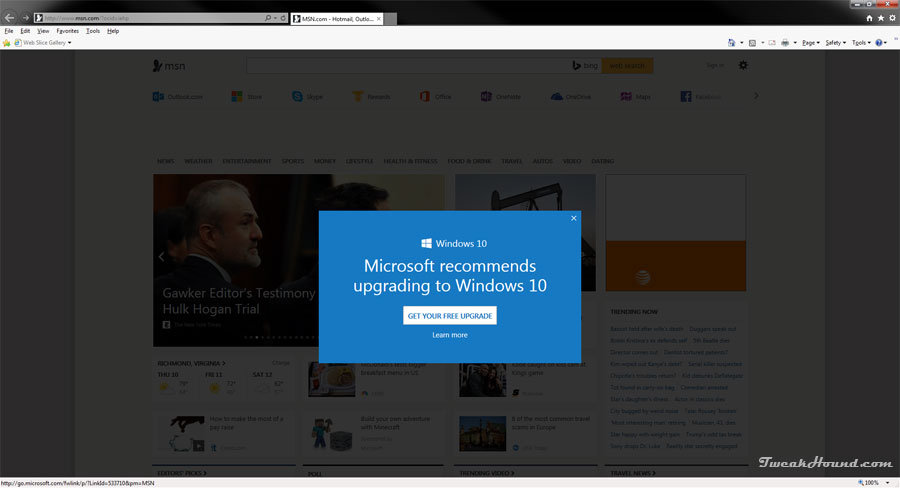
On its face this seems outrageous. I really can’t believe that MS would pull this kind of stunt again? And, there seems no proof of egregious behavior this time. At least not yet.
So, I dunno. I wonder if Microsoft is trolling Windows 7 Geeks?
Two Windows 7 Articles Updated
 Installing Windows 7 has received a much needed overhaul.
Remove And Block GWX In Windows 7 updated with a trimmed down script.
Comments and suggestions welcome.
Update To The Update On More On Win10 Privacy
 Ed Bott has called B.S. on the Forbes reporter that claimed Microsoft was gonna allow us to fully control Win10’s privacy options.
Geeze. I reckon only time will tell.
Here is the real gem from Microsoft’s statement to Ed:
“Executives believe that existing privacy controls are reasonable for consumers and there’s no need for a drastic change.”

More On Win10 Privacy
As I sat for 2 and 1/2 hours waiting for the local tire guys to put 2 new fracking tires on my wife’s car, reader Dave sent me the link to:
Ed Bott: When it comes to Windows 10 privacy, don’t trust amateur analysts
The article discusses the article I linked to Sunday. Some random dude took a stab at trying to figure out who/what Win10 was connecting to. Apparently that post has been deleted. I didn’t talk too much about it except to say I had made a similar attempt last September. I was hoping my readers would see that my results were almost totally opposite from his. I don’t know if anyone saw it or not.
Anyway, Ed completely dismantles this guys test and takes folks who were doing “I told you so’s” to task. I think Ed may have been a tad hard on the guy in the original post. He was just making an attempt at some Geekery. He didn’t ask for half the tech world to read it. The reporters sourcing the story deserve the blame for sensationalizing it. Ed does give it to them with both barrels.
Agree with him or not, it is a must read.
***UPDATE, 14:15hrs
The guy that Ed takes to task above has learned from Microsoft that:
Contacting me again a Microsoft spokesperson explained the company now wanted to speak about the issue. In short: Microsoft is taking action. It has decided to release updates “later this year” which will enable users to fully control all background telemetry and data tracking and, if desired, disable it completely. Microsoft also asked me to stress that disabling these background operations is something it would “strongly recommend against”.
My takeaway is that our incessant bitching to and about Microsoft on this issue has produced the second caving in by Microsoft in the last week. One button to shut it all down is what we asked for and it looks like we will get it.
Congrats to us!
and
Congrats to Microsoft!

Windows 10 Now Has Updates Release Notes
Holy cow! We bitched and Microsoft has caved. Win10 will now have release notes for updates.
“In response to this feedback, we’re providing more details about the Windows 10 updates we deliver through Windows Update. You’ll see a summary of important product developments included in each update, with links to more details. This page will be regularly refreshed, as new updates are released.”
Mary Jo Foley – Microsoft starts providing release notes for Windows 10 updates
Windows 10 update history
Patch Tuesday
Time To Run Windows Update
Updates available for all supported operating systems and MS Office versions.
Microsoft Security Bulletin Summary for February 2016
Flash Updated
APSB16-04 Security updates available for Adobe Flash Player
“These updates address critical vulnerabilities that could potentially allow an attacker to take control of the affected system.”
Main Download Page
Flash for IE
Flash for Firefox
Windows 8/8.1/10 users check Windows Update. Microsoft will get around to updating it…eventually.
Google Chrome users, ditto.
*update 14:58hrs
Google Chrome Updated
“The stable channel has been updated to 48.0.2564.109 for Windows, Mac, and Linux.”
Download or update from within the program.
Upgrade To Win10 And Keep Previous Windows Version
 I’m going to show you how I upgraded to Windows 10 and kept my Windows 7 install. I alluded to this method earlier. Although not tested this should work for Windows 8.1 too.
I searched the Windows 10 EULA and I can find nothing that restricts this but I’m not a lawyer either.
[Read more…] about Upgrade To Win10 And Keep Previous Windows Version