 I had done a few clean installs on my main rig but was waiting for TH2 for my “final”. This PC had previously been a dual-boot Windows 8.1 / Window 7 PC. I had upgraded 8.1 to Win 10.
[Read more…] about Win10 Clean Install On My Main PC
Windows
Windows 10 TH2 ISOs Pulled
 Microsoft has pulled the new Threshold 2 ISO’s. Ed Bott has the full story.
Note: They have not pulled TH2, just the ISOs. TH2 is still available via Windows Update.
Bottom line there is a bug or bugs in the ISOs. Rather than find it and fix it Microsoft wants you to install the first Win10 build ISO and then download and reinstall another 2-4 gigs of files and update. Is Win10 becoming a tragic comedy?
Where to get TH2 ISOs and ESDs:
1: WZOR
ESDs: https://cloud.mail.ru/public/2xE4/5k5wdRDSu
ISOs: https://cloud.mail.ru/public/AwAA/N9RXzm6eU
2: Torrents: http://umtorrent.com/usearch/windows%2010%2010586/?field=seeders&sorder=desc
Authors note: This story appeared all over the web overnight. As near as I can figure Ed Bott is the original source. “Journalists” often don’t source or barely source their information anymore. Many of them choose to just rewrite the original article without adding anything and post it as their own work. Disgusting.
Windows 10 Privacy Settings
************ This version is now expired. Updated version here: https://www.tweakhound.com/2020/12/30/tweaking-windows-10-version-20h2/
Windows 10 Privacy Settings
A companion guide for:
TweakHound’s

Tweaking Windows 10
Version 4.0, last edited 17 May, 2018
Windows 10 Privacy Settings
Page 1 – Intro, Windows Insider Program, Use A Local Account
Page 2 – Windows 10 Built-In Privacy Settings
Page 3 – Telemetry, Cortana
Page 4 – Update & Security, Windows Defender
Page 5 – Services, Microsoft Browsers
Page 6 – Remove Ads And Annoyances
Page 7 – Apps To Tweak Privacy Settings
Windows 10 does a lot of communicating with Microsoft servers. Many people find this to be somewhere between an annoyance to an outright invasion of privacy. Some folks suspect it’s even worse than that. For its part, Microsoft steadfastly insists that they do not invade your privacy, that any information sent back to Microsoft is “anonymous”, and that it is for your own good. I will leave it up to you to decide.
This section will show you your privacy options, the settings I use, and 3rd party apps that can help you configure your settings.
It should be noted that turning off some settings can hamper the ability of some built-in and Microsoft Store apps to function properly. Since I don’t use these things I haven’t run into a single issue.
Windows Insider Program
This is a neat program for those that want updates before everyone else or Geeks that live on the bleeding edge. It also sends the maximum amount of data back to Microsoft. If privacy is a concern, then don’t use this.
More info: https://insider.windows.com/
Use A Local Account
If you are using a Microsoft Account and privacy is a concern you should switch to a Local Account. Be warned you will lose syncing. If this is important to you then skip this.
More info: http://windows.microsoft.com/en-us/windows-10/getstarted-microsoft-account
Let switch to a Local account:
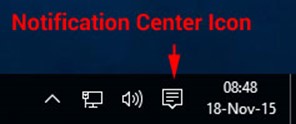
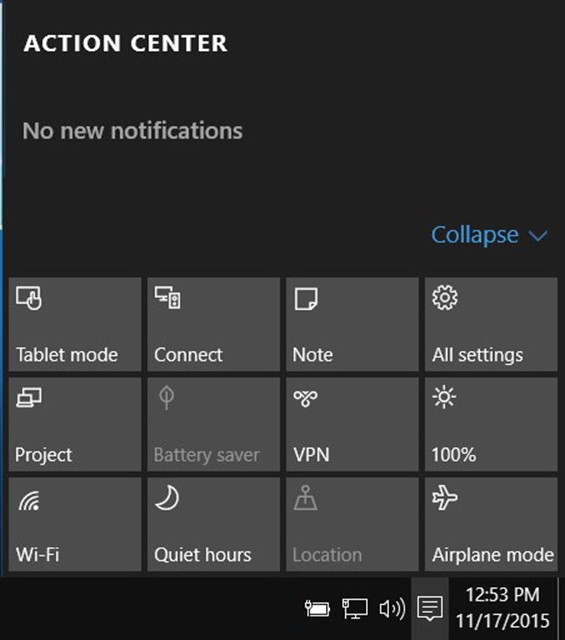
Choose All settings
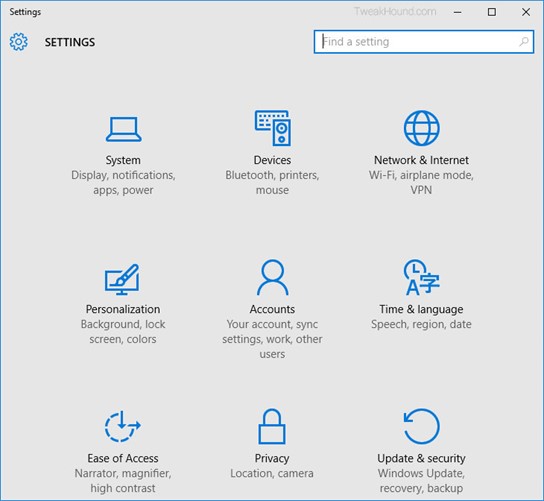
Choose Accounts
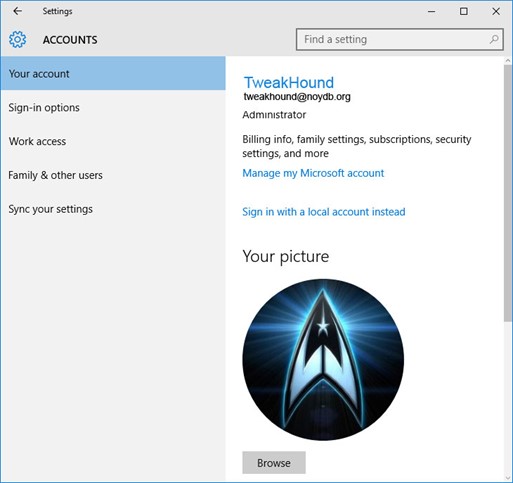
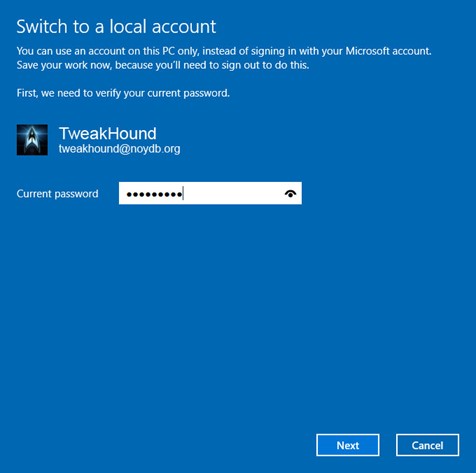
Choose Sign in with a local account instead
Enter current user password
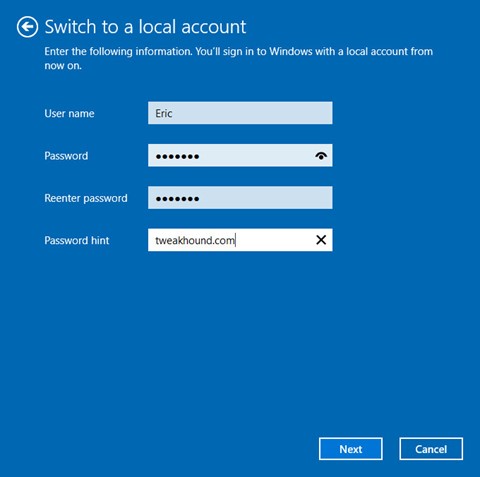
Enter the new User name, Password, and Password hint.
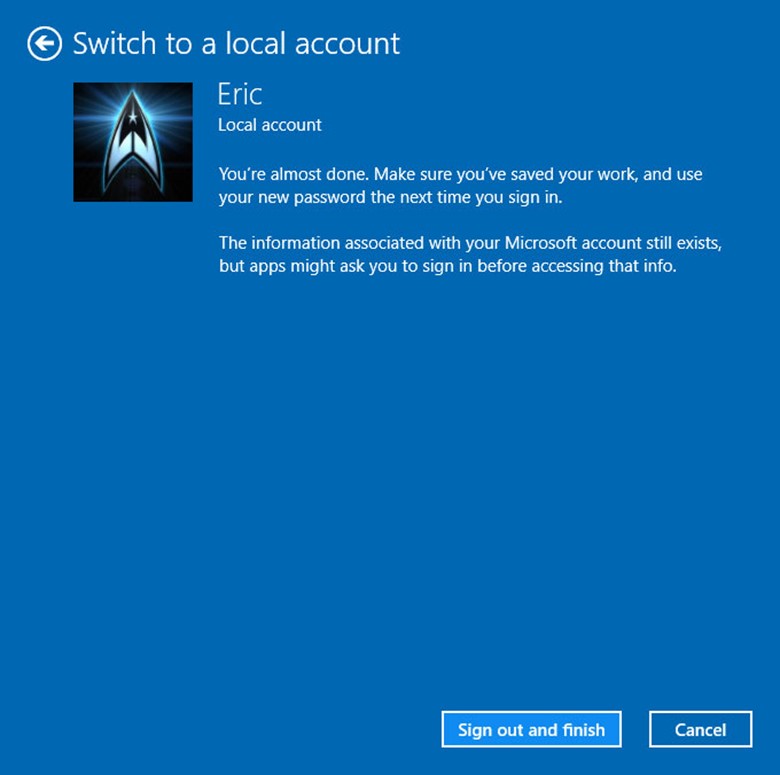
Sign out and finish.
Win10 Diagnostics Tracking Service Gone?
So I’m writing the Privacy section of the Win10 tweak guide. [Read more…] about Win10 Diagnostics Tracking Service Gone?
Cumulative Update for Windows 10 Version 1511 (KB3118754)
Just released.
*Edit 1811hrs* KB is up now: https://support.microsoft.com/en-us/kb/3118754
“This update includes improvements to enhance the functionality of Windows 10 Version 1511.”
Boy that is helpful.

Description from update:
“Install this update to resolve issues in Windows. For a complete listing of the issues that are included in this update, see the associated Microsoft Knowledge Base article for more information. After you install this item, you may have to restart your computer.“
Post Your Win10 Tips And Tweaks
Now that Threshold 2 is out I’m writing the Win10 tweak guide as time permits.
If you have any please post your tips and tweaks here. Be sure to include where you got it if you can.
My Desktop Pet Peeve
 I still do computer work as a side job. One of my pet peeves is seeing stuff stored on the desktop. I’m not talking a couple of files for a few days, I’m talking docs, pics, pdfs, mp3s, videos, etc. I see dozens and dozens flooding the desktop. It’s chaotic and ugly. It makes backups harder too. Need to use System Restore? All the files on your desktop will be gone!
Put your stuff in the folders they belong in!

If You Haven’t Received The TH2 Update…
If you haven’t received the Threshold 2 (Fall Update) via Windows Update you can:
[Read more…] about If You Haven’t Received The TH2 Update…
Recheck Your Tweaks After Installing TH2
 I found that several of my tweaks did not stick though the update, especially the right-click menu stuff.
You may want to check and/or reapply the tweaks.
Here are mine: https://www.tweakhound.com/2015/08/10/my-windows-10-tweaks/
Download Windows 10 TH2 ISO And Create Media
Go to the Windows 10 download page.
Scroll down to the Download Tool Button and click it.

Once downloaded, double-click MediaCreationTool.exe.
[Read more…] about Download Windows 10 TH2 ISO And Create Media