Just some pics of the upgrade experience.
[Read more…] about Pictures: Upgrading To Threshold 2
Windows
Threshold 2 Officially Released
The long-awaited Windows 10 Threshold 2 update is here. Microsoft is calling it the “Fall Update”.
Get the full scoop from Microsoft’s Terry Myerson: First Major Update for Windows 10 Available Today
I will have a few posts on this today.
New Poll Up: “Do you trust Microsoft?”
 Polls are in the right sidebar —>>>
Fix Windows 10 Folder View Settings
 Below is an email exchange with a long time TweakHound.com friend. He couldn’t get the folder view settings to stick.
I thought I would publish it on his suggestion. I hope this exchange helps someone.
[Read more…] about Fix Windows 10 Folder View Settings
It’s A Matter Of Honor

honor
noun
1.honesty, fairness, or integrity in one’s beliefs and actions:
a man of honor.
Last week Microsoft doubled down on trying to force Windows 10 on Windows 7 and Windows 8 users. This despite the outrage that has sprung up around the internet since GWX and it’s related telemetry issues came to fore.
In his blog post, Terry Myerson claimed “you can choose to upgrade or decline the offer”. That’s a statement the Washington D.C. spin doctors would love.
1 – By default Windows 7 and 8 downloads and installs updates to examine your computer and send that info back to Microsoft. They never ask you, they just do it.
2 – Starting next year, Microsoft will make Windows 10 a recommended update. Most folks computers are set to “Give me recommended updates the same way I receive important updates.” This means starting next year Microsoft will download Windows 10 to your computer WITHOUT ASKING YOU.
[Read more…] about It’s A Matter Of Honor
Windows 7 Diagnostics Tracking Service

*last updated 24OCT2016
Well it’s official. The Diagnostics Tracking Service is now a permanent part Windows 7.
Microsoft first introduced DiagTrack with KB3022345. Then they tried to sneak it back in with KB3068708 and again with KB3080149.
With these patches you could install or uninstall them and everything else was fine.
Now it is back with KB3192403 – October 2016 Preview of Monthly Quality Rollup for Windows 7 SP1 and Windows Server 2008 R2 SP1.
As the name suggests, this update is a preview of what is to come and is an optional update. It will become a standard update next month.
So, if you are a responsible and intelligent Windows user who keeps your system patched you are stuck with DiagTrack being installed. Since as Mary Jo put it, “Each monthly rollup will supersede the previous month’s rollup. The ultimate goal is for these monthly rollups to become fully cumulative, which will happen as the team adds patches released in the past, so users need only to install the latest single rollup.”
Now you must disable it via services.msc or in the registry.
Aren’t update rollups awesome! Welcome to the new Microsoft, “Resistance is futile. You will be assimilated.”
Diagnostics Tracking Service
“Start”=dword:00000002 is default . 2=auto, 3=manual, 4=disabled
HKEY_LOCAL_MACHINE\SYSTEM\CurrentControlSet\Services\DiagTrack
“Start”=dword:00000004
*edit 25OCT2016
I’m not sure what the confusion is but apparently I did not make myself clear above…
DISABLE this via the Services snap-in (services.msc) or manually via the registry. I provided the key above.
– – – – – – – – – – – – – – – – – – – – – – – – – – – – – – – – –
For some time now I’ve been seeing posts about disabling the Diagnostics Tracking Service in Windows 7.
This is unnecessary. Uninstall it instead.
Go to Control Panel > Windows Update > Installed updates (bottom left of windows) > find and uninistall KB3022345 (right-click > Uninstall)
Re-run Windows update > find KB3022345 and hide it (right-click > Hide update)
Microsoft continues to play games with its customers. The new update is below.
Go to Control Panel > Windows Update > Installed updates (bottom left of windows) > find and unnistall KB3080149 and/or KB3068708 (right-click > Uninstall)
Re-run Windows update > find KB3080149 and/or KB3068708 and hide it (right-click > Hide update)
Done
Diagnostics Tracking Service
“Start”=dword:00000002 is default . 2=auto, 3=manual, 4=disabled
HKEY_LOCAL_MACHINE\SYSTEM\CurrentControlSet\Services\DiagTrack
“Start”=dword:00000004
More info: KB3080149 – Update for customer experience and diagnostic telemetry
Remove And Block GWX In Windows 7
Last updated 12DEC2019
This is version 8 of my scripts to remove and block Windows 10 updates and related telemetry.
I’ve seen multiple posts at websites and forums telling folks how to deal with GWX. Most of them either don’t go far enough, or usually, they go way too far and break stuff.
This applies to Windows 7 ONLY.
Comments are closed after a while for security reasons. You can comment here if you like:
Remove And Block GWX In Windows 7 UPDATED 2
Since it has become obvious that this will be a running battle with Microsoft I’ve decided to make this page the permanent place to these scripts rather than a new post every time I update it.
You’ll need to check back here monthly for updates as Microsoft keeps re-releasing updates that in effect unhides them.
You’ll also want to keep the script handy and rerun it monthly for the same reason.
Thanks to:
Though info on all this stuff has come from dozens of sources, much of this info has come from the MDL forums.
In particular this thread: Remove Telemetry and Windows 10 Related Updates from Windows 7
Download my batch file: https://www.tweakhound.com/downloads/block_GWX_V8.zip
YOU MUST read the README.txt file.
The second half of this calls HideGWXetcV8.vbs to hide updates.
This will take a while.
DO NOT CLOSE WINDOW UNTIL YOU SEE: ” – Finished … All operations complete. Reboot now. Press any key to continue . . .”
Inspiration for this came from a variety of sources but started HERE.
The level of support you will receive is equal to the amount you paid for this 😉
This folder contains:
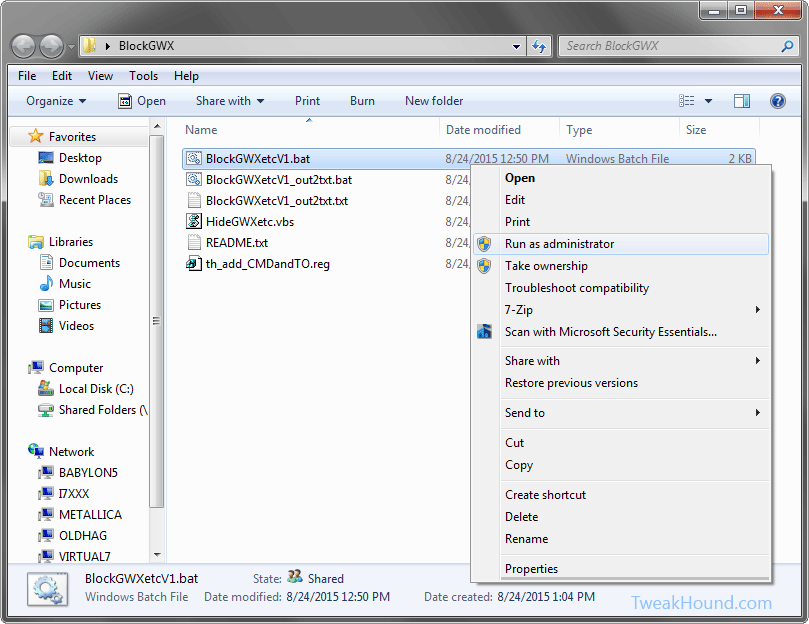
BlockGWXetcV8.bat – Removes and Hides GWX related updates like in step 2 above.
HideGWXetcV8.vbs – Automatically run by the above .bat files. This hides the updates the batch file uninstalled.
README.txt – Instructions
th_add_CMDandTO.reg – Adds open command windows here (standard and admin) ,and Take Ownership to right-click.
The .bat file and the .vbs files MUST be in the same folder!
(code is listed below)
To do this:
Either right-click the folder and choose Open Command Window Here as Administrator.
In the resulting command window type BlockGWXetcFINAL.bat and hit enter.
OR
right-click the BlockGWXetcFINAL.bat file (see above) and choose Run as Administrator.
If you do not have these right-click options, double-click in included th_add_CMDandTO.reg file and logout/reboot.
Let it run, when the .bat file runs HideGWXetc.vbs it will take a while.
It may look like things have stopped, they haven’t.
DO NOT CLOSE WINDOW UNTIL YOU SEE: ” – Finished … All operations complete. Reboot now. Press any key to continue . . .”
-END-
Windows 10, Where I Stand
I asked y’all a while back, “Why Are You Using Windows 10?” and I got some great responses. I thought I would let y’all know where I stand.
Please note the thoughts below are my own opinion. I’ve no intention of telling you what OS you should be using. I’ll try and keep this short…
[Read more…] about Windows 10, Where I Stand
Windows 10 Home Networking Tips
 As an old network guy, “TweakHound don’t do no Homegroup”. My home network is a mixed mess of Windows 7, openSUSE, Linux Mint, and Win10. These all interact via a standard Windows workgroup.
I’ve found Windows 10 workgroup networking to be a little wonky (to be kind).
Here are a few tips that have made my home networking easier:
[Read more…] about Windows 10 Home Networking Tips