• Skip to primary navigation
  • Skip to main content
  • Skip to primary sidebar

TweakHound

Computer stuff...

  • Home
  • Windows XP
  • Windows Vista
  • Windows 7
  • Windows 8
  • Windows 10
  • Windows 11
  • Linux
  • Tweak Guides
  • Site Info
    • About
    • About Me
    • TweakHound’s World
    • Contact
    • My Computers
    • Old Articles
    • Privacy Policy
    • Old Index
    • Advanced Search

Windows 10

Tuesday Morning News

April 24, 2018, 06:39(EDT) By Eric (a.k.a. TweakHound)

www_news

AMD Chipset Drivers
Version 18.10.0418 is out.
Download

Win10 Updates
Will 1803/RS4/SCU/Next/April/Whatever update be released today?
Dunno, but 1709 has got an update:
KB4093105 – April 23, 2018—KB4093105 (OS Build 16299.402)

CCleaner
Couple of IE/Edge fixes and… wait… the release announcement says, “Where appropriate, CCleaner Free may recommend improvements to your system’s antivirus protection“.
Hmmm… Pure speculation on my part but, is this gonna be ads for Avast? Has anyone seen one?
Download

Tagged With: Computer News

Fix Windows 10 Network Browsing

April 17, 2018, 17:00(EDT) By Eric (a.k.a. TweakHound)

Saw 2 posts published today:
Network Computers are Not Visible in Windows 10 Version 1803
Fix PCs no longer recognized in network after Windows 10 version 1803 upgrade

*cough*…ahem: December 30, 2017
Fix Windows 10 Network Browsing

Tagged With: This Site, Windows 10

Tuesday Morning Random Stuff…

April 17, 2018, 07:42(EDT) By Eric (a.k.a. TweakHound)

intellogo

Win10 SCU
The update that didn’t happen is back in the news with no news. We still do not know what the official name of the update is. We still don’t know when it will be released. Microsoft has given us a generic “reliability issues” statement as to why it was delayed.

Oh Intel
Intel says their chips have a vulnerability that, “could allow an attacker to block BIOS/UEFI updates, or to selectively erase or corrupt portions of the firmware.” This means you’ll have to wait for your PC manufacturer to release another BIOS update, if and when they feel like it.
Just after that news, Intel announced some “new initiatives that use features specific to the Intel hardware platform to boost security“.
– Advanced memory scanning will use your GPU to aid in malware scanning.
– Advanced Platform Telemetry “uses things like the processor’s integrated performance counters to spot unusual processor activity.”

Fbook
Yeah. I know I said I was out of Fbook news for a while. But this article is amazing. IMHO a must read.
‘Dear Mark, this is why I hate you.’ An open letter to Zuckerberg

Off Topic
How Often You Should Clean Everything In Your Home (Hint: Very, Very Often)
(check out the links at the bottom of the article for guides)

Tortured for fur: Terrified silver foxes fattened in cramped cages ready to be slaughtered for fashion

Researchers find genetic cause for Alzheimer’s, possible method to reverse it

‘I was a teacher for 17 years, but I couldn’t read or write’

RIP
R. Lee Ermey, Golden Globe Nominee for ‘Full Metal Jacket,’ Dies at 74
(quotes from Full Metal Jacket)
Harry Anderson, Judge On ‘Night Court,’ Dies At His N.C. Home. He Was 65

Tagged With: Computer News

Wednesday Random Stuff…

April 11, 2018, 14:57(EDT) By Eric (a.k.a. TweakHound)

Win10 1803/RS4/SCU/Next/Whatever
“They” say:
– Nobody knows what the actual name of the update is.
– Nobody knows why the update was not released.
– Nobody knows when it will be released.
Reckon the “inside sources” failed them, and us.

Winaero Tweaker 0.10
“Winaero Tweaker 0.10 is out. It will allow you to disable Windows Update reliably in Windows 10, get rid of update notifications, ads in Settings, Timeline and My People. Also, it comes with new tools and tweaks, and it properly works under Windows 10 version 1803 “Spring Creators Update”
Download

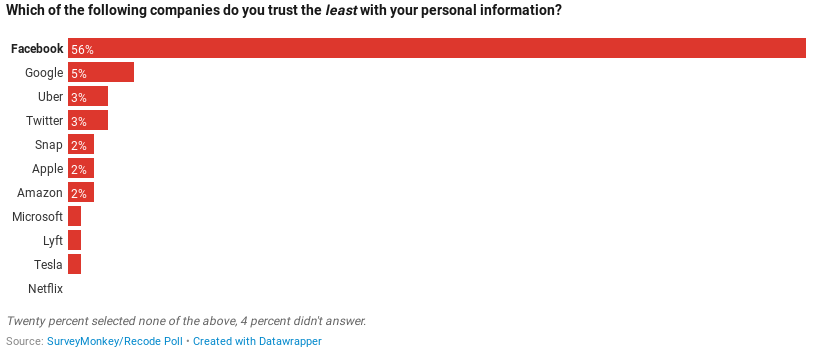
Which of the following companies do you trust the least with your personal information?
Recode polled Americans,
“Respondents were asked to choose among Amazon, Apple, Facebook, Google, Lyft, Microsoft, Netflix, Tesla, Twitter, Snap and Uber. Twenty percent selected none of the above.”

Tagged With: Computer News

Win10 SCU Delayed?

April 10, 2018, 11:16(EDT) By Eric (a.k.a. TweakHound)

***ATM this is interesting, high school gossipy speculation. But, what’s a day without a little drama! Follow the links in the post below and watch it unfold.

AskWoody reports both Paul Thurrott (thurrott.com) and Zac Bowden (windowscentral.com) are hearing SCU/RS4 is delayed.

*update 1243hrs
Don’t know if this is related but BuildFeed has the updated the latest build to 10.0.17133.1009, dated today.

Tagged With: Windows 10

Win10 SCU Is Out Next Week

April 5, 2018, 11:39(EDT) By Eric (a.k.a. TweakHound)

Windows 10 Spring Creators Update is going to be released next week.
In My Humble Opinion:
– There is no reason to upgrade within 30 days of release. (Or at least until the following Patch Tuesday.)
– There are no new features worth upgrading for.

You can stick with the current release you are on and still get updates for at least 18 months:
1709 (Fall Creators Update) Expires April 9, 2109
1703 (Creators Update) Expires October 9, 2018
1607 (Anniversary Update) Expires April 10, 2018

I recommend blocking/delaying feature updates:
– You need to be running Win10 Pro, Enterprise, or Education.
There is no way to stop a feature update in Win10 Home without stopping security updates. You can officially upgrade from Home to Pro for $99 but there are MUCH, MUCH cheaper legit keys to be had out there. If you can’t find them, email me.
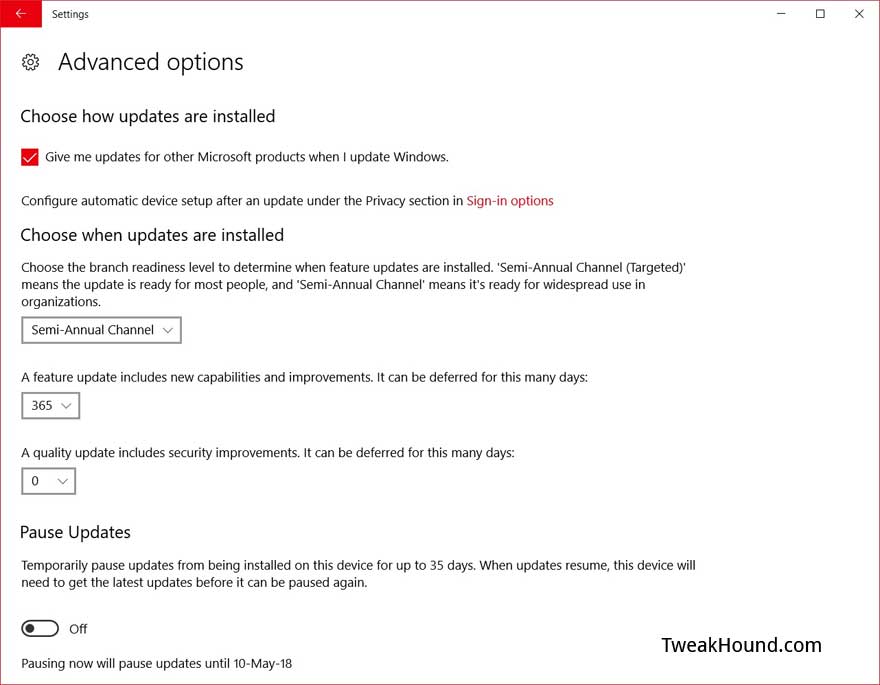
Go to Settings > Update & Security > Advanced options
Optional – Use the  > Semi-Annual Channel ( NOT Semi-Annual Channel (Targeted) )
This channel used to be Current Branch for Business. This delays feature updates until they are ready for business, i.e. all the bugs are worked out. This was about 3 months for FCU (approx. Oct 17 – Jan. 11).
Go to Settings > Update & Security > Advanced options >
In the box under A feature update includes new capabilities and improvements. It can be deferred for this many days:
Change days to desired amount. I recommend at least 31 but since SCU offers me nothing then up to 365 will not hurt. You can re-evaluate when the next feature update comes out and it looks to be a big one.

Tagged With: Windows 10

Win10 Updated

March 22, 2018, 15:39(EDT) By Eric (a.k.a. TweakHound)

win10_logo

“This update includes quality improvements. No new operating system features are being introduced in this update.”
Remember, updates are cumulative.

For 1709 (Latest Build) – March 22, 2018—KB4089848 (OS Build 16299.334)

For 1703 – March 22, 2018—KB4088891 (OS Build 15063.994)

For 1607 – March 22, 2018—KB4088889 (OS Build 14393.2155)
*1607 is getting EoS next month.

1709 (Fall Creators Update)
1703 (Creators Update)
1607 (Anniversary Update)

See also:
Windows lifecycle fact sheet
Windows 10 release information

Tagged With: Windows 10

Win10 Updated

March 6, 2018, 06:38(EST) By Eric (a.k.a. TweakHound)

win10_logo

March 5, 2018—KB4090913 (OS Build 16299.251)
“This update includes quality improvements. No new operating system features are being introduced in this update…Addresses an issue in which some USB devices and onboard devices, such as a built-in laptop camera, keyboard, or mouse, stop working.”
This update is a cumulative update. That means it will apply the Meltdown/Spectre patch from past months.

Tagged With: Windows 10

Standalone Win10 Meltdown and Spectre Patch Available

March 1, 2018, 14:08(EST) By Eric (a.k.a. TweakHound)

win10_logo

Got a Microsoft Security Advisory Notification. Just passing this along. I am NOT recommending you install it. At least not yet anyway.
[Read more…] about Standalone Win10 Meltdown and Spectre Patch Available

Tagged With: Windows 10

Windows 10 Ultimate Performance Power Mode

February 15, 2018, 07:21(EST) By Eric (a.k.a. TweakHound)

I woke up this morning and a number of sites are all giddy talking about the new Win10 Ultimate Performance Mode.
Windows Blog – Announcing Windows 10 Insider Preview Build 17101 for Fast & Build 17604 for Skip Ahead

A new power scheme – Ultimate Performance: Demanding workloads on workstations always desire more performance. As part of our effort to provide the absolute maximum performance we’re introducing a new power policy called Ultimate Performance. Windows has developed key areas where performance and efficiency tradeoffs are made in the OS. Over time, we’ve amassed a collection of settings which allow the OS to quickly tune the behavior based on user preference, policy, underlying hardware or workload.
This new policy builds on the current High-Performance policy, and it goes a step further to eliminate micro-latencies associated with fine grained power management techniques. The Ultimate Performance Power plan is selectable either by an OEM on new systems or selectable by a user. To do so, you can go to Control Panel and navigate to Power Options under Hardware and Sound (you can also “run” Powercfg.cpl). Just like other power policies in Windows, the contents of the Ultimate Performance policy can be customized.
The Ultimate Performance Power plan is selectable either by an OEM on new systems or selectable by a user. To do so, you can go to Control Panel and navigate to Power Options under Hardware and Sound (you can also “run” Powercfg.cpl).
As the power scheme is geared towards reducing micro-latencies it may directly impact hardware; and consume more power than the default balanced plan. The Ultimate Performance power policy is currently not available on battery powered systems.
We’ll continue to tune and evaluate the power plan settings. To submit feedback please use the Feedback Hub and file your feedback under Power & Battery > Setting category.

My take. Microsoft is going to fix the High Performance Power Scheme because it was still turning things off even though you told it not to. High Performance is just that. “Ultimate High Performance” is just a marketing ploy.

Tagged With: Windows 10

« Previous Page
Next Page »

Primary Sidebar

Popular Posts

Tweaking Windows 10

Software I Use – 2021 Edition

Timer Tweaks Benchmarked

Win10 – Get Auto-Login Back

Recent Posts

  • Patch Tuesday
  • Weekend News
  • Weekend News
  • Patch Tuesday
  • Friday News
  • Patch Tuesday
  • Using Wise Disk Cleaner
  • Using Cleanmgr+
  • O&O ShutUp10++ 2.2.1024
  • Friday News
buywin10th2

Tags

  • Android
  • Backup
  • Beer
  • Computer Hardware
  • Computer News
  • Cool Tools
  • Freeware
  • How-To's
  • Linux
  • Off Topic
  • openSUSE
  • Playlists
  • Privacy
  • Security
  • Software
  • This Site
  • vacation
  • Veterans
  • Windows 10
  • Windows 11
  • Windows 7
  • Windows 8
  • Windows Vista
  • Windows XP

Catagories

  • Android
  • Backup
  • Beer
  • Computer Hardware
  • Computer News
  • Cool Tools
  • Freeware
  • Freeware Machines
  • How-To's
  • Linux
  • News From The Web
  • Off Topic
  • openSUSE
  • Privacy
  • Security
  • Software
  • Tweak Guides
  • Veterans
  • Windows
  • Windows 10
  • Windows 11
  • Windows 7
  • Windows 8
  • Windows Vista
  • Windows XP

TweakHound - Optimize Your Computing Experience! TweakHound - Optimize Your Computing Experience!

Copyright 2002-2025 by Eric Vaughan All material contain here is the property of the materials owner. Windows, Windows XP, Windows Vista, Windows Seven, Windows 8, Windows 10, Windows 11, Microsoft, and all associated logos are trademarks/property of Microsoft. You may not use or copy any material from tweakhound.com without expressed written permission. Hotlinking to any material within this site is forbidden. Privacy Policy