March 5, 2018—KB4090913 (OS Build 16299.251)
“This update includes quality improvements. No new operating system features are being introduced in this update…Addresses an issue in which some USB devices and onboard devices, such as a built-in laptop camera, keyboard, or mouse, stop working.”
This update is a cumulative update. That means it will apply the Meltdown/Spectre patch from past months.
Windows 10
Standalone Win10 Meltdown and Spectre Patch Available
Got a Microsoft Security Advisory Notification. Just passing this along. I am NOT recommending you install it. At least not yet anyway.
[Read more…] about Standalone Win10 Meltdown and Spectre Patch Available
Windows 10 Ultimate Performance Power Mode

I woke up this morning and a number of sites are all giddy talking about the new Win10 Ultimate Performance Mode.
Windows Blog – Announcing Windows 10 Insider Preview Build 17101 for Fast & Build 17604 for Skip Ahead
A new power scheme – Ultimate Performance: Demanding workloads on workstations always desire more performance. As part of our effort to provide the absolute maximum performance we’re introducing a new power policy called Ultimate Performance. Windows has developed key areas where performance and efficiency tradeoffs are made in the OS. Over time, we’ve amassed a collection of settings which allow the OS to quickly tune the behavior based on user preference, policy, underlying hardware or workload.
This new policy builds on the current High-Performance policy, and it goes a step further to eliminate micro-latencies associated with fine grained power management techniques. The Ultimate Performance Power plan is selectable either by an OEM on new systems or selectable by a user. To do so, you can go to Control Panel and navigate to Power Options under Hardware and Sound (you can also “run” Powercfg.cpl). Just like other power policies in Windows, the contents of the Ultimate Performance policy can be customized.
The Ultimate Performance Power plan is selectable either by an OEM on new systems or selectable by a user. To do so, you can go to Control Panel and navigate to Power Options under Hardware and Sound (you can also “run” Powercfg.cpl).
As the power scheme is geared towards reducing micro-latencies it may directly impact hardware; and consume more power than the default balanced plan. The Ultimate Performance power policy is currently not available on battery powered systems.
We’ll continue to tune and evaluate the power plan settings. To submit feedback please use the Feedback Hub and file your feedback under Power & Battery > Setting category.
My take. Microsoft is going to fix the High Performance Power Scheme because it was still turning things off even though you told it not to. High Performance is just that. “Ultimate High Performance” is just a marketing ploy.
New Microsoft Win10 Docs
New or updated official Microsoft docs.
Shortcut keys for Windows 10
Getting to know Windows 10
Use Reset to restore your Windows 10 PC
Using AutoVPN to connect remotely
Cortana
Getting the most out of Microsoft Edge
Free Win10 Upgrade Extended
The Windows 10 free upgrade was due to expire on Dec. 31st of last year. It has been extended to January 16th, 2018.
Last Day For Free Win10 Upgrade
Today is the last day to get your free Windows 10 upgrade.
Fix Windows 10 Network Browsing

After my latest computer build, parts swapping in/out old computers, and making a new/old home server I noticed network browsing was FUBAR. I double-checked everything I could think of. Everything worked last time I checked. I did some Googling and finally came up with the answer.
Fall Creators Update broke network browsing. Surprise, surprise:
[Read more…] about Fix Windows 10 Network Browsing
Win10 FCU Updated
Windows 10 Fall Creators Update has been updated.
November 30, 2017—KB4051963 (OS Build 16299.98)
“This update includes quality improvements. No new operating system features are being introduced in this update.“
Windows 10 Disable Power Throttling

I have seen 2 posts about Win10 FCU messing with peoples power plans. One of them even intimated Win10 was somehow covertly throttling CPUs. A dastardly deed if there ever was one.
There is in fact a super-duper-top-secret way to disable CPU throttling in Windows 10. I’m going to show you but you must promise to keep this very covert and dangerous information away from… well, somebody. In fact this message may self-destruct any moment.
[Read more…] about Windows 10 Disable Power Throttling
My O&O Shutup10 Settings

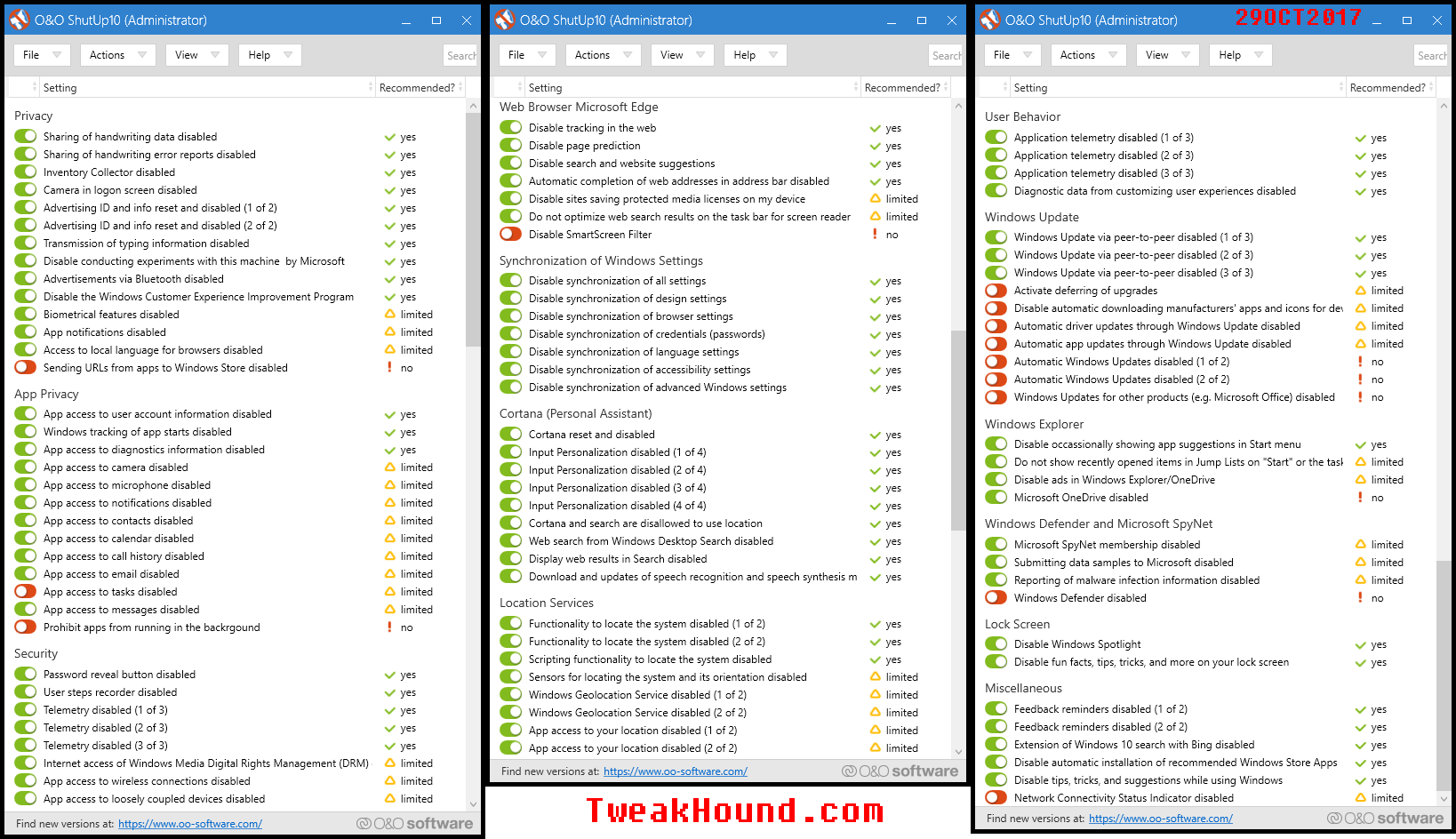
IMHO the Win10 Fall Creators Update was/is a giant waste of time and effort. It delivered nothing useful for the end user and caused headaches for many. FCU could have been delivered as a standard roll-up instead of a full system reset. There will be no changes to the Tweaking Windows 10. There is only one change to Windows 10 Privacy Settings and that is the screenshot to my O&O Shutup10 settings:
(click on image for full size.)