
• Skip to primary navigation
  • Skip to main content
  • Skip to primary sidebar

TweakHound

Computer stuff...

  • Home
  • Windows XP
  • Windows Vista
  • Windows 7
  • Windows 8
  • Windows 10
  • Windows 11
  • Linux
  • Tweak Guides
  • Site Info
    • About
    • About Me
    • TweakHound’s World
    • Contact
    • My Computers
    • Old Articles
    • Privacy Policy
    • Old Index
    • Advanced Search

Fix Windows 10 Network Browsing

December 30, 2017, 12:54(EST) By Eric (a.k.a. TweakHound)

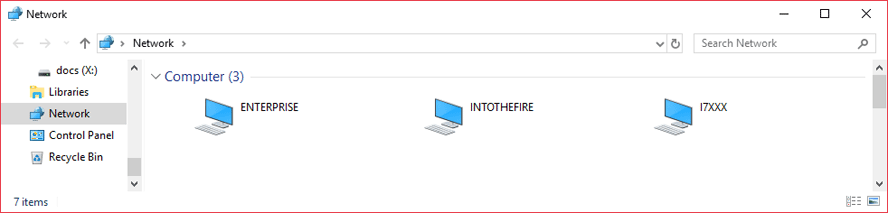
After my latest computer build, parts swapping in/out old computers, and making a new/old home server I noticed network browsing was FUBAR. I double-checked everything I could think of. Everything worked last time I checked. I did some Googling and finally came up with the answer.
Fall Creators Update broke network browsing. Surprise, surprise:

SMBv1 is not installed by default in Windows 10 Fall Creators Update and Windows Server, version 1709
I get why Microsoft removed SMBv1 but breaking the network browsing function is unacceptable and is indicative of Microsoft’s arrogance. They do include a fix but they left us to do it on our own.
The Fix
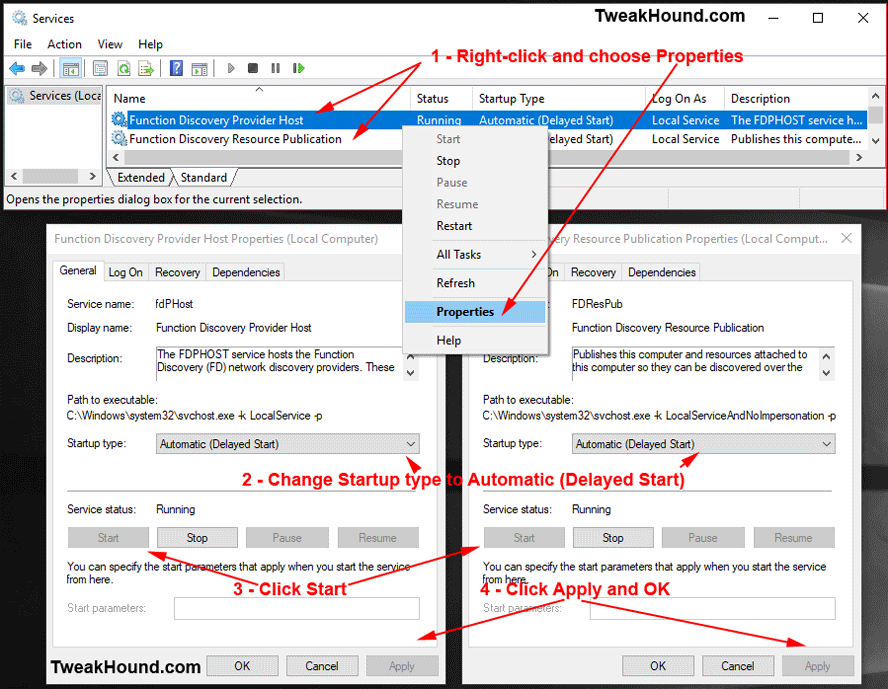
Short: “Start the “Function Discovery Provider Host” and “Function Discovery Resource Publication” services, and then set them to Automatic (Delayed Start)”
You need to this on every PC you want visible.
The changes will take effect immediately.

Long:
– Press the Windows + R keys and type services.msc
– Scroll down to the Function Discovery Provider Host service and double-click it.
– Change the startup type to Automatic (Delayed Start)
– Click the Start button.
– Click Apply and OK.
—
– Scroll down to the Function Discovery Resource Publication service and double-click it.
– Change the startup type to Automatic (Delayed Start)
– Click the Start button.
– Click Apply and OK.
You need to this on every PC you want visible.
The changes will take effect immediately.
-END-

Tagged With: How-To's, This Site, Windows 10

Reader Interactions

Comments

  1. Ed says

    December 30, 2017, 13:02(EST) at 13:02

    ERIC: YOUR THOUGHTS ON THIS POST???
    Two devastating global ransomware outbreaks, WannaCry and Petya, spread quickly because of a vulnerability in one of the internet’s most ancient networking protocols, Server Message Block version 1 (aka SMBv1).
    Open Control Panel (just start typing Control in the search box to find its shortcut quickly). Click Programs, and then click Turn Windows features on or off (under the Programs heading). Clear the check box for SMB 1.0/CIFS File Sharing Support, as shown here. That’s it; you’re protected.

    • Eric (a.k.a. TweakHound) says

      December 30, 2017, 13:17(EST) at 13:17

      Way ahead of ya Ed!
      https://www.tweakhound.com/?s=smbv1

  2. Doug says

    December 30, 2017, 15:41(EST) at 15:41

    Good info! I didn’t realize removing the SMBv1 component also disabled the network discovery services.
    Home server, huh? Very cool. Future article perhaps? 🙂

    • Eric (a.k.a. TweakHound) says

      December 30, 2017, 17:14(EST) at 17:14

      Shhhhh…..

Primary Sidebar

Popular Articles

Windows 10

Tweaking Windows 10

My Windows 10 Tweaks

Windows 10 Privacy Settings

Win10 Diagnostics Tracking Service Gone?

Windows 10 Advanced Disk Cleanup

Win10 Customize Installation Options

Windows 10 Dark Theme

Win10 Wallpapers, Graphics, etc.

All Windows 10 Articles

Windows 8

Tweaking Windows 8.1

Advice On Installing Windows 8.1

Clean Install Windows 8.1

Cleanup After Windows 8.1 Upgrade

Create Shutdown, Restart, Logoff Tiles For Windows 8

Tweaking Windows 8

Install Windows 8 – Clean Install With Upgrade Media

Install Windows 8 – Upgrade

Windows 8 – Cleaning Up After You’ve Upgraded

Windows 8 Freeware Machine

Windows 8 SSD Settings, Etc.

How To Resize Your Windows 8 Partition

Create Windows 8 Recovery Media

Windows 8 – Elevated Command Prompt

How To Fix The Windows Bootloader

Windows 7

Installing Windows 7

Tweaking Windows 7

Windows 7 Diagnostics Tracking Service

The Windows 7 Freeware Machine

The Windows 7 Pagefile And Running Without One

Bad Tweaks

SSD Tweak Guide (sort of)

The noguiboot (no GUI Boot) Tweak

NtfsMemoryUsage=2 Tweak

More Windows 7 articles here.

Windows Vista

Installing Windows Vista

Tweaking Windows Vista

More Windows Vista articles here.

Windows XP

eXPired - The Last Windows XP Guide You'll Ever Need

The Right Way To Install Windows XP

Super XP Tweaking Guide

The Freeware XP Machine

Bad Tweaks

More XP Articles here and here.

Backup

Backup Article Greatest Hits – Vol. 1

Other

Cataloging Your Music Collection

Finding Good Album Art

Converting Vinyl Records To Digital Music – A Non-Audiophiles Guide

Windows All-In-One Recovery Flash Drive

SSD Tweak Guide (sort of)

Raidmax Blackstorm Case Review

Disk Partitioning

Ditch Those CD's! A Guide To Using USB Flash Drives

Checking Your Disks For Problems

Bad Tweaks

More articles here

Tags

Android Backup Beer Computer Hardware Computer News Cool Tools Freeware How-To's Linux Off Topic openSUSE Playlists Privacy Security Software This Site vacation Veterans Windows 7 Windows 8 Windows 10 Windows 11 Windows Vista Windows XP

TweakHound - Optimize Your Computing Experience! TweakHound - Optimize Your Computing Experience!

Copyright 2002-2025 by Eric Vaughan All material contain here is the property of the materials owner. Windows, Windows XP, Windows Vista, Windows Seven, Windows 8, Windows 10, Windows 11, Microsoft, and all associated logos are trademarks/property of Microsoft. You may not use or copy any material from tweakhound.com without expressed written permission. Hotlinking to any material within this site is forbidden. Privacy Policy