• Skip to primary navigation
  • Skip to main content
  • Skip to primary sidebar

TweakHound

Computer stuff...

  • Home
  • Windows XP
  • Windows Vista
  • Windows 7
  • Windows 8
  • Windows 10
  • Windows 11
  • Linux
  • Tweak Guides
  • Site Info
    • About
    • About Me
    • TweakHound’s World
    • Contact
    • My Computers
    • Old Articles
    • Privacy Policy
    • Old Index
    • Advanced Search

Random Weekend Stuff…

August 31, 2014, 12:43(EDT) By Eric (a.k.a. TweakHound)

freeware baby!

freeware baby!Site Stuff…
All the Freeware Machine articles have been updated:
The Windows 8 Freeware Machine
The Windows 7 Freeware Machine
The Freeware XP Machine
If you got a suggestion for these guides. let me know.

A Legend Moves On
Website owner/editor and Geek legend Anand Lal Shimpi is signing off.
Sad to see him go.
Update – Now we know why: Veteran Tech Journalist Anand Shimpi Headed to Apple

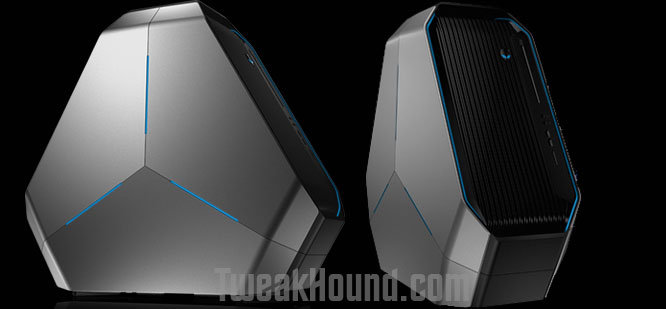
Beautiful Alien
The new Alienware Area 51 case looks awesome.
area51

Tagged With: Computer News

Updated: eXPired – The Last Windows XP Guide You’ll Ever Need

August 27, 2014, 18:54(EDT) By Eric (a.k.a. TweakHound)

xp_logo

xp_logoUpdated To “Final”
eXPired – The Last Windows XP Guide You’ll Ever Need

Tagged With: How-To's, This Site, Windows XP

Time To Run Windows Update

August 27, 2014, 13:13(EDT) By Eric (a.k.a. TweakHound)

windows security

windows securityLooks like Microsoft is starting to roll out fixed versions of their previously botched updates.
MS14-045 update is back.
KB article: https://support.microsoft.com/kb/2993651

Tagged With: Security

Random Tuesday Stuff…

August 26, 2014, 16:34(EDT) By Eric (a.k.a. TweakHound)

nfl2

nfl2Good Reads
Paul Thurrott – Putting the Win in Windows 9
Ars Technica System Guide: August 2014 (Re: Budget Box, Friends don’t let friends buy AMD CPU’s.) 😉
Pressy Review: I Had No Clue Something Could Suck This Badly – “I’m going to keep this short and sweet: Pressy is the worst product I’ve ever reviewed. I generally find some redeeming quality about even the worst products, but Pressy doesn’t have one. It is, without question, complete garbage and a waste of money.”
:rotfl:

CCleaner Updated
Download it here. Release notes here.
***Pay attention during install. May attempt to install unwanted programs.

Google Chrome
Chrome has been updated to version 37.0.2062.94 for Windows, Linux, and those poor souls using Macs.
Download or update within the program.
Optionally you can install the now stable 64-bit version of Chrome. Just look for “Windows 64-bit” under the download button at the link above.
Read about it here: Chromium Blog: 64 bits of awesome: 64-bit Windows Support, now in Stable!

Site Stuff
I forgot to mention there was a fantastic contribution by an expert about the useplatformclock tweak.

The links for my music collection in the article Cataloging Your Music Collection have been updated:
Vinyl
Discogs page: http://www.discogs.com/collection?user=TweakHound
HTML page: https://www.tweakhound.com/music/CATraxx_HTML/vinyl/index.html
CD’s
https://www.tweakhound.com/music/CATraxx_HTML/index.html
MP3’s
Starts here: https://www.tweakhound.com/music/mp3/beach/index.html

Reader Email
Q – When I have two folders open next to each other in 8.1 and I select a bunch of files from the left folder and I drag / drop them to the right folder, it copies the files. Is there any way that you know of to set the default Windows action to CUT these files? I never copy. According to two forum posts I made, the answer is no, but I don’t buy it.
A –
See:
http://windows.microsoft.com/en-us/windows-vista/moving-and-copying-files-by-using-the-drag-and-drop-method
And:
To use move instead of copy, press and hold SHIFT key > click, hold, and drag files.
http://windows.microsoft.com/en-us/windows-vista/moving-and-copying-files-by-using-the-drag-and-drop-method
http://windows.microsoft.com/en-us/windows-8/copy-move-files
App to change default behavior:
http://winaero.com/comment.php?comment.news.69

Tagged With: Computer News, This Site

Random Weekend Stuff…

August 24, 2014, 19:08(EDT) By Eric (a.k.a. TweakHound)

ra_bigx

ra_bigx Not As Easy As It Looks
SpaceX found out that it ain’t easy trying be like NASA.

Looking Good
Neowin has gotten to a new look. Too bad their lead article is lame. Still, Neowin, You Look Marvelous!
newneowin

God Speed Big X
Famed actor/director/producer Richard Attenborough passed away today.
A Bridge Too Far and The Great Escape are among my all-time favs.
Wikipedia – Richard Attenborough

Shame On You
The freeware screen recorder CamStudio now contains foistware and/or malware. It is even being discussed in their forums.
As of this writing, the old version at Major Geeks is still good. Version CamStudio_2.7_r316_setup.exe is what you are looking for. DO NOT update after installing.
The once great zip utility IZarc apparently is guilty of the same thing. I moved on to 7-Zip long ago.
I will be updating the freeware guides this week to reflect the change.

Software
Acronis TI 2014 Update 3 build 6688. Log in to your account for the update.

Reader Email
Q: In windows 7 you showed us how to avoid the 100MB partition during a clean install using diskpart. Is this necessary to do in win 8/8.1? Could you still do the clean command and partition creation and format? Or is it better just to install it to an unallocated space?

My Answer:
Short answer is that you can use the same procedure you used for Windows 7.*
That little partition works a little different on Windows 8/8.1 than it did on Windows 7 and is usually larger than 100mb.
My advice:
1 – Before partitioning and installing, disconnect all drives except the drive you wish to install Windows on.
2 – If your computer uses UEFI instead of BIOS I highly suggest you use a blank drive and let Windows 8/8.1 handle the partitioning.
3 – If you are an advanced user see:
See TechNet – Hard Drives and Partitions Hard Drives and Partitions
Specifically:
Configure UEFI/GPT-Based Hard Drive Partitions
Sample: Configure UEFI/GPT-Based Hard Drive Partitions by Using Windows Setup
Sample: Configure UEFI/GPT-Based Hard Drive Partitions by Using Windows PE and DiskPart

and

Configure BIOS/MBR-Based Hard Drive Partitions
Sample: Configure BIOS/MBR-Based Hard Drive Partitions by Using Windows Setup
Sample: Configure BIOS/MBR-Based Hard Disk Partitions by Using Windows PE and DiskPart
and

DiskPart Commands

*I should note that I currently do not use UEFI on any of my computers.

Tagged With: Computer News, This Site

Mini Resurrection

August 24, 2014, 16:40(EDT) By Eric (a.k.a. TweakHound)

th

thAs I told y’all earlier, I gave my laptop to my college bound nephew.
That left me with only my Android phone for mobile computing, which frankly sucks.
My nephew had received an HP Mini Netbook for Christmas 2009. I made him hand that over… [Read more…] about Mini Resurrection

Tagged With: How-To's, openSUSE, This Site, Windows 7

Sysinternals Freeware Updates

August 20, 2014, 06:43(EDT) By Eric (a.k.a. TweakHound)

cooltools

cooltoolsSysinternals has released the following updates:
Autoruns v12.02
Coreinfo v3.31
Sysmon v1.01
Whois v1.12
(SOURCE)

Tagged With: Cool Tools, Freeware

MediaMonkey 4.1.4

August 17, 2014, 18:36(EDT) By Eric (a.k.a. TweakHound)

mediamonkey

mediamonkey“It’s a minor update that includes fixes to playback, duplicates when browsing a USB stick, and 2 bugs that can result in data corruption. It is a strongly recommended upgrade.” SOURCE
Download: http://www.mediamonkey.com/sw/MediaMonkey_4.1.4.1709.exe
MediaMonkey is a free media manager/player. It used to be music only but now has video supported. This has caused the program to nearly double in size.
You can find the last non-video version here (MediaMonkey 3.2.5.1306): http://www.oldapps.com/mediamonkey.php?old_mediamoneky=6343

Tagged With: Freeware

Botched Windows Update

August 17, 2014, 18:25(EDT) By Eric (a.k.a. TweakHound)

oops

oopsSome folks are finding that the latest Patch Tuesday updates resulted in bluescreens.
Info is all over the web but the source of the news and the fix are all found in this Microsoft forum thread:
Blue Screen (Stop 0x50) after applying update KB2982791 to Windows 7 Home Premium 64 bit
The fix is on page 5 of that thread.
Microsoft’s official response, fixes, and recommendation to uninstall up to 4 updates is here:
MS14-045: Description of the security update for kernel-mode drivers: August 12, 2014

Tagged With: Security

Reader Emails

August 17, 2014, 18:02(EDT) By Eric (a.k.a. TweakHound)

email#1
Q – Hi Eric I’m one of your long time readers and just thought i would let you know that UBCD4Win has be discontinued and just wondering if you had any new recommendations.

A – Yeah,the UBCD4Win was given up several years ago. I believe the creator had financial issues and sold the domain too.
You can grab the last image at Major Geeks: http://www.majorgeeks.com/files/details/ubcd4win.html

As for an alternative, Hiren’s is good: http://www.hiren.info/pages/bootcd

If you are looking for something more modern you’ll have to manually create one.
Usually this involves creating a WinPE disk and can be quite involved. See:
http://winbuilder.net/
http://www.911cd.net/forums/index.php
http://reboot.pro/
http://winbuilder.net/


#2
Q – Hello i was following your tweak guide for windows 7 and when i got to the regedit tweak i noticed that some of the entries weren’t in that particular folder mentioned for example:
“HungAppTimeout”=”4000?
“WaitToKillAppTimeout”=”5000?
do i just add them as a string or dword or do i just leave it alone? i also dont have an entrie for the 8.3 names and last access.
any help would be highly appreciated thank you

A – Yes, some entries need to be created.
Download the file below, edit it as you see fit, change the file extension from .txt to .reg, double-click to apply, reboot.
https://www.dropbox.com/s/iwsanqf4ak6nm9g/TweakHound_Win7_Tweaks.txt


#3
Q – As I understand it, power saver can help you get the most from a single battery charge on a laptop. High performance maximizes screen brightness and might increase PC performance so this would be bet for a laptop that is plugged in 24/7? So when would I want to used Balanced if unplugged = power saver and plugged in = high performance?
Also, where do keep your slider bars for “Adjust plan brightness” for each plan?” I didn’t see it in the guide. Mine are all the way up for all three plans for both plugged in and battery. Don’t think they should be.

A – As I said in the Windows 8.1 Tweak Guide, “I use all 3 plans: High Perf on the desktop, Balanced on a laptop, and Power saver on the laptop while traveling.” You can adjust (and save) these plans as you see fit.
As to display brightness. This is personal preference (and will change with age). Obviously, the brighter the display the more you will consume power.
For laptop that is on battery power I would recommend.
High Perf: From the lowest comfortable setting to Max.
Balanced: the lowest comfortable setting.
Power Saver: the lowest usable setting.

Tagged With: Computer News, This Site

« Previous Page
Next Page »

Primary Sidebar

Popular Posts

Tweaking Windows 10

Software I Use – 2021 Edition

Timer Tweaks Benchmarked

Win10 – Get Auto-Login Back

Recent Posts

  • Monday News
  • Patch Tuesday
  • Weekend News
  • Weekend News
  • Patch Tuesday
  • Friday News
  • Patch Tuesday
  • Using Wise Disk Cleaner
  • Using Cleanmgr+
  • O&O ShutUp10++ 2.2.1024
buywin10th2

Tags

  • Android
  • Backup
  • Beer
  • Computer Hardware
  • Computer News
  • Cool Tools
  • Freeware
  • How-To's
  • Linux
  • Off Topic
  • openSUSE
  • Playlists
  • Privacy
  • Security
  • Software
  • This Site
  • vacation
  • Veterans
  • Windows 10
  • Windows 11
  • Windows 7
  • Windows 8
  • Windows Vista
  • Windows XP

Catagories

  • Android
  • Backup
  • Beer
  • Computer Hardware
  • Computer News
  • Cool Tools
  • Freeware
  • Freeware Machines
  • How-To's
  • Linux
  • News From The Web
  • Off Topic
  • openSUSE
  • Privacy
  • Security
  • Software
  • Tweak Guides
  • Veterans
  • Windows
  • Windows 10
  • Windows 11
  • Windows 7
  • Windows 8
  • Windows Vista
  • Windows XP

TweakHound - Optimize Your Computing Experience! TweakHound - Optimize Your Computing Experience!

Copyright 2002-2025 by Eric Vaughan All material contain here is the property of the materials owner. Windows, Windows XP, Windows Vista, Windows Seven, Windows 8, Windows 10, Windows 11, Microsoft, and all associated logos are trademarks/property of Microsoft. You may not use or copy any material from tweakhound.com without expressed written permission. Hotlinking to any material within this site is forbidden. Privacy Policy