• Skip to primary navigation
  • Skip to main content
  • Skip to primary sidebar

TweakHound

Computer stuff...

  • Home
  • Windows XP
  • Windows Vista
  • Windows 7
  • Windows 8
  • Windows 10
  • Windows 11
  • Linux
  • Tweak Guides
  • Site Info
    • About
    • About Me
    • TweakHound’s World
    • Contact
    • My Computers
    • Old Articles
    • Privacy Policy
    • Old Index
    • Advanced Search

Windows 7

Remove software related to the Windows 10 free upgrade offer

September 21, 2016, 06:38(EDT) By Eric (a.k.a. TweakHound)

Microsoft has a new Windows update that removes most GWX stuff from Windows 7 and 8.1.
“This update removes the Get Windows 10 app and other software related to the Windows 10 free upgrade offer that expired on July 29, 2016. ”
KB3184143 – Remove software related to the Windows 10 free upgrade offer

This update replaces the following previously-released software:
KB 3035583 — Update installs Get Windows 10 app in Windows 8.1 and Windows 7 SP1
KB 3064683 — Windows 8.1 OOBE modifications to reserve Windows 10
KB 3072318 — Update for Windows 8.1 OOBE to upgrade to Windows 10
KB 3090045 — Windows Update for reserved devices in Windows 8.1 or Windows 7 SP1
KB 3123862 — Updated capabilities to upgrade Windows 8.1 and Windows 7
KB 3173040 — Windows 8.1 and Windows 7 SP1 end of free upgrade offer notification
KB 3146449 — Updated Internet Explorer 11 capabilities to upgrade Windows 8.1 and Windows 7

Like everything else Microsoft does these days this is incomplete. Geeks have done their own research and come up with there own list to uninstall.
I did this via a Batch file, Remove And Block GWX In Windows 7. I included the updates I thought were important to remove. I’m going to revise it one more time this evening.
See this MDL forum thread for a bigger list: MDL – Remove Telemetry and Windows 10 Related Updates from Windows 7

Tagged With: Windows 7

Is Microsoft Trolling Windows 7 Geeks?

March 10, 2016, 14:52(EST) By Eric (a.k.a. TweakHound)

troll_blueWoody Leonhard wrote Windows patch KB 3139929: When a security update is not a security update. In it he discusses that Microsoft included a GWX non-security update in security update KB3139929. That non-security update is KB3146449 and is uninstallable. Here is the breakdown:
Updated Internet Explorer 11 capabilities to upgrade Windows 8.1 and Windows 7
About this update
This update adds functionality to Internet Explorer 11 on some computers that lets users learn about Windows 10 or start an upgrade to Windows 10. Before you install this update, see the Prerequisites section. For more information about Windows 10, see Windows 10.

So yes this doesn’t sound good. In fact it sounds like yet another low-down, underhanded, sneaky, dirty-rotten trick by Microsoft. A giant middle finger to Windows 7 users if you will.

But the thing is sites around the web parroted the fact that this update produced a “blue banner” promoting Win10 when using IE despite the fact that none of them are able to reproduce the issue.

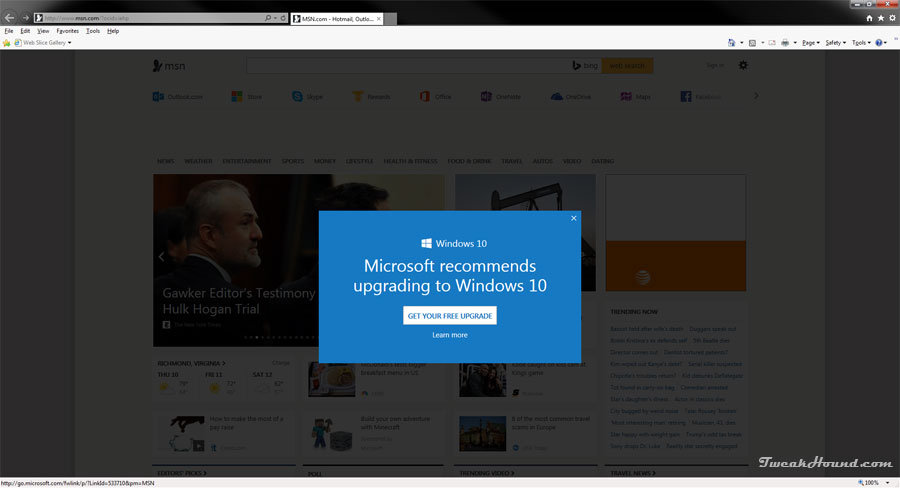
I’ve poked around on a couple of my Windows 7 machines and I can’t find anything nefarious related to this update. The only thing I can find is the picture below when you go to MSN:
ms_trollingwin7

 
On its face this seems outrageous. I really can’t believe that MS would pull this kind of stunt again? And, there seems no proof of egregious behavior this time. At least not yet.
So, I dunno. I wonder if Microsoft is trolling Windows 7 Geeks?

Tagged With: Windows 7

Two Windows 7 Articles Updated

February 24, 2016, 15:29(EST) By Eric (a.k.a. TweakHound)

win7orb

win7orbInstalling Windows 7 has received a much needed overhaul.
Remove And Block GWX In Windows 7 updated with a trimmed down script.
Comments and suggestions welcome.

Tagged With: Windows 7

Upgrade To Win10 And Keep Previous Windows Version

February 6, 2016, 11:39(EST) By Eric (a.k.a. TweakHound)

th

thI’m going to show you how I upgraded to Windows 10 and kept my Windows 7 install. I alluded to this method earlier. Although not tested this should work for Windows 8.1 too.
I searched the Windows 10 EULA and I can find nothing that restricts this but I’m not a lawyer either.
[Read more…] about Upgrade To Win10 And Keep Previous Windows Version

Tagged With: How-To's, This Site, Windows 10, Windows 7, Windows 8

GWX: The Saga Continues

January 14, 2016, 15:33(EST) By Eric (a.k.a. TweakHound)

win7orb

win7orbMicrosoft released “official” instructions on how to stop Windows 7 & 8 from upgrading to Win10:

To block the upgrade to Windows 10 through Windows Update, specify the following registry value:
Subkey: HKLM\SOFTWARE\Policies\Microsoft\Windows\WindowsUpdate
DWORD value: DisableOSUpgrade = 1

For non-Enterprise versions of Windows, the (GWX) notification icon can be suppressed through the Windows registry. To do this, set the following registry value:
Subkey: HKLM\Software\Policies\Microsoft\Windows\Gwx
DWORD value: DisableGwx = 1

Tagged With: Windows 7, Windows 8

Warning, GWX KB3035583 Re-released, Again

December 15, 2015, 13:29(EST) By Eric (a.k.a. TweakHound)

win10_logon_logoThe Microsoft update that provides GWX has been re-released and is back in the OPTIONAL updates.
KB3035583 – Update installs Get Windows 10 app in Windows 8.1 and Windows 7 SP1
By now you should have set Windows Update to NOT give recommended updates. Be sure to hide this again.

Tagged With: Windows 7, Windows 8

More GWX Related Updates

December 1, 2015, 15:59(EST) By Eric (a.k.a. TweakHound)

th

thMicrosoft has released OPTIONAL updates for Windows 7 & 8.1 that address upgrade issues to Win10.
Obviously, if you don’t want to upgrade to Win10 you don’t need them. Recommend you hide it too.
[Read more…] about More GWX Related Updates

Tagged With: Windows 10, Windows 7, Windows 8

Windows 7 Diagnostics Tracking Service

November 2, 2015, 08:32(EST) By Eric (a.k.a. TweakHound)

win7orb

*last updated 24OCT2016
Well it’s official. The Diagnostics Tracking Service is now a permanent part Windows 7.
Microsoft first introduced DiagTrack with KB3022345. Then they tried to sneak it back in with KB3068708 and again with KB3080149.
With these patches you could install or uninstall them and everything else was fine.
Now it is back with KB3192403 – October 2016 Preview of Monthly Quality Rollup for Windows 7 SP1 and Windows Server 2008 R2 SP1.
As the name suggests, this update is a preview of what is to come and is an optional update. It will become a standard update next month.
So, if you are a responsible and intelligent Windows user who keeps your system patched you are stuck with DiagTrack being installed. Since as Mary Jo put it, “Each monthly rollup will supersede the previous month’s rollup. The ultimate goal is for these monthly rollups to become fully cumulative, which will happen as the team adds patches released in the past, so users need only to install the latest single rollup.”
Now you must disable it via services.msc or in the registry.
Aren’t update rollups awesome! Welcome to the new Microsoft, “Resistance is futile. You will be assimilated.”

Diagnostics Tracking Service
“Start”=dword:00000002 is default . 2=auto, 3=manual, 4=disabled
HKEY_LOCAL_MACHINE\SYSTEM\CurrentControlSet\Services\DiagTrack
“Start”=dword:00000004

*edit 25OCT2016
I’m not sure what the confusion is but apparently I did not make myself clear above…
DISABLE this via the Services snap-in (services.msc) or manually via the registry. I provided the key above.


– – – – – – – – – – – – – – – – – – – – – – – – – – – – – – – – –
For some time now I’ve been seeing posts about disabling the Diagnostics Tracking Service in Windows 7.
This is unnecessary. Uninstall it instead.

Go to Control Panel > Windows Update > Installed updates (bottom left of windows) > find and uninistall KB3022345 (right-click > Uninstall)
Re-run Windows update > find KB3022345 and hide it (right-click > Hide update)

Microsoft continues to play games with its customers. The new update is below.

Go to Control Panel > Windows Update > Installed updates (bottom left of windows) > find and unnistall KB3080149 and/or KB3068708 (right-click > Uninstall)
Re-run Windows update > find KB3080149 and/or KB3068708 and hide it (right-click > Hide update)
Done

Diagnostics Tracking Service
“Start”=dword:00000002 is default . 2=auto, 3=manual, 4=disabled
HKEY_LOCAL_MACHINE\SYSTEM\CurrentControlSet\Services\DiagTrack
“Start”=dword:00000004


More info: KB3080149 – Update for customer experience and diagnostic telemetry

Tagged With: Windows 7

Remove And Block GWX In Windows 7

November 1, 2015, 13:17(EST) By Eric (a.k.a. TweakHound)

thpinpostlogo

Last updated 12DEC2019

This is version 8 of my scripts to remove and block Windows 10 updates and related telemetry.
I’ve seen multiple posts at websites and forums telling folks how to deal with GWX. Most of them either don’t go far enough, or usually, they go way too far and break stuff.
This applies to Windows 7 ONLY.

Comments are closed after a while for security reasons. You can comment here if you like:
Remove And Block GWX In Windows 7 UPDATED 2

Since it has become obvious that this will be a running battle with Microsoft I’ve decided to make this page the permanent place to these scripts rather than a new post every time I update it.

You’ll need to check back here monthly for updates as Microsoft keeps re-releasing updates that in effect unhides them.
You’ll also want to keep the script handy and rerun it monthly for the same reason.

Thanks to:
Though info on all this stuff has come from dozens of sources, much of this info has come from the MDL forums.
In particular this thread: Remove Telemetry and Windows 10 Related Updates from Windows 7

Download my batch file: https://www.tweakhound.com/downloads/block_GWX_V8.zip
YOU MUST read the README.txt file.
The second half of this calls HideGWXetcV8.vbs to hide updates.
This will take a while.
DO NOT CLOSE WINDOW UNTIL YOU SEE: ” – Finished … All operations complete. Reboot now. Press any key to continue . . .”

Inspiration for this came from a variety of sources but started HERE.
The level of support you will receive is equal to the amount you paid for this 😉
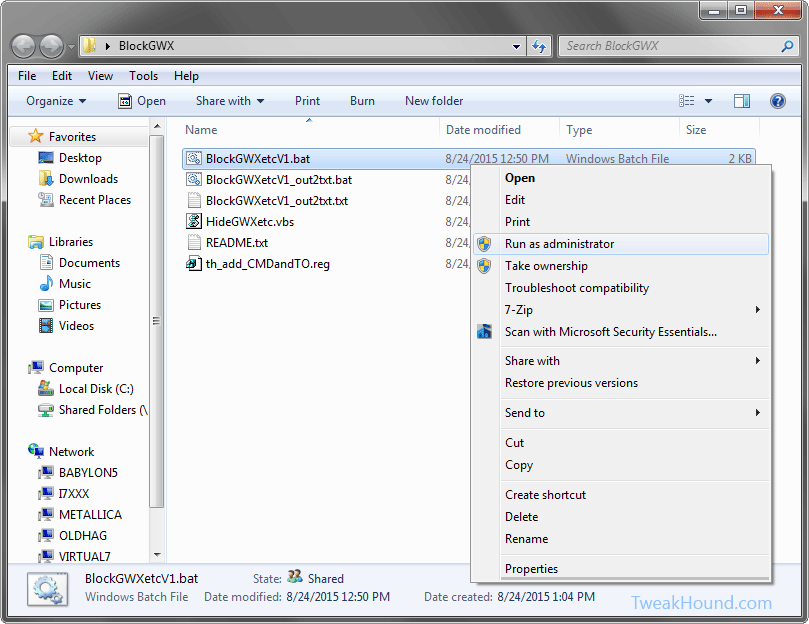
This folder contains:
BlockGWXetcV8.bat – Removes and Hides GWX related updates like in step 2 above.
HideGWXetcV8.vbs – Automatically run by the above .bat files. This hides the updates the batch file uninstalled.
README.txt – Instructions
th_add_CMDandTO.reg – Adds open command windows here (standard and admin) ,and Take Ownership to right-click.

The .bat file and the .vbs files MUST be in the same folder!

(code is listed below)

To do this:
Either right-click the folder and choose Open Command Window Here as Administrator.
In the resulting command window type BlockGWXetcFINAL.bat and hit enter.
OR
right-click the BlockGWXetcFINAL.bat file (see above) and choose Run as Administrator.
If you do not have these right-click options, double-click in included th_add_CMDandTO.reg file and logout/reboot.

Let it run, when the .bat file runs HideGWXetc.vbs it will take a while.
It may look like things have stopped, they haven’t.
DO NOT CLOSE WINDOW UNTIL YOU SEE: ” – Finished … All operations complete. Reboot now. Press any key to continue . . .”

block_gwx_1


-END-

Tagged With: Windows 7

Remove And Block GWX In Windows 7 v2.0

September 11, 2015, 14:13(EDT) By Eric (a.k.a. TweakHound)

th

Article moved here: https://www.tweakhound.com/2015/11/01/remove-and-block-gwx-in-windows-7-2/

Tagged With: How-To's, This Site, Windows 10, Windows 7

« Previous Page
Next Page »

Primary Sidebar

Popular Posts

Tweaking Windows 10

Software I Use – 2021 Edition

Timer Tweaks Benchmarked

Win10 – Get Auto-Login Back

Recent Posts

  • Patch Tuesday
  • Monday News
  • Patch Tuesday
  • Weekend News
  • Weekend News
  • Patch Tuesday
  • Friday News
  • Patch Tuesday
  • Using Wise Disk Cleaner
  • Using Cleanmgr+
buywin10th2

Tags

  • Android
  • Backup
  • Beer
  • Computer Hardware
  • Computer News
  • Cool Tools
  • Freeware
  • How-To's
  • Linux
  • Off Topic
  • openSUSE
  • Playlists
  • Privacy
  • Security
  • Software
  • This Site
  • vacation
  • Veterans
  • Windows 10
  • Windows 11
  • Windows 7
  • Windows 8
  • Windows Vista
  • Windows XP

Catagories

  • Android
  • Backup
  • Beer
  • Computer Hardware
  • Computer News
  • Cool Tools
  • Freeware
  • Freeware Machines
  • How-To's
  • Linux
  • News From The Web
  • Off Topic
  • openSUSE
  • Privacy
  • Security
  • Software
  • Tweak Guides
  • Veterans
  • Windows
  • Windows 10
  • Windows 11
  • Windows 7
  • Windows 8
  • Windows Vista
  • Windows XP

TweakHound - Optimize Your Computing Experience! TweakHound - Optimize Your Computing Experience!

Copyright 2002-2025 by Eric Vaughan All material contain here is the property of the materials owner. Windows, Windows XP, Windows Vista, Windows Seven, Windows 8, Windows 10, Windows 11, Microsoft, and all associated logos are trademarks/property of Microsoft. You may not use or copy any material from tweakhound.com without expressed written permission. Hotlinking to any material within this site is forbidden. Privacy Policy