 I found that several of my tweaks did not stick though the update, especially the right-click menu stuff.
You may want to check and/or reapply the tweaks.
Here are mine: https://www.tweakhound.com/2015/08/10/my-windows-10-tweaks/
Download Windows 10 TH2 ISO And Create Media
 Go to the Windows 10 download page.
Scroll down to the Download Tool Button and click it.

Once downloaded, double-click MediaCreationTool.exe.
[Read more…] about Download Windows 10 TH2 ISO And Create Media
Pictures: Upgrading To Threshold 2
 Just some pics of the upgrade experience.
[Read more…] about Pictures: Upgrading To Threshold 2
Threshold 2 Officially Released
The long-awaited Windows 10 Threshold 2 update is here. Microsoft is calling it the “Fall Update”.
Get the full scoop from Microsoft’s Terry Myerson: First Major Update for Windows 10 Available Today
I will have a few posts on this today.
New Poll Up: “Do you trust Microsoft?”
 Polls are in the right sidebar —>>>
Patch Tuesday
 TH2?
TH2?
“They” said Threshold 2 would be out today. No sign of it here.
Posted on Nov. 9th by @GabeAul on Twitter: “Not yet, will be a couple more days for ISO”
Time To Run Windows Update
Got Windows and/or MS Office? You’ve got updates.
Microsoft Security Bulletin Summary for November 2015
Flash
Adobe Flash patched again? No, say it isn’t so!
APSB15-28 Security Updates Available for Adobe Flash Player
Download Flash
Get Flash for IE in Win 8/8.1/10 via Windows Update.
Latest version of Chrome has it too (see below when released)
Related: 8 of top 10 vulnerabilities used by exploit kits target Adobe Flash Player
Google Chrome Updated
“The stable channel has been updated to 46.0.2490.86 for Windows, Mac, and Linux. This release contains an update to Adobe Flash Player (19.0.0.245) and security fixes.”
Download or update from within the program.
Newegg Premier, 3 Months Free
http://promotions.newegg.com/nepro/15-5150/ (takes a while to get the code)
Other News And Random Stupidity
The geek distrust of telemetry risks making software dumber
What the hell do they put in the water cooler at ZDNet?

“Why would you buy a PC anymore?” asks Tim Cook
It’s only Tuesday and we have the winner for Tool Of The Week!
Own a Vizio Smart TV? It’s Watching You
“The tracking — which Vizio calls “Smart Interactivity” — is turned on by default for the more than 10 million Smart TVs that the company has sold.“
openSUSE Leap 42.1 Tips, Tricks, and Tweaks
 This article IS NOT FINISHED. I’m preoccupied with other stuff but folks have been asking for this so I thought I would show what I’ve got.
[Read more…] about openSUSE Leap 42.1 Tips, Tricks, and Tweaks
Random Thursday Stuff…
 Threshold 2
Lots of folks are thinking the latest insider build (10586) is indeed TH2 RTM.
In an effort to avoid having my every move sent to Microsoft I stopped doing insider builds on my main rig.
Since TH2 official is “supposed” to be released Tuesday I’ll wait.
The place to watch for the real scoop is WZor.net.
New Nvidia Drivers
GeForce Game Ready Driver WHQL 358.87
Release Notes
Rockets Red Orange/Yellow Glare
Last October a NASA rocket exploded at Wallops Island in my state. They just released some awesome pics of the event.

Speaking of NASA
They have the details on some Geeks that spotted something leaving a black hole!
Cool Stars Wars Vids
10 Star Wars Movie Scenes You’ve Never Seen
10 Star Wars Movie Mistakes You Missed
Fix Windows 10 Folder View Settings
 Below is an email exchange with a long time TweakHound.com friend. He couldn’t get the folder view settings to stick.
I thought I would publish it on his suggestion. I hope this exchange helps someone.
[Read more…] about Fix Windows 10 Folder View Settings
Dual Boot openSUSE Leap and Windows 10 UEFI
This is how I dual-boot my Windows 10 rig with openSUSE Leap.
This article is virtually unchanged from: Dual Boot openSUSE 13.2 and Windows 8.1 UEFI
Notes:
– BACKUP your computer with a disk image before attempting this!
– Please do not contact me with questions on this topic.
That’s what the openSUSE forums are for.
– For how I dual-boot with a standard BIOS (legacy) see here: Dual-Boot openSUSE 12.3 And Windows (article is NOT compatible with BTRFS)
Interesting Links
openSUSE:UEFI
BCD System Store Settings for UEFI
Dual booting with Windows 8, not as painful as expected.
Preparation
1 – Full disk image backup using Acronis True Image.
2 – Make or leave unpartitioned space on OS drive for openSUSE. (If you can’t do this without a tutorial, well…..)
3 – Make UEFI boot usb flash drive with Rufus.
Installation
Pardon the odd screenshots. I used Vmware player for this article.
I should note that I am not a believer in using multiple partitions for my Linux installs.
Boot up, go through setup until you get to the partitioning section.
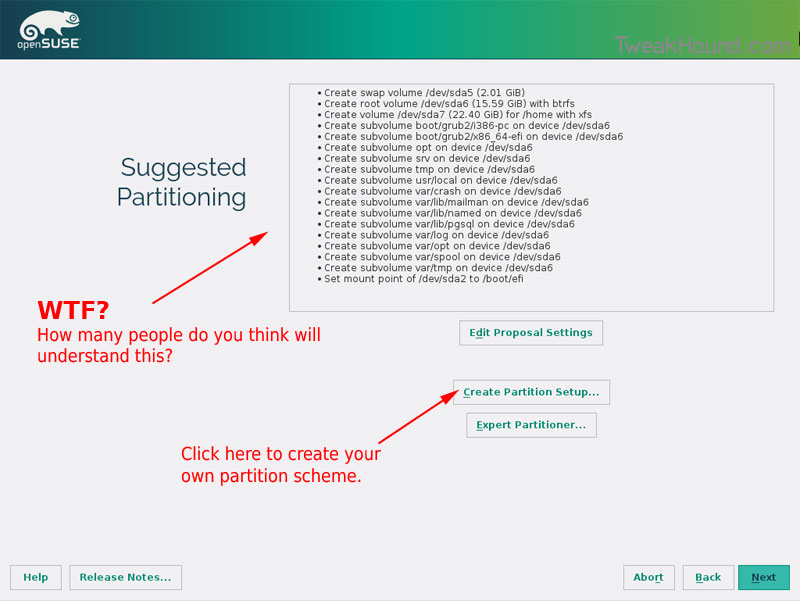
I do not use BTRFS and I always use Create Partition Setup…
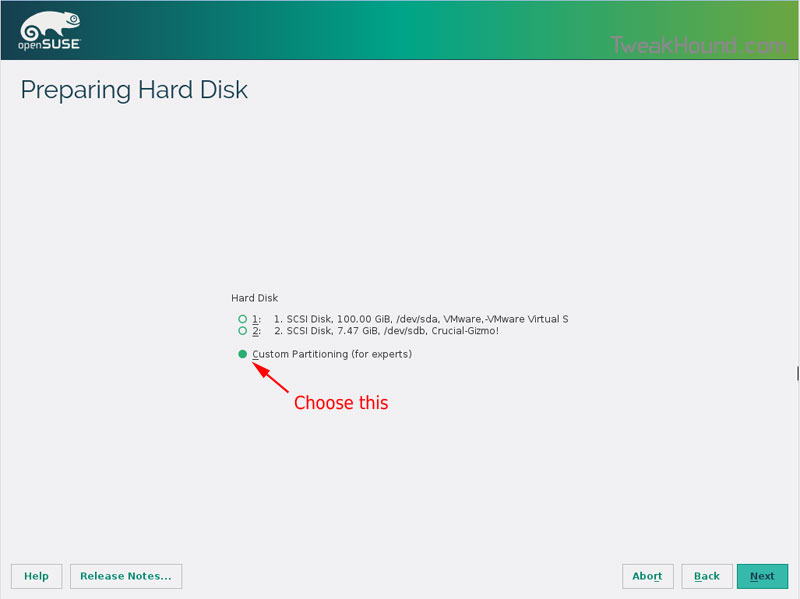
Choose Custom Partitioning (for experts) and click Next
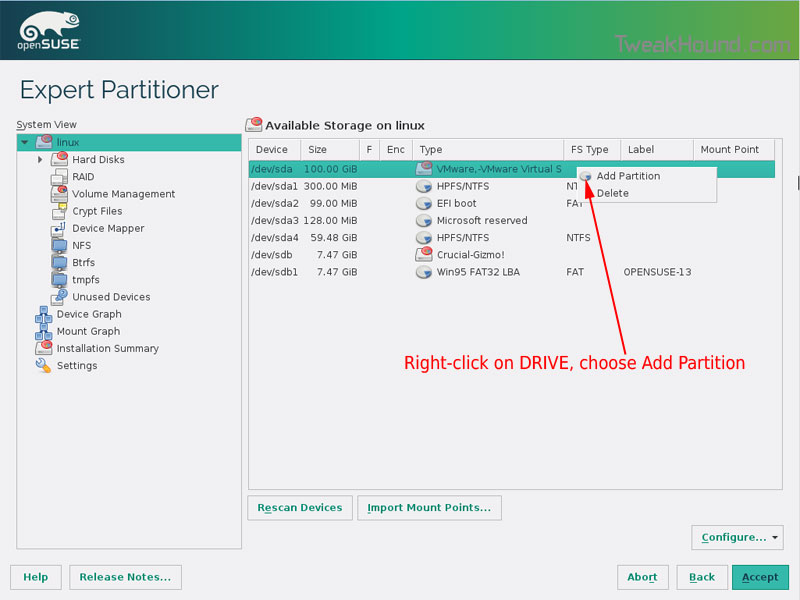
Right-click on the DRIVE where you want to install openSUSE and choose Add Partition
Make a swap partition, 2-4GB is fine.
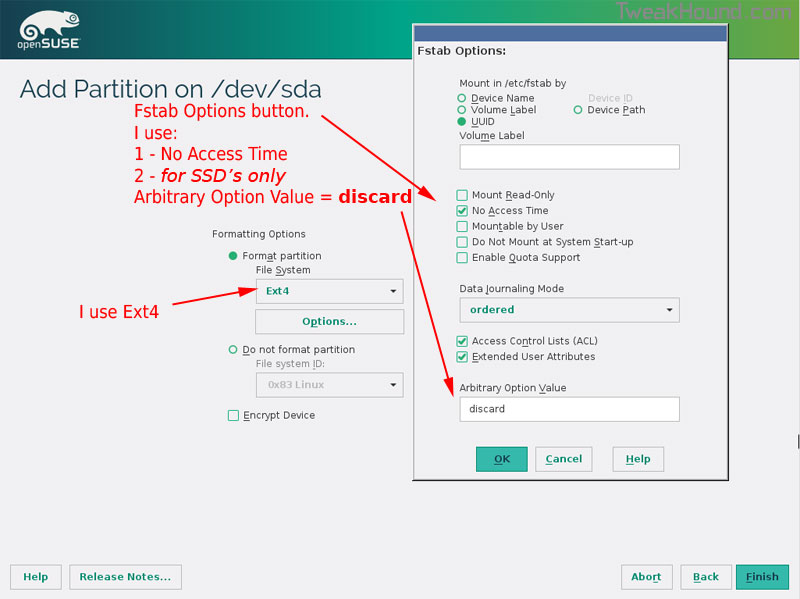
Below are the options I use. Ext4 for file system, noatime, discard* (=trim)
*note – I am not using discard at the moment because it was causing errors on my Samsung 850 Pro SSD.
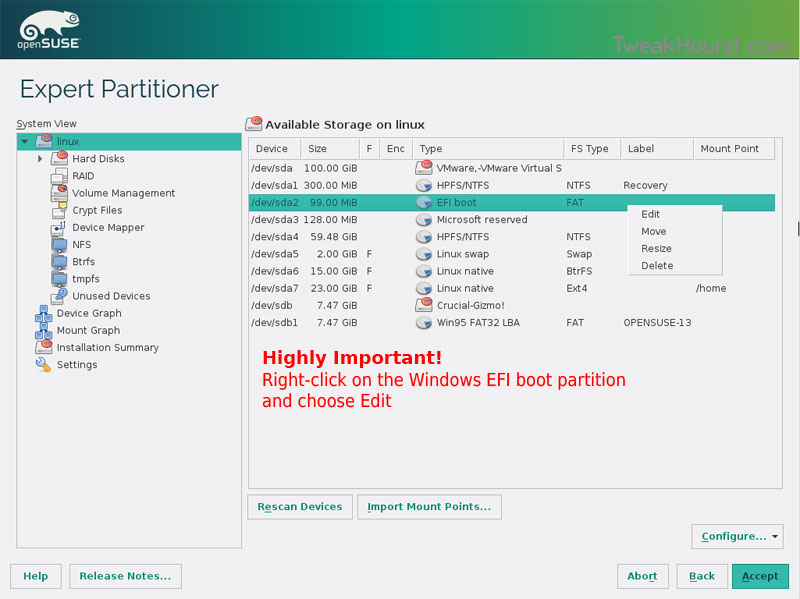
This next step is critical as your system will not boot without it.
Right-click on the Windows EFI boot partition and choose Edit
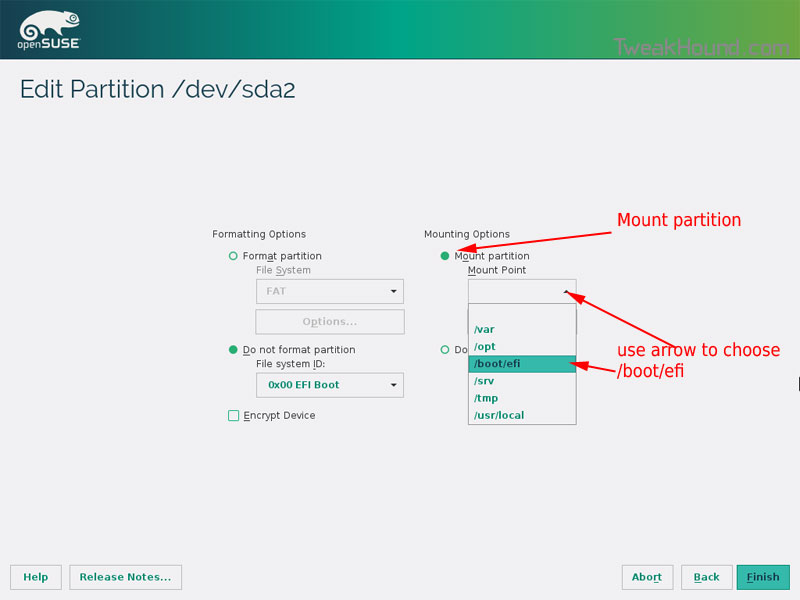
Choose Mount partition
Choose /boot/efi
Click Finish
Done? click Accept
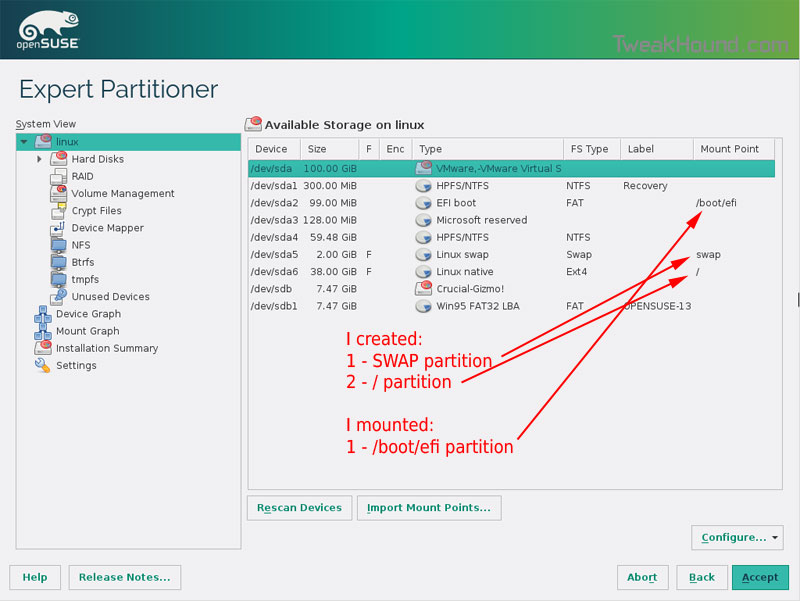
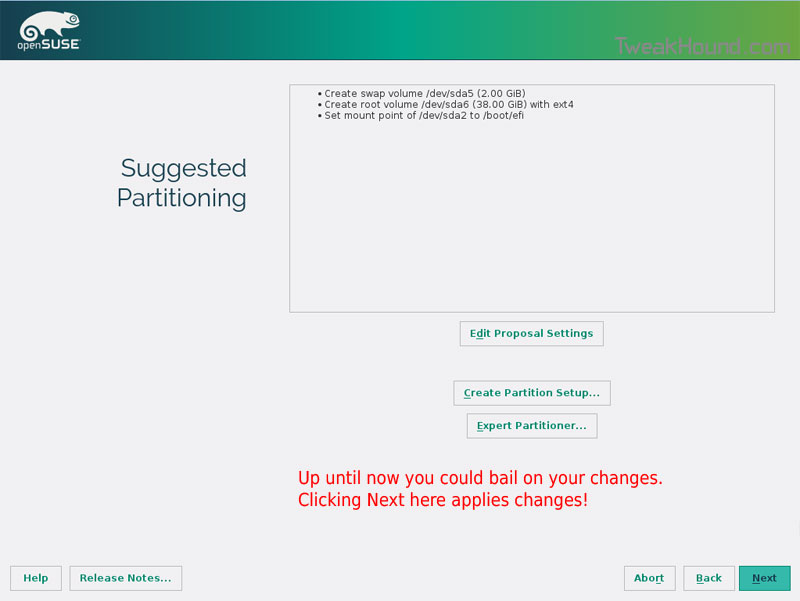
Last chance to bail…
Click Next
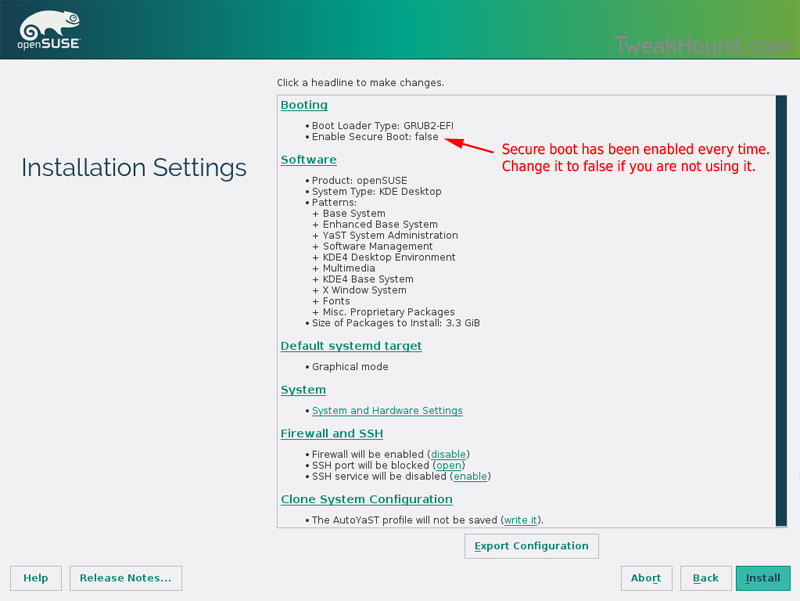
I don’t use Secure Boot. It can be disabled here:
Boot Screen:
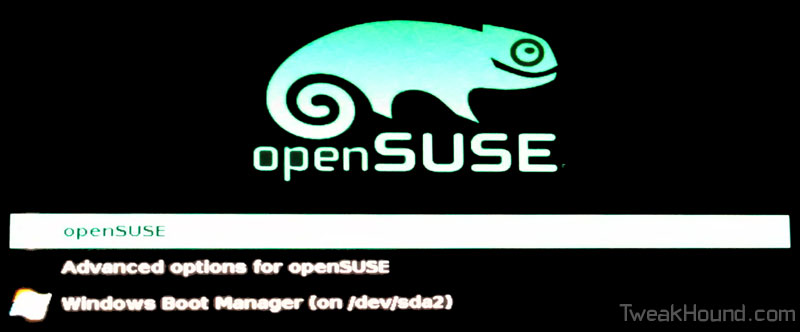
Everything should run just peachy until you boot into Windows again.
Windows will usually try and make its bootloader default again which means openSUSE isn’t an option.
While in Windows, open an Elevated Command Prompt and copy/paste this command (source):
bcdedit /set {bootmgr} path \EFI\opensuse\shim.efi
That’s it!