• Skip to primary navigation
  • Skip to main content
  • Skip to primary sidebar

TweakHound

Computer stuff...

  • Home
  • Windows XP
  • Windows Vista
  • Windows 7
  • Windows 8
  • Windows 10
  • Windows 11
  • Linux
  • Tweak Guides
  • Site Info
    • About
    • About Me
    • TweakHound’s World
    • Contact
    • My Computers
    • Old Articles
    • Privacy Policy
    • Old Index
    • Advanced Search

Remove And Block GWX In Windows 7

November 1, 2015, 13:17(EST) By Eric (a.k.a. TweakHound)

thpinpostlogo

Last updated 12DEC2019

This is version 8 of my scripts to remove and block Windows 10 updates and related telemetry.
I’ve seen multiple posts at websites and forums telling folks how to deal with GWX. Most of them either don’t go far enough, or usually, they go way too far and break stuff.
This applies to Windows 7 ONLY.

Comments are closed after a while for security reasons. You can comment here if you like:
Remove And Block GWX In Windows 7 UPDATED 2

Since it has become obvious that this will be a running battle with Microsoft I’ve decided to make this page the permanent place to these scripts rather than a new post every time I update it.

You’ll need to check back here monthly for updates as Microsoft keeps re-releasing updates that in effect unhides them.
You’ll also want to keep the script handy and rerun it monthly for the same reason.

Thanks to:
Though info on all this stuff has come from dozens of sources, much of this info has come from the MDL forums.
In particular this thread: Remove Telemetry and Windows 10 Related Updates from Windows 7

Download my batch file: https://www.tweakhound.com/downloads/block_GWX_V8.zip
YOU MUST read the README.txt file.
The second half of this calls HideGWXetcV8.vbs to hide updates.
This will take a while.
DO NOT CLOSE WINDOW UNTIL YOU SEE: ” – Finished … All operations complete. Reboot now. Press any key to continue . . .”

Inspiration for this came from a variety of sources but started HERE.
The level of support you will receive is equal to the amount you paid for this 😉
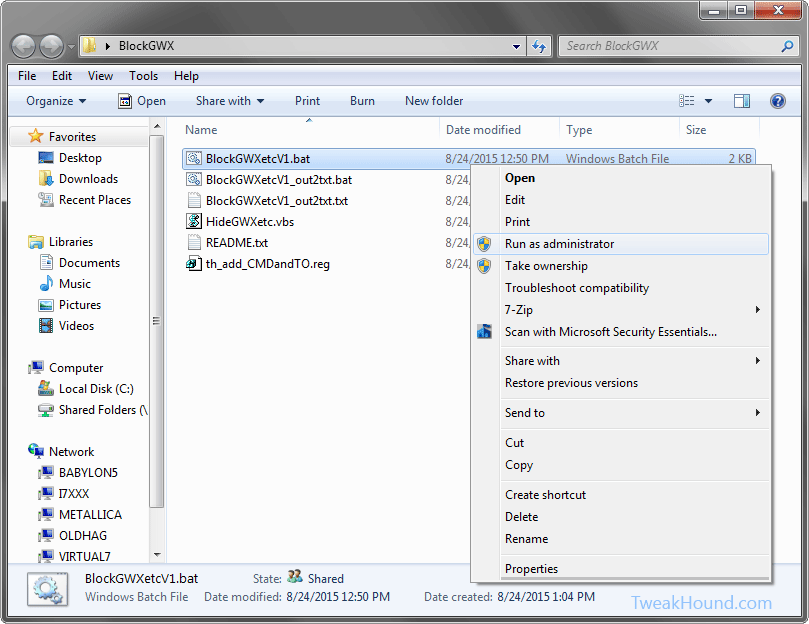
This folder contains:
BlockGWXetcV8.bat – Removes and Hides GWX related updates like in step 2 above.
HideGWXetcV8.vbs – Automatically run by the above .bat files. This hides the updates the batch file uninstalled.
README.txt – Instructions
th_add_CMDandTO.reg – Adds open command windows here (standard and admin) ,and Take Ownership to right-click.

The .bat file and the .vbs files MUST be in the same folder!

(code is listed below)

To do this:
Either right-click the folder and choose Open Command Window Here as Administrator.
In the resulting command window type BlockGWXetcFINAL.bat and hit enter.
OR
right-click the BlockGWXetcFINAL.bat file (see above) and choose Run as Administrator.
If you do not have these right-click options, double-click in included th_add_CMDandTO.reg file and logout/reboot.

Let it run, when the .bat file runs HideGWXetc.vbs it will take a while.
It may look like things have stopped, they haven’t.
DO NOT CLOSE WINDOW UNTIL YOU SEE: ” – Finished … All operations complete. Reboot now. Press any key to continue . . .”

block_gwx_1


-END-

Tagged With: Windows 7

Thursday Random Stuff…

October 29, 2015, 18:11(EDT) By Eric (a.k.a. TweakHound)

win10_logo

win10_logoWin10 Critical Update
MS updated an old update and rolled it into a new update and that is your update update.
KB3106932 – Compatibility update for upgrading to Windows 10: October 29, 2015
[Read more…] about Thursday Random Stuff…

Tagged With: Computer News

Several Sysinternals Tools Updated

October 27, 2015, 06:11(EDT) By Eric (a.k.a. TweakHound)

cooltools

cooltoolsThese updates include the TweakHound favorite Autoruns.
Update: Autoruns v13.5, Sigcheck v2.3, RAMMap v1.4, BgInfo v4.21, Sysmon v3.11, ADInsight v1.2

Tagged With: Cool Tools, Freeware

Windows 10, Where I Stand

October 26, 2015, 16:27(EDT) By Eric (a.k.a. TweakHound)

th

thI asked y’all a while back, “Why Are You Using Windows 10?” and I got some great responses. I thought I would let y’all know where I stand.
Please note the thoughts below are my own opinion. I’ve no intention of telling you what OS you should be using. I’ll try and keep this short…
[Read more…] about Windows 10, Where I Stand

Tagged With: This Site, Windows 10

Monday Random Stuff…

October 26, 2015, 15:42(EDT) By Eric (a.k.a. TweakHound)

samsung_ssd

samsung_ssd
[Read more…] about Monday Random Stuff…

Tagged With: Computer Hardware

Wednesday Random Stuff…

October 21, 2015, 16:55(EDT) By Eric (a.k.a. TweakHound)

backtothefuture2015
[Read more…] about Wednesday Random Stuff…

Tagged With: Computer News

Windows 10 Home Networking Tips

October 20, 2015, 15:21(EDT) By Eric (a.k.a. TweakHound)

win10network_iconAs an old network guy, “TweakHound don’t do no Homegroup”. My home network is a mixed mess of Windows 7, openSUSE, Linux Mint, and Win10. These all interact via a standard Windows workgroup.
I’ve found Windows 10 workgroup networking to be a little wonky (to be kind).
Here are a few tips that have made my home networking easier:
[Read more…] about Windows 10 Home Networking Tips

Tagged With: How-To's, This Site, Windows 10

Monday Random Stuff…

October 19, 2015, 15:42(EDT) By Eric (a.k.a. TweakHound)

starwars1
[Read more…] about Monday Random Stuff…

Tagged With: Computer News

Friday Morning News

October 16, 2015, 06:32(EDT) By Eric (a.k.a. TweakHound)

www_news

www_news
[Read more…] about Friday Morning News

Tagged With: Computer News

Patch Tuesday

October 13, 2015, 16:25(EDT) By Eric (a.k.a. TweakHound)

windows security

windows security
[Read more…] about Patch Tuesday

Tagged With: Security

« Previous Page
Next Page »

Primary Sidebar

Popular Posts

Tweaking Windows 10

Software I Use – 2021 Edition

Timer Tweaks Benchmarked

Win10 – Get Auto-Login Back

Recent Posts

  • Sunday News
  • Patch Tuesday
  • Wednesday News
  • Patch Tuesday
  • Monday News
  • Patch Tuesday
  • Weekend News
  • Weekend News
  • Patch Tuesday
  • Friday News
buywin10th2

Tags

  • Android
  • Backup
  • Beer
  • Computer Hardware
  • Computer News
  • Cool Tools
  • Freeware
  • How-To's
  • Linux
  • Off Topic
  • openSUSE
  • Playlists
  • Privacy
  • Security
  • Software
  • This Site
  • vacation
  • Veterans
  • Windows 10
  • Windows 11
  • Windows 7
  • Windows 8
  • Windows Vista
  • Windows XP

Catagories

  • Android
  • Backup
  • Beer
  • Computer Hardware
  • Computer News
  • Cool Tools
  • Freeware
  • Freeware Machines
  • How-To's
  • Linux
  • News From The Web
  • Off Topic
  • openSUSE
  • Privacy
  • Security
  • Software
  • Tweak Guides
  • Veterans
  • Windows
  • Windows 10
  • Windows 11
  • Windows 7
  • Windows 8
  • Windows Vista
  • Windows XP

TweakHound - Optimize Your Computing Experience! TweakHound - Optimize Your Computing Experience!

Copyright 2002-2025 by Eric Vaughan All material contain here is the property of the materials owner. Windows, Windows XP, Windows Vista, Windows Seven, Windows 8, Windows 10, Windows 11, Microsoft, and all associated logos are trademarks/property of Microsoft. You may not use or copy any material from tweakhound.com without expressed written permission. Hotlinking to any material within this site is forbidden. Privacy Policy