• Skip to primary navigation
  • Skip to main content
  • Skip to primary sidebar

TweakHound

Computer stuff...

  • Home
  • Windows XP
  • Windows Vista
  • Windows 7
  • Windows 8
  • Windows 10
  • Windows 11
  • Linux
  • Tweak Guides
  • Site Info
    • About
    • About Me
    • TweakHound’s World
    • Contact
    • My Computers
    • Old Articles
    • Privacy Policy
    • Old Index
    • Advanced Search

Random Tuesday Stuff…

October 7, 2014, 16:36(EDT) By Eric (a.k.a. TweakHound)

goodgrief

goodgriefChrome 38.0.2125.101
Download or update from within the program.
Source: Google Chrome Blog

The Chrome team is delighted to announce the promotion of Chrome 38 to the stable channel for Windows, Mac and Linux. Chrome 38.0.2125.101 contains a number of fixes and improvements, including:
– A number of new apps/extension APIs
– Lots of under the hood changes for stability and performance

Oh, Good Grief
Dunno what has gotten in to Neowin lately. Is this really a front page news story?
Especially since it was posted last January at WinAero :rolleyes:

Tagged With: Computer News

Random Thursday Stuff…

October 2, 2014, 15:53(EDT) By Eric (a.k.a. TweakHound)

thpinpostlogo

thpinpostlogoGoing Around Your A$$ To Get To Your Elbow
Both Neowin And Betanews posted articles on how to install Win10 from a USB stick. Both posted the hard way. As immediately pointed out by Neowinians, just use the same tool we’ve all been using for Windows 7/8/8.1, the Windows 7 USB/DVD Download Tool. It is how I did it.
BTW – I’m going to keep calling it Win10. Remember, you saw it hear first 😉

Upgrade To Win10
I never do this but after installing Win10 straight up, I decided to see how upgrading to Win10 from Windows 8.1 would go…
I mounted the ISO and clicked setup.exe. 20 minutes later I was done. Event Viewer had a few issues but in general everything went OK. Even Start8 was in place and working. I don’t recommend this however. If you attempt this be sure to make a disk image first.

Quickie
PCMark got an update today. Below is the text of the email I received:

Hello Editor
We released a minor update for PCMark 8 today that adds a much requested feature.
By default, PCMark 8 runs each test workload three times, using the average to calculate the overall score. We’ve found that this is the best way to smooth out any variance introduced by operating system factors outside of the benchmark itself.
Repeating each test three times, however, does mean that it can take a long time to complete a benchmark run. We know that when troubleshooting or trying to improve performance it would be helpful to run a shorter test that completes in less time.
This update introduces a new command line option to PCMark 8 Professional Edition that allows you to set the number of passes for each test. Set –pass=1 for a quick test running each workload just once. Or set –pass to a higher number to repeat each test multiple times for highly accurate benchmark results.
You can read the complete release notes for this update below. PCMark 8 will prompt you to install the update, or you can download the latest version here: http://www.futuremark.com/downloads/pcmark8.zip (2.9 GB)
Best wishes,
Oliver

Feedback
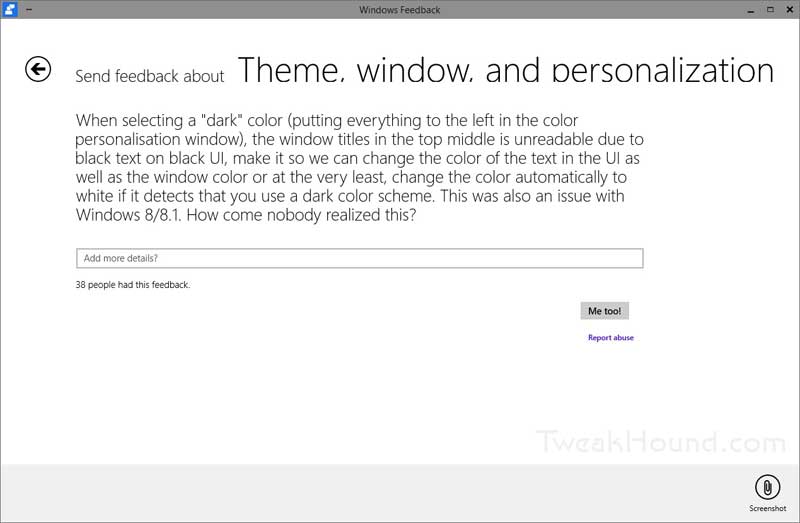
All you guys using Win10 be sure to leave feedback. I left one for some issues in Event Viewer. The feedback is searchable too. I found the one below and piled on (click Me Too!).
win10_white_text

I saw this at Brobible. Had to post it…
isheep

Tagged With: Computer News, Windows 10

A Few Windows 10 Tech Preview Tweak Related Notes

October 1, 2014, 16:08(EDT) By Eric (a.k.a. TweakHound)

win8logo

win8logoI don’t plan on doing too much with the tech preview article wise but I thought I would share a few quick notes.
[Read more…] about A Few Windows 10 Tech Preview Tweak Related Notes

Tagged With: Windows 10

Windows 10 Tech Preview Default Services (without description)

October 1, 2014, 15:42(EDT) By Eric (a.k.a. TweakHound)

thpinpostlogo

thpinpostlogoWindows 10 Tech Preview Default Services (without description)
01OCT2014
[Read more…] about Windows 10 Tech Preview Default Services (without description)

Tagged With: Windows 10

Because 7 8 9

September 30, 2014, 16:53(EDT) By Eric (a.k.a. TweakHound)

win8logo

win8logoWindows 10.
Yep, that’s the name of the next Windows version. When asked why “Windows 10”, Microsoft’s Terry Myerson said, “Because 7 8 9”.
I was keeping up with the Windows 10 announcement event via Tom Warren at The Verge, and Paul Thurrott & Mary Jo Foley’s Twitter feeds.
My notes:
1 – You can get the very rough and very unfinished Enterprise preview tomorrow.
2 – Release sometime after April 2015.
3 – No word on cost or free upgrades.
4 – Sounds…better than Windows 8/8.1.

w10

Official Links:
Microsoft News Center – Microsoft unveils the future of Windows
Official Windows Blog – Announcing Windows 10
Windows Insider Program

Comprehensive Info:
The Verge – Posts tagged “Windows 10”
Neowin – Posts tagged “Windows 10”
Mary Jo Foley at ZDNet
Paul Thurrott

Tagged With: Windows 10

Audacity 2.0.6

September 29, 2014, 18:43(EDT) By Eric (a.k.a. TweakHound)

audacity

audacityThe free, cross-platform, and awesome Audacity 2.0.6 is out.
Download
Release Notes

Tagged With: Cool Tools, Freeware

AMD Catalyst 14.9 Released

September 29, 2014, 16:33(EDT) By Eric (a.k.a. TweakHound)

rad

amdradeonAMD Catalyst 14.9 drivers are out.
Release Notes (Windows)
Release Notes (Linux)
Download Page

Tagged With: Computer Hardware

CCleaner 4.18 Active System Monitoring

September 25, 2014, 17:56(EDT) By Eric (a.k.a. TweakHound)

CCleaner

CCleaner“Active System Monitoring now available for Free users!” [Read more…] about CCleaner 4.18 Active System Monitoring

Tagged With: Software

Random Thursday Stuff…

September 25, 2014, 17:29(EDT) By Eric (a.k.a. TweakHound)

acronisti2014

acronisti2014Acronis True Image 2015 Released
More Info
How I Use Acronis Ture Image
Acronis True Image 2015 Full ($49.99)
Acronis True Image 2015 Upgrade ($29.99)
Acronis True Image 2015 Full , 3 PC License ($79.99)

CCleaner v4.18 Is Out
Download
Version History
***Pay attention during install. May attempt to install unwanted programs.
Change log:
-Added Active System Monitoring for Free users
-Improved Firefox Saved Password cleaning
-Improved Opera History cleaning
-Improved 64-bit build architecture for Window 8 and 8.1
-Added Ashampoo Burning Studio 14, XnView and FastStone Capture cleaning
-Improved localization support
-Minor GUI Improvements
-Minor bug fixes

Tagged With: Cool Tools

openSUSE 13.2 Beta: BTRFS vs. EXT4

September 25, 2014, 16:43(EDT) By Eric (a.k.a. TweakHound)

opensusegeeko

opensusegeekoopenSUSE has decided to use BTRFS as the default file system for openSUSE 13.2.
I’m currently testing 13.2 Beta 1 ( openSUSE 13.2 Is Coming – First Beta Has Arrived! ).
My main reason for testing is to see if I want to use BTRFS. To be clear, I am testing this to see if I want to use this on MY computers. For the purpose of this article I am not interested in any other scenario. [Read more…] about openSUSE 13.2 Beta: BTRFS vs. EXT4

Tagged With: Linux, openSUSE

« Previous Page
Next Page »

Primary Sidebar

Popular Posts

Tweaking Windows 10

Software I Use – 2021 Edition

Timer Tweaks Benchmarked

Win10 – Get Auto-Login Back

Recent Posts

  • Sunday News
  • Patch Tuesday
  • Wednesday News
  • Patch Tuesday
  • Monday News
  • Patch Tuesday
  • Weekend News
  • Weekend News
  • Patch Tuesday
  • Friday News
buywin10th2

Tags

  • Android
  • Backup
  • Beer
  • Computer Hardware
  • Computer News
  • Cool Tools
  • Freeware
  • How-To's
  • Linux
  • Off Topic
  • openSUSE
  • Playlists
  • Privacy
  • Security
  • Software
  • This Site
  • vacation
  • Veterans
  • Windows 10
  • Windows 11
  • Windows 7
  • Windows 8
  • Windows Vista
  • Windows XP

Catagories

  • Android
  • Backup
  • Beer
  • Computer Hardware
  • Computer News
  • Cool Tools
  • Freeware
  • Freeware Machines
  • How-To's
  • Linux
  • News From The Web
  • Off Topic
  • openSUSE
  • Privacy
  • Security
  • Software
  • Tweak Guides
  • Veterans
  • Windows
  • Windows 10
  • Windows 11
  • Windows 7
  • Windows 8
  • Windows Vista
  • Windows XP

TweakHound - Optimize Your Computing Experience! TweakHound - Optimize Your Computing Experience!

Copyright 2002-2025 by Eric Vaughan All material contain here is the property of the materials owner. Windows, Windows XP, Windows Vista, Windows Seven, Windows 8, Windows 10, Windows 11, Microsoft, and all associated logos are trademarks/property of Microsoft. You may not use or copy any material from tweakhound.com without expressed written permission. Hotlinking to any material within this site is forbidden. Privacy Policy