
• Skip to primary navigation
  • Skip to main content
  • Skip to primary sidebar

TweakHound

Computer stuff...

  • Home
  • Windows XP
  • Windows Vista
  • Windows 7
  • Windows 8
  • Windows 10
  • Windows 11
  • Linux
  • Tweak Guides
  • Site Info
    • About
    • About Me
    • TweakHound’s World
    • Contact
    • My Computers
    • Old Articles
    • Privacy Policy
    • Old Index
    • Advanced Search

Random Thursday Stuff…

thpinpostlogo

October 2, 2014, 15:53(EDT) By Eric (a.k.a. TweakHound)

thpinpostlogoGoing Around Your A$$ To Get To Your Elbow
Both Neowin And Betanews posted articles on how to install Win10 from a USB stick. Both posted the hard way. As immediately pointed out by Neowinians, just use the same tool we’ve all been using for Windows 7/8/8.1, the Windows 7 USB/DVD Download Tool. It is how I did it.
BTW – I’m going to keep calling it Win10. Remember, you saw it hear first 😉

Upgrade To Win10
I never do this but after installing Win10 straight up, I decided to see how upgrading to Win10 from Windows 8.1 would go…
I mounted the ISO and clicked setup.exe. 20 minutes later I was done. Event Viewer had a few issues but in general everything went OK. Even Start8 was in place and working. I don’t recommend this however. If you attempt this be sure to make a disk image first.

Quickie
PCMark got an update today. Below is the text of the email I received:

Hello Editor
We released a minor update for PCMark 8 today that adds a much requested feature.
By default, PCMark 8 runs each test workload three times, using the average to calculate the overall score. We’ve found that this is the best way to smooth out any variance introduced by operating system factors outside of the benchmark itself.
Repeating each test three times, however, does mean that it can take a long time to complete a benchmark run. We know that when troubleshooting or trying to improve performance it would be helpful to run a shorter test that completes in less time.
This update introduces a new command line option to PCMark 8 Professional Edition that allows you to set the number of passes for each test. Set –pass=1 for a quick test running each workload just once. Or set –pass to a higher number to repeat each test multiple times for highly accurate benchmark results.
You can read the complete release notes for this update below. PCMark 8 will prompt you to install the update, or you can download the latest version here: http://www.futuremark.com/downloads/pcmark8.zip (2.9 GB)
Best wishes,
Oliver

Feedback
All you guys using Win10 be sure to leave feedback. I left one for some issues in Event Viewer. The feedback is searchable too. I found the one below and piled on (click Me Too!).
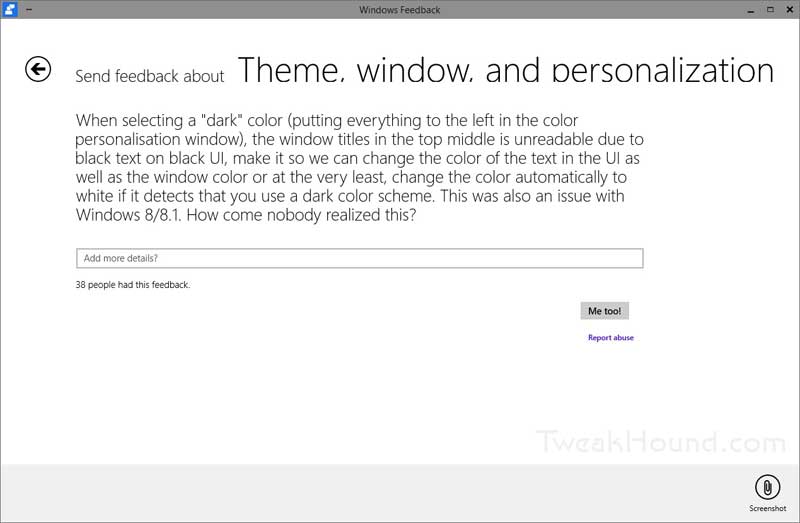
win10_white_text

I saw this at Brobible. Had to post it…

isheep

Tagged With: Computer News, Windows 10

Primary Sidebar

Popular Articles

Windows 10

Tweaking Windows 10

My Windows 10 Tweaks

Windows 10 Privacy Settings

Win10 Diagnostics Tracking Service Gone?

Windows 10 Advanced Disk Cleanup

Win10 Customize Installation Options

Windows 10 Dark Theme

Win10 Wallpapers, Graphics, etc.

All Windows 10 Articles

Windows 8

Tweaking Windows 8.1

Advice On Installing Windows 8.1

Clean Install Windows 8.1

Cleanup After Windows 8.1 Upgrade

Create Shutdown, Restart, Logoff Tiles For Windows 8

Tweaking Windows 8

Install Windows 8 – Clean Install With Upgrade Media

Install Windows 8 – Upgrade

Windows 8 – Cleaning Up After You’ve Upgraded

Windows 8 Freeware Machine

Windows 8 SSD Settings, Etc.

How To Resize Your Windows 8 Partition

Create Windows 8 Recovery Media

Windows 8 – Elevated Command Prompt

How To Fix The Windows Bootloader

Windows 7

Installing Windows 7

Tweaking Windows 7

Windows 7 Diagnostics Tracking Service

The Windows 7 Freeware Machine

The Windows 7 Pagefile And Running Without One

Bad Tweaks

SSD Tweak Guide (sort of)

The noguiboot (no GUI Boot) Tweak

NtfsMemoryUsage=2 Tweak

More Windows 7 articles here.

Windows Vista

Installing Windows Vista

Tweaking Windows Vista

More Windows Vista articles here.

Windows XP

eXPired - The Last Windows XP Guide You'll Ever Need

The Right Way To Install Windows XP

Super XP Tweaking Guide

The Freeware XP Machine

Bad Tweaks

More XP Articles here and here.

Backup

Backup Article Greatest Hits – Vol. 1

Other

Cataloging Your Music Collection

Finding Good Album Art

Converting Vinyl Records To Digital Music – A Non-Audiophiles Guide

Windows All-In-One Recovery Flash Drive

SSD Tweak Guide (sort of)

Raidmax Blackstorm Case Review

Disk Partitioning

Ditch Those CD's! A Guide To Using USB Flash Drives

Checking Your Disks For Problems

Bad Tweaks

More articles here

Tags

Android Backup Beer Computer Hardware Computer News Cool Tools Freeware How-To's Linux Off Topic openSUSE Playlists Privacy Security Software This Site vacation Veterans Windows 7 Windows 8 Windows 10 Windows 11 Windows Vista Windows XP

TweakHound - Optimize Your Computing Experience! TweakHound - Optimize Your Computing Experience!

Copyright 2002-2025 by Eric Vaughan All material contain here is the property of the materials owner. Windows, Windows XP, Windows Vista, Windows Seven, Windows 8, Windows 10, Windows 11, Microsoft, and all associated logos are trademarks/property of Microsoft. You may not use or copy any material from tweakhound.com without expressed written permission. Hotlinking to any material within this site is forbidden. Privacy Policy