• Skip to primary navigation
  • Skip to main content
  • Skip to primary sidebar

TweakHound

Computer stuff...

  • Home
  • Windows XP
  • Windows Vista
  • Windows 7
  • Windows 8
  • Windows 10
  • Windows 11
  • Linux
  • Tweak Guides
  • Site Info
    • About
    • About Me
    • TweakHound’s World
    • Contact
    • My Computers
    • Old Articles
    • Privacy Policy
    • Old Index
    • Advanced Search

This Site

Advice On Installing Windows 8.1

January 4, 2015, 10:49(EST) By Eric (a.k.a. TweakHound)

thpinpostlogo

thpinpostlogoI am constantly asked installation/partitioning advice on installing Windows.
Below is my advice on installing Windows 8.1.
[Read more…] about Advice On Installing Windows 8.1

Tagged With: How-To's, This Site, Windows 8

Merry Christmas

December 24, 2014, 13:37(EST) By Eric (a.k.a. TweakHound)

merrychristmas

[Read more…] about Merry Christmas

Tagged With: This Site

Windows 8.1 SSD Defrag

December 15, 2014, 18:39(EST) By Eric (a.k.a. TweakHound)

th

thAn interesting blog post was brought to me attention by a reader. Many Geeks will recognize the blogger, Scott Hanselman:
The real and complete story – Does Windows defragment your SSD? (be cure to check out the comments too)
The gist of this post is to tell us we’ve all been wrong and Windows 8.1 does in fact defrag SSD’s.
However, we need to dig a little deeper. [Read more…] about Windows 8.1 SSD Defrag

Tagged With: This Site, Windows 8

Backup Locations

December 9, 2014, 12:36(EST) By Eric (a.k.a. TweakHound)

thpinpostlogo

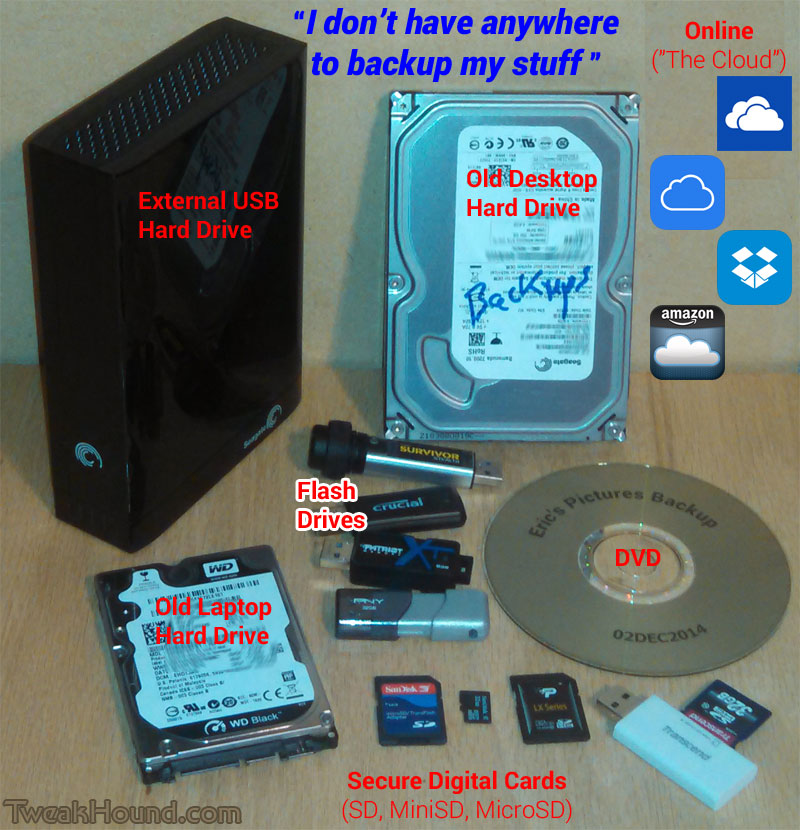
thpinpostlogoY’all know I’ve no sympathy for folks who don’t backup their computers and info.
This morning I heard “I don’t have anywhere to backup my stuff”.
I have backups of backups. Backups in safes. Backups off site…
Feel free to pass this image on.
backup_locations_1

Tagged With: Backup, This Site

Fix KB3000850 Will Not Install

November 24, 2014, 16:09(EST) By Eric (a.k.a. TweakHound)

thpinpostlogo

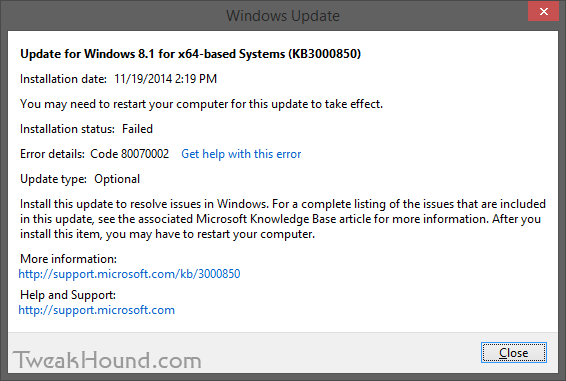
thpinpostlogoI had a couple of Windows 8.1 computers that would not install KB3000850.
KB3000850 is also called “The November 2014 update rollup for Windows RT 8.1, Windows 8.1, and Windows Server 2012 R2.”
The specific error code was 80070002.
fix_kb3000850_1

The Windows error logs directed me to C:\Windows\Logs\CBS\CBS.log. There I found complaints about system files.
The cure for that is:
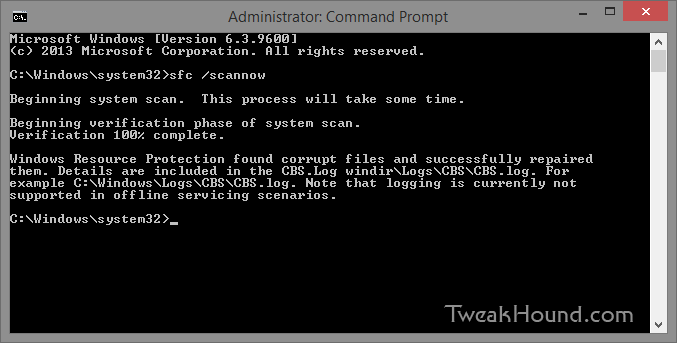
From an ELEVATED command prompt [Command Prompt (Admin) ] > type sfc /scannow and press the Enter key >
Let it do its thing > Reboot and install your update.
fix_kb3000850_2

– END –

Tagged With: How-To's, This Site, Windows 8

openSUSE 13.2 Tips, Tricks, and Tweaks

November 14, 2014, 11:13(EST) By Eric (a.k.a. TweakHound)

opensusegeeko

opensusegeekoHow I use openSUSE 13.2. I hope you find something useful here!
This article will be updated as I find more tips or on the off chance that someone actually sends some in.
[Read more…] about openSUSE 13.2 Tips, Tricks, and Tweaks

Tagged With: How-To's, Linux, openSUSE, This Site

Dual Boot openSUSE 13.2 and Windows 8.1 UEFI

November 13, 2014, 14:35(EST) By Eric (a.k.a. TweakHound)

opensusegeeko

opensusegeekoThis is how I dual-boot my Windows 8.1 rig with openSUSE 13.2.
Though virtually unchanged from this version, I’ve put up a new version here: Dual Boot openSUSE Leap and Windows 10 UEFI
Notes:
– BACKUP your computer with a disk image before attempting this!
– Please do not contact me with questions on this topic.
That’s what the openSUSE forums are for.
– For how I dual-boot with a standard BIOS (legacy) see here: Dual-Boot openSUSE 12.3 And Windows (article is NOT compatible with BTRFS)

Interesting Links
openSUSE:UEFI
BCD System Store Settings for UEFI
Dual booting with Windows 8, not as painful as expected.

Preparation
1 – Full disk image backup using Acronis True Image.
2 – Make or leave unpartitioned space on OS drive for openSUSE. (If you can’t do this without a tutorial, well…..)
3 – Make UEFI boot usb flash drive with Rufus.

Installation
Pardon the odd screenshots. I used Vmware player for this article.

I should note that I am not a believer in using multiple partitions for my Linux installs.

Boot up, go through setup until you get to the partitioning section.
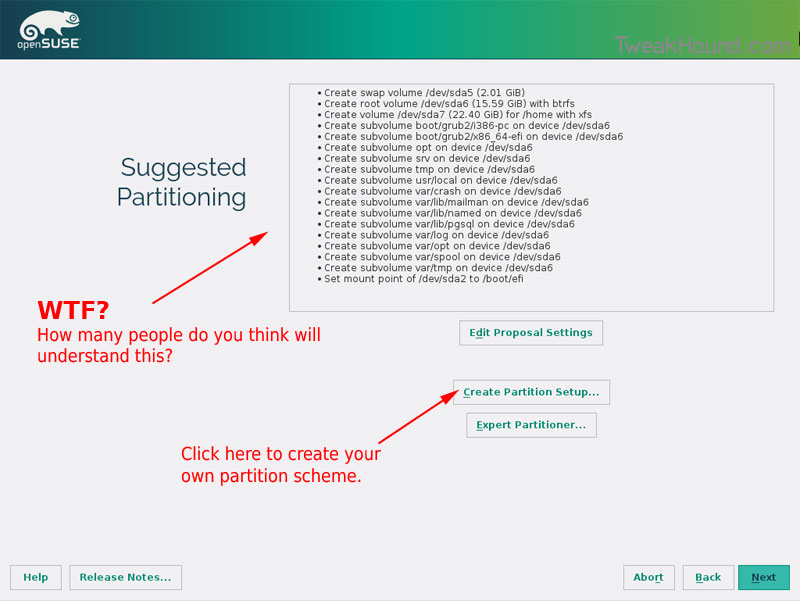
I do not use BTRFS and I always use Create Partition Setup…
os132_uefiboot_1

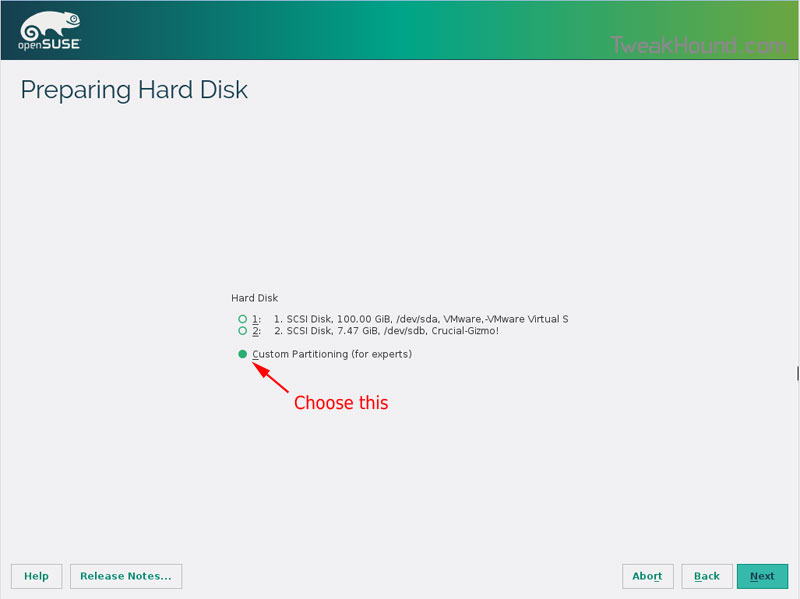
Choose Custom Partitioning (for experts) and click Next
os132_uefiboot_2

Right-click on the DRIVE where you want to install openSUSE and choose Add Partition
Make a swap partition, 2-4GB is fine.
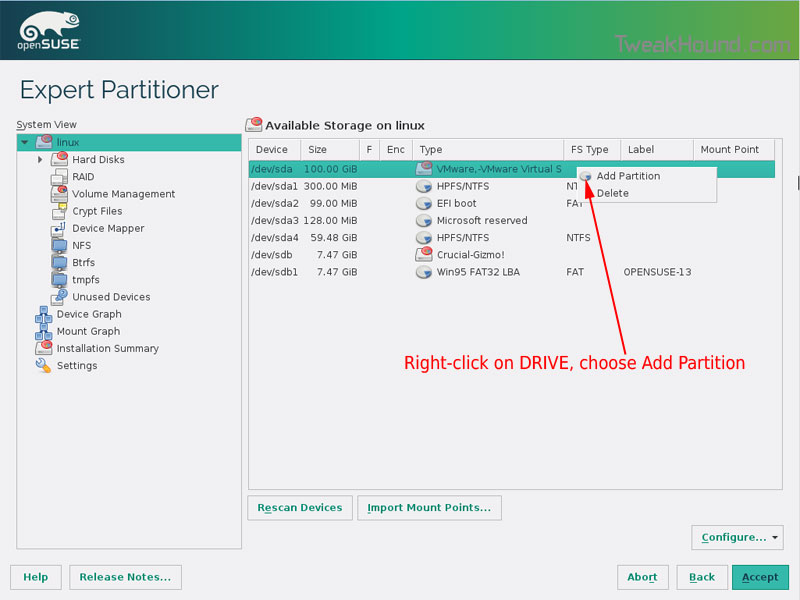
os132_uefiboot_3

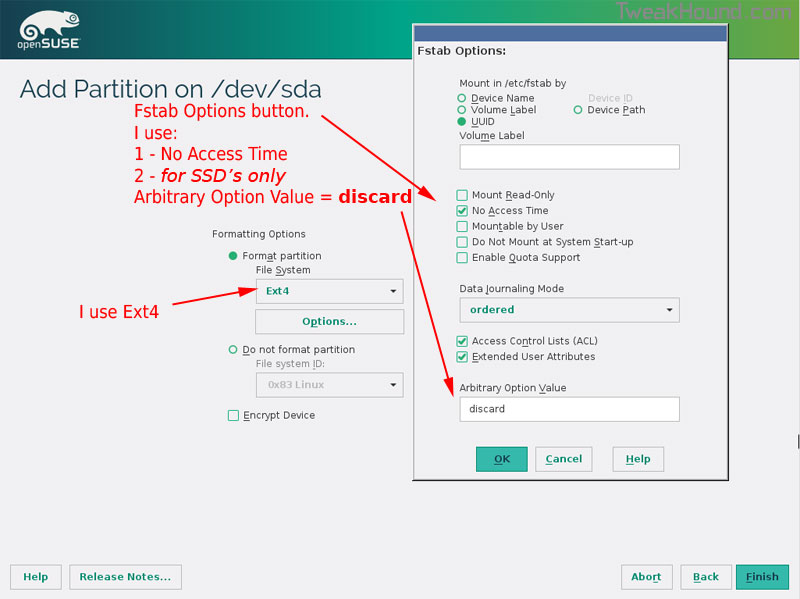
Below are the options I use. Ext4 for file system, noatime, discard (=trim)
os132_uefiboot_4

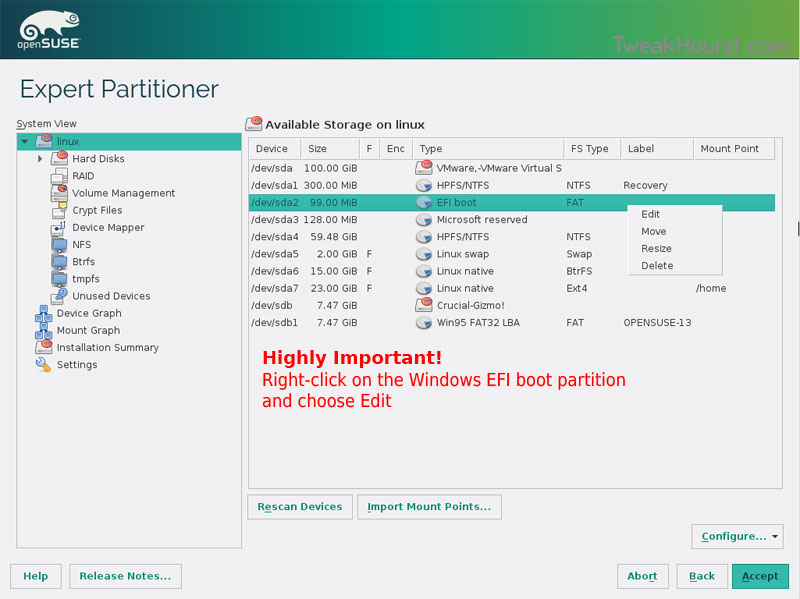
This next step is critical as your system will not boot without it.

Right-click on the Windows EFI boot partition and choose Edit
os132_uefiboot_5

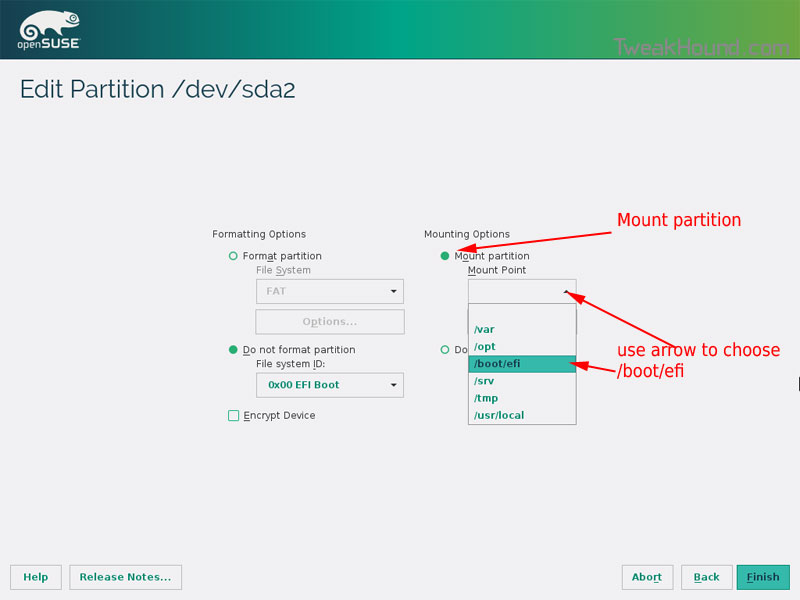
Choose Mount partition
Choose /boot/efi
Click Finish
os132_uefiboot_6

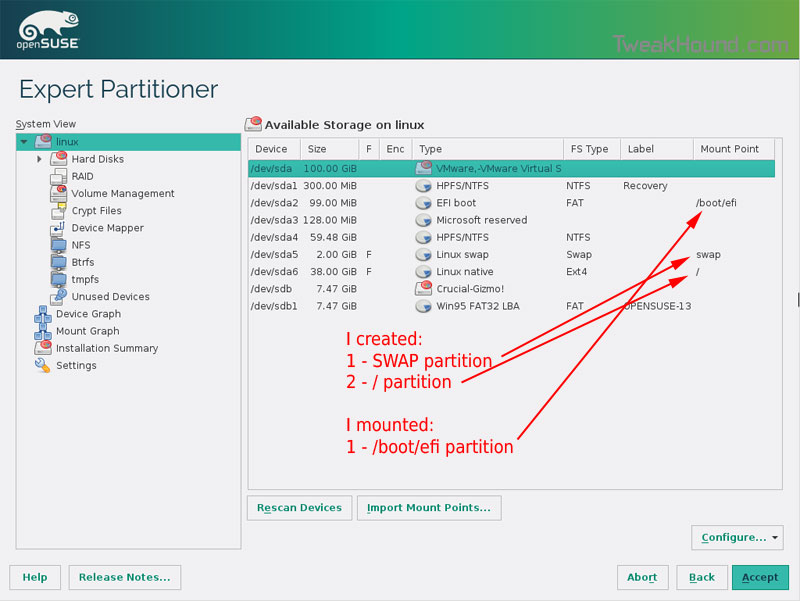
Done?  click Accept

os132_uefiboot_7

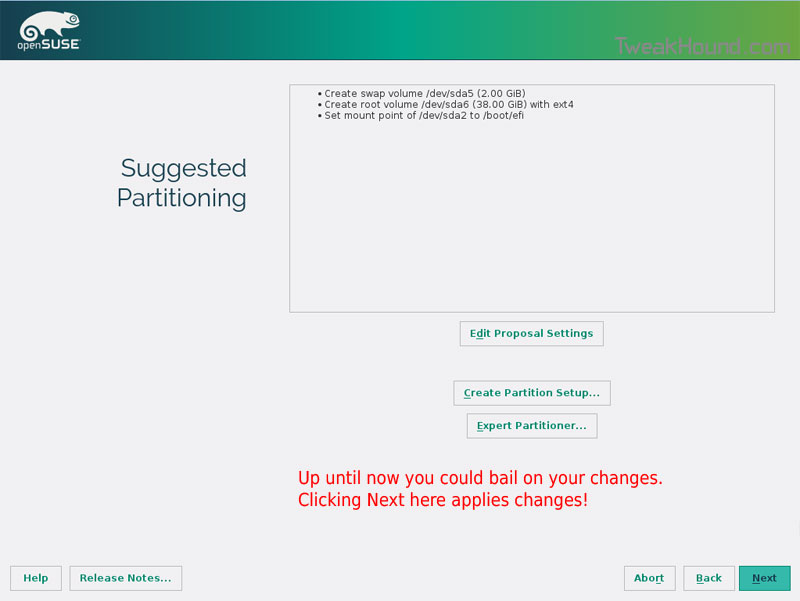
Last chance to bail…
Click Next

os132_uefiboot_8

I don’t use Secure Boot. It can be disabled here:
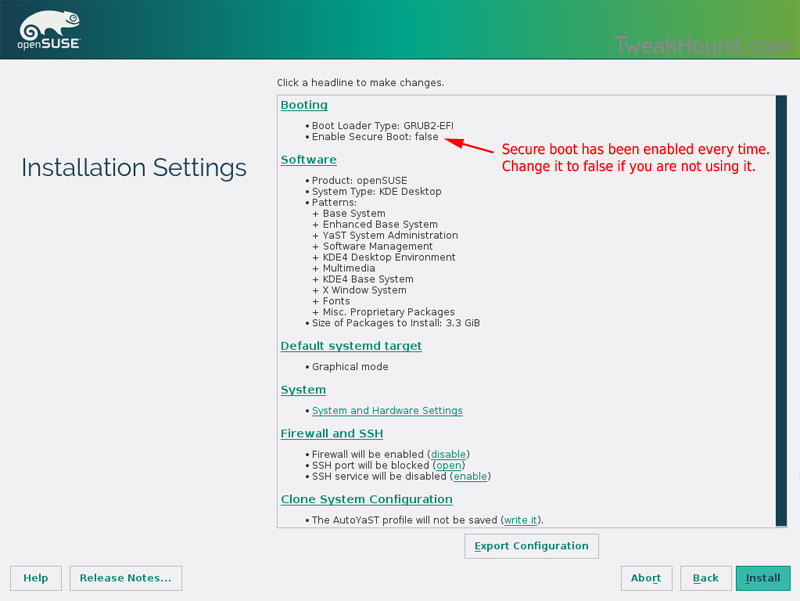
os132_uefiboot_9

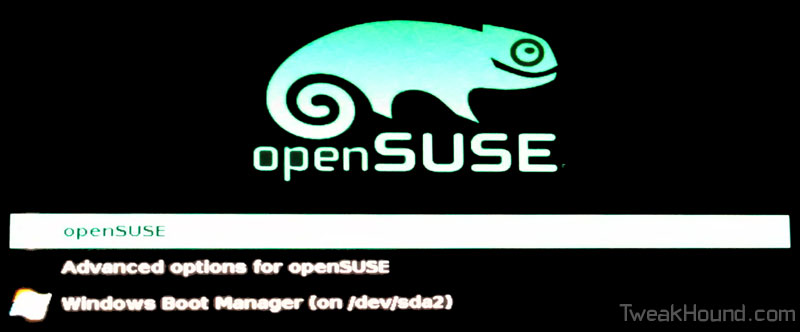
Boot Screen:

os132_bootmenu_1


Everything should run just peachy until you boot into Windows again.

Windows will usually try and make its bootloader default again which means openSUSE isn’t an option.

While in Windows, open an Elevated Command Prompt and copy/paste this command (source):

bcdedit /set {bootmgr} path \EFI\opensuse\shim.efi

That’s it!

Tagged With: How-To's, Linux, openSUSE, This Site

My New / Used Computer

November 7, 2014, 13:04(EST) By Eric (a.k.a. TweakHound)

thpinpostlogo

thpinpostlogoLots of parts swapping going on…
[Read more…] about My New / Used Computer

Tagged With: This Site

Updated: eXPired – The Last Windows XP Guide You’ll Ever Need

August 27, 2014, 18:54(EDT) By Eric (a.k.a. TweakHound)

xp_logo

xp_logoUpdated To “Final”
eXPired – The Last Windows XP Guide You’ll Ever Need

Tagged With: How-To's, This Site, Windows XP

Random Tuesday Stuff…

August 26, 2014, 16:34(EDT) By Eric (a.k.a. TweakHound)

nfl2

nfl2Good Reads
Paul Thurrott – Putting the Win in Windows 9
Ars Technica System Guide: August 2014 (Re: Budget Box, Friends don’t let friends buy AMD CPU’s.) 😉
Pressy Review: I Had No Clue Something Could Suck This Badly – “I’m going to keep this short and sweet: Pressy is the worst product I’ve ever reviewed. I generally find some redeeming quality about even the worst products, but Pressy doesn’t have one. It is, without question, complete garbage and a waste of money.”
:rotfl:

CCleaner Updated
Download it here. Release notes here.
***Pay attention during install. May attempt to install unwanted programs.

Google Chrome
Chrome has been updated to version 37.0.2062.94 for Windows, Linux, and those poor souls using Macs.
Download or update within the program.
Optionally you can install the now stable 64-bit version of Chrome. Just look for “Windows 64-bit” under the download button at the link above.
Read about it here: Chromium Blog: 64 bits of awesome: 64-bit Windows Support, now in Stable!

Site Stuff
I forgot to mention there was a fantastic contribution by an expert about the useplatformclock tweak.

The links for my music collection in the article Cataloging Your Music Collection have been updated:
Vinyl
Discogs page: http://www.discogs.com/collection?user=TweakHound
HTML page: https://www.tweakhound.com/music/CATraxx_HTML/vinyl/index.html
CD’s
https://www.tweakhound.com/music/CATraxx_HTML/index.html
MP3’s
Starts here: https://www.tweakhound.com/music/mp3/beach/index.html

Reader Email
Q – When I have two folders open next to each other in 8.1 and I select a bunch of files from the left folder and I drag / drop them to the right folder, it copies the files. Is there any way that you know of to set the default Windows action to CUT these files? I never copy. According to two forum posts I made, the answer is no, but I don’t buy it.
A –
See:
http://windows.microsoft.com/en-us/windows-vista/moving-and-copying-files-by-using-the-drag-and-drop-method
And:
To use move instead of copy, press and hold SHIFT key > click, hold, and drag files.
http://windows.microsoft.com/en-us/windows-vista/moving-and-copying-files-by-using-the-drag-and-drop-method
http://windows.microsoft.com/en-us/windows-8/copy-move-files
App to change default behavior:
http://winaero.com/comment.php?comment.news.69

Tagged With: Computer News, This Site

« Previous Page
Next Page »

Primary Sidebar

Popular Posts

Tweaking Windows 10

Software I Use – 2021 Edition

Timer Tweaks Benchmarked

Win10 – Get Auto-Login Back

Recent Posts

  • Patch Tuesday
  • Weekend News
  • Weekend News
  • Patch Tuesday
  • Friday News
  • Patch Tuesday
  • Using Wise Disk Cleaner
  • Using Cleanmgr+
  • O&O ShutUp10++ 2.2.1024
  • Friday News
buywin10th2

Tags

  • Android
  • Backup
  • Beer
  • Computer Hardware
  • Computer News
  • Cool Tools
  • Freeware
  • How-To's
  • Linux
  • Off Topic
  • openSUSE
  • Playlists
  • Privacy
  • Security
  • Software
  • This Site
  • vacation
  • Veterans
  • Windows 10
  • Windows 11
  • Windows 7
  • Windows 8
  • Windows Vista
  • Windows XP

Catagories

  • Android
  • Backup
  • Beer
  • Computer Hardware
  • Computer News
  • Cool Tools
  • Freeware
  • Freeware Machines
  • How-To's
  • Linux
  • News From The Web
  • Off Topic
  • openSUSE
  • Privacy
  • Security
  • Software
  • Tweak Guides
  • Veterans
  • Windows
  • Windows 10
  • Windows 11
  • Windows 7
  • Windows 8
  • Windows Vista
  • Windows XP

TweakHound - Optimize Your Computing Experience! TweakHound - Optimize Your Computing Experience!

Copyright 2002-2025 by Eric Vaughan All material contain here is the property of the materials owner. Windows, Windows XP, Windows Vista, Windows Seven, Windows 8, Windows 10, Windows 11, Microsoft, and all associated logos are trademarks/property of Microsoft. You may not use or copy any material from tweakhound.com without expressed written permission. Hotlinking to any material within this site is forbidden. Privacy Policy