 Linux Mint has released version 17.2 of their Cinnamon and Mate desktops.
Hit up their home page for more info. Download it here.
Here is a screenshot of my Linux Mint 17.2 Cinnamon virtual machine: [Read more…] about Linux Mint 17.2 Is Out
Linux
openSUSE – Unlocking KWallet and Google Integration
 I wanted to add Google Calendar to KOrganizer but it kept pestering me for a password at every sign-in. A quick Google search and a little configuring got it to work.
[Read more…] about openSUSE – Unlocking KWallet and Google Integration
openSUSE 13.2 Tips, Tricks, and Tweaks
How I use openSUSE 13.2. I hope you find something useful here!
This article will be updated as I find more tips or on the off chance that someone actually sends some in.
[Read more…] about openSUSE 13.2 Tips, Tricks, and Tweaks
Dual Boot openSUSE 13.2 and Windows 8.1 UEFI
This is how I dual-boot my Windows 8.1 rig with openSUSE 13.2.
Though virtually unchanged from this version, I’ve put up a new version here: Dual Boot openSUSE Leap and Windows 10 UEFI
Notes:
– BACKUP your computer with a disk image before attempting this!
– Please do not contact me with questions on this topic.
That’s what the openSUSE forums are for.
– For how I dual-boot with a standard BIOS (legacy) see here: Dual-Boot openSUSE 12.3 And Windows (article is NOT compatible with BTRFS)
Interesting Links
openSUSE:UEFI
BCD System Store Settings for UEFI
Dual booting with Windows 8, not as painful as expected.
Preparation
1 – Full disk image backup using Acronis True Image.
2 – Make or leave unpartitioned space on OS drive for openSUSE. (If you can’t do this without a tutorial, well…..)
3 – Make UEFI boot usb flash drive with Rufus.
Installation
Pardon the odd screenshots. I used Vmware player for this article.
I should note that I am not a believer in using multiple partitions for my Linux installs.
Boot up, go through setup until you get to the partitioning section.
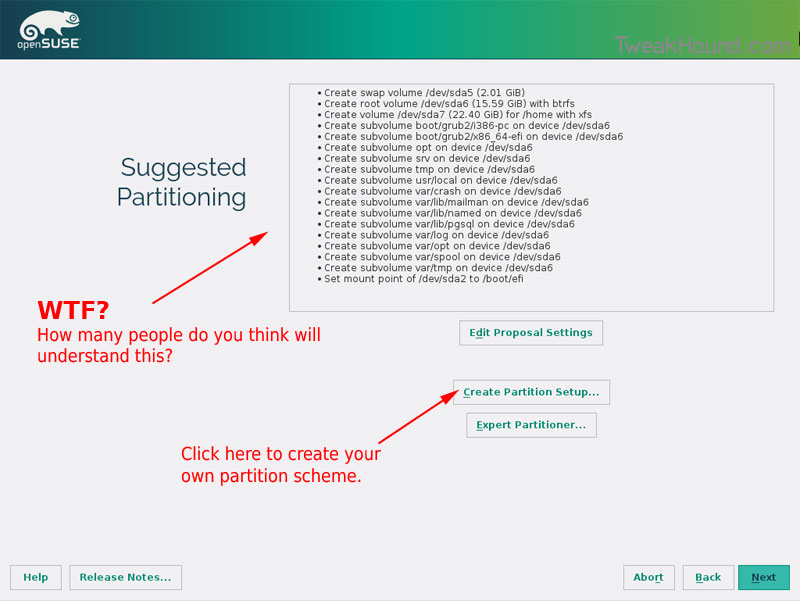
I do not use BTRFS and I always use Create Partition Setup…
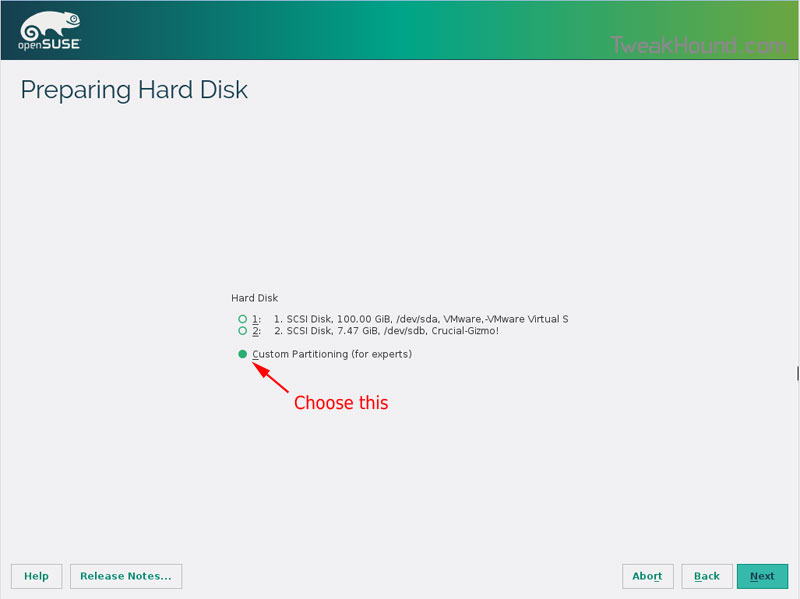
Choose Custom Partitioning (for experts) and click Next
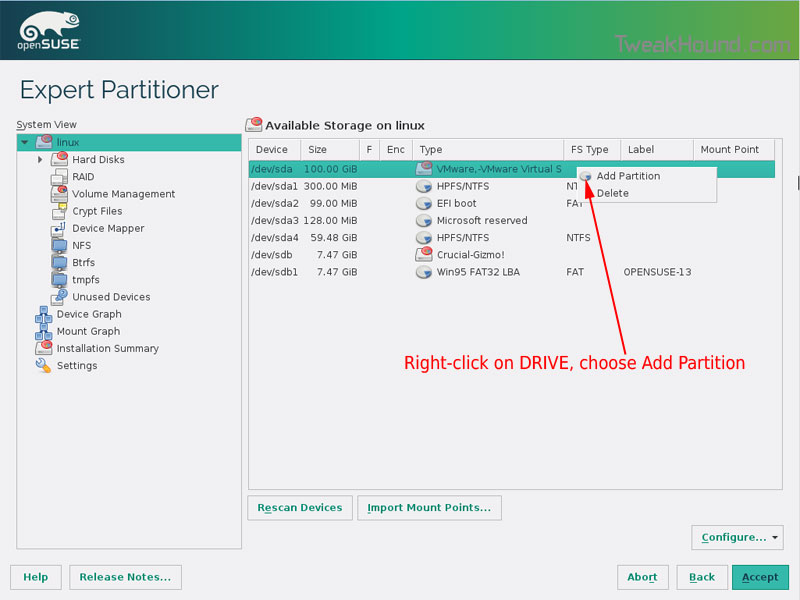
Right-click on the DRIVE where you want to install openSUSE and choose Add Partition
Make a swap partition, 2-4GB is fine.
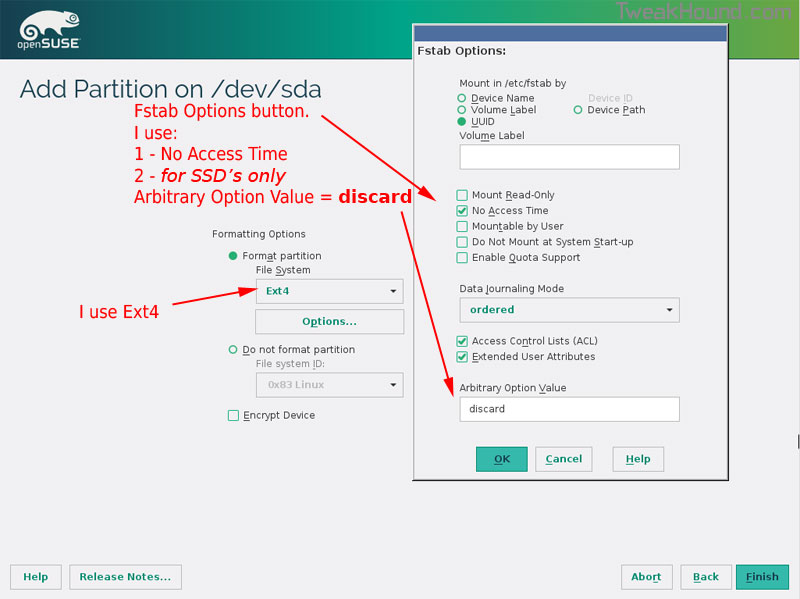
Below are the options I use. Ext4 for file system, noatime, discard (=trim)
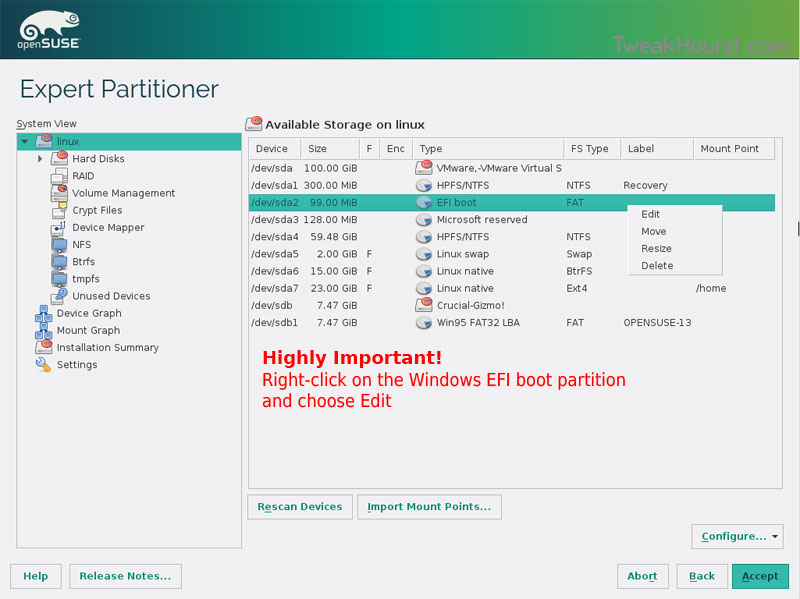
This next step is critical as your system will not boot without it.
Right-click on the Windows EFI boot partition and choose Edit
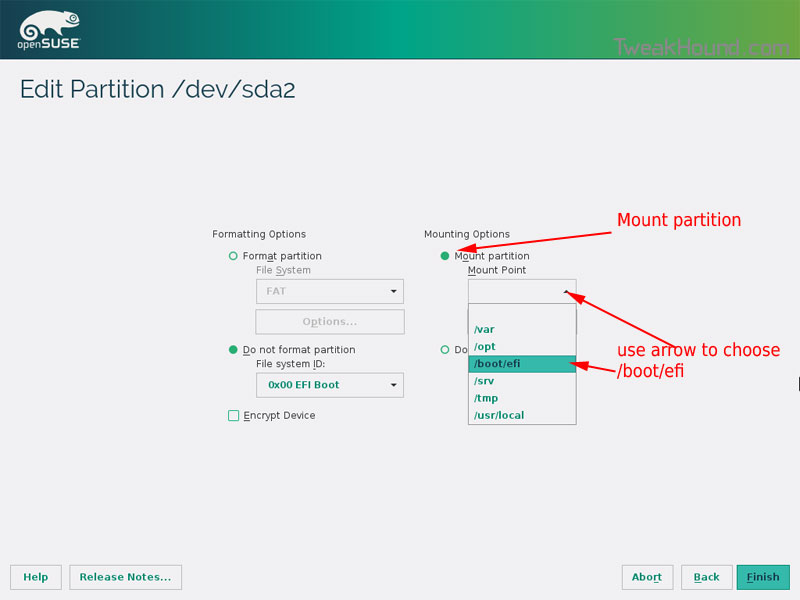
Choose Mount partition
Choose /boot/efi
Click Finish
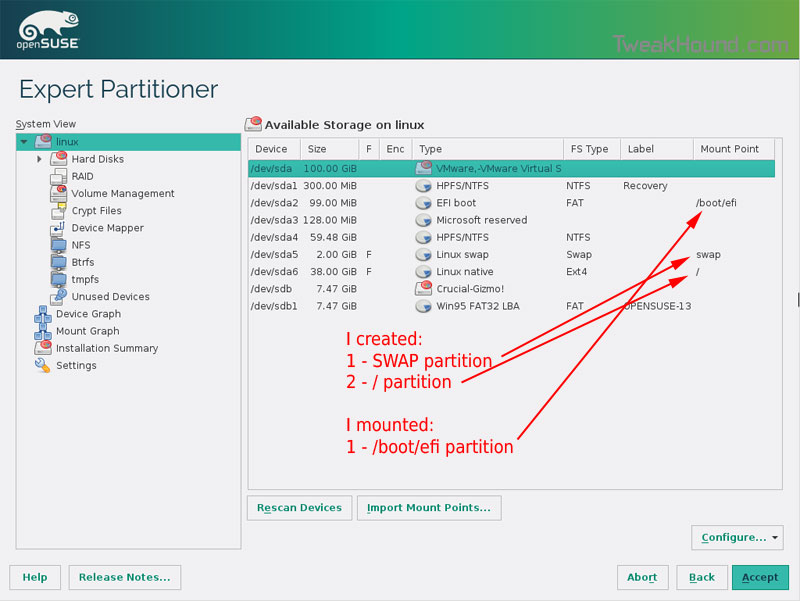
Done? click Accept
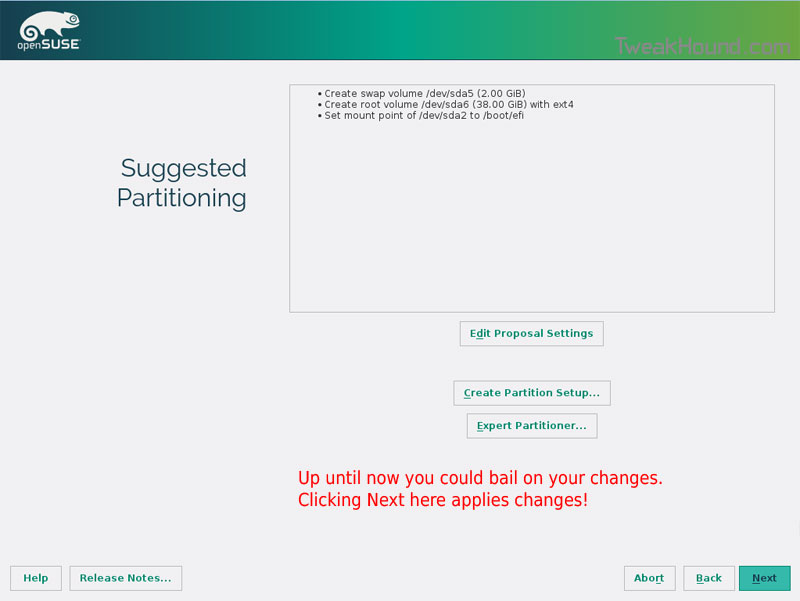
Last chance to bail…
Click Next
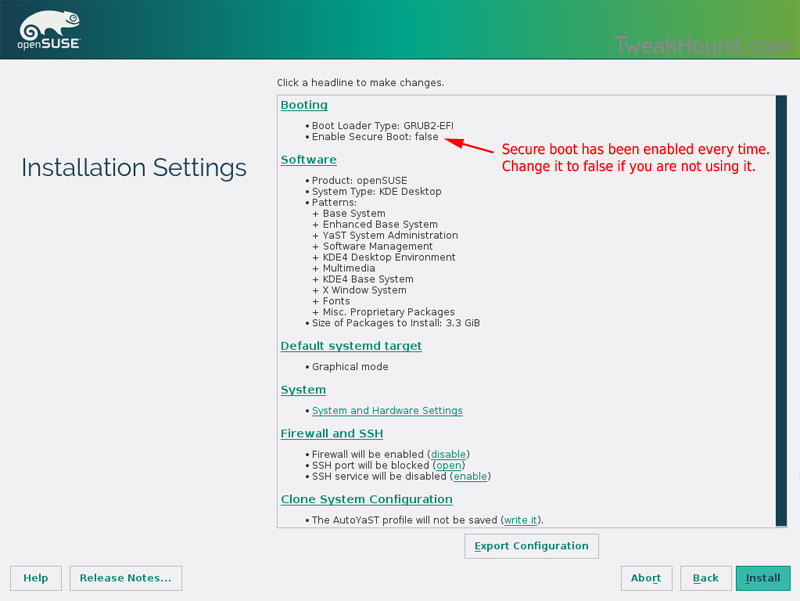
I don’t use Secure Boot. It can be disabled here:
Boot Screen:
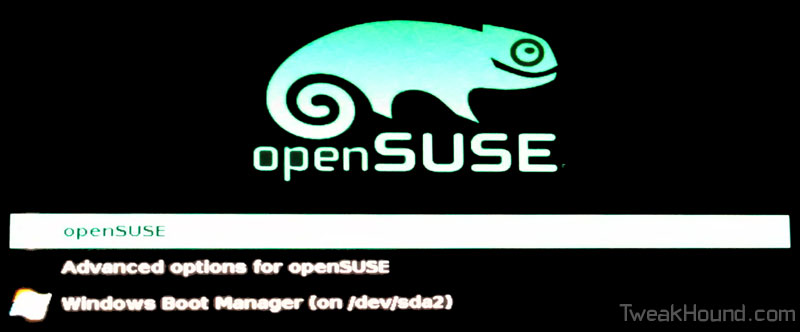
Everything should run just peachy until you boot into Windows again.
Windows will usually try and make its bootloader default again which means openSUSE isn’t an option.
While in Windows, open an Elevated Command Prompt and copy/paste this command (source):
bcdedit /set {bootmgr} path \EFI\opensuse\shim.efi
That’s it!
TweakHound’s BTRFS Notes
First draft: 15OCT2014
Purpose
This page contains my notes on BTRFS. I hope that others may find it useful.
This page will be updated as I gather more info.
If you have useful info please contact me.
[Read more…] about TweakHound’s BTRFS Notes
openSUSE 13.2 Beta: BTRFS vs. EXT4
openSUSE has decided to use BTRFS as the default file system for openSUSE 13.2.
I’m currently testing 13.2 Beta 1 ( openSUSE 13.2 Is Coming – First Beta Has Arrived! ).
My main reason for testing is to see if I want to use BTRFS. To be clear, I am testing this to see if I want to use this on MY computers. For the purpose of this article I am not interested in any other scenario. [Read more…] about openSUSE 13.2 Beta: BTRFS vs. EXT4
openSUSE Moves To Rolling KDE Releases
For those that like the latest KDE releases, openSUSE has just made that easier. They’ve added a “rolling release” repo.
See: Raymond Wooninck – Moving to a rolling KDE release repository
The new repos are:
KDE – http://download.opensuse.org/repositories/KDE:/Current/openSUSE_13.1/
KDE Extra – http://download.opensuse.org/repositories/KDE:/Extra/KDE_Current_openSUSE_13.1/
To switch to the repos use the “switch system packages” option in YaST.
See: http://en.opensuse.org/SDB:Vendor_change_update#Full_repository_Vendor_change
(if you use Packman be sure to use this method on the Packman repo after your initial update)
You can follow all the latest KDE release news here.
openSUSE 13.1 Tips, Tricks, and Tweaks
openSUSE 13.2 has been released. Please see: openSUSE 13.2 Tips, Tricks, and Tweaks
openSUSE 13.1 Tips, Tricks, and Tweaks
This article will be updated as I find more tips or on the off chance that someone actually sends some in.
[Read more…] about openSUSE 13.1 Tips, Tricks, and Tweaks
openSUSE 13.1 Is Out
Announcement: openSUSE 13.1: Ready For Action!
Download
openSUSE Forums
Useful Links
openSUSE 13.1 Multi-media and Restricted Format Installation Guide
openSUSE 13.1: install ‘bumblebee’ and disable discrete graphics adapter on NVIDIA Optimus laptop
There will not be acrobat reader in 13.1
openSUSE: Security Guide
Lots of other guides from openSUSE
more this weekend…
openSUSE 12.3 Tips, Tricks, And Tweaks
This page is dedicated to making your openSUSE experience a little better.
I will continue to update this page as:
– Folks send in or post tips. Please send them in!
– I find tips somewhere else.
– I write tips myself.
Please keep in mind that I do not use and have no interest in any other desktop than KDE.
last updated 30MAR2013
[Read more…] about openSUSE 12.3 Tips, Tricks, And Tweaks