 openSUSE has decided to use BTRFS as the default file system for openSUSE 13.2.
I’m currently testing 13.2 Beta 1 ( openSUSE 13.2 Is Coming – First Beta Has Arrived! ).
My main reason for testing is to see if I want to use BTRFS. To be clear, I am testing this to see if I want to use this on MY computers. For the purpose of this article I am not interested in any other scenario.
First I did my research. See the following links:
Slashdot – OpenSUSE 13.2 To Use Btrfs By Default (first comment, “Finally someone who beta tests btrfs for me!“)
Phoronix
Linux 3.14 File-System HDD Benchmarks
8-Way Linux 3.13 File-System Benchmarks
More: Phoronix Storage
openSUSE Forums
Fwd: BtrFS as default fs?
Decision to use BTRFS in 13.2?
Backup
I’m a little leery of BTRFS because it’s new and my main backup program (Acronis TI) doesn’t support BTRFS. So the first thing I did after installing openSUSE 13.2 beta1 is use Clonezilla to backup and restore the drive. Everything went perfect.
Installation
Test drive was a very old Intel SSD X25-M 80GB that has had the stuffing beat out of it over the years. For this test I used a single partition (easier to benchmark). I did find it rather odd that after touting the awesomeness of BTRFS, openSUSE 13.2 beta 1 defaults to using XFS on the /home partition.
Tweaks
Before we get started here. The ONLY backup program I am interested in is a disk image, PERIOD.
Yes, this renders the btrfs snapshot (and subvolumes) feature useless for me. (See: Btrfs: Subvolumes and snapshots )
BTRFS tweaks I used (See: https://btrfs.wiki.kernel.org/index.php/Mount_options )
compress=lzo,discard,noatime,nodatasum,space_cache,ssd
In addition, there are NO subvolumes and snapshotting is disabled.
EXT4 tweaks I used:
discard,noatime
Results
For those who do not want to look at the results below…
The tests I choose were ones that I could collectively run in a couple of hours. The results are a mixed bag. BTRFS losing in DD & HDPARM but winning the Phoronix benchmarks. Because EXT4 is a mature and reliable file system, because I can use an Acronis boot disk for backups, because I can access my EXT4 partitions from Windows if need be, BTRFS is not the right file system FOR ME at this time.
***I am not a Linux expert and I sure as hell don’t have all the answers. If I got something wrong, PLEASE let me know.
***Edit 30SEP2014, I screwed up the mount options for BTRFS. As pointed out to me, nodatacow disables compression. I changed the option to nodatasum and reran the benchmarks
Phoronix Test Suite ( http://www.phoronix-test-suite.com/ )
(added form repo: http://download.opensuse.org/repositories/benchmark/openSUSE_Factory/benchmark.repo )
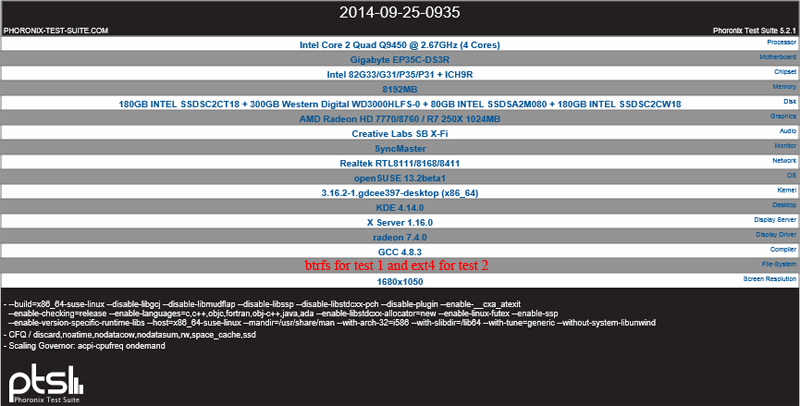
Command: phoronix-test-suite batch-setup
(answers y/n/n/n/n)
Command: phoronix-test-suite batch-benchmark pts/compilebench pts/dbench pts/fio pts/iozone
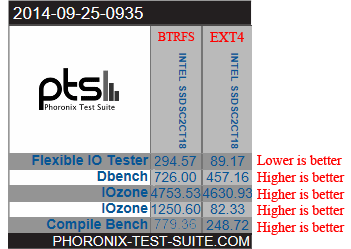
DD & HDPARM
For these next 2 tests see: ArchLinux – SSD Benchmarking
DD
Results:
BTRFS average: 4.4 GB/s
EXT4 average: 4.566 GB/s
Detailed results:
————-btrfs—————
linux-j7ab:/home/tweakhound # cd /
linux-j7ab:/ # dd if=/dev/zero of=tempfile bs=1M count=1024 conv=fdatasync,notrunc
1024+0 records in
1024+0 records out
1073741824 bytes (1.1 GB) copied, 1.06067 s, 1.0 GB/s
linux-j7ab:/ # echo 3 > /proc/sys/vm/drop_caches
linux-j7ab:/ # dd if=tempfile of=/dev/null bs=1M count=1024
1024+0 records in
1024+0 records out
1073741824 bytes (1.1 GB) copied, 0.264001 s, 4.1 GB/s
linux-j7ab:/ # dd if=tempfile of=/dev/null bs=1M count=1024
1024+0 records in
1024+0 records out
1073741824 bytes (1.1 GB) copied, 0.233136 s, 4.6 GB/s
linux-j7ab:/ # dd if=tempfile of=/dev/null bs=1M count=1024
1024+0 records in
1024+0 records out
1073741824 bytes (1.1 GB) copied, 0.237341 s, 4.5 GB/s
————-ext4—————
linux-vdhe:/home/tweakhound # cd /
linux-vdhe:/ # dd if=/dev/zero of=tempfile bs=1M count=1024 conv=fdatasync,notrunc
1024+0 records in
1024+0 records out
1073741824 bytes (1.1 GB) copied, 12.4502 s, 86.2 MB/s
linux-vdhe:/ # echo 3 > /proc/sys/vm/drop_caches
linux-vdhe:/ # dd if=tempfile of=/dev/null bs=1M count=1024
1024+0 records in
1024+0 records out
1073741824 bytes (1.1 GB) copied, 4.03808 s, 266 MB/s
linux-vdhe:/ # dd if=tempfile of=/dev/null bs=1M count=1024
1024+0 records in
1024+0 records out
1073741824 bytes (1.1 GB) copied, 0.266608 s, 4.0 GB/s
linux-vdhe:/ # dd if=tempfile of=/dev/null bs=1M count=1024
1024+0 records in
1024+0 records out
1073741824 bytes (1.1 GB) copied, 0.235168 s, 4.6 GB/s
linux-vdhe:/ # dd if=tempfile of=/dev/null bs=1M count=1024
1024+0 records in
1024+0 records out
1073741824 bytes (1.1 GB) copied, 0.212486 s, 5.1 GB/s
HDPARM
BTRFS
average – Timing cached reads: 6191.3766
average Timing buffered disk reads: 244.8166
EXT4
average – Timing cached reads: 6345.0533
average Timing buffered disk reads: 254.4333
Detailed results:
——————–btrfs—————–
linux-j7ab:/home/tweakhound # echo 3 > /proc/sys/vm/drop_caches
linux-j7ab:/home/tweakhound # hdparm -Tt /dev/sdc1
/dev/sdc1:
Timing cached reads: 12920 MB in 2.00 seconds = 6466.52 MB/sec
Timing buffered disk reads: 734 MB in 3.00 seconds = 244.38 MB/sec
linux-j7ab:/home/tweakhound # hdparm -Tt /dev/sdc1
/dev/sdc1:
Timing cached reads: 11838 MB in 2.00 seconds = 5924.99 MB/sec
Timing buffered disk reads: 736 MB in 3.01 seconds = 244.74 MB/sec
linux-j7ab:/home/tweakhound # hdparm -Tt /dev/sdc1
/dev/sdc1:
Timing cached reads: 12354 MB in 2.00 seconds = 6182.62 MB/sec
Timing buffered disk reads: 736 MB in 3.00 seconds = 245.33 MB/sec
——————–ext4—————–
linux-vdhe:/home/tweakhound # echo 3 > /proc/sys/vm/drop_caches
linux-vdhe:/home/tweakhound # hdparm -Tt /dev/sdc1
/dev/sdc1:
Timing cached reads: 12612 MB in 2.00 seconds = 6312.02 MB/sec
Timing buffered disk reads: 764 MB in 3.00 seconds = 254.42 MB/sec
linux-vdhe:/home/tweakhound # hdparm -Tt /dev/sdc1
/dev/sdc1:
Timing cached reads: 12678 MB in 2.00 seconds = 6345.57 MB/sec
Timing buffered disk reads: 764 MB in 3.00 seconds = 254.54 MB/sec
linux-vdhe:/home/tweakhound # hdparm -Tt /dev/sdc1
/dev/sdc1:
Timing cached reads: 12742 MB in 2.00 seconds = 6377.30 MB/sec
Timing buffered disk reads: 764 MB in 3.00 seconds = 254.52 MB/sec