
Got a Microsoft Security Advisory Notification. Just passing this along. I am NOT recommending you install it. At least not yet anyway.
[Read more…] about Standalone Win10 Meltdown and Spectre Patch Available
Windows 10
Windows 10 Ultimate Performance Power Mode

I woke up this morning and a number of sites are all giddy talking about the new Win10 Ultimate Performance Mode.
Windows Blog – Announcing Windows 10 Insider Preview Build 17101 for Fast & Build 17604 for Skip Ahead
A new power scheme – Ultimate Performance: Demanding workloads on workstations always desire more performance. As part of our effort to provide the absolute maximum performance we’re introducing a new power policy called Ultimate Performance. Windows has developed key areas where performance and efficiency tradeoffs are made in the OS. Over time, we’ve amassed a collection of settings which allow the OS to quickly tune the behavior based on user preference, policy, underlying hardware or workload.
This new policy builds on the current High-Performance policy, and it goes a step further to eliminate micro-latencies associated with fine grained power management techniques. The Ultimate Performance Power plan is selectable either by an OEM on new systems or selectable by a user. To do so, you can go to Control Panel and navigate to Power Options under Hardware and Sound (you can also “run” Powercfg.cpl). Just like other power policies in Windows, the contents of the Ultimate Performance policy can be customized.
The Ultimate Performance Power plan is selectable either by an OEM on new systems or selectable by a user. To do so, you can go to Control Panel and navigate to Power Options under Hardware and Sound (you can also “run” Powercfg.cpl).
As the power scheme is geared towards reducing micro-latencies it may directly impact hardware; and consume more power than the default balanced plan. The Ultimate Performance power policy is currently not available on battery powered systems.
We’ll continue to tune and evaluate the power plan settings. To submit feedback please use the Feedback Hub and file your feedback under Power & Battery > Setting category.
My take. Microsoft is going to fix the High Performance Power Scheme because it was still turning things off even though you told it not to. High Performance is just that. “Ultimate High Performance” is just a marketing ploy.
New Microsoft Win10 Docs
New or updated official Microsoft docs.
Shortcut keys for Windows 10
Getting to know Windows 10
Use Reset to restore your Windows 10 PC
Using AutoVPN to connect remotely
Cortana
Getting the most out of Microsoft Edge
Windows Performance Impact Of Meltdown And Spectre
Microsoft exec Terry Myerson lays out what he expects the performance impact of the Meltdown/Spectre patches.
– With Windows 10 on newer silicon (2016-era PCs with Skylake, Kabylake or newer CPU), benchmarks show single-digit slowdowns, but we don’t expect most users to notice a change because these percentages are reflected in milliseconds.
TH – Skylake released 2015. Kaby Lake 2016.
– With Windows 10 on older silicon (2015-era PCs with Haswell or older CPU), some benchmarks show more significant slowdowns, and we expect that some users will notice a decrease in system performance.
TH – Haswell released 2013.
– With Windows 8 and Windows 7 on older silicon (2015-era PCs with Haswell or older CPU), we expect most users to notice a decrease in system performance.
TH – Haswell released 2013
– Windows Server on any silicon, especially in any IO-intensive application, shows a more significant performance impact when you enable the mitigations to isolate untrusted code within a Windows Server instance. This is why you want to be careful to evaluate the risk of untrusted code for each Windows Server instance, and balance the security versus performance tradeoff for your environment.
TH – You’re attached to another object by an incline plane wrapped helically around an axis.
Conveniently left out is any reference to Microsoft bricking AMD machines.
I will repeat my advice to not update Windows machines right now. Certainly you need to have a full image backup before you do.
I recommend Macrium Reflect 7 Free Edition.
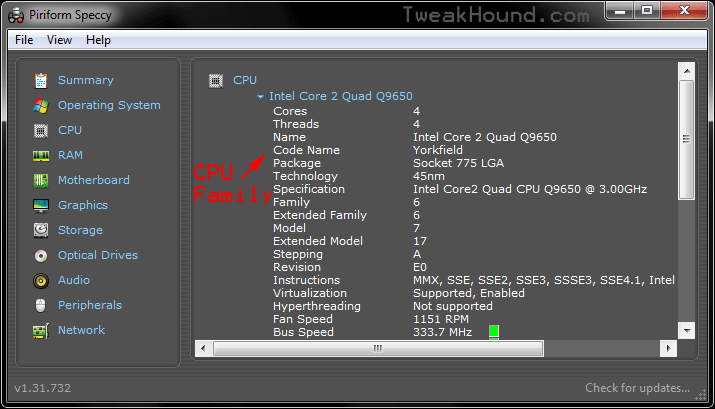
To find your CPU family.
Those odd names are CPU Family or CPU Code Names (Haswell, Skylake, Kabylake…).
Download Speccy PORTABLE and run it.
Click the CPU tab. Find the line Code Name, that is your CPU family.
Google it or, see: https://en.wikipedia.org/wiki/List_of_Intel_microprocessors
Windows 7 BSODs From Latest Updates

I few days ago I warned folks not to run Windows Update because of the possible dangers of the latest round of updates. One reader reported a BSOD here.
Over at AskWoody there is a post and running comment section full of reports of BSODs:
Multiple reports of blue screens (BSODs) 0X000000C4 when installing the January Win7 Monthly Rollup KB 4056894
“AMD machines are being pinpointed.”
I have autoupdate disabled on all my machines. 5 of my computers are running Windows 7. KB4056894 is only showing up on my laptop (Haswell). The rest of my Win7 PCs are Ivybridge or older. I’m not about to install this update.
As of yet none of my manufacturers have an update for Meltdown/Spectre.
I installed the latest update on my Win10 rig because I need to watch the effects so I can relay them to you.
Free Win10 Upgrade Extended
The Windows 10 free upgrade was due to expire on Dec. 31st of last year. It has been extended to January 16th, 2018.
Last Day For Free Win10 Upgrade
Today is the last day to get your free Windows 10 upgrade.
Fix Windows 10 Network Browsing

After my latest computer build, parts swapping in/out old computers, and making a new/old home server I noticed network browsing was FUBAR. I double-checked everything I could think of. Everything worked last time I checked. I did some Googling and finally came up with the answer.
Fall Creators Update broke network browsing. Surprise, surprise:
[Read more…] about Fix Windows 10 Network Browsing
Win10 FCU Updated
Windows 10 Fall Creators Update has been updated.
November 30, 2017—KB4051963 (OS Build 16299.98)
“This update includes quality improvements. No new operating system features are being introduced in this update.“
O&O ShutUp10 Updated

New in Version 1.6.1394
New Settings:
Disable saving SMS messages to the cloud
Disable network access for OneDrive before log-in
Disable Updates for voice recognition and synthesis
Disable Cloud Search form Cortana
Bug Fixes:
Bugfix implemented for Exception 0x80004003 when starting under Windows 10 Build 10240
Download