
Patches will be rolling out today for the Intel CPU Fiasco.
(See below for the email I woke up to this morning.)
I highly recommend you pause, disable, stop, do not run Windows Update.
Full details have not been released as of this writing. These updates will at the kernel level. For the non-Geek that means at the core of Windows. I am not trying to play chicken little (henny penny for my U.K. friends). IMHO these updates are being rushed out and will be altered over time. They could slow down or even hose your PC. Let someone else beta test this stuff.
Delay Windows Update
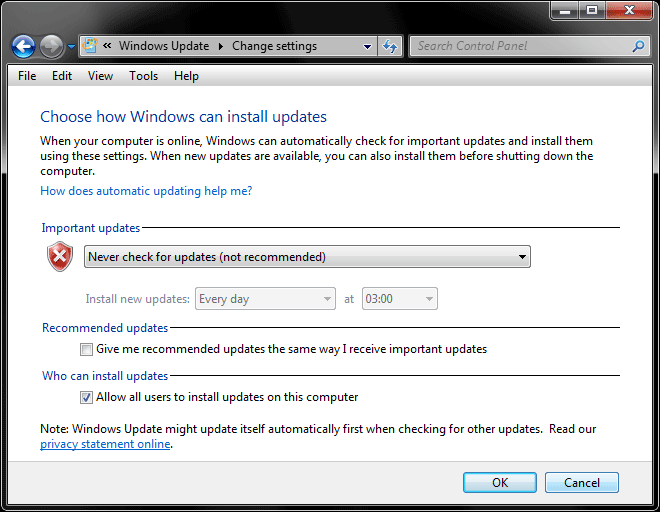
Windows 7
Control Panel > Windows Update > Change settings > Never check for updates > Reboot.
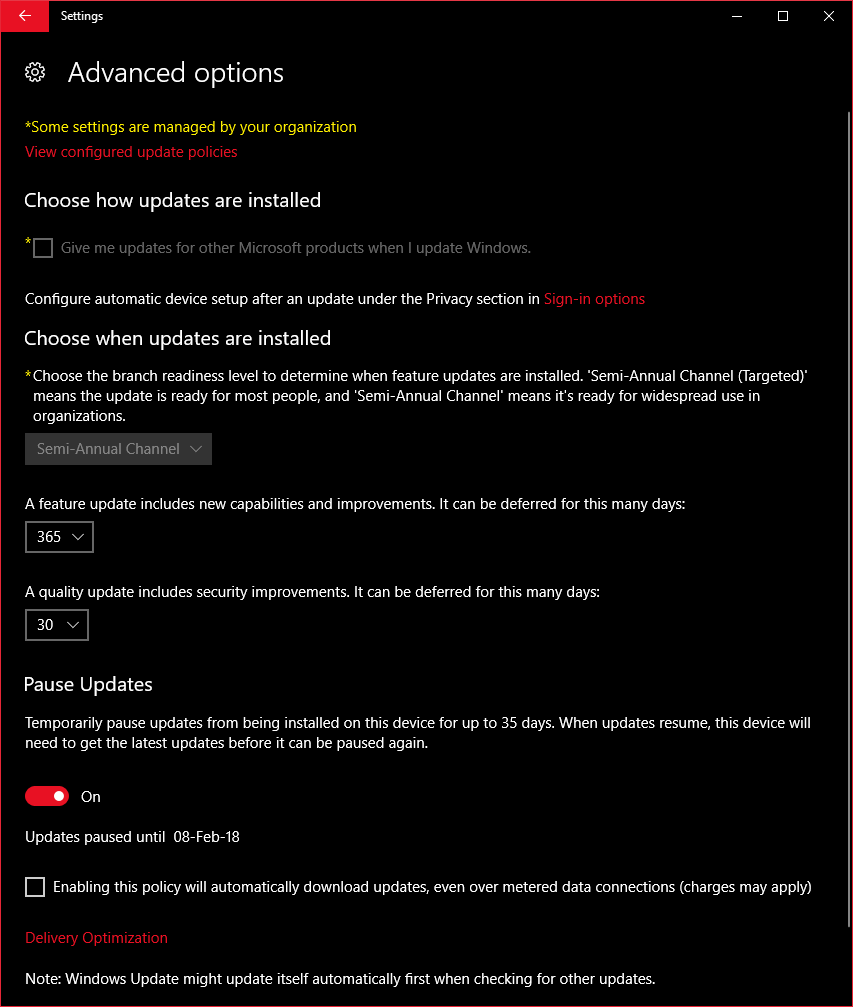
Win10 (Pro Only)
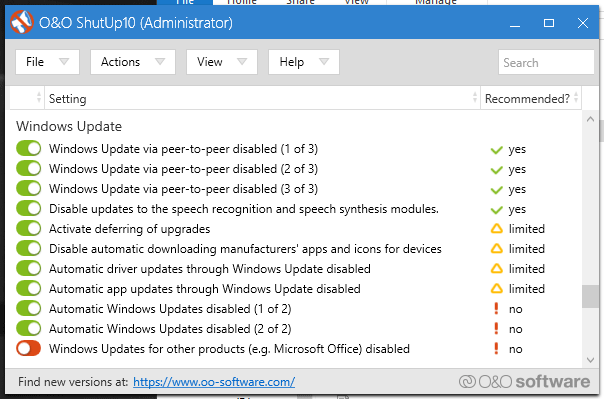
I use O&O Shutup10 for this.
Settings > Update & Security > Windows Update > Advanced Options > Pause Updates
Settings > Update & Security > Windows Update > Advanced Options > change Feature update and Quality update settings.
– – – – – – – – – – – – – – – – – – –
Email from Microsoft:
– – – – – – – – – – – – – – – – – – –
—–BEGIN PGP SIGNED MESSAGE—–
Hash: SHA256
********************************************************************
Microsoft Security Update Summary for January 3, 2018
Issued: January 3, 2018
********************************************************************
This summary lists security updates released for January 3, 2018.
Complete information for the January 2018 security update release can
Be found at
Critical Security Updates
============================
Microsoft Edge
Internet Explorer 9
Internet Explorer 11
Windows 7 for 32-bit Systems Service Pack 1
Windows 7 for x64-based Systems Service Pack 1
Windows 8.1 for 32-bit systems
Windows 8.1 for x64-based systems
Windows Server 2008 for 32-bit Systems Service Pack 2
Windows Server 2008 for Itanium-Based Systems Service Pack 2
Windows Server 2008 for x64-based Systems Service Pack 2
Windows Server 2008 R2 for Itanium-Based Systems Service Pack 1
Windows Server 2008 R2 for x64-based Systems Service Pack 1
Windows Server 2012
Windows Server 2012 R2
Windows 10 for 32-bit Systems
Windows 10 for x64-based Systems
Windows 10 Version 1511 for 32-bit Systems
Windows 10 Version 1511 for x64-based Systems
Windows 10 Version 1607 for 32-bit Systems
Windows 10 Version 1607 for x64-based Systems
Windows 10 Version 1703 for 32-bit Systems
Windows 10 Version 1703 for x64-based Systems
Windows 10 Version 1709 for 32-bit Systems
Windows 10 Version 1709 for x64-based Systems
Windows Server 2016
Important Security Updates
============================
Windows 7 for 32-bit Systems Service Pack 1
Windows 7 for x64-based Systems Service Pack 1
Windows 8.1 for 32-bit systems
Windows 8.1 for x64-based systems
Windows Server 2008 for 32-bit Systems Service Pack 2
Windows Server 2008 for 32-bit Systems Service Pack 2 (Server Core installation)
Windows Server 2008 for Itanium-Based Systems Service Pack 2
Windows Server 2008 for x64-based Systems Service Pack 2
Windows Server 2008 for x64-based Systems Service Pack 2 (Server Core installation)
Windows Server 2008 R2 for Itanium-Based Systems Service Pack 1
Windows Server 2008 R2 for x64-based Systems Service Pack 1
Windows Server 2008 R2 for x64-based Systems Service Pack 1 (Server Core installation)
Windows Server 2012
Windows Server 2012 (Server Core installation)
Windows Server 2012 R2
Windows Server 2012 R2 (Server Core installation)
Windows 10 for 32-bit Systems
Windows 10 for x64-based Systems
Windows 10 Version 1511 for 32-bit Systems
Windows 10 Version 1511 for x64-based Systems
Windows 10 Version 1607 for 32-bit Systems
Windows 10 Version 1607 for x64-based Systems
Windows 10 Version 1703 for 32-bit Systems
Windows 10 Version 1703 for x64-based Systems
Windows 10 Version 1709 for 32-bit Systems
Windows 10 Version 1709 for x64-based Systems
Windows Server 2016
Windows Server 2016 (Server Core installation)
Windows Server, version 1709 (Server Core Installation)
Moderate Security Updates
============================
Internet Explorer 10
So, we have to choose between having a security flaw or having a slow PC? Thanks Intel.