• Skip to primary navigation
  • Skip to main content
  • Skip to primary sidebar

TweakHound

Computer stuff...

  • Home
  • Windows XP
  • Windows Vista
  • Windows 7
  • Windows 8
  • Windows 10
  • Windows 11
  • Linux
  • Tweak Guides
  • Site Info
    • About
    • About Me
    • TweakHound’s World
    • Contact
    • My Computers
    • Old Articles
    • Privacy Policy
    • Old Index
    • Advanced Search

Windows 10

Win10 April Update Download Is Live

April 30, 2018, 13:05(EDT) By Eric (a.k.a. TweakHound)

win10_logo

https://www.microsoft.com/en-us/software-download/windows10

*edit 14:00hrs
Folks are reporting this is available via Windows Update. Hasn’t showed up on my laptop.

*edit 14:04hrs
Windows Blog
What’s new in the Windows 10 April 2018 Update
How to get the Windows 10 April 2018 Update
“The April 2018 Update is available today if you go to Windows Update and manually check for updates. We will begin the global rollout out via Windows Update on May 8. As with previous rollouts, we will use real-time quality feedback to smartly update your device when we have data that shows your device is ready and will have a great experience. You don’t have to do anything to get the update; it will roll out automatically to you through Windows Update if you’ve chosen to have updates installed automatically on your device. Once the download is complete and the update is ready to install, we’ll notify you, so you can pick the right time to finish the installation and reboot, so the update does not disrupt you.”

I am currently running the 2 available methods:
Update now button (IMHO if you are doing one machine use this)
&
Create Windows 10 installation media
(IMHO if you are upgrading more than one machine use this, download iso, extract with 7-zip, run setup.exe)

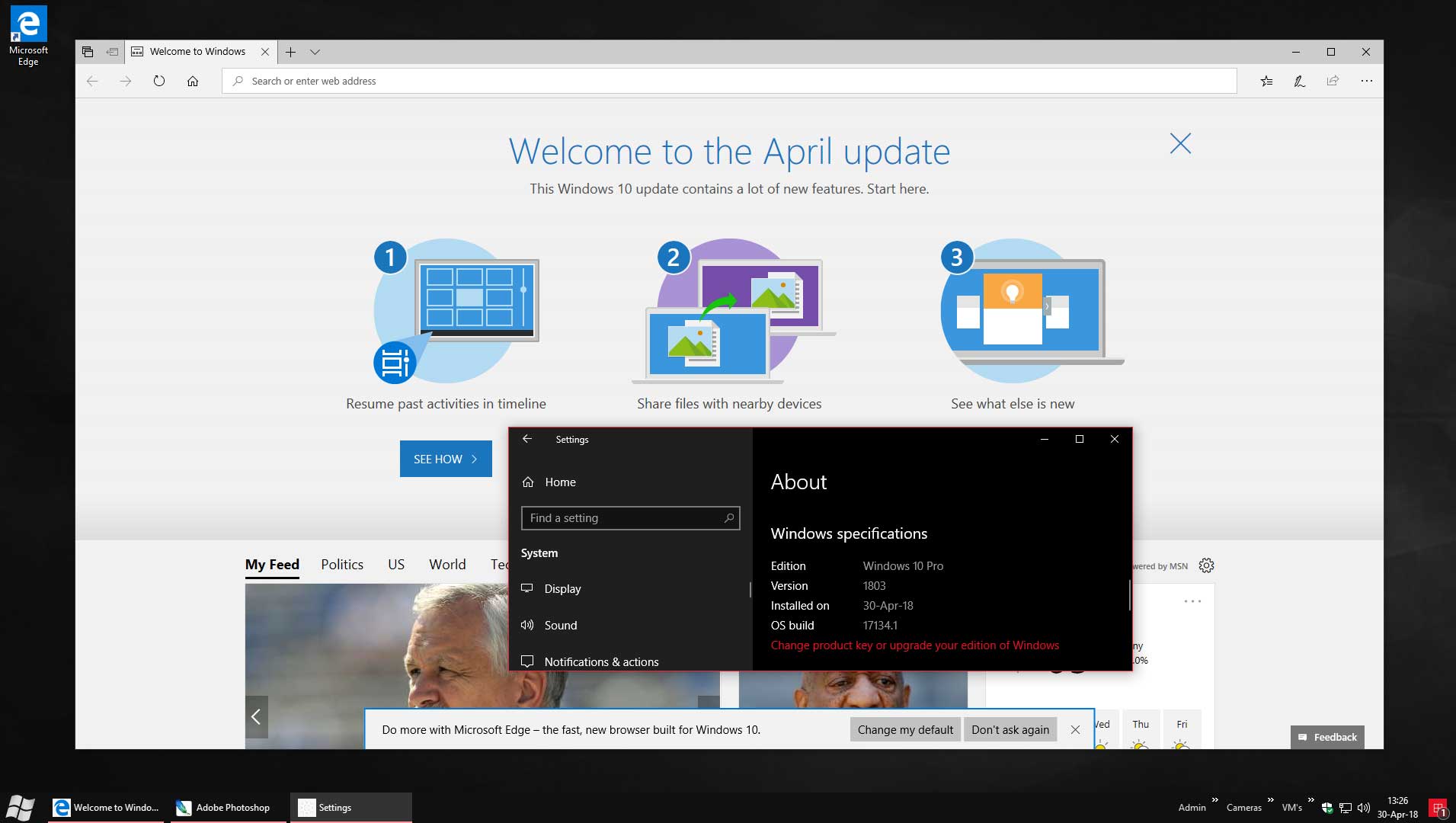
*edit 13:31hrs
Done (click pic for larger version)

Tagged With: Windows 10

Fix Windows 10 Network Browsing

April 17, 2018, 17:00(EDT) By Eric (a.k.a. TweakHound)

Saw 2 posts published today:
Network Computers are Not Visible in Windows 10 Version 1803
Fix PCs no longer recognized in network after Windows 10 version 1803 upgrade

*cough*…ahem: December 30, 2017
Fix Windows 10 Network Browsing

Tagged With: This Site, Windows 10

Patch Tuesday

April 10, 2018, 13:30(EDT) By Eric (a.k.a. TweakHound)

windows security

*This post will be updated as info comes in.
Microsoft Security Update Summary at bottom of post.

Windows 7 SP1 – April 10, 2018—KB4093118 (Monthly Rollup)

Win10 1709 – April 10, 2018—KB4093112 (OS Build 16299.371)
“This update includes quality improvements. No new operating system features are being introduced in this update.”
Win10 1703 – April 10, 2018—KB4093107 (OS Build 15063.1029)
“This update includes quality improvements. No new operating system features are being introduced in this update.”
Win10 1607 – April 10, 2018—KB4093119 (OS Build 14393.2189)
“Windows 10 version 1607 will reach end of service on April 10, 2018. Devices running Windows 10 Home or Pro editions will no longer receive monthly security and quality updates that contain protection from the latest security threats. To continue receiving security and quality updates, Microsoft recommends updating to the latest version of Windows 10.”

Insider builds also get the above updates (KB4100375).
[Read more…] about Patch Tuesday

Tagged With: Security, Windows 10, Windows 7

Win10 SCU Delayed?

April 10, 2018, 11:16(EDT) By Eric (a.k.a. TweakHound)

***ATM this is interesting, high school gossipy speculation. But, what’s a day without a little drama! Follow the links in the post below and watch it unfold.

AskWoody reports both Paul Thurrott (thurrott.com) and Zac Bowden (windowscentral.com) are hearing SCU/RS4 is delayed.

*update 1243hrs
Don’t know if this is related but BuildFeed has the updated the latest build to 10.0.17133.1009, dated today.

Tagged With: Windows 10

Win10 SCU Is Out Next Week

April 5, 2018, 11:39(EDT) By Eric (a.k.a. TweakHound)

Windows 10 Spring Creators Update is going to be released next week.
In My Humble Opinion:
– There is no reason to upgrade within 30 days of release. (Or at least until the following Patch Tuesday.)
– There are no new features worth upgrading for.

You can stick with the current release you are on and still get updates for at least 18 months:
1709 (Fall Creators Update) Expires April 9, 2109
1703 (Creators Update) Expires October 9, 2018
1607 (Anniversary Update) Expires April 10, 2018

I recommend blocking/delaying feature updates:
– You need to be running Win10 Pro, Enterprise, or Education.
There is no way to stop a feature update in Win10 Home without stopping security updates. You can officially upgrade from Home to Pro for $99 but there are MUCH, MUCH cheaper legit keys to be had out there. If you can’t find them, email me.
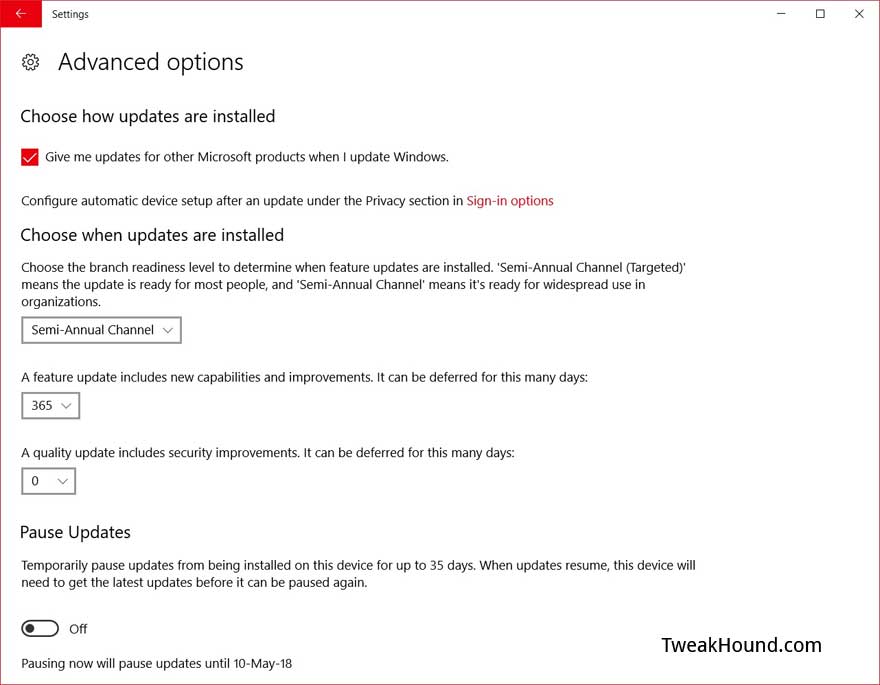
Go to Settings > Update & Security > Advanced options
Optional – Use the  > Semi-Annual Channel ( NOT Semi-Annual Channel (Targeted) )
This channel used to be Current Branch for Business. This delays feature updates until they are ready for business, i.e. all the bugs are worked out. This was about 3 months for FCU (approx. Oct 17 – Jan. 11).
Go to Settings > Update & Security > Advanced options >
In the box under A feature update includes new capabilities and improvements. It can be deferred for this many days:
Change days to desired amount. I recommend at least 31 but since SCU offers me nothing then up to 365 will not hurt. You can re-evaluate when the next feature update comes out and it looks to be a big one.

Tagged With: Windows 10

Updating Windows

March 26, 2018, 08:09(EDT) By Eric (a.k.a. TweakHound)

th

If and when should you update Windows? I have been wrestling with this question as I know many of you have. What follows is my personal opinion.
[Read more…] about Updating Windows

Tagged With: Windows 10, Windows 7

Win10 Updated

March 22, 2018, 15:39(EDT) By Eric (a.k.a. TweakHound)

win10_logo

“This update includes quality improvements. No new operating system features are being introduced in this update.”
Remember, updates are cumulative.

For 1709 (Latest Build) – March 22, 2018—KB4089848 (OS Build 16299.334)

For 1703 – March 22, 2018—KB4088891 (OS Build 15063.994)

For 1607 – March 22, 2018—KB4088889 (OS Build 14393.2155)
*1607 is getting EoS next month.

1709 (Fall Creators Update)
1703 (Creators Update)
1607 (Anniversary Update)

See also:
Windows lifecycle fact sheet
Windows 10 release information

Tagged With: Windows 10

Patch Tuesday

March 13, 2018, 14:12(EDT) By Eric (a.k.a. TweakHound)

windows security

Updates available for all things Windows. I am still not updating my Windows 7 machines. The only Win10 machine I am updating is my main rig. I have switched that over to Windows Insider Fast Lane so I can get a head start on the Spring Creators Update that comes out next month. The things I do for you guys.

Full Windows Update info at the bottom of this post.
Win10 version 1709: March 13, 2018—KB4088776 (OS Build 16299.309)
“This update includes quality improvements. No new operating system features are being introduced in this update.”
Win10 version 1703: March 13, 2018—KB4088782 (OS Build 15063.966)
“This update includes quality improvements. No new operating system features are being introduced in this update.”

Firefox 59
Firefox 32-bit
Firefox 64-bit
All downloads
Release Notes. Be sure to check these out as there are a couple of new features you’ll want to know about.
Related: Tor Browser 7.5.1 released and Tails 3.6 too.

CCleaner 5.41
Release Announcement
Download (I use the portable version)
Thanks Arthur!

Adobe Flash Player 29.0.0.113
for Firefox, Opera
for Internet Explorer

[Read more…] about Patch Tuesday

Tagged With: Security, Software, Windows 10, Windows 7

Win10 Updated

March 6, 2018, 06:38(EST) By Eric (a.k.a. TweakHound)

win10_logo

March 5, 2018—KB4090913 (OS Build 16299.251)
“This update includes quality improvements. No new operating system features are being introduced in this update…Addresses an issue in which some USB devices and onboard devices, such as a built-in laptop camera, keyboard, or mouse, stop working.”
This update is a cumulative update. That means it will apply the Meltdown/Spectre patch from past months.

Tagged With: Windows 10

Standalone Win10 Meltdown and Spectre Patch Available

March 1, 2018, 14:08(EST) By Eric (a.k.a. TweakHound)

win10_logo

Got a Microsoft Security Advisory Notification. Just passing this along. I am NOT recommending you install it. At least not yet anyway.
[Read more…] about Standalone Win10 Meltdown and Spectre Patch Available

Tagged With: Windows 10

« Previous Page
Next Page »

Primary Sidebar

Popular Posts

Tweaking Windows 10

Software I Use – 2021 Edition

Timer Tweaks Benchmarked

Win10 – Get Auto-Login Back

Recent Posts

  • Patch Tuesday
  • Monday News
  • Patch Tuesday
  • Weekend News
  • Weekend News
  • Patch Tuesday
  • Friday News
  • Patch Tuesday
  • Using Wise Disk Cleaner
  • Using Cleanmgr+
buywin10th2

Tags

  • Android
  • Backup
  • Beer
  • Computer Hardware
  • Computer News
  • Cool Tools
  • Freeware
  • How-To's
  • Linux
  • Off Topic
  • openSUSE
  • Playlists
  • Privacy
  • Security
  • Software
  • This Site
  • vacation
  • Veterans
  • Windows 10
  • Windows 11
  • Windows 7
  • Windows 8
  • Windows Vista
  • Windows XP

Catagories

  • Android
  • Backup
  • Beer
  • Computer Hardware
  • Computer News
  • Cool Tools
  • Freeware
  • Freeware Machines
  • How-To's
  • Linux
  • News From The Web
  • Off Topic
  • openSUSE
  • Privacy
  • Security
  • Software
  • Tweak Guides
  • Veterans
  • Windows
  • Windows 10
  • Windows 11
  • Windows 7
  • Windows 8
  • Windows Vista
  • Windows XP

TweakHound - Optimize Your Computing Experience! TweakHound - Optimize Your Computing Experience!

Copyright 2002-2025 by Eric Vaughan All material contain here is the property of the materials owner. Windows, Windows XP, Windows Vista, Windows Seven, Windows 8, Windows 10, Windows 11, Microsoft, and all associated logos are trademarks/property of Microsoft. You may not use or copy any material from tweakhound.com without expressed written permission. Hotlinking to any material within this site is forbidden. Privacy Policy