
• Skip to primary navigation
  • Skip to main content
  • Skip to primary sidebar

TweakHound

Computer stuff...

  • Home
  • Windows XP
  • Windows Vista
  • Windows 7
  • Windows 8
  • Windows 10
  • Windows 11
  • Linux
  • Tweak Guides
  • Site Info
    • About
    • About Me
    • TweakHound’s World
    • Contact
    • My Computers
    • Old Articles
    • Privacy Policy
    • Old Index
    • Advanced Search

Windows 8.1 SSD Defrag

th

December 15, 2014, 18:39(EST) By Eric (a.k.a. TweakHound)

thAn interesting blog post was brought to me attention by a reader. Many Geeks will recognize the blogger, Scott Hanselman:
The real and complete story – Does Windows defragment your SSD? (be cure to check out the comments too)
The gist of this post is to tell us we’ve all been wrong and Windows 8.1 does in fact defrag SSD’s.
However, we need to dig a little deeper.

First let’s take this quote, “Storage Optimizer will defrag an SSD once a month if volume snapshots are enabled.”
That means System Restore (and File History).
System Restore is one of the very first things I disable, opting instead for system images via Acronis True Image.
As a result I’ve never seen Windows 8.1 defrag an SSD.
So, if you’ve disabled System Restore then your SSD is not subjected to defrag. Defrag / Optimize will still just manually run the trim command. Windows calls this retrim since trim is supposed to be done on the fly.
If you have System Restore (or File History) enabled then your SSD will be defragged monthly via Automatic Maintenance.
You can disable Automatic Maintenance in Task Scheduler but I do not recommend it.
To check if your SSD has been defragged:
Open Event Viewer > Windows Logs > Applications > order the list by Event ID and look for Event ID 258 entries.
To test this I enabled System Restore > Jumped by date ahead more than a month > ran Automatic Maintenance:
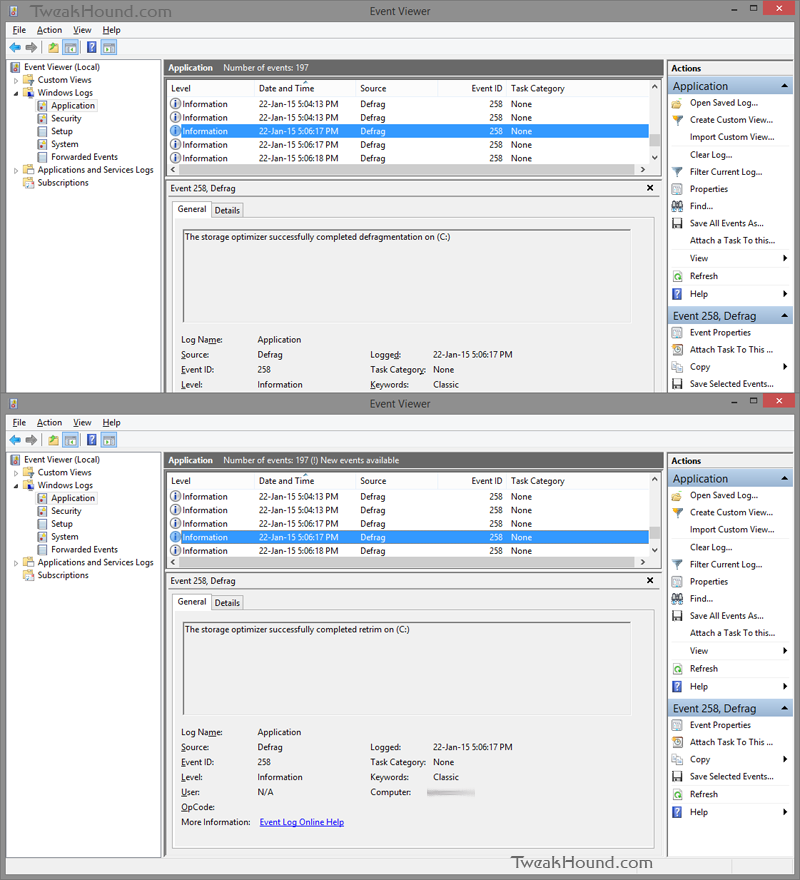
win81_defrag_retrim_1

Another way of looking at this situation is that System Restore fubars your file system so much that Microsoft feels SSD’s using it need defragging.
(Reason #4,867 not to use it?!)

It’s sad that so much confusion exists.
Microsoft could clear it up by actually posting some fracking official documentation but nooooooooo. :rolleyes:

-END-

Tagged With: This Site, Windows 8

Primary Sidebar

Popular Articles

Windows 10

Tweaking Windows 10

My Windows 10 Tweaks

Windows 10 Privacy Settings

Win10 Diagnostics Tracking Service Gone?

Windows 10 Advanced Disk Cleanup

Win10 Customize Installation Options

Windows 10 Dark Theme

Win10 Wallpapers, Graphics, etc.

All Windows 10 Articles

Windows 8

Tweaking Windows 8.1

Advice On Installing Windows 8.1

Clean Install Windows 8.1

Cleanup After Windows 8.1 Upgrade

Create Shutdown, Restart, Logoff Tiles For Windows 8

Tweaking Windows 8

Install Windows 8 – Clean Install With Upgrade Media

Install Windows 8 – Upgrade

Windows 8 – Cleaning Up After You’ve Upgraded

Windows 8 Freeware Machine

Windows 8 SSD Settings, Etc.

How To Resize Your Windows 8 Partition

Create Windows 8 Recovery Media

Windows 8 – Elevated Command Prompt

How To Fix The Windows Bootloader

Windows 7

Installing Windows 7

Tweaking Windows 7

Windows 7 Diagnostics Tracking Service

The Windows 7 Freeware Machine

The Windows 7 Pagefile And Running Without One

Bad Tweaks

SSD Tweak Guide (sort of)

The noguiboot (no GUI Boot) Tweak

NtfsMemoryUsage=2 Tweak

More Windows 7 articles here.

Windows Vista

Installing Windows Vista

Tweaking Windows Vista

More Windows Vista articles here.

Windows XP

eXPired - The Last Windows XP Guide You'll Ever Need

The Right Way To Install Windows XP

Super XP Tweaking Guide

The Freeware XP Machine

Bad Tweaks

More XP Articles here and here.

Backup

Backup Article Greatest Hits – Vol. 1

Other

Cataloging Your Music Collection

Finding Good Album Art

Converting Vinyl Records To Digital Music – A Non-Audiophiles Guide

Windows All-In-One Recovery Flash Drive

SSD Tweak Guide (sort of)

Raidmax Blackstorm Case Review

Disk Partitioning

Ditch Those CD's! A Guide To Using USB Flash Drives

Checking Your Disks For Problems

Bad Tweaks

More articles here

Tags

Android Backup Beer Computer Hardware Computer News Cool Tools Freeware How-To's Linux Off Topic openSUSE Playlists Privacy Security Software This Site vacation Veterans Windows 7 Windows 8 Windows 10 Windows 11 Windows Vista Windows XP

TweakHound - Optimize Your Computing Experience! TweakHound - Optimize Your Computing Experience!

Copyright 2002-2025 by Eric Vaughan All material contain here is the property of the materials owner. Windows, Windows XP, Windows Vista, Windows Seven, Windows 8, Windows 10, Windows 11, Microsoft, and all associated logos are trademarks/property of Microsoft. You may not use or copy any material from tweakhound.com without expressed written permission. Hotlinking to any material within this site is forbidden. Privacy Policy