• Skip to primary navigation
  • Skip to main content
  • Skip to primary sidebar

TweakHound

Computer stuff...

  • Home
  • Windows XP
  • Windows Vista
  • Windows 7
  • Windows 8
  • Windows 10
  • Windows 11
  • Linux
  • Tweak Guides
  • Site Info
    • About
    • About Me
    • TweakHound’s World
    • Contact
    • My Computers
    • Old Articles
    • Privacy Policy
    • Old Index
    • Advanced Search

Ditch Those CD’s! A Guide To Using USB Flash Drives

July 26, 2011, 15:16(EDT) By Eric (a.k.a. TweakHound)

Page 4 – Install a Linux Operating From A USB Flash Drive or Boot from one or more Linux Live CD’s on a USB Flash Drive

There are several that allow for this. They allow you to choose 1 or more Linux operating systems on the flash drive.
For this most folks use the “Live CD’s” of the distro.
I’ve listed the information from some specific distros for your reference.

Official Pages

openSUSE
If you know of one that works give me a shout.
See openSUSE SDB:Live USB stick.
“This page explains how to create a bootable USB stick from a LiveCD, or in other words a LiveUSB.”

Ubuntu (and derivatives)
See Ubuntu InstallationFromUSBStick.

Fedora
See Fedora How to create and use Live USB.

Linux Bootable Live USB
If you simply want a fully featured Live bootable flash drive with Linux I highly suggest you use Linux Mint. AFAIK it is the only distro that has everything you need for a fully functional desktop, codec and plug in wise. Advanced users with specific needs might want to check out SUSE Studio.

Linux Bootable Live USB – Just One Distro
Unetbootin is the traditional program most folks use for this. It runs from Windows, Linux, and Mac.
It does all the popular distros without issue (except openSUSE).

usb_linux_2

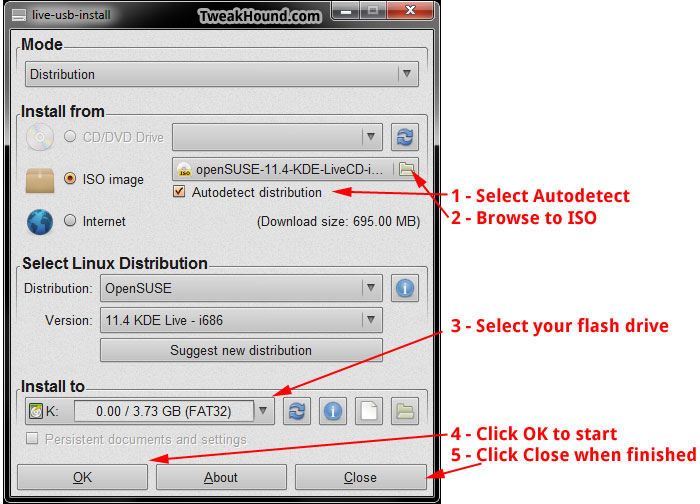
New on the scene is LiveUSB Install. It runs from Windows and Linux. Outside of the official openSUSE tool it is the only program I’ve found that works with openSUSE.
usb_linux_1

Linux Bootable Live USB – Multiple Distros
For this YUMI is probably the easiest to use though the tools in the next section can also create your multiboot flash drive.
(again, except for openSUSE in my attempts)

yumi

Pages: Page 1 Page 2 Page 3 Page 4 Page 5 Page 6 Page 7

Primary Sidebar

Popular Posts

Tweaking Windows 10

Software I Use – 2021 Edition

Timer Tweaks Benchmarked

Win10 – Get Auto-Login Back

Recent Posts

  • Wednesday News
  • Patch Tuesday
  • Monday News
  • Patch Tuesday
  • Weekend News
  • Weekend News
  • Patch Tuesday
  • Friday News
  • Patch Tuesday
  • Using Wise Disk Cleaner
buywin10th2

Tags

  • Android
  • Backup
  • Beer
  • Computer Hardware
  • Computer News
  • Cool Tools
  • Freeware
  • How-To's
  • Linux
  • Off Topic
  • openSUSE
  • Playlists
  • Privacy
  • Security
  • Software
  • This Site
  • vacation
  • Veterans
  • Windows 10
  • Windows 11
  • Windows 7
  • Windows 8
  • Windows Vista
  • Windows XP

Catagories

  • Android
  • Backup
  • Beer
  • Computer Hardware
  • Computer News
  • Cool Tools
  • Freeware
  • Freeware Machines
  • How-To's
  • Linux
  • News From The Web
  • Off Topic
  • openSUSE
  • Privacy
  • Security
  • Software
  • Tweak Guides
  • Veterans
  • Windows
  • Windows 10
  • Windows 11
  • Windows 7
  • Windows 8
  • Windows Vista
  • Windows XP

TweakHound - Optimize Your Computing Experience! TweakHound - Optimize Your Computing Experience!

Copyright 2002-2025 by Eric Vaughan All material contain here is the property of the materials owner. Windows, Windows XP, Windows Vista, Windows Seven, Windows 8, Windows 10, Windows 11, Microsoft, and all associated logos are trademarks/property of Microsoft. You may not use or copy any material from tweakhound.com without expressed written permission. Hotlinking to any material within this site is forbidden. Privacy Policy