As I told y’all earlier, I gave my laptop to my college bound nephew.
That left me with only my Android phone for mobile computing, which frankly sucks.
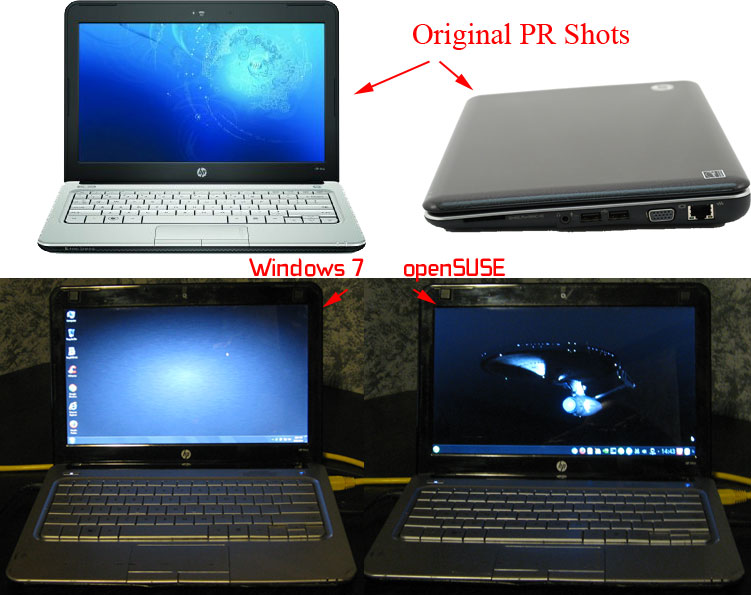
My nephew had received an HP Mini Netbook for Christmas 2009. I made him hand that over…
Two years ago I had redone this system for him, trading his virus ridden XP for Windows 7 and the hard drive for my old SSD. All he really used it for was web surfing.
Specs:
HP Mini 311-1000NR
CPU: 1.60GHz Intel Atom Processor N270
RAM: 3GB DDR3 (this is max)
Video: NVIDIA ION LE (has HDMI out)
Drive: Intel SSD X25-M 80GB (single partition)
Network: Wifi, Ethernet
Webcam
So, the system is-what-it-is. It isn’t going to get any faster. More importantly, I’m not willing to spend a penny on it.
Step 1: I dig up the backup I made with Acronis TI 2 years ago and restore it.
Step 2: Added myself as a user (admin) and deleted him.
Step 3: Updated drivers: Nvidia, Intel SSD Toolbox
Step 4: Ran windows update.
Step 5: Installed software including:
Adobe Reader
CCleaner
Chrome
Firefox
Microsoft Office 365 (already installed on my PC as a yearly subscription, up to 5 devices, includes 1TB of cloud storage)
Conclusion, Windows 7
Windows 7 is slow on this thing. Especially the browsers, Chrome in particular. Office runs surprisingly well.
Time to throw Linux on this thing…
Installing Linux
I already know that I’m going to keep Windows on this PoS. So, as I normally do I’ll be using EasyBCD to dual-boot. As some of you know, openSUSE is my choice for Linux distros, mainly because I’m used to it. The first shot I took was at using XFCE for the desktop. I know lots of folks like it but it is just too spartan for me. I reckon I’m just too used to KDE. So, I reinstall choosing KDE as the desktop.
First boot under booth XFCE and KDE reveals nouveau (Linux open-source nvidia driver) faulting all over the place but does boot and seems to work but is laggy. Also, multiple monitors (hdmi out) does not work (crashes kwin). I pop over to openSUSE Nvidia Easy Way page and do not see Nvidia Ion LE listed anywhere. Feeling adventurous, I try the 1-click install for openSUSE 13.1, 12.3 and 12.2. For GeForce 8 and later. Fully expecting failure I reboot. Hmmm, seems now I’m using a basic video driver. I start up Nvidia Config and recieve a warning thta I’m not using the Nvdia driver and to run nvidia-settings (which I thought the 1-click was supposed to do). I run it, reboot and all is perfect. HMDI out works great too.
Conclusion, Linux
After going through my usual steps I’m quite satisfied with how openSUSE/KDE runs on this system. Chromium and Firefox work fine. Kaffine plays video OK (via HDMI too). The system as a whole is far more responsive than under Windows 7. openSUSE will be the main OS for this computer.
You Get What You Pay For
I would love to tell you I’m enamored with this HP Mini, but I’m not. I can say, “It will do.” Honestly that is all I can ask out of it. It cost me nothing and that is about what it is worth with all the tablet options out there. I can sit in front of the TV and use it. I can use it on the road. I can even to wifi on the road via tethering to my Droid phone. Hopefully this will hold me over until Windows Threshold laptops are released next spring/summer.
Pics: