
• Skip to primary navigation
  • Skip to main content
  • Skip to primary sidebar

TweakHound

Computer stuff...

  • Home
  • Windows XP
  • Windows Vista
  • Windows 7
  • Windows 8
  • Windows 10
  • Windows 11
  • Linux
  • Tweak Guides
  • Site Info
    • About
    • About Me
    • TweakHound’s World
    • Contact
    • My Computers
    • Old Articles
    • Privacy Policy
    • Old Index
    • Advanced Search

Tuesday Random Stuff…

March 14, 2017, 09:59(EDT) By Eric (a.k.a. TweakHound)

It’s Patch Tuesday so look for another post this afternoon.

Win10 Ads
Everyone is pissed off that Microsoft is putting ads in Windows. IMHO it is just the latest fiasco surrounding Win10.

CCleaner Monthly Update
Version 5.28 released.
Download
Version History

Finally
Verizon managed to finally push out Android Nougat to my Galaxy S7.
The update also put in the most recent security updates (Feb. 1) which is all I really cared about.
The update broke LED notifications and I had to do a full reset to get them to work.

New Bike
Last year I had mentioned I was looking for a hybrid bike. Several of you emailed some good suggestions.
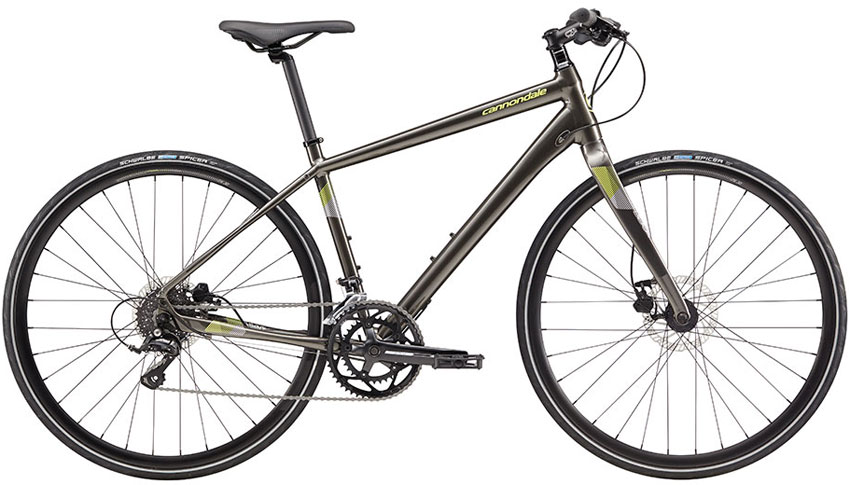
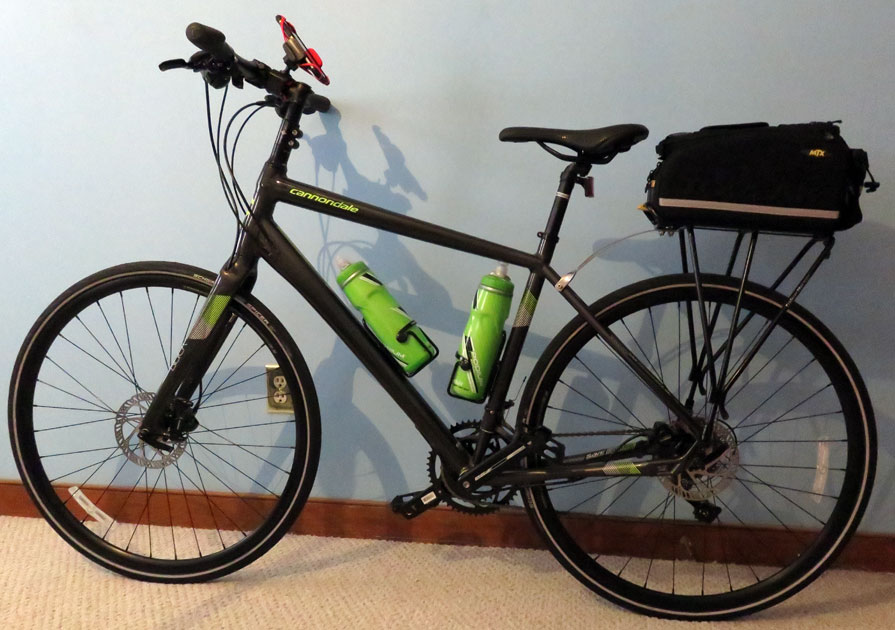
I recently bought a Cannondale Quick 3 Disc on sale for $749 at a local bike shop.
I put a phone holder, two water bottle cages, and a rear bike rack on it.  I have 2 CamelBak Podium Big Chill Insulated Water Bottles. I also got a 529 Garage Bicycle Registration Kit to help recover the bike if it is stolen.
I look forward to putting some serious miles on it once the weather breaks.
Tagged With: Off Topic, Windows 10

Reader Interactions

Comments

  1. Tim says

    March 14, 2017, 12:18(EDT) at 12:18

    read this article to learn how to neuter some of the ads
    https://www.thurrott.com/windows/windows-10/106643/windows-10-tip-turn-off-lock-screen-start-action-center-advertising

    • Eric (a.k.a. TweakHound) says

      March 14, 2017, 12:51(EDT) at 12:51

      Thanks. See a lot of those posted. I wonder who was the first to show how to do that?

  2. Kelly says

    March 14, 2017, 12:47(EDT) at 12:47

    Than bike looks like work to me…

    • Eric (a.k.a. TweakHound) says

      March 14, 2017, 12:52(EDT) at 12:52

      That is kinda the point. I need to drop 20lbs!

  3. Ron from the Netherlands says

    March 20, 2017, 19:31(EDT) at 19:31

    MS did it again … and tries to do some damage control. Read this if the latest PT messed up your ‘device’ as MS puts it.

    http://news.softpedia.com/news/windows-10-cumulative-update-kb4015438-released-fixes-kb4013429-issues-514091.shtml
    and
    https://support.microsoft.com/en-us/help/4015438/windows-10-update-kb4015438

  4. matt says

    March 27, 2017, 10:20(EDT) at 10:20

    Nice bike. Enjoy

    • Eric (a.k.a. TweakHound) says

      March 31, 2017, 14:19(EDT) at 14:19

      Thanks Matt!

Primary Sidebar

Popular Articles

Windows 10

Tweaking Windows 10

My Windows 10 Tweaks

Windows 10 Privacy Settings

Win10 Diagnostics Tracking Service Gone?

Windows 10 Advanced Disk Cleanup

Win10 Customize Installation Options

Windows 10 Dark Theme

Win10 Wallpapers, Graphics, etc.

All Windows 10 Articles

Windows 8

Tweaking Windows 8.1

Advice On Installing Windows 8.1

Clean Install Windows 8.1

Cleanup After Windows 8.1 Upgrade

Create Shutdown, Restart, Logoff Tiles For Windows 8

Tweaking Windows 8

Install Windows 8 – Clean Install With Upgrade Media

Install Windows 8 – Upgrade

Windows 8 – Cleaning Up After You’ve Upgraded

Windows 8 Freeware Machine

Windows 8 SSD Settings, Etc.

How To Resize Your Windows 8 Partition

Create Windows 8 Recovery Media

Windows 8 – Elevated Command Prompt

How To Fix The Windows Bootloader

Windows 7

Installing Windows 7

Tweaking Windows 7

Windows 7 Diagnostics Tracking Service

The Windows 7 Freeware Machine

The Windows 7 Pagefile And Running Without One

Bad Tweaks

SSD Tweak Guide (sort of)

The noguiboot (no GUI Boot) Tweak

NtfsMemoryUsage=2 Tweak

More Windows 7 articles here.

Windows Vista

Installing Windows Vista

Tweaking Windows Vista

More Windows Vista articles here.

Windows XP

eXPired - The Last Windows XP Guide You'll Ever Need

The Right Way To Install Windows XP

Super XP Tweaking Guide

The Freeware XP Machine

Bad Tweaks

More XP Articles here and here.

Backup

Backup Article Greatest Hits – Vol. 1

Other

Cataloging Your Music Collection

Finding Good Album Art

Converting Vinyl Records To Digital Music – A Non-Audiophiles Guide

Windows All-In-One Recovery Flash Drive

SSD Tweak Guide (sort of)

Raidmax Blackstorm Case Review

Disk Partitioning

Ditch Those CD's! A Guide To Using USB Flash Drives

Checking Your Disks For Problems

Bad Tweaks

More articles here

Tags

Android Backup Beer Computer Hardware Computer News Cool Tools Freeware How-To's Linux Off Topic openSUSE Playlists Privacy Security Software This Site vacation Veterans Windows 7 Windows 8 Windows 10 Windows 11 Windows Vista Windows XP

TweakHound - Optimize Your Computing Experience! TweakHound - Optimize Your Computing Experience!

Copyright 2002-2025 by Eric Vaughan All material contain here is the property of the materials owner. Windows, Windows XP, Windows Vista, Windows Seven, Windows 8, Windows 10, Windows 11, Microsoft, and all associated logos are trademarks/property of Microsoft. You may not use or copy any material from tweakhound.com without expressed written permission. Hotlinking to any material within this site is forbidden. Privacy Policy