
• Skip to primary navigation
  • Skip to main content
  • Skip to primary sidebar

TweakHound

Computer stuff...

  • Home
  • Windows XP
  • Windows Vista
  • Windows 7
  • Windows 8
  • Windows 10
  • Windows 11
  • Linux
  • Tweak Guides
  • Site Info
    • About
    • About Me
    • TweakHound’s World
    • Contact
    • My Computers
    • Old Articles
    • Privacy Policy
    • Old Index
    • Advanced Search

Tuesday Random Stuff…

June 25, 2019, 15:36(EDT) By Eric (a.k.a. TweakHound)

CCleaner 5.59
3 small fixes that won’t matter to 99.9% of you. Skip this one.
Download (I use portable) | Release Announcement
See also: Blocking A Programs Internet Access Via The Windows Firewall

Stuff I bookmarked recently. Some off topic, some not:

OneDrive Personal Vault
“OneDrive runs on the trusted Microsoft cloud, which has many security measures in place to keep your files safe. But we understand that some people want more protection for their most important and sensitive files, which is why we’re introducing Personal Vault.
Personal Vault is a protected area in OneDrive that you can only access with a strong authentication method or a second step of identity verification, such as your fingerprint, face, PIN, or a code sent to you via email or SMS.1 Your locked files in Personal Vault have an extra layer of security, keeping them more secured in the event that someone gains access to your account or your device.
”
I dropped OneDrive a few years ago because the syncing between devices sucked. Has it improved? Right now I just encrypt my sensitive folders.

How To View Someone’s LinkedIn Profile Anonymously Without Account
I wanted to do this recently and found the above guide. Of the first 3 or 4 methods I found Gooogling, this was the only one that produced results. Limited but it works for the basics. I’m not on nor am I interested in being on Linkedin.

‘Dark patterns’ are steering many internet users into making bad decisions
“Even if you’ve never heard the phrase “dark patterns,” you’re almost certainly familiar with them. They’re the sneaky ways online companies trick you into agreeing to stuff you’d normally never assent to.
Classic example: You encounter a prompt asking if you want to sign up for some program or service, and the box is already checked. If you don’t uncheck it — that is, if you do nothing — you’re enrolled.
A bipartisan bill has been introduced in Congress that would prohibit websites and online platforms (hi, Facebook!) from employing such deliberately deceptive tactics, and would empower the Federal Trade Commission to crack down on sites that keep trying to fool people.
”

You cannot be ‘too clean’ health experts warn, in bid to debunk myths
“You cannot be “too clean”, millennials are being told, as public health experts attempt to debunk myths around hygiene. The Royal Society for Public Health (RSPH) said incorrect theories which became popular in the 1990s were fuelling confusion and unhygienic habits among subsequent generations.”
“Millennials”…

Cars.com’s 2019 American-Made Index: What’s the Most American Car?
1. Jeep Cherokee
2. Honda Odyssey
3. Honda Ridgeline
4. Honda Passport
5. Chevrolet Corvette
13. Ford F-150

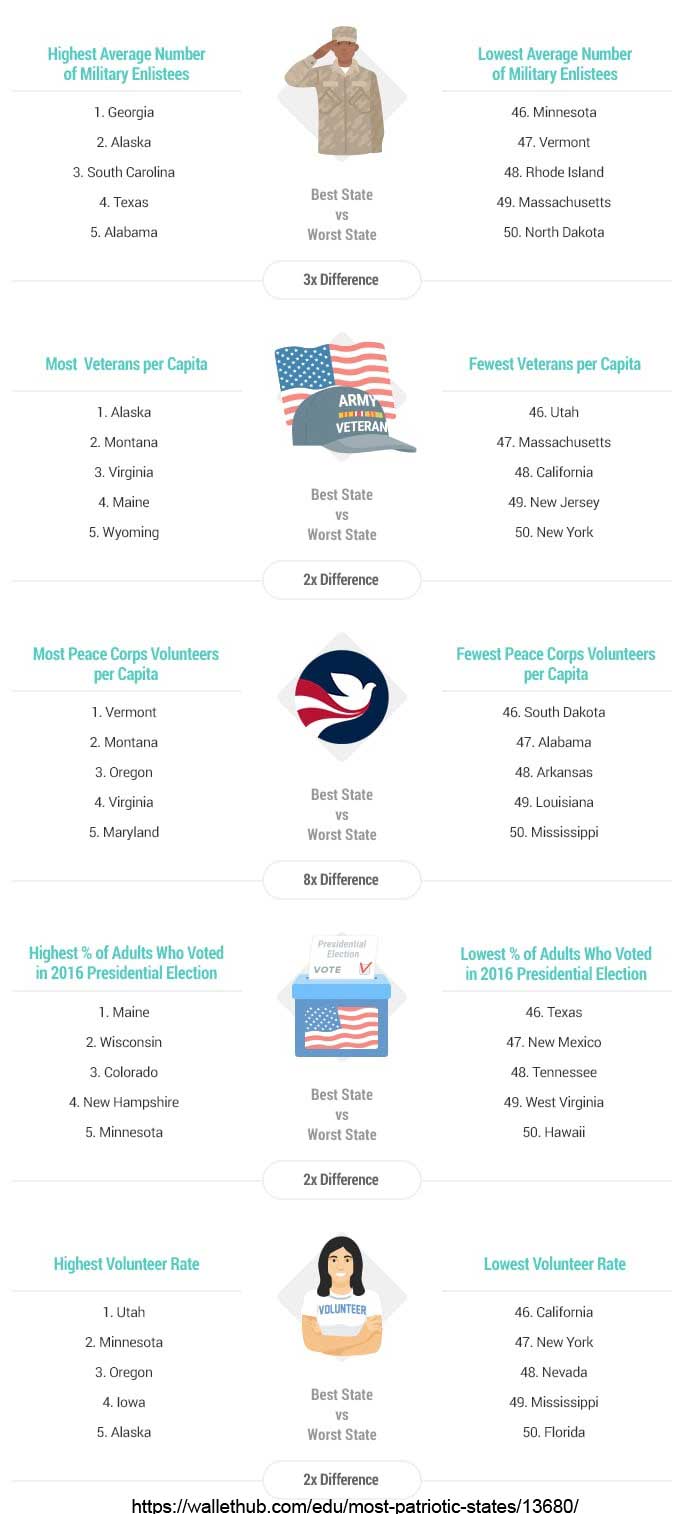
NJ ‘Least Patriotic’ State In US, Study Says
The above article led to this one: 2019’s Most Patriotic States in America
Tagged With: Computer News

Primary Sidebar

Popular Articles

Windows 10

Tweaking Windows 10

My Windows 10 Tweaks

Windows 10 Privacy Settings

Win10 Diagnostics Tracking Service Gone?

Windows 10 Advanced Disk Cleanup

Win10 Customize Installation Options

Windows 10 Dark Theme

Win10 Wallpapers, Graphics, etc.

All Windows 10 Articles

Windows 8

Tweaking Windows 8.1

Advice On Installing Windows 8.1

Clean Install Windows 8.1

Cleanup After Windows 8.1 Upgrade

Create Shutdown, Restart, Logoff Tiles For Windows 8

Tweaking Windows 8

Install Windows 8 – Clean Install With Upgrade Media

Install Windows 8 – Upgrade

Windows 8 – Cleaning Up After You’ve Upgraded

Windows 8 Freeware Machine

Windows 8 SSD Settings, Etc.

How To Resize Your Windows 8 Partition

Create Windows 8 Recovery Media

Windows 8 – Elevated Command Prompt

How To Fix The Windows Bootloader

Windows 7

Installing Windows 7

Tweaking Windows 7

Windows 7 Diagnostics Tracking Service

The Windows 7 Freeware Machine

The Windows 7 Pagefile And Running Without One

Bad Tweaks

SSD Tweak Guide (sort of)

The noguiboot (no GUI Boot) Tweak

NtfsMemoryUsage=2 Tweak

More Windows 7 articles here.

Windows Vista

Installing Windows Vista

Tweaking Windows Vista

More Windows Vista articles here.

Windows XP

eXPired - The Last Windows XP Guide You'll Ever Need

The Right Way To Install Windows XP

Super XP Tweaking Guide

The Freeware XP Machine

Bad Tweaks

More XP Articles here and here.

Backup

Backup Article Greatest Hits – Vol. 1

Other

Cataloging Your Music Collection

Finding Good Album Art

Converting Vinyl Records To Digital Music – A Non-Audiophiles Guide

Windows All-In-One Recovery Flash Drive

SSD Tweak Guide (sort of)

Raidmax Blackstorm Case Review

Disk Partitioning

Ditch Those CD's! A Guide To Using USB Flash Drives

Checking Your Disks For Problems

Bad Tweaks

More articles here

Tags

Android Backup Beer Computer Hardware Computer News Cool Tools Freeware How-To's Linux Off Topic openSUSE Playlists Privacy Security Software This Site vacation Veterans Windows 7 Windows 8 Windows 10 Windows 11 Windows Vista Windows XP

TweakHound - Optimize Your Computing Experience! TweakHound - Optimize Your Computing Experience!

Copyright 2002-2025 by Eric Vaughan All material contain here is the property of the materials owner. Windows, Windows XP, Windows Vista, Windows Seven, Windows 8, Windows 10, Windows 11, Microsoft, and all associated logos are trademarks/property of Microsoft. You may not use or copy any material from tweakhound.com without expressed written permission. Hotlinking to any material within this site is forbidden. Privacy Policy