• Skip to primary navigation
  • Skip to main content
  • Skip to primary sidebar

TweakHound

Computer stuff...

  • Home
  • Windows XP
  • Windows Vista
  • Windows 7
  • Windows 8
  • Windows 10
  • Windows 11
  • Linux
  • Tweak Guides
  • Site Info
    • About
    • About Me
    • TweakHound’s World
    • Contact
    • My Computers
    • Old Articles
    • Privacy Policy
    • Old Index
    • Advanced Search

Old Photos

October 16, 2019, 13:30(EDT) By Eric (a.k.a. TweakHound)

I’m finally gonna start scanning in my old photos.

I’ve got an HP Officejet Pro 8720 that I will scan them in with. Since I want to do a lot of photos I want a program that is quick and easy to use. I’m starting with Photoshop Elements 2020.
Anyone got any tips on this subject?
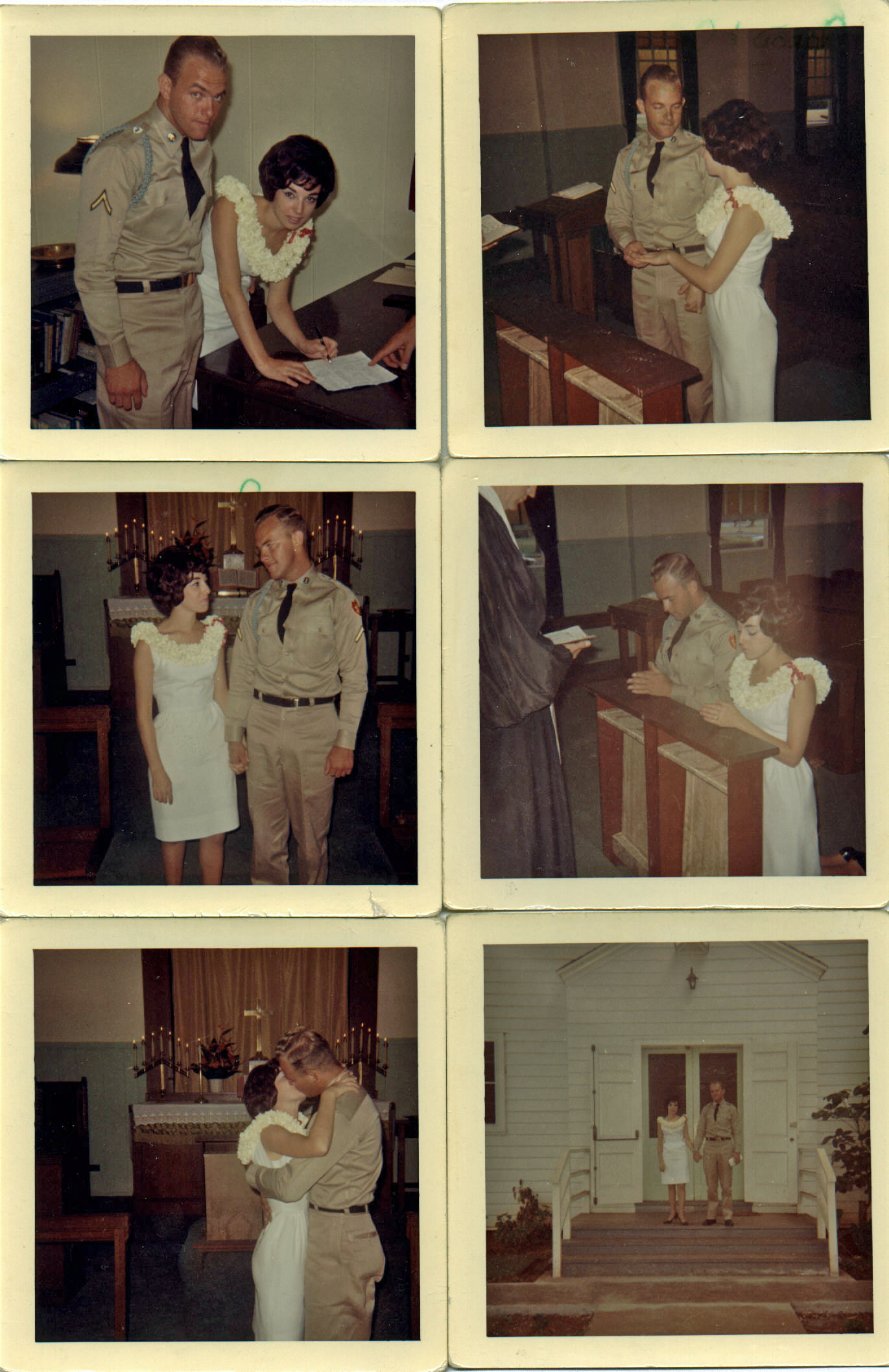
Here is an old photo I scanned in some time ago. It is my Mom & Dad at the church at Schofield Barracks, Hawaii on their wedding day Wednesday, September 5th, 1964.
(click on pic for full size. you’ll probably have to click the resulting page again to make it full size)
Tagged With: Off Topic

Reader Interactions

Comments

  1. James says

    October 16, 2019, 13:58(EDT) at 13:58

    I use ACDSee Better then PS Elements and almost as comprehensive as PhotoShop but at a fraction of the cost https://www.acdsee.com/en/index/

    • Eric (a.k.a. TweakHound) says

      October 17, 2019, 06:59(EDT) at 06:59

      Tried it. Didn’t like it. PS Elements is $100 but I paid $80 for upgrade.

  2. a says

    October 16, 2019, 16:39(EDT) at 16:39

    I’ve typically gone to Costco and have them scan photos and burn to DVD’s. Sometimes there is a convenience to it, even for a fee, that outweighs having to learn yet another program after researching it to death. Plus the time to scan.

    Either I’ve gotten lazy in my old age or have become less obsessive about some things. (which for me, is saying alot! LOL).

    Be interested to hear if the pictures or the final DVD photo-show trigger any moments of remembrance for your Dad.

    • Eric (a.k.a. TweakHound) says

      October 17, 2019, 06:59(EDT) at 06:59

      What do they charge?

  3. Gary says

    October 16, 2019, 18:05(EDT) at 18:05

    I scanned hundreds of pictures several years ago — I bought an Epson Scanner — model Perfection V33. I think it was about $80 when I got it. You can put 4 pictures on the scanner and the software that comes with it automatically breaks the into 4 jpg files. I then used Photoshop elements to clean them up.

  4. Allen says

    October 16, 2019, 18:15(EDT) at 18:15

    That should work for your old photos, but there is a free program called paint.net. it’s a free combo of photoshop and elements at least that’s how I see it. It’s very user friendly and a has a lot of plugins that can be dl if you would like extra bells and whistles. I use this all the time and it does great with old photos. ?

    • Eric (a.k.a. TweakHound) says

      October 17, 2019, 07:02(EDT) at 07:02

      Good program but too complicated to use for so many photos.

  5. Tim says

    October 17, 2019, 06:47(EDT) at 06:47

    https://www.thurrott.com/music-videos/198409/digital-decluttering-high-speed-photo-scanning This unit is good if you have a ton of them to process.

    • Eric (a.k.a. TweakHound) says

      October 17, 2019, 06:55(EDT) at 06:55

      Paywalled. I’ve no idea what this article says. The hardware pictured is over $500 which, IMHO, is ridiculous.

  6. Michael Vernon says

    October 17, 2019, 10:18(EDT) at 10:18

    I have used Google’s Photoscan app. It works like a charm.

  7. a says

    October 17, 2019, 11:08(EDT) at 11:08

    Per Costco site:

    Starting at $19.99
    for the first 62 photos, $0.32 per photo after 62 photos.

    You might try a batch and see what you think?

  8. James LK says

    October 17, 2019, 20:37(EDT) at 20:37

    I recommend Vuescan scanning software. I’ve used it for years and have always achieved very good results. It’s a bit expensive but well worth it. You can try it for free.

  9. Allen says

    October 18, 2019, 14:41(EDT) at 14:41

    Understandable, I hope adobe treats your photos well?

Primary Sidebar

Popular Articles

Windows 10

Tweaking Windows 10

My Windows 10 Tweaks

Windows 10 Privacy Settings

Win10 Diagnostics Tracking Service Gone?

Windows 10 Advanced Disk Cleanup

Win10 Customize Installation Options

Windows 10 Dark Theme

Win10 Wallpapers, Graphics, etc.

All Windows 10 Articles

Windows 8

Tweaking Windows 8.1

Advice On Installing Windows 8.1

Clean Install Windows 8.1

Cleanup After Windows 8.1 Upgrade

Create Shutdown, Restart, Logoff Tiles For Windows 8

Tweaking Windows 8

Install Windows 8 – Clean Install With Upgrade Media

Install Windows 8 – Upgrade

Windows 8 – Cleaning Up After You’ve Upgraded

Windows 8 Freeware Machine

Windows 8 SSD Settings, Etc.

How To Resize Your Windows 8 Partition

Create Windows 8 Recovery Media

Windows 8 – Elevated Command Prompt

How To Fix The Windows Bootloader

Windows 7

Installing Windows 7

Tweaking Windows 7

Windows 7 Diagnostics Tracking Service

The Windows 7 Freeware Machine

The Windows 7 Pagefile And Running Without One

Bad Tweaks

SSD Tweak Guide (sort of)

The noguiboot (no GUI Boot) Tweak

NtfsMemoryUsage=2 Tweak

More Windows 7 articles here.

Windows Vista

Installing Windows Vista

Tweaking Windows Vista

More Windows Vista articles here.

Windows XP

eXPired - The Last Windows XP Guide You'll Ever Need

The Right Way To Install Windows XP

Super XP Tweaking Guide

The Freeware XP Machine

Bad Tweaks

More XP Articles here and here.

Backup

Backup Article Greatest Hits – Vol. 1

Other

Cataloging Your Music Collection

Finding Good Album Art

Converting Vinyl Records To Digital Music – A Non-Audiophiles Guide

Windows All-In-One Recovery Flash Drive

SSD Tweak Guide (sort of)

Raidmax Blackstorm Case Review

Disk Partitioning

Ditch Those CD's! A Guide To Using USB Flash Drives

Checking Your Disks For Problems

Bad Tweaks

More articles here

Tags

Android Backup Beer Computer Hardware Computer News Cool Tools Freeware How-To's Linux Off Topic openSUSE Playlists Privacy Security Software This Site vacation Veterans Windows 7 Windows 8 Windows 10 Windows 11 Windows Vista Windows XP

TweakHound - Optimize Your Computing Experience! TweakHound - Optimize Your Computing Experience!

Copyright 2002-2025 by Eric Vaughan All material contain here is the property of the materials owner. Windows, Windows XP, Windows Vista, Windows Seven, Windows 8, Windows 10, Windows 11, Microsoft, and all associated logos are trademarks/property of Microsoft. You may not use or copy any material from tweakhound.com without expressed written permission. Hotlinking to any material within this site is forbidden. Privacy Policy