
• Skip to primary navigation
  • Skip to main content
  • Skip to primary sidebar

TweakHound

Computer stuff...

  • Home
  • Windows XP
  • Windows Vista
  • Windows 7
  • Windows 8
  • Windows 10
  • Windows 11
  • Linux
  • Tweak Guides
  • Site Info
    • About
    • About Me
    • TweakHound’s World
    • Contact
    • My Computers
    • Old Articles
    • Privacy Policy
    • Old Index
    • Advanced Search

Wednesday Random Stuff…

google chrome

March 18, 2020, 17:41(EDT) By Eric (a.k.a. TweakHound)

Win10 Updated
Versions 1809 and below have been updated.
“This non-security update includes quality improvements. Key changes include:” a bunch of “Addresses an issue” stuff.
March 17, 2020—KB4541331 (OS Build 17763.1131)

Google Chrome Updated
“This update includes 13 security fixes.”
Download | Release Info
Chrome for Android updated too, update via the play store

Samsung SSD Magician 6.1.0
Will appear here when download restrictions removed.
The only change from the previous versions:
“Changed the character(O →√, X→“”)in Supported Features by model”
I’m skipping it.

Adobe Reader Updated
Security Updates. Lots of Adobe products patched.

Cleanmgr+ Updated
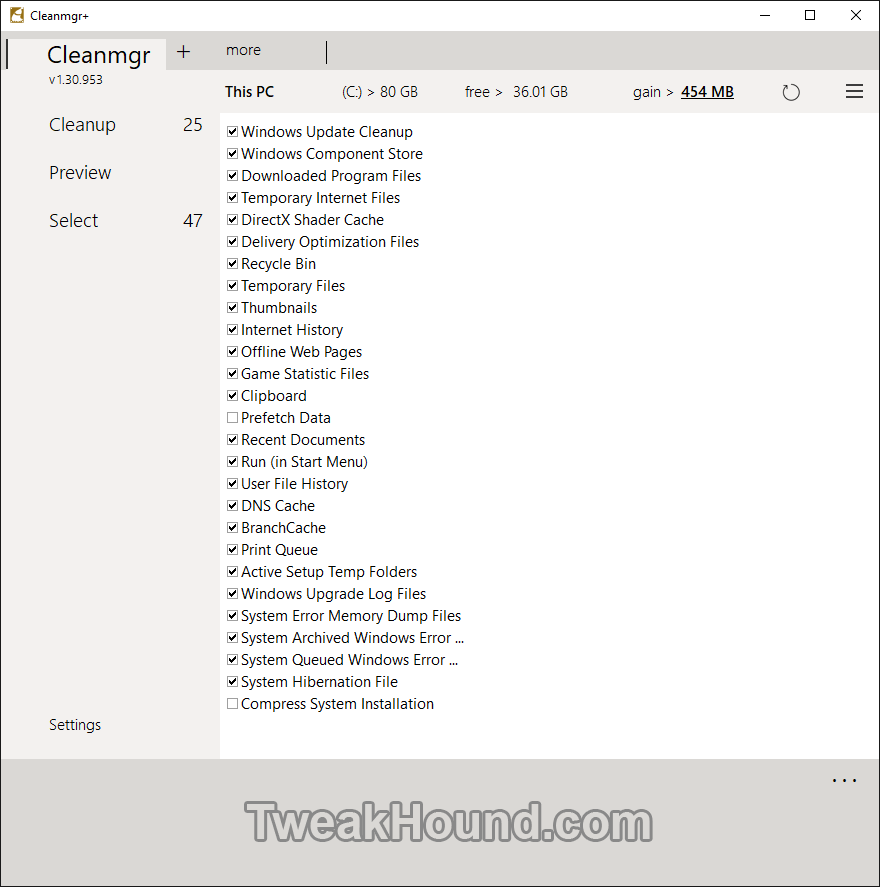
This is a disk cleanup tool. I had previously not been discussing this program because I didn’t like the name. Cleanmgr.exe is Windows Disk Cleanup and it sounded to me like they were pimping Cleanmgr+ as a Disk Cleanup enhancement which it is not. Still, it’s a good program and I’ve been using it for several months. Recommended.
Download & Info
Tagged With: Computer News

Reader Interactions

Comments

  1. Ziggy says

    March 18, 2020, 22:44(EDT) at 22:44

    Found this program some while back and what I particularly like about it is the “preview” feature and a “description” of what has been ticked to be deleted. Use it occasionally but not all the time – always seem to go back to CCleaner, portable edition.

  2. Kenneth H Smet says

    March 19, 2020, 07:37(EDT) at 07:37

    When I clicked on the link you provided about “Cleanmgr+ updated” my Malwarebytes (premium) flagged it as: “Website blocked due to Trojan”

    Domain: http://www.mirinsoft.com
    IP Address: 89.107.70.204
    Port 443
    Type: Outbound
    File: C:\Program Files (x86) \Br…ser\Application\brave.exe

    • Eric (a.k.a. TweakHound) says

      March 19, 2020, 08:37(EDT) at 08:37

      False positive?

  3. Amir says

    March 19, 2020, 21:32(EDT) at 21:32

    Indeed. I use Kaspersky Internet Security, but nothing detected.

  4. Tim says

    March 21, 2020, 11:39(EDT) at 11:39

    Thanks for the cleanmgr tooltip Eric! Will use on mine and clients pc’s.

  5. Edward says

    March 21, 2020, 11:52(EDT) at 11:52

    Would you mind posting how you have your cleanmgr+ setup or is it only just as pictured? been following you for years and your comp setup is great when it comes to “tweaks” and proper use without fucking it up. Sorry about your dad as well

    • Eric (a.k.a. TweakHound) says

      March 21, 2020, 12:06(EDT) at 12:06

      As pictured. I don’t use anything on the 2nd tab.

Primary Sidebar

Popular Articles

Windows 10

Tweaking Windows 10

My Windows 10 Tweaks

Windows 10 Privacy Settings

Win10 Diagnostics Tracking Service Gone?

Windows 10 Advanced Disk Cleanup

Win10 Customize Installation Options

Windows 10 Dark Theme

Win10 Wallpapers, Graphics, etc.

All Windows 10 Articles

Windows 8

Tweaking Windows 8.1

Advice On Installing Windows 8.1

Clean Install Windows 8.1

Cleanup After Windows 8.1 Upgrade

Create Shutdown, Restart, Logoff Tiles For Windows 8

Tweaking Windows 8

Install Windows 8 – Clean Install With Upgrade Media

Install Windows 8 – Upgrade

Windows 8 – Cleaning Up After You’ve Upgraded

Windows 8 Freeware Machine

Windows 8 SSD Settings, Etc.

How To Resize Your Windows 8 Partition

Create Windows 8 Recovery Media

Windows 8 – Elevated Command Prompt

How To Fix The Windows Bootloader

Windows 7

Installing Windows 7

Tweaking Windows 7

Windows 7 Diagnostics Tracking Service

The Windows 7 Freeware Machine

The Windows 7 Pagefile And Running Without One

Bad Tweaks

SSD Tweak Guide (sort of)

The noguiboot (no GUI Boot) Tweak

NtfsMemoryUsage=2 Tweak

More Windows 7 articles here.

Windows Vista

Installing Windows Vista

Tweaking Windows Vista

More Windows Vista articles here.

Windows XP

eXPired - The Last Windows XP Guide You'll Ever Need

The Right Way To Install Windows XP

Super XP Tweaking Guide

The Freeware XP Machine

Bad Tweaks

More XP Articles here and here.

Backup

Backup Article Greatest Hits – Vol. 1

Other

Cataloging Your Music Collection

Finding Good Album Art

Converting Vinyl Records To Digital Music – A Non-Audiophiles Guide

Windows All-In-One Recovery Flash Drive

SSD Tweak Guide (sort of)

Raidmax Blackstorm Case Review

Disk Partitioning

Ditch Those CD's! A Guide To Using USB Flash Drives

Checking Your Disks For Problems

Bad Tweaks

More articles here

Tags

Android Backup Beer Computer Hardware Computer News Cool Tools Freeware How-To's Linux Off Topic openSUSE Playlists Privacy Security Software This Site vacation Veterans Windows 7 Windows 8 Windows 10 Windows 11 Windows Vista Windows XP

TweakHound - Optimize Your Computing Experience! TweakHound - Optimize Your Computing Experience!

Copyright 2002-2025 by Eric Vaughan All material contain here is the property of the materials owner. Windows, Windows XP, Windows Vista, Windows Seven, Windows 8, Windows 10, Windows 11, Microsoft, and all associated logos are trademarks/property of Microsoft. You may not use or copy any material from tweakhound.com without expressed written permission. Hotlinking to any material within this site is forbidden. Privacy Policy