 Apps I use on my Android Phone both free and not.
Some of the ones I don’t use that often I install and uninstall as needed.
Many of these require Root.
Hopefully I put an app or two here you don’t know about and find useful.
The Net
Browser
Chrome (free) : Main browser.
Firefox (free) : Mostly for sites I want to see desktop version of by using the Phony extension.
Browser Ad-Ons
Chrome To Phone (free) : “share links, maps, and currently selected phone numbers and text between your computer running Chrome and your phone.”
Password Manager
LastPass Premium (not-free) :I use this on laptop and phone.
Ad Blocker
AdAway
Search
DuckDuckGo Search & Stories (free) : Anonymous
Gmail (free)
Outlook (free)
The Cloud
Dropbox (free)
Google Drive (free)
Skydrive (free)
The Office
Office Viewers / Editors
Adobe Reader (free)
OfficeSuite Viewer (free) : Open Word, Excel, PowerPoint and PDF.
OfficeSuite Pro (not-free) : View, create, edit, print and share Word, Excel and PowerPoint. This is often on sale for half off or more.
Printing
HP ePrint (free) : Obviously you need a networked HP printer.
PrinterShare Mobile Print (not-free) : There is a free, extremely limited version that sucks. The pay-for version rocks.
Other printing options:
Your Printer Brand – Search the Play store for your printer manufacturer (i.e. – “lexmark”). Your printer will need to be networked and supported by the app.
Google Cloud Print (free) : Currently in beta. More info. Requires a “cloud ready printer“.
MultiMedia
Music
Winamp Pro (not-free) : Free version is all most folks will need. Among other things the pay-for version plays FLAC files.
Yes, I’ve tried Poweramp and Google Play Music and I don’t like them.
Movie Info
Flixter (free) : Movie reviews and showtimes.
IMDB (free) – In-depth movie info.
Pictures
Camera Zoom FX (not-free) : I use both this and the stock camera app.
note – I do very little picture editing on my phone. I prefer to do it on my desktop.
Utilities
Security
Avast Mobile Security & Antivirus (free) : AV, firewall, locator, remote-lock, etc.
Cleaners
CacheMate for Root Users (free) : Non-free version adds more cleaners.
Backup
Titanium Backup Pro – ‘Nuff said!
Widgets, Launchers, Etc.
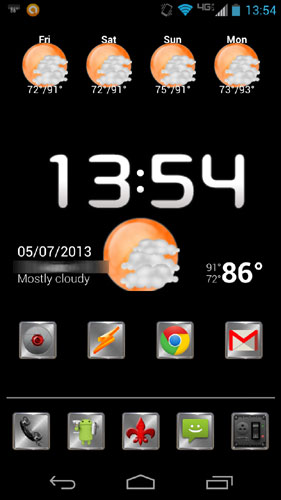
Beautiful Widgets Pro (not-free)
Apex Launcher (free) : There is a non-free version with more features.
File Explorer
ES File Explorer (free) : Have used others but like this one best.
Terminal
Android Terminal Emulator (free) : Geeks gotta have it.
Networking
None – On the rare occasion I want to network I just use ES File Explorer. I just don’t find it all that necessary anymore. I either plug the phone to the computer or use the cloud.
Wi-Fi
Analyze it (free) : Wifi Analyzer
Recover Wifi Keys (free) : WiFi Key Recovery
Other
Car Dock
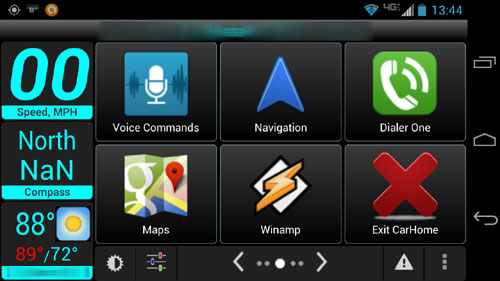
Car Home Ultra (free and not-free) : I use the pay-for version.
The Standards And Other Stuff
Barcode Scanner (free)
Compass (free)
Extreme Call Blocker (not-free) : Block calls and SMS.
Facebook (free) : NOT!
GasBuddy (free) : Find cheap gas.
Light Flow (not-free) : “allow you to control the notification color for the over 600 applications and system events”
OTA Rootkeeper (free)
Screencast Video Recorder (not-free) : “captures your phone screen at high frame rates into a high quality MPEG4 video with audio.”
Tiny Flashlight + LED (free)
Twitter (free)
Wordfeud (free)
YouTube (free)
-END-