
• Skip to primary navigation
  • Skip to main content
  • Skip to primary sidebar

TweakHound

Computer stuff...

  • Home
  • Windows XP
  • Windows Vista
  • Windows 7
  • Windows 8
  • Windows 10
  • Windows 11
  • Linux
  • Tweak Guides
  • Site Info
    • About
    • About Me
    • TweakHound’s World
    • Contact
    • My Computers
    • Old Articles
    • Privacy Policy
    • Old Index
    • Advanced Search

Random Weekend Stuff…

ra_bigx

August 24, 2014, 19:08(EDT) By Eric (a.k.a. TweakHound)

ra_bigx Not As Easy As It Looks
SpaceX found out that it ain’t easy trying be like NASA.

Looking Good
Neowin has gotten to a new look. Too bad their lead article is lame. Still, Neowin, You Look Marvelous!
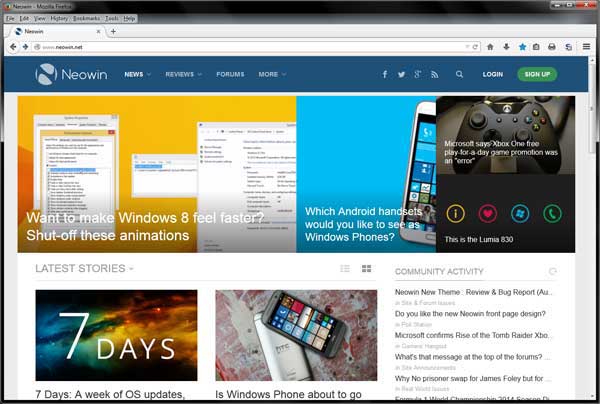
newneowin

God Speed Big X
Famed actor/director/producer Richard Attenborough passed away today.
A Bridge Too Far and The Great Escape are among my all-time favs.
Wikipedia – Richard Attenborough

Shame On You
The freeware screen recorder CamStudio now contains foistware and/or malware. It is even being discussed in their forums.
As of this writing, the old version at Major Geeks is still good. Version CamStudio_2.7_r316_setup.exe is what you are looking for. DO NOT update after installing.
The once great zip utility IZarc apparently is guilty of the same thing. I moved on to 7-Zip long ago.
I will be updating the freeware guides this week to reflect the change.

Software
Acronis TI 2014 Update 3 build 6688. Log in to your account for the update.

Reader Email
Q: In windows 7 you showed us how to avoid the 100MB partition during a clean install using diskpart. Is this necessary to do in win 8/8.1? Could you still do the clean command and partition creation and format? Or is it better just to install it to an unallocated space?

My Answer:
Short answer is that you can use the same procedure you used for Windows 7.*
That little partition works a little different on Windows 8/8.1 than it did on Windows 7 and is usually larger than 100mb.
My advice:
1 – Before partitioning and installing, disconnect all drives except the drive you wish to install Windows on.
2 – If your computer uses UEFI instead of BIOS I highly suggest you use a blank drive and let Windows 8/8.1 handle the partitioning.
3 – If you are an advanced user see:
See TechNet – Hard Drives and Partitions Hard Drives and Partitions
Specifically:
Configure UEFI/GPT-Based Hard Drive Partitions
Sample: Configure UEFI/GPT-Based Hard Drive Partitions by Using Windows Setup
Sample: Configure UEFI/GPT-Based Hard Drive Partitions by Using Windows PE and DiskPart

and

Configure BIOS/MBR-Based Hard Drive Partitions
Sample: Configure BIOS/MBR-Based Hard Drive Partitions by Using Windows Setup
Sample: Configure BIOS/MBR-Based Hard Disk Partitions by Using Windows PE and DiskPart
and

DiskPart Commands

*I should note that I currently do not use UEFI on any of my computers.

Tagged With: Computer News, This Site

Primary Sidebar

Popular Articles

Windows 10

Tweaking Windows 10

My Windows 10 Tweaks

Windows 10 Privacy Settings

Win10 Diagnostics Tracking Service Gone?

Windows 10 Advanced Disk Cleanup

Win10 Customize Installation Options

Windows 10 Dark Theme

Win10 Wallpapers, Graphics, etc.

All Windows 10 Articles

Windows 8

Tweaking Windows 8.1

Advice On Installing Windows 8.1

Clean Install Windows 8.1

Cleanup After Windows 8.1 Upgrade

Create Shutdown, Restart, Logoff Tiles For Windows 8

Tweaking Windows 8

Install Windows 8 – Clean Install With Upgrade Media

Install Windows 8 – Upgrade

Windows 8 – Cleaning Up After You’ve Upgraded

Windows 8 Freeware Machine

Windows 8 SSD Settings, Etc.

How To Resize Your Windows 8 Partition

Create Windows 8 Recovery Media

Windows 8 – Elevated Command Prompt

How To Fix The Windows Bootloader

Windows 7

Installing Windows 7

Tweaking Windows 7

Windows 7 Diagnostics Tracking Service

The Windows 7 Freeware Machine

The Windows 7 Pagefile And Running Without One

Bad Tweaks

SSD Tweak Guide (sort of)

The noguiboot (no GUI Boot) Tweak

NtfsMemoryUsage=2 Tweak

More Windows 7 articles here.

Windows Vista

Installing Windows Vista

Tweaking Windows Vista

More Windows Vista articles here.

Windows XP

eXPired - The Last Windows XP Guide You'll Ever Need

The Right Way To Install Windows XP

Super XP Tweaking Guide

The Freeware XP Machine

Bad Tweaks

More XP Articles here and here.

Backup

Backup Article Greatest Hits – Vol. 1

Other

Cataloging Your Music Collection

Finding Good Album Art

Converting Vinyl Records To Digital Music – A Non-Audiophiles Guide

Windows All-In-One Recovery Flash Drive

SSD Tweak Guide (sort of)

Raidmax Blackstorm Case Review

Disk Partitioning

Ditch Those CD's! A Guide To Using USB Flash Drives

Checking Your Disks For Problems

Bad Tweaks

More articles here

Tags

Android Backup Beer Computer Hardware Computer News Cool Tools Freeware How-To's Linux Off Topic openSUSE Playlists Privacy Security Software This Site vacation Veterans Windows 7 Windows 8 Windows 10 Windows 11 Windows Vista Windows XP

TweakHound - Optimize Your Computing Experience! TweakHound - Optimize Your Computing Experience!

Copyright 2002-2025 by Eric Vaughan All material contain here is the property of the materials owner. Windows, Windows XP, Windows Vista, Windows Seven, Windows 8, Windows 10, Windows 11, Microsoft, and all associated logos are trademarks/property of Microsoft. You may not use or copy any material from tweakhound.com without expressed written permission. Hotlinking to any material within this site is forbidden. Privacy Policy