
Slashdot asks, “What Happened To Winamp?”
[Read more…] about What Happened To Winamp?
New Firefox Focus Browser

Mozilla has launched a new browser for Android and iOS called Firefox Focus. The focus of Focus is ad blocking and tracking protection.
[Read more…] about New Firefox Focus Browser
Sunday Random Stuff…

Firefox 55.0.2 Released
4 bugfixes
Download
Bing
Like many other tech news site, ARS Technica passed along Microsoft’s tweet that 1/3 of all U.S. searches is conducted via Bing.
I cannot verify or refute those stats but as far as TweakHound.com is concerned those stats are bull caca.
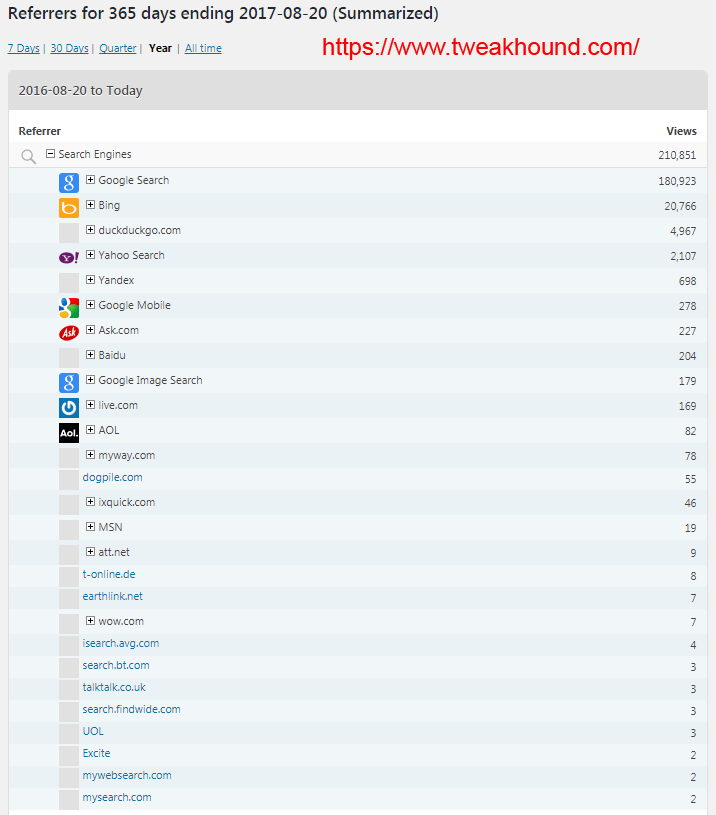
In the last year page view referrers to this site Google outnumbers Bing at over a 8.7 to 1 ratio. To put it another way, Bing accounted for just 9.85% of traffic from search engines.
Tuesday Random Stuff…

Google Chrome Updated
“The stable channel has been updated to 60.0.3112.101 for Windows, Mac, and Linux”
Download 32-bit or 64-bit
Nvidia Drivers
Geforce 385.28 WHQL Game Ready Drivers are out. Download
Other Software Updates
CCleaner 5.33
Winaero Tweaker 0.8
Logan Lucky
I gotta see this movie. It’s got James Bond and Kylo Ren in it!
Monday Morning News

Classic Shell 4.3.1
I mainly use Classic Shell for Classic Start Menu.
“Here’s what’s new:
– Official support for the Creators Update version of Windows 10
– Added a setting to clear icon cache
– Multiple minor improvements and bugfixes
Download
Release Info
Wise Disk Cleaner 9.52
– Improved cleaning for Windows Winsxs Backup.
– Updated various translations.
Download
New CPUs
AMD Threadripper vs. Intel Core i9: The best CPU for enthusiasts
“We pitted both chips against each other in a grudge match… and each walked away claiming victory. If you’re obsessed with single-threaded performance (including games), back the Core i9 and its higher clock speeds. Threadripper 1950X’s outsized core count punches way higher in multithreaded performance, though, and it’s the people’s champion in everyday tasks and price.”
AMD Ryzen Threadripper 1950X and 1920X CPU Review
“These High End Desktop (HEDT) systems are certainly not meant for everyone. Many folks simply do not have a need for this many cores/threads and certainly the expense of the CPU itself and subsequent motherboard and RAM are going to put it out of reach for many. That said, if you do actually have the need for a 1950X or 1920X, you can certainly put these work. Content creation professionals and hobbyists are going to love having these CPUs on their desktops.”
The AMD Ryzen Threadripper 1950X and 1920X Review: CPUs on Steroids
“If I were to turn around and say that Threadripper CPUs were not pure gaming CPUs, it would annoy a fair lick of the tech audience. The data is there – it’s not the best gaming CPU… You need a lot to do in order to fill 16 cores to the max, and for those that do, it’s a potential winner. For anyone that needs hardcore throughput such as transcode, decode, rendering such as Blender, Cinema 4D or ray-tracing, it’s a great CPU to have. For multi-GPUs or multi-storage aficionados or the part of the crowd that wants to cram a bunch of six PCIe 3.0 x8 FPGAs into a system, AMD has you covered.”
Etc
Is Alexa spying on us? We’re too busy to care — and we might regret that
No, the Google manifesto isn’t sexist or anti-diversity. It’s science
Ditching Dropbox

I’ve used Dropbox for some time here at TweakHound.com. A few months ago, Dropbox banned links from this site. I corrected the issue they had even though it was in fact bogus. No matter how hard I tried Dropbox would not rectify this situation. Truly poor, almost non-existent customer service. So I have dropped them for both this site and my paid, separate, personal account.
I am now going with MediaFire. They have a free account but I am going with the “Pro” version. It is currently half off at $3.75 per month (U.S.) billed annually or $5 month-to-month. With this I get:
– PC and mobile device access (app)
– Unlimited sharing
– Direct links to files
– 1TB (1000GB) of space
– and 20GB per file among other things.
I will be updating links here as I have time.
Wednesday Morning Random Stuff…

Adobe Updates
APSB17-23 Security Updates Available for Adobe Flash Player
Download for Firefox
Download for Internet Explorer
Google Chrome and IE for Win10 do their own updates. Flash for IE Win10 was part of yesterdays updates (KB4034662).
APSB17-24 Security Updates Available for Adobe Acrobat and Reader
Tor Browser 7.0.4
Download
Release Announcement
Etc.
Best practices for passwords updated after original author regrets his advice
Off Topic
Struggling for inspiration? A pint of beer could release creative block, say scientists
Tuesday Random Stuff…

Finally some time off. On Thursday and Friday I got to watch the Detroit Tigers win 2 in Baltimore. Also we did some biking there including a stop at Fort McHenry and Faidley’s Seafood (best Crab Cakes I’ve ever had). Sunday we rode our bikes from Old Town Alexandria to Mount Vernon. Sunday evening we took a Potomac River cruise to view Washington D.C. from the water. There was beer involved 🙂 Monday I got to watch ex-Tiger Max Scherzer and the Washington Nationals get a win against the Miami Marlins. So now, back to work.
Time To Run Windows Update
Updates available for all things Microsoft.
For Win10 see: August 8, 2017—KB4034674 (OS Build 15063.540)
For everything else see the Microsoft Security Update Summary for August 2017 at the end of this post for a full breakdown.
Firefox 55
“Today’s release brings innovative functionality, improvements to core browser performance, and more proof that we’re committed to making Firefox better than ever. New features include support for WebVR, making Firefox the first Windows desktop browser to support VR experiences. Performance changes include significantly faster startup times when restoring lots of tabs and settings that let users take greater control of our new multi-process architecture. We’ve also upgraded the address bar to make finding what you want easier, with search suggestions and the integration of our one-click search feature, and safer, by prioritizing the secure – https – version of sites when possible.”
Download: 32-bit & 64-bit
All Downloads
Thursday Random Stuff…

Win10 KB4032188
This update has been rolling out the last few days.
“This update includes quality improvements. No new operating system features are being introduced in this update.”
Google Chrome Updated
Chrome 60.0.3112.90 released. Looks to be bugfixes.
Download: Google Chrome Web 32-bit Google Chrome 64-bit
Etc.
Google’s new program to track shoppers sparks a federal privacy complaint
“Google said it had obtained access to the credit and debit card records of 70 percent of U.S. consumers”
Off Topic
Moderate, Heavy Drinkers More Likely To Reach Age 85 Without Dementia, Study Says


Non-USA Readers

My security program (firewall) for this site is able to filter access to this site or parts of it by country. I want to be sure folks that do not live in the USA are not getting blocked.
If you are not from the USA please leave a comment to let me know you are seeing this site.
Wow! That was fast. Obviously not having issues.
THANK YOU!