• Skip to primary navigation
  • Skip to main content
  • Skip to primary sidebar

TweakHound

Computer stuff...

  • Home
  • Windows XP
  • Windows Vista
  • Windows 7
  • Windows 8
  • Windows 10
  • Windows 11
  • Linux
  • Tweak Guides
  • Site Info
    • About
    • About Me
    • TweakHound’s World
    • Contact
    • My Computers
    • Old Articles
    • Privacy Policy
    • Old Index
    • Advanced Search

Eric (a.k.a. TweakHound)

Monday Random Stuff…

November 2, 2015, 14:51(EST) By Eric (a.k.a. TweakHound)

hardocp

hardocpGet The Latest SSD Info
[H]ardOCP has a great article detailing the recent goings-on with SSD’s. They have buying advice too.

Threshold 2
The “experts” told us TH2 would be released today.
Instead Microsoft will apparently release it on Patch Tuesday, which kinda makes sense, even though Patch Tuesday was supposed to go away.

Firefox 42 Hits Mirrors
Not official yet.
Download (en-US)
Download other systems and languages
Release Notes

AMD Drivers
Changes are afoot.
“AMD is ditching Catalyst Control Center in favor of newly architected solutions dubbed Radeon Settings, which is a critical part of what AMD is calling the Radeon Software Crimson Edition.”
Head over to Hot Hardware for more info and videos!

New Star Trek Series
Oh hell yeah!
“CBS Television Studios announced today it will launch a totally new Star Trek television series in January 2017. The new series will blast off with a special preview broadcast on the CBS Television Network. The premiere episode and all subsequent first-run episodes will then be available exclusively in the United States on CBS All Access, the Network’s digital subscription video on demand and live streaming service.“


Tagged With: Computer News

It’s A Matter Of Honor

November 2, 2015, 09:51(EST) By Eric (a.k.a. TweakHound)

thpinpostlogo

thpinpostlogo

honor
noun
1.honesty, fairness, or integrity in one’s beliefs and actions:
a man of honor.

Last week Microsoft doubled down on trying to force Windows 10 on Windows 7 and Windows 8 users. This despite the outrage that has sprung up around the internet since GWX and it’s related telemetry issues came to fore.
In his blog post, Terry Myerson claimed “you can choose to upgrade or decline the offer”. That’s a statement the Washington D.C. spin doctors would love.
1 – By default Windows 7 and 8 downloads and installs updates to examine your computer and send that info back to Microsoft. They never ask you, they just do it.
2 – Starting next year, Microsoft will make Windows 10 a recommended update. Most folks computers are set to “Give me recommended updates the same way I receive important updates.” This means starting next year Microsoft will download Windows 10 to your computer WITHOUT ASKING YOU.
[Read more…] about It’s A Matter Of Honor

Tagged With: This Site

Windows 7 Diagnostics Tracking Service

November 2, 2015, 08:32(EST) By Eric (a.k.a. TweakHound)

win7orb

*last updated 24OCT2016
Well it’s official. The Diagnostics Tracking Service is now a permanent part Windows 7.
Microsoft first introduced DiagTrack with KB3022345. Then they tried to sneak it back in with KB3068708 and again with KB3080149.
With these patches you could install or uninstall them and everything else was fine.
Now it is back with KB3192403 – October 2016 Preview of Monthly Quality Rollup for Windows 7 SP1 and Windows Server 2008 R2 SP1.
As the name suggests, this update is a preview of what is to come and is an optional update. It will become a standard update next month.
So, if you are a responsible and intelligent Windows user who keeps your system patched you are stuck with DiagTrack being installed. Since as Mary Jo put it, “Each monthly rollup will supersede the previous month’s rollup. The ultimate goal is for these monthly rollups to become fully cumulative, which will happen as the team adds patches released in the past, so users need only to install the latest single rollup.”
Now you must disable it via services.msc or in the registry.
Aren’t update rollups awesome! Welcome to the new Microsoft, “Resistance is futile. You will be assimilated.”

Diagnostics Tracking Service
“Start”=dword:00000002 is default . 2=auto, 3=manual, 4=disabled
HKEY_LOCAL_MACHINE\SYSTEM\CurrentControlSet\Services\DiagTrack
“Start”=dword:00000004

*edit 25OCT2016
I’m not sure what the confusion is but apparently I did not make myself clear above…
DISABLE this via the Services snap-in (services.msc) or manually via the registry. I provided the key above.


– – – – – – – – – – – – – – – – – – – – – – – – – – – – – – – – –
For some time now I’ve been seeing posts about disabling the Diagnostics Tracking Service in Windows 7.
This is unnecessary. Uninstall it instead.

Go to Control Panel > Windows Update > Installed updates (bottom left of windows) > find and uninistall KB3022345 (right-click > Uninstall)
Re-run Windows update > find KB3022345 and hide it (right-click > Hide update)

Microsoft continues to play games with its customers. The new update is below.

Go to Control Panel > Windows Update > Installed updates (bottom left of windows) > find and unnistall KB3080149 and/or KB3068708 (right-click > Uninstall)
Re-run Windows update > find KB3080149 and/or KB3068708 and hide it (right-click > Hide update)
Done

Diagnostics Tracking Service
“Start”=dword:00000002 is default . 2=auto, 3=manual, 4=disabled
HKEY_LOCAL_MACHINE\SYSTEM\CurrentControlSet\Services\DiagTrack
“Start”=dword:00000004


More info: KB3080149 – Update for customer experience and diagnostic telemetry

Tagged With: Windows 7

Remove And Block GWX In Windows 7

November 1, 2015, 13:17(EST) By Eric (a.k.a. TweakHound)

thpinpostlogo

Last updated 12DEC2019

This is version 8 of my scripts to remove and block Windows 10 updates and related telemetry.
I’ve seen multiple posts at websites and forums telling folks how to deal with GWX. Most of them either don’t go far enough, or usually, they go way too far and break stuff.
This applies to Windows 7 ONLY.

Comments are closed after a while for security reasons. You can comment here if you like:
Remove And Block GWX In Windows 7 UPDATED 2

Since it has become obvious that this will be a running battle with Microsoft I’ve decided to make this page the permanent place to these scripts rather than a new post every time I update it.

You’ll need to check back here monthly for updates as Microsoft keeps re-releasing updates that in effect unhides them.
You’ll also want to keep the script handy and rerun it monthly for the same reason.

Thanks to:
Though info on all this stuff has come from dozens of sources, much of this info has come from the MDL forums.
In particular this thread: Remove Telemetry and Windows 10 Related Updates from Windows 7

Download my batch file: https://www.tweakhound.com/downloads/block_GWX_V8.zip
YOU MUST read the README.txt file.
The second half of this calls HideGWXetcV8.vbs to hide updates.
This will take a while.
DO NOT CLOSE WINDOW UNTIL YOU SEE: ” – Finished … All operations complete. Reboot now. Press any key to continue . . .”

Inspiration for this came from a variety of sources but started HERE.
The level of support you will receive is equal to the amount you paid for this 😉
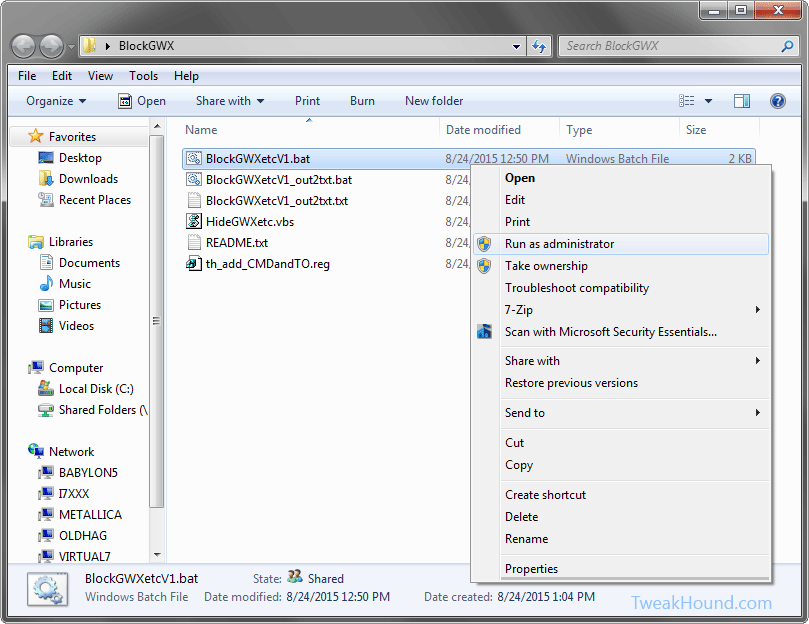
This folder contains:
BlockGWXetcV8.bat – Removes and Hides GWX related updates like in step 2 above.
HideGWXetcV8.vbs – Automatically run by the above .bat files. This hides the updates the batch file uninstalled.
README.txt – Instructions
th_add_CMDandTO.reg – Adds open command windows here (standard and admin) ,and Take Ownership to right-click.

The .bat file and the .vbs files MUST be in the same folder!

(code is listed below)

To do this:
Either right-click the folder and choose Open Command Window Here as Administrator.
In the resulting command window type BlockGWXetcFINAL.bat and hit enter.
OR
right-click the BlockGWXetcFINAL.bat file (see above) and choose Run as Administrator.
If you do not have these right-click options, double-click in included th_add_CMDandTO.reg file and logout/reboot.

Let it run, when the .bat file runs HideGWXetc.vbs it will take a while.
It may look like things have stopped, they haven’t.
DO NOT CLOSE WINDOW UNTIL YOU SEE: ” – Finished … All operations complete. Reboot now. Press any key to continue . . .”

block_gwx_1


-END-

Tagged With: Windows 7

Thursday Random Stuff…

October 29, 2015, 18:11(EDT) By Eric (a.k.a. TweakHound)

win10_logo

win10_logoWin10 Critical Update
MS updated an old update and rolled it into a new update and that is your update update.
KB3106932 – Compatibility update for upgrading to Windows 10: October 29, 2015
[Read more…] about Thursday Random Stuff…

Tagged With: Computer News

Several Sysinternals Tools Updated

October 27, 2015, 06:11(EDT) By Eric (a.k.a. TweakHound)

cooltools

cooltoolsThese updates include the TweakHound favorite Autoruns.
Update: Autoruns v13.5, Sigcheck v2.3, RAMMap v1.4, BgInfo v4.21, Sysmon v3.11, ADInsight v1.2

Tagged With: Cool Tools, Freeware

Windows 10, Where I Stand

October 26, 2015, 16:27(EDT) By Eric (a.k.a. TweakHound)

th

thI asked y’all a while back, “Why Are You Using Windows 10?” and I got some great responses. I thought I would let y’all know where I stand.
Please note the thoughts below are my own opinion. I’ve no intention of telling you what OS you should be using. I’ll try and keep this short…
[Read more…] about Windows 10, Where I Stand

Tagged With: This Site, Windows 10

Monday Random Stuff…

October 26, 2015, 15:42(EDT) By Eric (a.k.a. TweakHound)

samsung_ssd

samsung_ssd
[Read more…] about Monday Random Stuff…

Tagged With: Computer Hardware

Wednesday Random Stuff…

October 21, 2015, 16:55(EDT) By Eric (a.k.a. TweakHound)

backtothefuture2015
[Read more…] about Wednesday Random Stuff…

Tagged With: Computer News

Windows 10 Home Networking Tips

October 20, 2015, 15:21(EDT) By Eric (a.k.a. TweakHound)

win10network_iconAs an old network guy, “TweakHound don’t do no Homegroup”. My home network is a mixed mess of Windows 7, openSUSE, Linux Mint, and Win10. These all interact via a standard Windows workgroup.
I’ve found Windows 10 workgroup networking to be a little wonky (to be kind).
Here are a few tips that have made my home networking easier:
[Read more…] about Windows 10 Home Networking Tips

Tagged With: How-To's, This Site, Windows 10

« Previous Page
Next Page »

Primary Sidebar

Popular Articles

Windows 10

Tweaking Windows 10

My Windows 10 Tweaks

Windows 10 Privacy Settings

Win10 Diagnostics Tracking Service Gone?

Windows 10 Advanced Disk Cleanup

Win10 Customize Installation Options

Windows 10 Dark Theme

Win10 Wallpapers, Graphics, etc.

All Windows 10 Articles

Windows 8

Tweaking Windows 8.1

Advice On Installing Windows 8.1

Clean Install Windows 8.1

Cleanup After Windows 8.1 Upgrade

Create Shutdown, Restart, Logoff Tiles For Windows 8

Tweaking Windows 8

Install Windows 8 – Clean Install With Upgrade Media

Install Windows 8 – Upgrade

Windows 8 – Cleaning Up After You’ve Upgraded

Windows 8 Freeware Machine

Windows 8 SSD Settings, Etc.

How To Resize Your Windows 8 Partition

Create Windows 8 Recovery Media

Windows 8 – Elevated Command Prompt

How To Fix The Windows Bootloader

Windows 7

Installing Windows 7

Tweaking Windows 7

Windows 7 Diagnostics Tracking Service

The Windows 7 Freeware Machine

The Windows 7 Pagefile And Running Without One

Bad Tweaks

SSD Tweak Guide (sort of)

The noguiboot (no GUI Boot) Tweak

NtfsMemoryUsage=2 Tweak

More Windows 7 articles here.

Windows Vista

Installing Windows Vista

Tweaking Windows Vista

More Windows Vista articles here.

Windows XP

eXPired - The Last Windows XP Guide You'll Ever Need

The Right Way To Install Windows XP

Super XP Tweaking Guide

The Freeware XP Machine

Bad Tweaks

More XP Articles here and here.

Backup

Backup Article Greatest Hits – Vol. 1

Other

Cataloging Your Music Collection

Finding Good Album Art

Converting Vinyl Records To Digital Music – A Non-Audiophiles Guide

Windows All-In-One Recovery Flash Drive

SSD Tweak Guide (sort of)

Raidmax Blackstorm Case Review

Disk Partitioning

Ditch Those CD's! A Guide To Using USB Flash Drives

Checking Your Disks For Problems

Bad Tweaks

More articles here

Tags

Android Backup Beer Computer Hardware Computer News Cool Tools Freeware How-To's Linux Off Topic openSUSE Playlists Privacy Security Software This Site vacation Veterans Windows 7 Windows 8 Windows 10 Windows 11 Windows Vista Windows XP

TweakHound - Optimize Your Computing Experience! TweakHound - Optimize Your Computing Experience!

Copyright 2002-2025 by Eric Vaughan All material contain here is the property of the materials owner. Windows, Windows XP, Windows Vista, Windows Seven, Windows 8, Windows 10, Windows 11, Microsoft, and all associated logos are trademarks/property of Microsoft. You may not use or copy any material from tweakhound.com without expressed written permission. Hotlinking to any material within this site is forbidden. Privacy Policy