File Name : SBXF_PCDRV_XPVT_LB_2_18_0015.exe
This download is a driver providing Microsoft® Windows® support for Creative Sound Blaster® X-Fi™ series of audio devices. For more details, read the rest of this web release note.
This download supports the following audio devices only:
* Sound Blaster X-Fi XtremeGamer Fatal1ty® Professional Series
* Sound Blaster X-Fi Platinum Fatal1ty Champion Series
* Sound Blaster X-Fi XtremeMusic
* Sound Blaster X-Fi XtremeGamer
* Sound Blaster X-Fi Platinum
* Sound Blaster X-Fi Fatal1ty
* Sound Blaster X-Fi Elite Pro
* Sound Blaster X-Fi
Fixes:
Resolves the following issues:
* System taking more than two minutes to shut down.
* PowerDVD® DX 8.3 (Dell® version) not working properly.
* Passthrough of Dolby®/DTS® audio to an external decoder not working with Windows Media Player 12.
Requirements:
* Microsoft Windows Vista® 32-bit or 64-bit with Service Pack 1 or higher, Windows XP Professional x64 Edition or Windows XP with Service Pack 2 or higher, Windows XP Media Center Edition (MCE) 2004 or later
* Sound Blaster X-Fi audio devices listed above
SSD Tweak Guide (sort of)
created 19 February, 2011
***This is the first revision of this article. I would appreciate any questions, comments, tips, links you may have at would improve this article. Thank you!
I’ve been asked by several people for an SSD tweak guide. So, here it is.
Let’s get this out of the way right now. There are no tweaks that will squeeze any more performance out of an SSD.
Let me say this again and you can quote me.
There are no tweaks that will squeeze any more performance out of an SSD.
For Windows 7 and the latest Linux distros you only need to set the drive up properly in the first place for it to run at max performance.
So why the guide? Because there is too much Bravo Sierra floating around on this subject.
I’ll also show you how to install it correctly or transfer an existing install to a new SSD.
For XP and Vista users I’ll so you how to apply the same settings Windows 7 uses (I reckon you can call these tweaks).
And, because you asked!
***Attention Windows 8 Users – None of this article applies to Windows 8. See: Windows 8 SSD Settings, Etc.
* Article Note For Windows Users
This article will make references to using the command prompt and assumes elevated privileges.
If you are using Vista or Seven and have UAC enabled then you can open an elevated prompt by:
Type cmd in the Start Menu Search Box > In the results you’ll see cmd.exe > right-click on it and choose Run as administrator. (alternate method here)
The Basics For Windows and Linux
– Windows XP, Vista, and Seven all run just fine on SSD’s. You will need the proper drivers and BIOS settings.
– Most Linux distros run fine on SSD’s. Your distro will handle the drivers, you just need to add “discard” to your fstab and set the BIOS correctly.
– If you want to max out SSD performance and efficiency then Windows 7 or the latest Linux distros (discussed later) are your only real option.
BIOS Settings For SSD’s
– Should be set to AHCI if capable. Look in your motherboard / computers manual or Google it.
AHCI enables enhanced functions of the controller / SSD. In particular it allows Windows 7 to install the correct drivers natively (which supports Trim).
Some folks have reported issues with it. When in doubt defer to the particular drive makers manual or support forums.
– Some motherboards have an “Enhanced” mode for the controller. If you have this setting, ensure this is enabled (if you have a modern OS it should have been anyway).
TRIM
“Trim” is what keeps an SSD’s performance from degrading over time. Trim is a command that the OS sends to the SSD.
In overly simplified terms the OS informs the SSD you’ve deleted a file. The SSD then cleans that space for use.
For Linux, Trim is known as “discard”.
For a better explanation and why it is important see here: http://www.anandtech.com/show/2738/10
Trim is only supported natively in Windows 7 and Linux distros with a kernel version of 2.6.33 (ext4 and btrfs only).
For XP and Vista the trim command can be issued either manually or on a schedule for certain manufacturers drives by using a “toolbox”.
See:
Intel SSD Toolbox
OCZ SSD Tools
Trim is not supported on RAID configurations.
To check if Trim is running on Windows 7.
Open a command prompt (Press the Windows + R keys > type cmd).
Type (or copy/paste): fsutil behavior query DisableDeleteNotify
The result should be DisableDeleteNotify = 0
Trim (discard) In Linux
– You need a distro running a kernel of 2.6.33 or higher.
– You need to use ext4 or brtfs as the filesytem.
– You need to add discard as an option in your fstab for all the partitions on the SSD.
i.e. / , /home , but only for ext4 or btrfs formatted partitions (not swap, or Windows, etc.).
To edit your fstab to enable discard (trim)
– How I do it (openSUSE 11.3/KDE): press the alt + f2 keys > type kdesu kwrite > navigate to and open /etc/fstab >
find the partitions mentioned above > add discard to that line.
– What mine looks like:
/dev/sda2 / ext4 acl,user_xattr,noatime,discard
To check if Trim is working in Linux:
See – HOWTO: Check If TRIM On Ext4 Is Enabled And Working On Ubuntu And Other Distributions
How To Transfer Windows 7 To New SSD
1 – Keep your configuration as is. Plug in SSD drive (as a spare) and boot up as you normally would.
2 – If possible use a Windows 7 disk to create a new partition on your drive (see below)
3 – Windows 7 will install correct driver. Windows XP and Vista you may need chipset drivers and/or storage drivers.
I recommend you download and install the latest chipset drivers and/or storage drivers for your system regardless of OS.
Intel recommends you use the Intel RST Drivers for their SSD’s.
Intel RST Drivers can be found here:
http://downloadcenter.intel.com/ see section Solid State Drives and Caching > Intel High Performance Solid State Drive > your SSD model
Intel chipset drivers
4 – Image OS drive
5 – Transfer image to SSD
6 – Start up into your BIOS setup. Check to see if you have an AHCI setting (yes / no ? ). Don’t change anything yet. Exit BIOS setup.
7 – Boot from SSD (windows may install hardware).
8 – If you have an AHCI Change registry setting (Press the Windows + R keys > type regedit > navigate to the key below):
HKEY_LOCAL_MACHINE\SYSTEM\CurrentControlSet\services\msahci
Change the value for Start to 0.
“Start”=dword:00000000
DO NOT DO THIS IF YOU DON’T HAVE AN AHCI SETTING IN YOUR BIOS.
9 – Reboot
10 – Enable AHCI in BIOS if capable.
11 – Reboot, Done!
Format Your New SSD Drive For Windows 7
or
Format Your SSD To Transfer Windows To Your New SSD
The purpose of this is to align the disk for an SSD (for performance). Some manufactures say you should do this, others say it doesn’t matter (can’t hurt).
***I would recommend that those unfamiliar with this sort of operation unplug all drives except the SSD for this step. Otherwise you could erase another drive by mistake.
Mark the connections before you do this.
Plug the other drives back in where they were before and connect the SSD in an empty slot.
We are going to use standard Windows 7 install disk.
You can also use a Windows 7 Recovery Disk.
If you don’t have one then “find” or borrow one.
The reason for this is Windows 7 aligns the disk correctly for SSD’s by default (1024KB offset).
These instructions help avoid the hidden system partition.
These instructions should not be used for folks requiring Windows 7 Bitlocker (you really outta try TrueCrypt instead).
If you desire Bitlocker see Recommended Partitions from MS below.
1 – Boot up from the Windows 7 installation disc.
2 – Choose Repair your computer.
3 – In the System Recovery Options screen, choose Use recovery tools… and click Next.
4 – Open the Command Prompt.
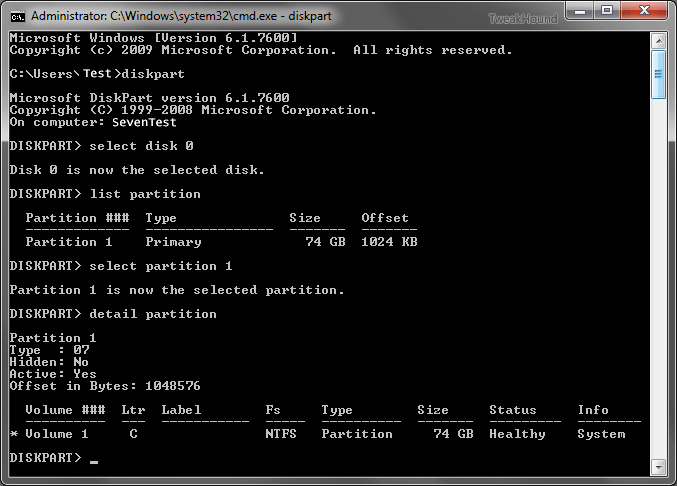
5 – Type diskpart and hit Enter.
6 – Type list disk . Find the disk you wish to install Windows 7 on. If you only have one disk then it will show as disk 0. If you have multiple disks find the drive you wish to install 7 on.
7 – Type select disk 0 (or use the number of the disk you wish to install Windows 7 on)(note – that is a zero)
8 – Type list partition. There shouldn’t be any.
9 – Type create partition primary.
10- Type select partition 1.
11- Type active.
12- Type format quick.
13- When finished reboot and begin your installation.
(see here for a screenshot)
(The above instructions were originally published here .)
Recommended Partitions from MS
– select disk 0
– clean
– create partition primary size=300
– format quick fs=ntfs label=”System”
– assign letter=”S”
– create partition primary
– format quick fs=ntfs label=”Windows”
– assign letter=”W”
– exit
(In this example, the Windows partition is assigned the letter “W” to avoid drive-letter conflicts. After the computer reboots, the primary hard disk will automatically be reassigned to the letter “C”.)
The Best SSD Tweaks
1 – Install and format the drive correctly.
2 – Choose a quality drive. Do your research!
3 – Windows Users. Windows 7 operates far better on SSD’s than do earlier versions of Windows.
4 – Linux Users. Use the newest version of your Distro.
Standard Drive Tweaks For Windows
These are tweaks you can enable on any hard drive. They are not “SSD Tweaks”.
Because of the speed of SSD’s these tweaks have little or no performance impact but the features are unnecessary for home users.
These are handled via the registry.
Disable 8.3 names and Last Access
Press the Windows + R keys > type regedit > navigate to the following key >
HKEY_LOCAL_MACHINE\SYSTEM\CurrentControlSet\Control\FileSystem
Change the value of the 2 keys below to 1.
“NtfsDisable8dot3NameCreation”=dword:00000001
“NtfsDisableLastAccessUpdate”=dword:00000001
For more info see here.
Legitimate Windows XP SSD Tweaks
SSD’s are so fast they do not need the features below.
1 – The Standard Drive Tweaks For Windows listed above.
2 – Disable Prefetch
Windows 7 does this for SSD’s but XP does not do it automatically.
Navigate to the following key in the registry:
HKEY_LOCAL_MACHINE\SYSTEM\CurrentControlSet\Control\Session Manager\Memory Management\PrefetchParameters
Change EnablePrefetcher to 0.
3 – Disable Indexing
Unlike Windows 7, the Indexing Service in XP isn’t very useful.
However, if you consistently search for stuff on other non-SSD drives then you will have to weigh the costs / benefit.
In this case you should at least disable Indexing on the SSD.
To disable indexing on a drive:
Open My Computer ( press the Windows & E keys) > right click on each drive and choose Properties > under the General tab, uncheck the box that says Allow the Indexing Service to index this disk for fast file searching > a window will pop up, make sure the box is checked that says Apply change to (drive letter):\, subfolders and files and click OK. Windows will apply the changes, click OK. Once you have done all the drives I recommend you reboot.
To Disable The Indexing Service
This disables Indexing for all drives.
Press the Windows + R keys > type services.msc > Navigate to the Indexing Service and double-click on it >
In the Startup type box, choose Disabled > Reboot.
4 – Disable Disk Defrag
For folks who have moved XP to a new SSD and had built-in defrag scheduled (or had a 3rd party defragger scheduled) disable it.
5 – Disable Boot Tracing
Press the Windows + R keys > type regedit > navigate to the following key >
HKEY_LOCAL_MACHINE\SOFTWARE\Microsoft\Dfrg\BootOptimizeFunction
Change “Enable”=”Y” to “Enable”=”N”
Legitimate Windows Vista SSD Tweaks
1 – The above Standard Drive Tweaks For Windows and Legitimate Windows XP SSD Tweaks.
2 – Disable Superfetch.
Press the Windows + R keys > type services.msc > double-click on the Superfetch service > set Startup type to disabled then Stop the service or reboot.
3 – Don’t Use ReadyBoost
Legitimate Windows 7 SSD Tweaks
1 – The above Standard Drive Tweaks For Windows.
2 – Windows 7’s Own SSD Tweaks (below)
Windows 7’s Own SSD Tweaks
These are tweaks that Windows 7 does on its own when it sees you are installing on an SSD.
There are 2 exceptions to this:
– Windows 7 fails to recognize the SSD as an SSD.
– You transferred Windows 7 from a standard hard drive to SSD.
1 – Disable Disk Defrag
Despite what some folks who want to sell you a defrag program say, SSD’s don’t need defragging. In fact this will hurt performance.
The only possible exception to this is a very, very occasional “consolidate free space” option available in some 3rd party defrag programs.
To disable disk defrag in Windows 7:
Press the Windows + R keys > type dfrgui.exe (Start Orb > All Programs > Accessories > System Tools > Disk Defragmenter).
Click Configure Schedule button > Change Schedule to fit your needs or uncheck Run on schedule to disable
2 – Disable Superfetch
Press the Windows + R keys > type services.msc > double-click on the Superfetch service > set Startup type to disabled then Stop the service or reboot.
3 – Don’t Use ReadyBoost
Optional SSD Tweaks For Windows
1 – Move Your Libraries or My Documents Folder – They should be on a drive / partition other than Windows anyway.
The purpose of this is to keep your personal doc, pics, and music away from the OS. This has the advantage of safety of those items and speeds backup and restore of the OS.
– For XP see here (in the Using PowerToys TweakUI > Change location of Special Folders section).
– For Vista see here.
– For Seven see here.
2 – System Restore – Folks, if you do not have an alternative 3rd party backup and use it regularly then please don’t disable this. You may need it to get out of trouble.
If you do have a reliable 3rd party backup program then go ahead and disable it (I do). I use Acronis True Image. See Bad Tweaks below for more.
3 – Hibernation – I’ve never made a secret of the fact that I do not like the hibernation features in any version of any OS. I’ve always said better to turn it off. Rebooting a system with an SSD takes under a minute (my system stays in the 25 second range). Rebooting empties your RAM and depending on how your setup, the caches and temp files too. This results in a more responsive system.
The reason I have this listed as optional is I know several people who use hibernation and swear by it. You’ll have to weigh the pros and cons for yourself.
To disable hibernation:
– For Vista and Seven you can use MS Fix it: http://support.microsoft.com/kb/920730
– For Vista and Seven you can open a command prompt and type powercfg /hibernate off ( powercfg /hibernate on to turn it back on ).
– For Windows XP go to Start > Settings > Control Panel > Power Options > click on the Hibernate tab > uncheck Enable hibernation.
4 – Enable Write Caching On The Disk
This should have already been enabled.
Open Device Manager > In the Disk drives section find your SSD and double-click on it > click the Policies tab >
Ensure the Enable write caching on the disk box is checked.
5 – Turn Off Windows Write-cache Buffer Flushing on the Device
Depends on what drive you have.
– Guidance in the Intel SSD forums say disable this (or rather, leave it disabled) though I’ve seen no benchmarks or official statements on the matter.
– Guidance in the OCZ SSD forums say enable this though I’ve seen no benchmarks or official statements on the matter.
IMHO – Leave it alone unless you get info from the SSD manufacturer that states otherwise.
Bad SSD Tweaks
These are tweaks that are either unnecessary, don’t do anything, or hurt performance.
Many of these are based on the misguided assumption that the SSD will wear out quickly.
True, SSD’s are only good for so many writes (unless they are DRAM). But, the number of writes an SSD is good for is, well, astronomical.
Let’s take this quote from Anandtech:
“Intel estimates that even if you wrote 20GB of data to your drive per day, its X25-M would be able to last you at least 5 years. Realistically, that’s a value far higher than you’ll use consistently.” This was written August, 2009 and SSD lifespans are getting better all the time.
Truth be told you’ll most likely move on to a new computer before you wear out your SSD.
For example: I have an Intel X25-M SSD (80GB). As of this writing it is approximately 16 months old. It has had 2 firmware updates. It has had installed on it: Windows 7 Home & Ultimate, openSUSE 11.2 & 11.3 , many Virtual Machines, and more programs than you can shake a stick at. Because of this and all the testing I do it has been restored from an image dozens of times. It has also been beat on by numerous benchmark tests. To this date I haven’t seen any loss in performance.
1 – Disable The Pagefile.
What better place for a pagefile than on an SSD?
Yeah, I know, folks are always saying disabling the pagefile is a tweak. I’ve covered this topic many times over the years (look around my site). Windows (all versions) were designed to use a pagefile. Many programs you may use count it too. BTW, Windows is going to page some stuff to your disk anyway if it needs to. Just leave the pagefile alone.
If you want to optimize it then see here (personally I think it’s a waste of time).
2 – Disable Indexing
OK, most people agree that Indexing in XP and Vista sucks. Go ahead a disable it for XP and Vista if you desire. But for Windows 7, you know the handy, dandy Start Menu Search Box? Yup, disabling Indexing renders it useless. Configuring Indexing to suit your needs is a better option:
Type indexing in the Start Menu Search Box and choose Indexing Options (Control Panel > Indexing Options) > Click the Modify button to add or remove folders.
3 – System Restore
I know, this was listed in the Optional SSD Tweaks For Windows section above. I put it here for those who didn’t bother to read it. Please do.
4 – Turn Off Windows Write-cache Buffer Flushing on the Device
Yup, this was in the Optional SSD Tweaks For Windows section too. Read it please.
5 – NtfsMemoryUsage=2 Tweak
See my NtfsMemoryUsage=2 Tweak article.
6 -Disable LargeSystemCache
HKEY_LOCAL_MACHINE\SYSTEM\CurrentControlSet\Control\Session Manager\Memory Management
“LargeSystemCache”=dword:000000000
Um, it’s not enabled by default anyway?!
7 – Uninstall Remote Differential Compression
What the? Well, OK, it’s a useless feature for home users and should be uninstalled anyway. But how this ever got listed as an SSD tweak is beyond me. System Resources tweak, OK. Network tweak, maybe. SSD tweak, not.
Sources And Place To Find More Info
Intel whitepaper: Intel® Solid-State Drive Optimizer
Intel SSD New Users Guide
Engineering Windows 7 – Support and Q&A for Solid-State Drives.
AnandTech – Storage. Probably the best source of SSD articles anywhere.
Wikipedia – SSD
Wikipedia – Trim
Documentation for Windows 7 and Windows Server 2008 R2 SP1
Microsoft has released Documentation for Windows 7 and Windows Server 2008 R2 Service Pack 1 (KB976932)These docs are aimed at IT folks, for home users there is nothing to look at here.
This page currently links to the following documentation:
Deployment Guide for Windows Server 2008 R2 with SP1 and Windows 7 with SP1
Hotfixes and Security Updates included in Windows 7 and Windows Server 2008 R2 Service Pack 1
Installing Windows Server 2008 R2 with SP1
Release Notes for Windows 7 with Service Pack 1
Release Notes for Windows Server 2008 R2 with Service Pack 1
ATI Catalyst 11.2’s Released
Terry Makedon just announced via Twitter “Catalyst 11.2 is live“.
ATI Catalyst 11.2 drivers are available for XP, Vista, and Windows 7. Linux 11.2′s available here.
Microsoft Fix it Updated
Microsoft Fix it has been updated to version 2.5. For those who don’t know what this is yet:
Microsoft Fix it troubleshooters help you automatically diagnose and repair common computer problems, and provide you with the next steps to take if your problems aren’t fixed.
You can see / download all Fix it apps here. I recommend this only for advanced users.
Home users should check out the main Fix it page here.
Internet Explorer 9 RC
Microsoft has released the IE9 Release Candidate. RC usually means it is the last step to the final version.
Below are the links of interest.
Need some help. MS changed a few things from the Beta involving the placement of the bars up top. For moving the menu bar up top the old itbar7position tweak doesn’t seem to work. Anyone figured this out?
Download IE9 RC (Vista, 7, 2K8 only. Not XP.)
Internet Explorer 9 Release Candidate Product Guide
Internet Explorer 9 Release Candidate – New Features Summary
IE Blog – Acting on Feedback: IE9 Release Candidate Available for Download

Acronis True Image 2011 Updated
Log in to your account for the update.
Don’t have TI yet? Get $15 off now!
Release notes for Acronis True Image Home 2011
Release date: 04.02.2011
Build: English UK, English USA, French, German
Downloadable basic: 6696
Installation procedure
The installation procedure is straightforward. Please, run the downloaded executable file and follow instructions.
List of fixed issues
* When selecting a backup destination Acronis True Image Home 2011 tried to access locations which weren’t selected. This caused a long response time of the application.
* If a trial version of Acronis True Image Home 2011 is present in a system, TrueImageNonregisterInstallMenu_standard crashes after installer launch.
* Acronis True Image sets up a wrong backup name if a user clicks Browse for Destination during creation of an Image Backup Task.
* The “Failed to back up file or folder” error message is displayed if a scheduled Mail backup runs with open MS Outlook. The backup cannot be recovered.
* DELL OEM partition can’t be recovered with Acronis True Image Home 2011.
* After upgrading Standalone Acronis Online Backup Client to Acronis True Image Home, the Online Backup icon disappears from True Image Home.
* It is impossible to recover incremental and differential backups by partition if the backed up disk is GPT Dynamic.
Flash Player 10.2
Flash Player 10.2 delivers beautiful HD video, faster graphics rendering, and high performance on mobile screens and is designed to take advantage of native device capabilities — enabling richer, more immersive user experiences.
-Internet Explorer 9 hardware accelerated rendering support
-Native custom mouse cursors
-Support for full screen mode with multiple monitor
Adobe Reader 10.0.1
Download it from Major Geeks or update from within the program (Help > Check for Updates).
Release Notes:
Feb 8 2011
10.0.1
Numerous security fixes as well as improvements to Protected Mode, QTP support, Flash, and support for SCCM via newly released SCUP catalogs.
Windows 7 SP1 Release Date
Winrumors had posted earlier that Windows 7 SP1 would be released to the public on Feb. 22, 2011. A Microsoft blog now confirms it.
*edit – The above Windows Team blog says final build number is 7601.17514.101119-1850 (see reply #4 in that blog). This matches the build I had installed (see below).*
Now most tech pundits will tell you Windows 7 SP1 is no big deal. Certainly for the home user it contains no useful additions. It is simply a collection of security updates, bugfixes (publicly available and not).
I’ve done a little testing with the SP1 that has been floating around (wzor). Here are some screenshots and notes for those who are interested.
[Read more…] about Windows 7 SP1 Release Date