
• Skip to primary navigation
  • Skip to main content
  • Skip to primary sidebar

TweakHound

Computer stuff...

  • Home
  • Windows XP
  • Windows Vista
  • Windows 7
  • Windows 8
  • Windows 10
  • Windows 11
  • Linux
  • Tweak Guides
  • Site Info
    • About
    • About Me
    • TweakHound’s World
    • Contact
    • My Computers
    • Old Articles
    • Privacy Policy
    • Old Index
    • Advanced Search

Computer News

Random Weekend Stuff…

August 24, 2014, 19:08(EDT) By Eric (a.k.a. TweakHound)

ra_bigx

ra_bigx Not As Easy As It Looks
SpaceX found out that it ain’t easy trying be like NASA.

Looking Good
Neowin has gotten to a new look. Too bad their lead article is lame. Still, Neowin, You Look Marvelous!
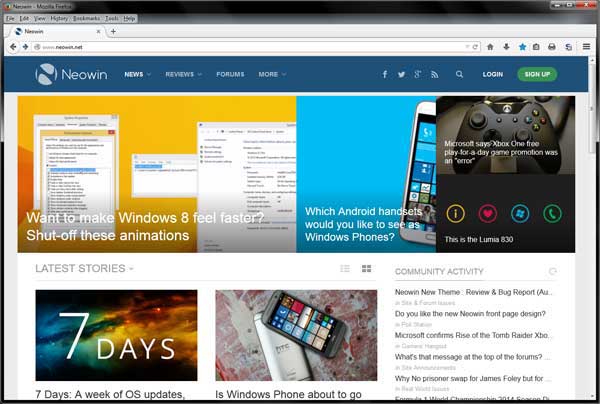
newneowin

God Speed Big X
Famed actor/director/producer Richard Attenborough passed away today.
A Bridge Too Far and The Great Escape are among my all-time favs.
Wikipedia – Richard Attenborough

Shame On You
The freeware screen recorder CamStudio now contains foistware and/or malware. It is even being discussed in their forums.
As of this writing, the old version at Major Geeks is still good. Version CamStudio_2.7_r316_setup.exe is what you are looking for. DO NOT update after installing.
The once great zip utility IZarc apparently is guilty of the same thing. I moved on to 7-Zip long ago.
I will be updating the freeware guides this week to reflect the change.

Software
Acronis TI 2014 Update 3 build 6688. Log in to your account for the update.

Reader Email
Q: In windows 7 you showed us how to avoid the 100MB partition during a clean install using diskpart. Is this necessary to do in win 8/8.1? Could you still do the clean command and partition creation and format? Or is it better just to install it to an unallocated space?

My Answer:
Short answer is that you can use the same procedure you used for Windows 7.*
That little partition works a little different on Windows 8/8.1 than it did on Windows 7 and is usually larger than 100mb.
My advice:
1 – Before partitioning and installing, disconnect all drives except the drive you wish to install Windows on.
2 – If your computer uses UEFI instead of BIOS I highly suggest you use a blank drive and let Windows 8/8.1 handle the partitioning.
3 – If you are an advanced user see:
See TechNet – Hard Drives and Partitions Hard Drives and Partitions
Specifically:
Configure UEFI/GPT-Based Hard Drive Partitions
Sample: Configure UEFI/GPT-Based Hard Drive Partitions by Using Windows Setup
Sample: Configure UEFI/GPT-Based Hard Drive Partitions by Using Windows PE and DiskPart

and

Configure BIOS/MBR-Based Hard Drive Partitions
Sample: Configure BIOS/MBR-Based Hard Drive Partitions by Using Windows Setup
Sample: Configure BIOS/MBR-Based Hard Disk Partitions by Using Windows PE and DiskPart
and

DiskPart Commands

*I should note that I currently do not use UEFI on any of my computers.

Tagged With: Computer News, This Site

Reader Emails

August 17, 2014, 18:02(EDT) By Eric (a.k.a. TweakHound)

email#1
Q – Hi Eric I’m one of your long time readers and just thought i would let you know that UBCD4Win has be discontinued and just wondering if you had any new recommendations.

A – Yeah,the UBCD4Win was given up several years ago. I believe the creator had financial issues and sold the domain too.
You can grab the last image at Major Geeks: http://www.majorgeeks.com/files/details/ubcd4win.html

As for an alternative, Hiren’s is good: http://www.hiren.info/pages/bootcd

If you are looking for something more modern you’ll have to manually create one.
Usually this involves creating a WinPE disk and can be quite involved. See:
http://winbuilder.net/
http://www.911cd.net/forums/index.php
http://reboot.pro/
http://winbuilder.net/


#2
Q – Hello i was following your tweak guide for windows 7 and when i got to the regedit tweak i noticed that some of the entries weren’t in that particular folder mentioned for example:
“HungAppTimeout”=”4000?
“WaitToKillAppTimeout”=”5000?
do i just add them as a string or dword or do i just leave it alone? i also dont have an entrie for the 8.3 names and last access.
any help would be highly appreciated thank you

A – Yes, some entries need to be created.
Download the file below, edit it as you see fit, change the file extension from .txt to .reg, double-click to apply, reboot.
https://www.dropbox.com/s/iwsanqf4ak6nm9g/TweakHound_Win7_Tweaks.txt


#3
Q – As I understand it, power saver can help you get the most from a single battery charge on a laptop. High performance maximizes screen brightness and might increase PC performance so this would be bet for a laptop that is plugged in 24/7? So when would I want to used Balanced if unplugged = power saver and plugged in = high performance?
Also, where do keep your slider bars for “Adjust plan brightness” for each plan?” I didn’t see it in the guide. Mine are all the way up for all three plans for both plugged in and battery. Don’t think they should be.

A – As I said in the Windows 8.1 Tweak Guide, “I use all 3 plans: High Perf on the desktop, Balanced on a laptop, and Power saver on the laptop while traveling.” You can adjust (and save) these plans as you see fit.
As to display brightness. This is personal preference (and will change with age). Obviously, the brighter the display the more you will consume power.
For laptop that is on battery power I would recommend.
High Perf: From the lowest comfortable setting to Max.
Balanced: the lowest comfortable setting.
Power Saver: the lowest usable setting.

Tagged With: Computer News, This Site

Updates Galore!

August 12, 2014, 14:54(EDT) By Eric (a.k.a. TweakHound)

deflep_logo

deflep_logoSorry for the lack of updates. I went out of town for a few days.
One of the things I did was attend the Def Leppard / KISS concert in VA Beach.
:band:
I’ve put a few pics up in Dropbox if you’re interested.

Time To Run Windows Update
Updates available for all currently supported MS operating systems(and OneNote 2007 SP3).
Microsoft Security Bulletin Summary for August 2014
As predicted, the updates for Windows 8.1 Update 2 were minimal.
See: August updates for Windows 8.1 and Windows Server 2012 R2

Adobe Updates
As usual Adobe has rolled out their updates on Patch Tuesday too:
APSB14-19 Security updates available for Adobe Reader and Acrobat
Download Adobe Reader or update from within the program (Help > Check for updates).
APSB14-18 Security updates available for Adobe Flash Player
Download Adobe Flash Player

Flashy Chrome
“The Stable Channel has been updated to 36.0.1985.143 for Windows, Mac and Linux.”
Because Google Chrome has Flash embedded it gets updated when Flash does. This update also contains other security fixes.
Download or update from within the program.

Sysinternals Freeware Updates
System Monitor is a new program that monitors and logs system activity. I haven’t had time to check it out.
Autoruns 12.01
Coreinfo 3.3
Process Explorer 16.03

Etc.
iTunes 11.3.1
Mp3tag v2.62
XBMC is now named Kodi

Site Stuff…
My nephew is off to college and needed a laptop. I gave him my Alienware so I’m back to my 6+ year old system. It’s been updated since that first article. See My Computers for the full specs.

kissdeff

Tagged With: Computer News

Random Friday Stuff…

July 25, 2014, 13:19(EDT) By Eric (a.k.a. TweakHound)

isheep

isheep Breaking News! – iSheep exposed
:rotfl:

Microsoft Layoffs
Leo, Mary Jo, and Paul discuss the Microsoft layoffs among other things.
See also: Microsoft laid me off after 15 years of service. Life after Microsoft?

One Windows
ArsTechnica – Nadella’s “one operating system” ain’t new and won’t be one OS
&
Paul Thurrott – Microsoft Muddies the One Windows Waters
I’m not a fan of the direction Microsoft is headed.
Surprisingly this Apple fanboi has some good points related to this “One Windows” crap:
Microsoft still doesn’t get why the iPhone succeeded
You cannot be all things to all people Microsoft, stop it.

Windows 8.1 Update 2 rumored to be Aug. 12.

Interesting Links
Cool article and site:
Today I Found Out – A Japanese Soldier Who Continued Fighting WWII 29 Years After the Japanese Surrendered, Because He Didn’t Know

Don’t Send Your Kid to the Ivy League

Give to a good cause:
rrksth

sw

Tagged With: Computer News

Random Wednesday Stuff…

July 16, 2014, 17:11(EDT) By Eric (a.k.a. TweakHound)

onedrive

onedriveYour OneDrive just got bigger

New and existing personal OneDrive accounts will come with:
15 GB of free storage (up from 7 GB)
1 TB of additional OneDrive storage with an Office 365 Home/Personal/University subscription (up from 20 GB)
The option to buy additional storage at much lower prices, starting at 100 GB for $1.99 per month

Latest Software Releases
Google Chrome 36.0.1985.125 (Windows & Mac). Chrome for Android updated too.
AIMP v3.55 Build 1355
VirtualBox 4.3.14
Ultimate Windows Tweaker 3.1.2.0 for Windows 8

This dude NAILED IT! – Sultans Of Swing (Dire Straits Cover Guitar HD) – Ao vivo São Paulo 2014
sultanofswing

Tagged With: Computer News

Random Weekend Stuff…

June 8, 2014, 10:27(EDT) By Eric (a.k.a. TweakHound)

washmonIt was a slow week tech wise as Computex was a yawner.

Wil Wheaton has a new show on Syfy.
wwp1

The gang at Windows Weekly discussed the Windows start menu saga.
ww112633ythdgbnfg

I went up to D.C. to visit (some of) the Smithsonian museums, the Washington Monument, and Mount Vernon. It was a great experience and one I would recommend.
On a Geek related note…
They are building a new museum and next to it was the dumpster pictured below.
The dumpster is for metal scrap but on first glance that is not what I saw 😉
msdump

Tagged With: Computer News

TrueCrypt Finished

May 28, 2014, 18:38(EDT) By Eric (a.k.a. TweakHound)

truecrypt_logo

truecrypt_logo

WARNING: Using TrueCrypt is not secure as it may contain unfixed security issues
This page exists only to help migrate existing data encrypted by TrueCrypt.
The development of TrueCrypt was ended in 5/2014 after Microsoft terminated support of Windows XP. Windows 8/7/Vista and later offer integrated support for encrypted disks and virtual disk images. Such integrated support is also available on other platforms (click here for more information). You should migrate any data encrypted by TrueCrypt to encrypted disks or virtual disk images supported on your platform.

😥

Tagged With: Computer News

Random Wednesday Stuff…

May 28, 2014, 17:10(EDT) By Eric (a.k.a. TweakHound)

th

thXP Update Hack?
NOT!

Registry Cleaners
Microsoft support policy for the use of registry cleaning utilities

However, serious issues can occur when you modify the registry incorrectly using these types of utilities. These issues might require users to reinstall the operating system due to instability.

10+ year old quote from me:

These programs may be of use to those who know what they are doing to fix problems. The problem is people use this for some sort of a performance tweak (which it isn’t) and then run into problems like Windows or programs becoming unresponsive or not working as expected.

Hardware
New Middleware Technology Quadruples SSD Speed

Pricing and Details for Intel’s Devil’s Canyon and Unlocked Pentium Leaked Online
&
Intel Devil’s Canyon and Pentium 20th Anniversary Series CPUZ Shots Leaked – Specifications Confirmed

Good Reading
Everything Is Broken

Tagged With: Computer News

DuckDuckGo News

May 22, 2014, 18:33(EDT) By Eric (a.k.a. TweakHound)

duckduckgo

duckduckgoDuckDuckGo has lots of nifty updates. You can find out what’s new here.
In case you didn’t know, DuckDuckGo is a search engine that doesn’t track you (among other things).
Check out their About Page for more info.
See also: 10 Useful DuckDuckGo Instant Answers That Save You Time & A Few Clicks at MakeUseOf
P.S. – They have an app too (iPhone & Android).

Tagged With: Cool Tools

Random Weekend Stuff…

May 18, 2014, 15:55(EDT) By Eric (a.k.a. TweakHound)

palm tree

palm treeSorry for the lack of updates. I took a mini-vacation.
It’s been pretty boring out there, let’s see what I missed…

Program Updates
Autoruns updated to version 12. Nothing new for average users.

iTunes 11.2 – added a couple of fixes and a security update.

VirtualBox version 4.3.12 is out. Maintenance release.

Yawn. I should have stayed at the beach 😉

Tagged With: Computer News

« Previous Page
Next Page »

Primary Sidebar

Popular Articles

Windows 10

Tweaking Windows 10

My Windows 10 Tweaks

Windows 10 Privacy Settings

Win10 Diagnostics Tracking Service Gone?

Windows 10 Advanced Disk Cleanup

Win10 Customize Installation Options

Windows 10 Dark Theme

Win10 Wallpapers, Graphics, etc.

All Windows 10 Articles

Windows 8

Tweaking Windows 8.1

Advice On Installing Windows 8.1

Clean Install Windows 8.1

Cleanup After Windows 8.1 Upgrade

Create Shutdown, Restart, Logoff Tiles For Windows 8

Tweaking Windows 8

Install Windows 8 – Clean Install With Upgrade Media

Install Windows 8 – Upgrade

Windows 8 – Cleaning Up After You’ve Upgraded

Windows 8 Freeware Machine

Windows 8 SSD Settings, Etc.

How To Resize Your Windows 8 Partition

Create Windows 8 Recovery Media

Windows 8 – Elevated Command Prompt

How To Fix The Windows Bootloader

Windows 7

Installing Windows 7

Tweaking Windows 7

Windows 7 Diagnostics Tracking Service

The Windows 7 Freeware Machine

The Windows 7 Pagefile And Running Without One

Bad Tweaks

SSD Tweak Guide (sort of)

The noguiboot (no GUI Boot) Tweak

NtfsMemoryUsage=2 Tweak

More Windows 7 articles here.

Windows Vista

Installing Windows Vista

Tweaking Windows Vista

More Windows Vista articles here.

Windows XP

eXPired - The Last Windows XP Guide You'll Ever Need

The Right Way To Install Windows XP

Super XP Tweaking Guide

The Freeware XP Machine

Bad Tweaks

More XP Articles here and here.

Backup

Backup Article Greatest Hits – Vol. 1

Other

Cataloging Your Music Collection

Finding Good Album Art

Converting Vinyl Records To Digital Music – A Non-Audiophiles Guide

Windows All-In-One Recovery Flash Drive

SSD Tweak Guide (sort of)

Raidmax Blackstorm Case Review

Disk Partitioning

Ditch Those CD's! A Guide To Using USB Flash Drives

Checking Your Disks For Problems

Bad Tweaks

More articles here

Tags

Android Backup Beer Computer Hardware Computer News Cool Tools Freeware How-To's Linux Off Topic openSUSE Playlists Privacy Security Software This Site vacation Veterans Windows 7 Windows 8 Windows 10 Windows 11 Windows Vista Windows XP

TweakHound - Optimize Your Computing Experience! TweakHound - Optimize Your Computing Experience!

Copyright 2002-2025 by Eric Vaughan All material contain here is the property of the materials owner. Windows, Windows XP, Windows Vista, Windows Seven, Windows 8, Windows 10, Windows 11, Microsoft, and all associated logos are trademarks/property of Microsoft. You may not use or copy any material from tweakhound.com without expressed written permission. Hotlinking to any material within this site is forbidden. Privacy Policy