• Skip to primary navigation
  • Skip to main content
  • Skip to primary sidebar

TweakHound

Computer stuff...

  • Home
  • Windows XP
  • Windows Vista
  • Windows 7
  • Windows 8
  • Windows 10
  • Windows 11
  • Linux
  • Tweak Guides
  • Site Info
    • About
    • About Me
    • TweakHound’s World
    • Contact
    • My Computers
    • Old Articles
    • Privacy Policy
    • Old Index
    • Advanced Search

Fix KB3000850 Will Not Install

November 24, 2014, 16:09(EST) By Eric (a.k.a. TweakHound)

thpinpostlogo

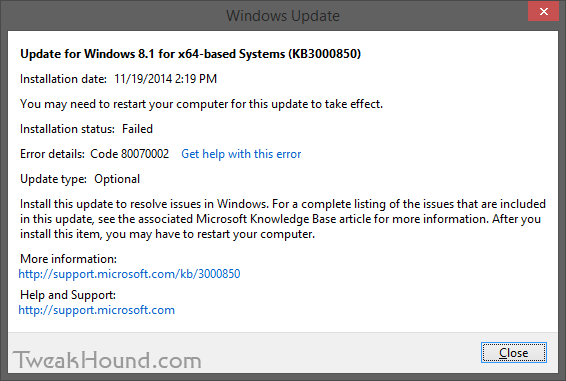
thpinpostlogoI had a couple of Windows 8.1 computers that would not install KB3000850.
KB3000850 is also called “The November 2014 update rollup for Windows RT 8.1, Windows 8.1, and Windows Server 2012 R2.”
The specific error code was 80070002.
fix_kb3000850_1

The Windows error logs directed me to C:\Windows\Logs\CBS\CBS.log. There I found complaints about system files.
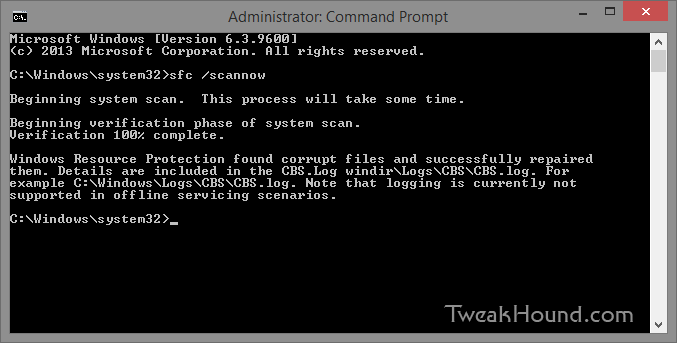
The cure for that is:
From an ELEVATED command prompt [Command Prompt (Admin) ] > type sfc /scannow and press the Enter key >
Let it do its thing > Reboot and install your update.

fix_kb3000850_2

– END –

Tagged With: How-To's, This Site, Windows 8

Random Weekend Stuff…

November 23, 2014, 16:07(EST) By Eric (a.k.a. TweakHound)

th

thSoftware
BleachBit 1.6
VirtualBox 4.3.20

Detekt
Several privacy outfits have banded together to release Detekt.
“Detekt is a free tool that scans your Windows computer for traces of FinFisher and Hacking Team RCS, commercial surveillance spyware that has been identified to be also used to target and monitor human rights defenders and journalists around the world.”
It does not work on Windows 8.1 64-bit.

Reader Emails
Q – Does the 8.1 workaround work for systems that came with 8.1 preinstalled? I used ProduKey to find my product key, but when I enter it into the Windows 8 Setup it does not work. Any thoughts? Thanks.

A – Why would you need a workaround for a 8.1 key?
If you don’t have an 8.1 ISO you can make one: http://windows.microsoft.com/en-us/windows-8/create-reset-refresh-media
Generic keys are here: http://technet.microsoft.com/en-us/library/jj612867.aspx
You may also want to check out: http://forums.mydigitallife.info/forums/42-Windows-8 😉

– – – – –

Q – I loved your article and I enjoy Open Suse 13.2,, but one thing really irks me and that is the software patterns.
I remove all the patterns, yet the system still re-installs unwanted packages everytime i install software ( I even select packages selected by user), yet still I am unable to slim my installation. For me this is the biggest problem that Open Suse has and theefore stops newbies from using it.
Any ideas?

A – That ticked me off too. This behavior did not happen in previous versions of openSUSE. When I mentioned it in the forums they acted like I’ve got a screw loose.
To fix it: YaST > Software Management > Options > check Ignore Recommended Packages for Already Installed Packages.

Tagged With: Computer News

Time To Run Windows Update

November 18, 2014, 13:08(EST) By Eric (a.k.a. TweakHound)

windows security

windows securityMicrosoft Security Bulletin Advance Notification for November 2014
Out-of-band security update available for all supported versions of Windows.
Windows 8.1 users, be sure to check the optional updates.
KB3000850 “resolves issues in Windows” is available.

Tagged With: Security

Google Chrome 39

November 18, 2014, 12:59(EST) By Eric (a.k.a. TweakHound)

google chrome

google chromeThe Chrome team is delighted to announce the promotion of Chrome 39 to the stable channel for Windows, Mac and Linux. Chrome 39.0.2171.65 contains a number of fixes and improvements, including:
-64-bit support for Mac
-A number of new apps/extension APIs
-Lots of under the hood changes for stability and performance

Source: Google Chrome Blog
Download or update from within the program.

Tagged With: Freeware

Geforce 344.75’s

November 18, 2014, 12:53(EST) By Eric (a.k.a. TweakHound)

nvidia

nvidiaGeForce Game Ready Driver 344.75 WHQL released.
“Best gaming experience for Far Cry 4, Dragon Age: Inquisition, The Crew, and World of Warcraft: Warlords of Draenor.”
Download
Release Notes
Newest Linux drivers are v346.16 BETA released on Nov. 13.

Nvidia has been on a roll releasing Windows driver updates these last few months:
Version: 344.75 – Release Date: Tue Nov 18, 2014
Version: 344.65 – Release Date: Mon Nov 10, 2014
Version: 344.60 – Release Date: Tue Nov 04, 2014
Version: 344.48 – Release Date: Wed Oct 22, 2014
Version: 344.16 – Release Date: Tue Sep 23, 2014
Version: 344.11 – Release Date: Thu Sep 18, 2014

Tagged With: Computer Hardware

openSUSE 13.2 Tips, Tricks, and Tweaks

November 14, 2014, 11:13(EST) By Eric (a.k.a. TweakHound)

opensusegeeko

opensusegeekoHow I use openSUSE 13.2. I hope you find something useful here!
This article will be updated as I find more tips or on the off chance that someone actually sends some in.
[Read more…] about openSUSE 13.2 Tips, Tricks, and Tweaks

Tagged With: How-To's, Linux, openSUSE, This Site

Dual Boot openSUSE 13.2 and Windows 8.1 UEFI

November 13, 2014, 14:35(EST) By Eric (a.k.a. TweakHound)

opensusegeeko

opensusegeekoThis is how I dual-boot my Windows 8.1 rig with openSUSE 13.2.
Though virtually unchanged from this version, I’ve put up a new version here: Dual Boot openSUSE Leap and Windows 10 UEFI
Notes:
– BACKUP your computer with a disk image before attempting this!
– Please do not contact me with questions on this topic.
That’s what the openSUSE forums are for.
– For how I dual-boot with a standard BIOS (legacy) see here: Dual-Boot openSUSE 12.3 And Windows (article is NOT compatible with BTRFS)

Interesting Links
openSUSE:UEFI
BCD System Store Settings for UEFI
Dual booting with Windows 8, not as painful as expected.

Preparation
1 – Full disk image backup using Acronis True Image.
2 – Make or leave unpartitioned space on OS drive for openSUSE. (If you can’t do this without a tutorial, well…..)
3 – Make UEFI boot usb flash drive with Rufus.

Installation
Pardon the odd screenshots. I used Vmware player for this article.

I should note that I am not a believer in using multiple partitions for my Linux installs.

Boot up, go through setup until you get to the partitioning section.
I do not use BTRFS and I always use Create Partition Setup…
os132_uefiboot_1

Choose Custom Partitioning (for experts) and click Next

os132_uefiboot_2

Right-click on the DRIVE where you want to install openSUSE and choose Add Partition
Make a swap partition, 2-4GB is fine.

os132_uefiboot_3

Below are the options I use. Ext4 for file system, noatime, discard (=trim)

os132_uefiboot_4

This next step is critical as your system will not boot without it.

Right-click on the Windows EFI boot partition and choose Edit

os132_uefiboot_5

Choose Mount partition
Choose /boot/efi
Click Finish

os132_uefiboot_6

Done?  click Accept

os132_uefiboot_7

Last chance to bail…
Click Next

os132_uefiboot_8

I don’t use Secure Boot. It can be disabled here:

os132_uefiboot_9

Boot Screen:

os132_bootmenu_1


Everything should run just peachy until you boot into Windows again.

Windows will usually try and make its bootloader default again which means openSUSE isn’t an option.

While in Windows, open an Elevated Command Prompt and copy/paste this command (source):

bcdedit /set {bootmgr} path \EFI\opensuse\shim.efi

That’s it!

Tagged With: How-To's, Linux, openSUSE, This Site

Mega Patch Tuesday

November 11, 2014, 15:28(EST) By Eric (a.k.a. TweakHound)

windows security

windows securityTime To Run Windows Update
As I mentioned this past weekend Microsoft has as many updates as I can remember on a Patch Tuesday.
Microsoft Security Bulletin Summary for November 2014

Adobe Flash Player
APSB14-24 Security updates available for Adobe Flash Player
Flash for IE
Flash for other browsers
Main download page
Windows 8 users check Windows Update.

Google Chrome
“The stable channel has been updated to 38.0.2125.122 for Windows, Mac and Linux.
This release contains an update for Adobe Flash as well as a number of other fixes.
”
Download or update from within the program.

Tagged With: Security

New GeForce Drivers

November 10, 2014, 14:12(EST) By Eric (a.k.a. TweakHound)

nvidia

nvidiaGeForce Game Ready Driver 344.65 WHQL released.
Download
Release Notes

The new GeForce Game Ready driver, release 344.65 WHQL, includes improvements which allows GeForce owners to continue to have the ultimate gaming platform. In addition, this Game Ready WHQL driver ensures you’ll have the best possible gaming experience for Assassin’s Creed: Unity

Tagged With: Computer Hardware

Firefox Updated

November 10, 2014, 12:48(EST) By Eric (a.k.a. TweakHound)

firefox_2013

firefox_2013Firefox 33.1 is out.
Several new features including a “Forget” button you can add to your menu bar.
I call it the “my wife just walked in the room button” 😉
Download (Windows, EN-US)
Release Notes
Download other languages and operating systems
Firefox 33.1 for Android is available in the Play Store.
openSUSE users, Firefox 33.1 is available in the Mozilla repo.
forget

Tagged With: Cool Tools, Freeware

« Previous Page
Next Page »

Primary Sidebar

Popular Posts

Tweaking Windows 10

Software I Use – 2021 Edition

Timer Tweaks Benchmarked

Win10 – Get Auto-Login Back

Recent Posts

  • Sunday News
  • Patch Tuesday
  • Wednesday News
  • Patch Tuesday
  • Monday News
  • Patch Tuesday
  • Weekend News
  • Weekend News
  • Patch Tuesday
  • Friday News
buywin10th2

Tags

  • Android
  • Backup
  • Beer
  • Computer Hardware
  • Computer News
  • Cool Tools
  • Freeware
  • How-To's
  • Linux
  • Off Topic
  • openSUSE
  • Playlists
  • Privacy
  • Security
  • Software
  • This Site
  • vacation
  • Veterans
  • Windows 10
  • Windows 11
  • Windows 7
  • Windows 8
  • Windows Vista
  • Windows XP

Catagories

  • Android
  • Backup
  • Beer
  • Computer Hardware
  • Computer News
  • Cool Tools
  • Freeware
  • Freeware Machines
  • How-To's
  • Linux
  • News From The Web
  • Off Topic
  • openSUSE
  • Privacy
  • Security
  • Software
  • Tweak Guides
  • Veterans
  • Windows
  • Windows 10
  • Windows 11
  • Windows 7
  • Windows 8
  • Windows Vista
  • Windows XP

TweakHound - Optimize Your Computing Experience! TweakHound - Optimize Your Computing Experience!

Copyright 2002-2025 by Eric Vaughan All material contain here is the property of the materials owner. Windows, Windows XP, Windows Vista, Windows Seven, Windows 8, Windows 10, Windows 11, Microsoft, and all associated logos are trademarks/property of Microsoft. You may not use or copy any material from tweakhound.com without expressed written permission. Hotlinking to any material within this site is forbidden. Privacy Policy