Firefox 3.5.6 fixes the following issues:
* Fixed several security issues.
* Fixed several stability issues.
Submit Apps For The 7 Freeware Machine
This week I will be working on The Windows 7 Freeware Machine.
If you have a suggestion for this article leave it here.
Please state why you prefer one app over another. User preference, efficiency, looks, less system resources (examples please), etc.
It isn’t necessary to bash one program to promote another (respectfully pointing out a programs shortcomings is not bashing).
Please see The Vista Freeware Machine for examples and categories.
NtfsMemoryUsage=2 Tweak

Testing the NtfsMemoryUsage Tweak
There have been a number of sites and forum posts listing this tweak. Lately this tweak seems to be mentioned as an SSD tweak. This tweak or rather the registry setting, has almost no documentation which makes me a little suspicious.
The tweak: NtfsMemoryUsage=2
Often listed as a way to “increase the file system memory cache size”.
Registry key: HKEY_LOCAL_MACHINE\SYSTEM\CurrentControlSet\Control\FileSystem
Change the following value from 0 to 2: NtfsMemoryUsage=2
or sometimes seen as the following command: ” fsutil behavior set memoryusage 2 ”
Documentation: The only official Microsoft documentation I can find on this is:
Fsutil behavior & Fsutil behavior.
Now, the first clue you should see here is that both the above links reference Windows Server (as in not XP, Vista, or 7). It makes me more than a little suspicious.
Although mentioned in the links above the ntfsmemoryusage tweak is noticeably absent from the Performance Tuning Guidelines for Windows Server 2008 whitepaper even though it mentions the Disablelastaccess & NtfsDisable8dot3NameCreation. Now I’m really beginning to question the value of this tweak.
What the tweak does (taken from the above 2 links):
“When set to 2, NTFS increases the size of its lookaside lists and memory thresholds.”
&
“Increasing physical memory does not always increase the amount of paged pool memory available to NTFS. Setting memoryusage to 2 raises the limit of paged pool memory. This might improve performance if your system is opening and closing many files in the same file set and is not already using large amounts of system memory for other applications or for cache memory.”
Let’s take a step back.
Paged pool memory is memory that can be swapped out of memory and paged to disk.
The limit for 32-bit Vista and 7 is 2GB, and “four times the nonpaged pool limit or 128GB, whichever is smaller” for 64-bit. So I’m not sure what you stand to gain if anything by using the tweak.
(See: Pushing the Limits of Windows: Paged and Nonpaged Pool for more info on this topic.)
Let’s keep reading.
“If your computer is already using large amounts of system memory for other applications or for cache memory, increasing the limit of NTFS paged and non-paged pool memory reduces the available pool memory for other processes. This might reduce overall system performance. This parameter updates the HKLM\SYSTEM\CurrentControlSet\Control\FileSystem\NtfsMemoryUsage registry key.”
So, if I actually use my computer for something other than say, surfing the web, this tweak may actually hurt my performance? That doesn’t sound good.
Looks like this needs a little more investigation. *Sigh*, time to do some investigating and maybe break out the benchmark tools.
A View From Task Manager:
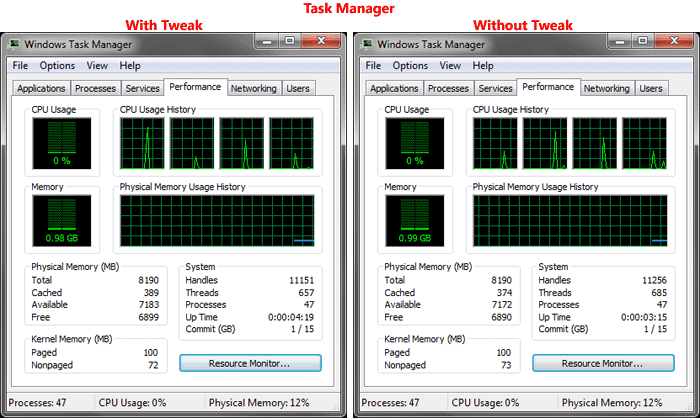
Well, OK. Nothing much to see there.
Next I’m going to get a little advanced. I will use Process Explorer & Debugging Tools for Windows to look at memory use.
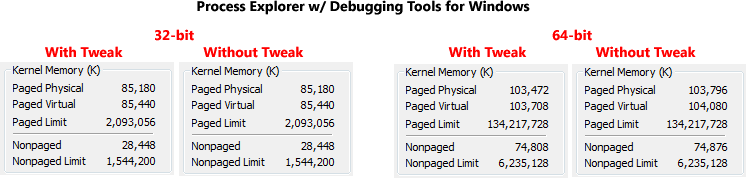
Well heck, nothing much to see there either.
Next, I’ll try a tool called Driver Verifier. I’m going to query the ntfs.sys driver.
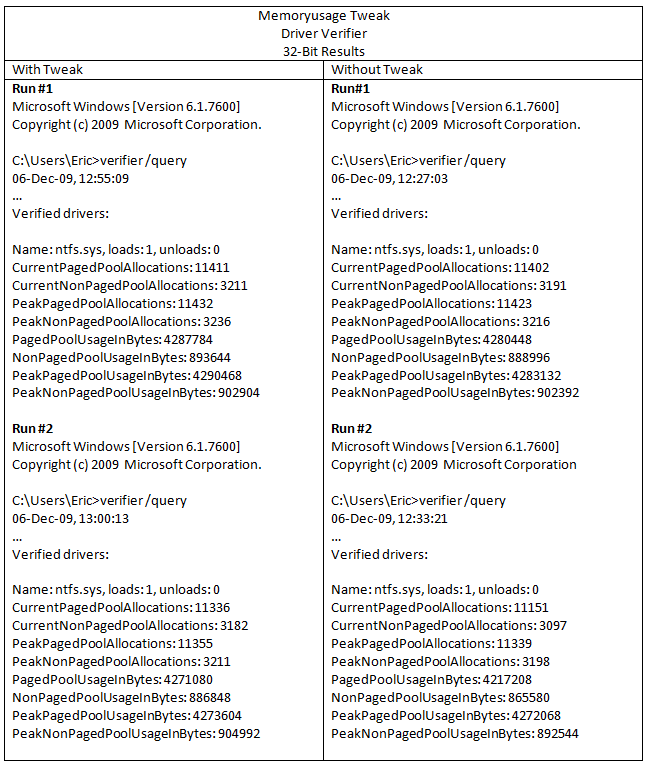
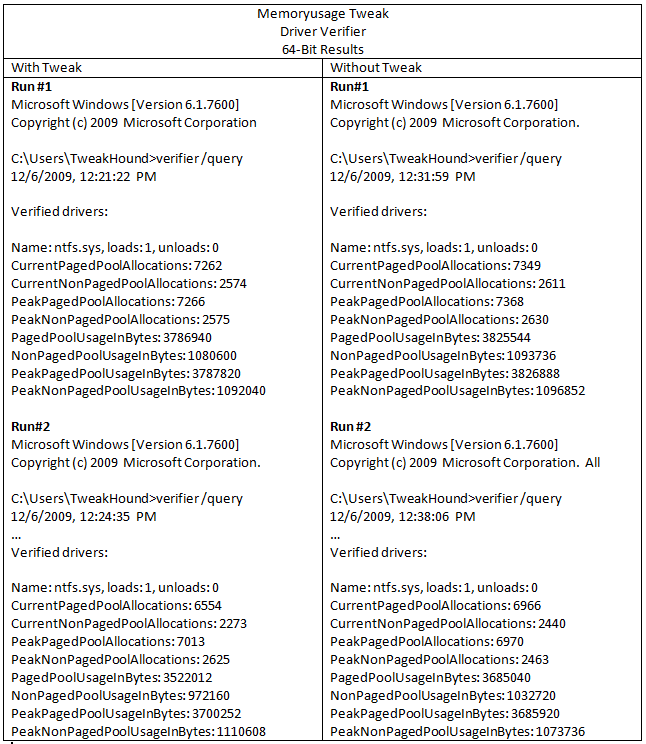
As you can see, there is no real difference with or without the tweak.
Let’s see if putting a heavy load on the computer will make a difference. I’m going to run PCMark Vantage, while under the debugger, and Driver Verifier querying ntfs.sys. That should put a very heavy load on the computer.
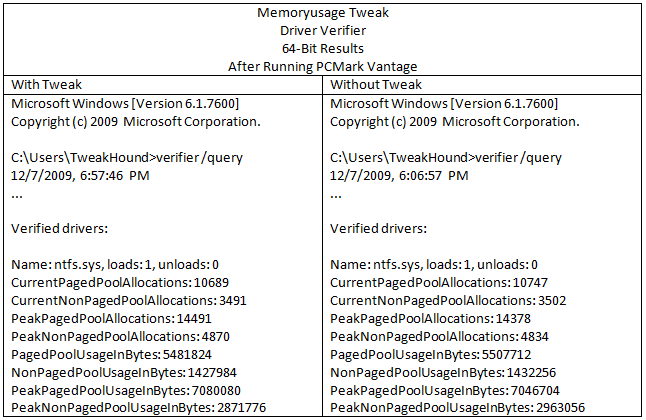
No difference here either.
OK, now let’s see what AS SSD Benchmark says:
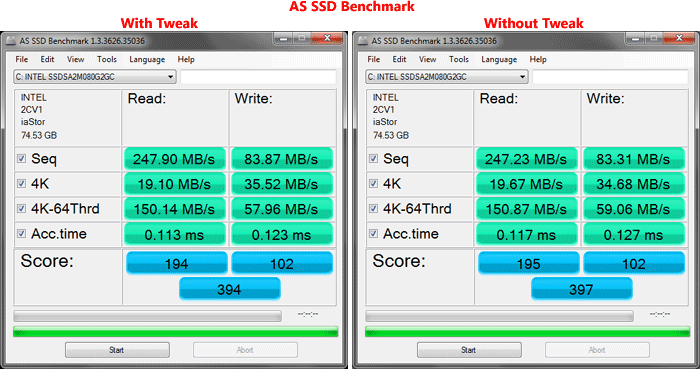
Again, no difference.
Conclusion
Everything I have tested has shown this tweak as having no effect at all.
My conclusion based on what little documentation is available and after running the aforementioned tests is:
For a PC this tweak is useless.
Postscript
After doing all this testing and writing this article something was nagging at me. The Ntfsmemoryusage key exists in the registry by default and Microsoft lists the options for this key. Yet, making changes to this key made absolutely no difference. I thought, “I’ve got to be missing something.” I kept going over my notes. I can’t see where I’ve missed anything. I need some input. I’ve always said I’m no Windows expert, but I do follow the works of some folks who are. So I sent an email out to a couple of people who know way more about the guts of Windows than I ever will, people that I highly respect. I don’t know either of them but I thought I would give it a shot. The email contained a link to the unpublished version of this article.
Only one of the two responded. Rafael Rivera of WithinWindows.com. Here is his reply:
“That registry value is only referenced in fsutil.exe. It is not referenced in any other system binary within Windows 7, meaning the value is purely there for compatibility reasons (otherwise does nothing). Increases in performance are purely imagined. You can quote me 😉” Rafael Rivera
So there you have it.
The purpose of the extended length of this post is to show you the kinds of steps I take to investigate a tweak.
This “tweak” will be added to the Tweaking Windows 7, Bad Tweaks section.
*Edit – 12DEC09 Just to be clear, this information applies to Windows 7.
Got a comment? Did I miss something? Give me a shout.
Time To Run Windows Update
Updates for Internet Explorer 5-8, 2K, XP, 2K3, Vista, 2K8, Windows 7 (IE8).
Mozilla Thunderbird 3.0 Released
Mozilla has released Thunderbird 3.0 final.
Key new features in this release include:
* Tabbed Email
* Filtered Search
* Message Archive
* One-click Address Book
* New Mail Account Setup Wizard
* Smart Folder
* Add-ons Manager
* Better Integration with Gmail
* Better Integration with Windows and Mac OS X
* Gecko 1.9.1 Engine
* Automated Updates
Intel Solid-State Drive Firmware Update Dec. 1, 2009
http://communities.intel.com/community/tech/solidstate?view=discussions
Intel® Solid-State Drive Firmware Update Dec. 1, 2009
Intel has released a new firmware (02HD) and firmware update tool (version 1.5) to fix the issue with the firmware update process on 34nm (G2) Intel® X25-M SSDs (80GB and 160GB).
Intel recommends that end users Download this firmware update tool and upgrade your SSD
• This new firmware provides Trim support (on 80GB and 160GB) and better sequential write performance (on 160GB)
• If you experience any issues during the upgrade process contact Intel Customer Support
I’ve downloaded it. Going to try to update…
***EDIT 03DEC09
Everything went good. I had already seen a performance bump with the previous version. I’ve also backed up and restored the disk with Acronis TI.
FYI – My AS SSD Benchmark has ranged from 395-401 with booth v1.4 and v1.5 firmware.
Windows 7 Twinkle Wish Theme
Microsoft has a Christmas type theme available called “Twinkle Wish”. You can get it from the themes home page or download it. (source: Bink)
Microsoft Office Home and Student 2007 On Sale
MS Black Friday deal: Microsoft Office Home and Student 2007 for $79.99. This is the download version from the Microsoft Store. Includes 3 home PC licenses. Sale expires Nov. 30, 2009.
Links at the MS Office home page.
Lowest price I can find to order the CD is at Newegg for $64.95 + free shipping (don’t know when that deal expires).
The Microsoft Security Update Guide
“This Guide was designed to help IT professionals better understand and use Microsoft security release information, processes, communications, and tools.”
Aimed at IT people but Geeks my find some good info here on the what,whys, and hows of Windows Updates.
The Microsoft Security Update Guide
CCleaner 2.26 Released
v2.26.1050
——————————————–
– Added support to clean Windows DNS cache.
– Added vacuum SQLite databases for Firefox and Google Chrome.
– Added publisher and version to Uninstall tool.
– Added Taskbar jump list tasks for Windows 7.
– Added Taskbar Progress for Windows 7.
– Improved Exclude list registry keys addition functionality in 64bit Windows 7.
– Improved Registry Cleaner detection algorithm and 64-bit file system redirection.
– Improved “Save to text file” functionality in Cleaner screen.
– Improved system tray icon activation and tooltip.
– Improved Registry screen “fix selected issues” dialog usability by removing prompt.
– Further improved RECURSE and REMOVESELF functionality.
– Improved Uninstall screen detection algorithm.
– Improved memory usage to avoid GDI leaks.
– Fixed issue with Sticky Notes being detected as Missing startup item.
– Fixed “Edit” and “Remove” button availability on Include/Exclude screen.
– Fixed various GUI bugs.