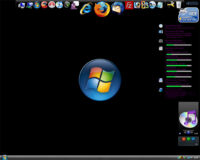
RocketDock is a smoothly animated, alpha blended application launcher. It provides a nice clean interface to drop shortcuts on for easy access and organization. With each item completely customizable there is no end to what you can add and launch from the dock.
Freeware
SyncToy v2.0 Beta
SyncToy 2.0 Beta for Windows is available as a free download from the Microsoft Download Center. The easy to use, customizable application helps you copy, move, rename, and delete files between folders and computers.
SIW 1.71 is available
SIW is an advanced System Information for Windows tool that gathers detailed information about your system properties and settings and displays it in an extremely comprehensible manner.
Firefox 2.0.0.8 Is Out
Fixes 8 security issues,
adds Mac OS X 10.5 (Leopard) Support,
New Languages.
Download
Cool Tool Of The Week: SyncToy
SyncToy 1.4 for Windows Vista is available as a free download from the Microsoft Download Center. The easy to use, customizable application helps you copy, move, rename, and delete files between folders and computers.
This is a FREE program from Microsoft. I use this program religiously and highly recommend it.
Works on XP & Vista.
Download & Info
See also: Synchronizing Images and Files in Windows XP Using Microsoft SyncToy
Winamp 5.50 Build 1640 Final
IE7Pro
Nice add-on for IE7 users with added script blocker cookies and temp files cleaned automatically.
Please check it out.
http://www.ie7pro.com/
Update and Blog on ProcessMonitor v1.25
ProcessMonitor v1.25: Minor bug fixes.
ProcessMonitor Blog on “The Case of the Failed File Copy”: Check out Mark’s new blog where he uses Process Monitor to uncover the root cause for a file copy error. Process Monitor is uniquely useful for exposing file, registry, and process activity within Windows.
JAlbum – News Flash
I just received early news from JAlbum (official announcement will come tomorrow):
PRESS RELEASE
Stockholm, October 3rd, 2007JAlbum sets your pictures free – for free
Today, JAlbum releases a free hosting alternative for your pictures. With 8 million published albums, the free JAlbum software is one of the most popular tools in the world for producing web photo albums. Up until now, users have needed to have their own web site to put their albums. This new service makes publishing stunning photo albums easier than ever.
Three million photo sharing enthusiasts use JAlbum to publish web photo albums. These users have had to find their own hosting solution for their albums, which has limited the JAlbum user base towards the more tech-experienced. With the new hosting alternative, JAlbum is opening up for a much broader market, simplifying the process of publishing photo albums to a few easy clicks. The free account holds 30 MB and fit 200 pictures to start out with. Users will also be able to upgrade their account for more storage.
A lot more expression
Most photo sharing sites have only one album look. With JAlbum, you set the look and feel of the album to fit your photos and the rest of your web site. Everything is customizable; you can resize thumbnails, write descriptions to every picture the way you want, choose color themes, add music and more.
“- This is a big step for JAlbum, enabling anyone to publish web albums. I believe people who care about the appearance of their photo albums will find JAlbum a great fit for their needs”, says founder David Ekholm.
Pretty nifty. You can signup here.
***UPDATE – I quickly threw together a couple and pics and uploaded the album to the new service.
You can see it here: http://tweakhound.myjalbum.net/thtest/
Again, it was done very quickly and with basically the default settings. I just wanted you to see it in action.
JAlbum 7.3 Released
JAlbum is a gallery software that makes web albums from your digital images. We aim to make it the easiest to use and most powerful tool in this category – and always keep it free! So far over 7 million photo albums have been published with JAlbum and the software is started every 5 seconds somewhere in the world.
I use it and recommend it. See the JAlbum home page for more info.